
1. Introduction
This manual provides detailed instructions for the installation, operation, and maintenance of your Blütezeit MJ-400 Sliding Gate Opener, including the integrated WiFi module and 433MHz push button. Please read this manual thoroughly before installation and use to ensure proper function and safety.
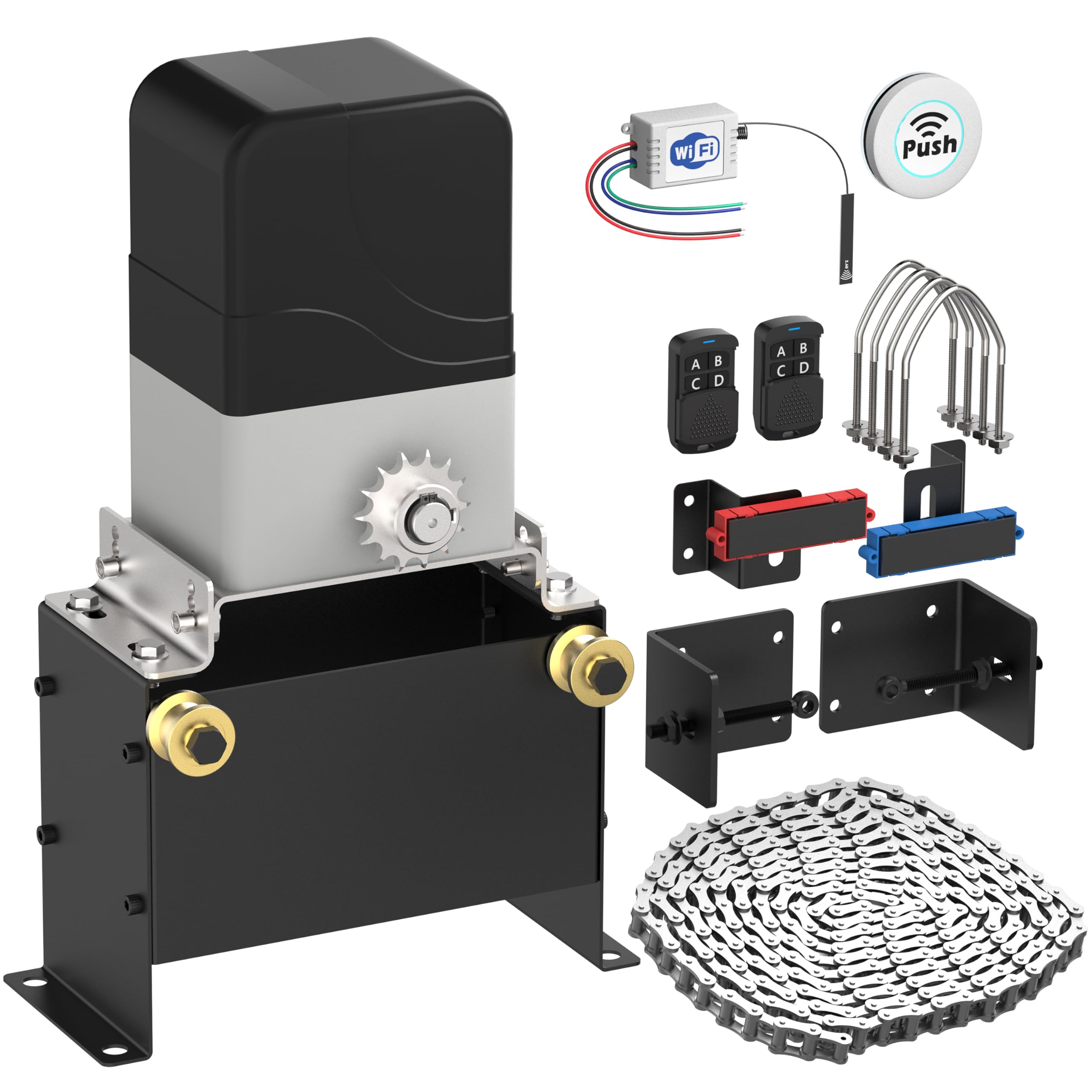
Image 1.1: Blütezeit MJ-400 Sliding Gate Opener with WiFi Module and Push Button components.
2. Safety Information
WARNING: Failure to follow these safety instructions may result in serious injury or death.
- Always keep the gate area clear of people, pets, and objects while the gate is in motion.
- Do not allow children to operate or play with the gate opener controls.
- Ensure all electrical connections are made by a qualified electrician and comply with local codes.
- Install safety devices such as photo-electric sensors to prevent the gate from closing on obstructions.
- Regularly inspect the gate and opener for signs of wear, damage, or misalignment.
- Disconnect power before performing any maintenance or repairs.
3. Package Contents
Verify that all items listed below are present in your package:
- Blütezeit MJ-400 Sliding Gate Opener Motor Unit
- 16.4 ft (5 meters) Heavy-Duty Drive Chain
- MJ-series WiFi Module (MWF30)
- 433MHz Wireless Push Button Transmitter
- Mounting Hardware and Brackets
- Remote Controls (Quantity may vary, typically 2)
- Installation Manual

Image 3.1: Overview of the Blütezeit MJ-400 Sliding Gate Opener and included accessories.
4. Specifications
| Feature | Specification |
|---|---|
| Model | MJ-400 |
| Motor Type | AC Chain-Drive |
| Power Supply | AC110V/60Hz |
| Motor Power | 130W (Copper Motor) |
| Max Gate Weight | 1100 lb (500 kg) |
| Max Gate Length | 50 ft (15 meters) |
| Gate Speed | 0.7 ft/s (21 cm/s) |
| WiFi Module Input | DC 7-32V |
| WiFi Frequency | 2.4GHz (5GHz not supported) |
| Remote Frequency | 433.92MHz (Original MJ rolling-code) & 433MHz (Expanded accessory support) |
5. Setup and Installation
5.1 Gate Opener Installation
- Mounting the Motor Unit: Securely mount the MJ-400 motor unit on a stable, level concrete pad or equivalent foundation next to your sliding gate. Ensure proper alignment with the gate's path.
- Chain Installation: Attach the provided 16.4 ft heavy-duty chain to the gate and route it through the motor unit's sprocket. Adjust chain tension to allow for smooth movement without excessive slack or tightness.
- Limit Switch Adjustment: Install and adjust the magnetic limit switches at the desired open and closed positions of your gate. These switches signal the motor to stop.
- Electrical Connection: Connect the AC110V/60Hz power supply to the motor unit according to the wiring diagram in the main gate opener manual. Ensure all connections are secure and insulated.
5.2 WiFi Module (MWF30) Installation
The WiFi module integrates with the gate opener's control board for smart control.
- Access Control Box: Open the control box of your MJ-400 gate opener.
- Wired Connection: The WiFi module features pre-wired leads. Connect these leads to the corresponding terminals on the gate opener's control board. The module supports DC 7-32V input. Refer to the module's labels for correct wiring (e.g., N.C., Com, V+, GND).

Image 5.1: Blütezeit MWF30 WiFi Module showing pre-wired leads for easy connection.

Image 5.2: The compact Blütezeit MWF30 WiFi Module designed for seamless integration within the MJ-series gate opener.
- Antenna Placement: Position the 5-inch external antenna for optimal signal reception.

Image 5.3: The 5-inch external antenna for the WiFi module, designed to enhance signal strength and connectivity.
5.3 433MHz Push Button Setup
The included 433MHz push button is pre-paired with the WiFi module and operates in a single-button loop mode (Open-Stop-Close).
- Mounting: The wireless push button can be mounted anywhere in your home for convenient access.
- Operation: Pressing the button will cycle the gate through Open, Stop, and Close states.

Image 5.4: The wireless push button, offering one-touch control for the gate opener.
6. Operating Instructions
6.1 Standard Remote Control Operation
Use the original MJ 433.92MHz rolling-code remotes to operate the gate. Each button typically corresponds to Open, Stop, or Close functions, or a single button may cycle through these states depending on programming.
6.2 Smart App Control via eWeLink (WiFi Module)
The WiFi module enables remote control and smart features through the eWeLink app.
- Download eWeLink App: Download and install the eWeLink app on your smartphone from your device's app store.
- Pairing the Module: Follow the in-app instructions to add and pair your Blütezeit WiFi module. Ensure your smartphone is connected to a 2.4GHz WiFi network during pairing (5GHz networks are not supported).
- Remote Control: Once paired, you can remotely Open, Stop, or Close your gate using the app. The app typically operates in a loop mode for gate control.
- Smart Integrations: The eWeLink app supports integration with platforms like Amazon Alexa, Google Home, Siri Shortcuts, and IFTTT for voice control, automation, scheduling, and smart routines.

Image 6.1: The eWeLink app interface demonstrating smart control and compatibility with various smart home platforms.
6.3 433MHz Accessory Operation
The system supports additional 433MHz accessories (e.g., wireless keypads, remotes) which operate independently of the original MJ rolling-code remotes. These accessories will typically function in a single-button loop mode (Open-Stop-Close).
7. Maintenance
Regular maintenance ensures the longevity and reliable operation of your gate opener.
- Chain Inspection: Periodically check the drive chain for proper tension, rust, or damage. Lubricate the chain as needed with appropriate chain lubricant.
- Moving Parts: Inspect all moving parts for wear and tear. Ensure rollers and hinges on the gate are clean and lubricated.
- Safety Devices: Test photo-electric sensors and other safety devices regularly to ensure they are functioning correctly.
- Cleanliness: Keep the motor unit and control box free from dirt, debris, and insects.
- Power Supply: Check electrical connections for corrosion or loose wiring.
8. Troubleshooting
| Problem | Possible Cause | Solution |
|---|---|---|
| Gate does not move | No power; Remote battery low; Limit switch issue; Obstruction | Check power supply; Replace remote battery; Adjust limit switches; Remove obstruction. |
| Remote control not working | Battery dead; Remote not paired; Interference | Replace battery; Re-pair remote (refer to main manual); Check for signal interference. |
| WiFi app control not working | WiFi module not powered; Incorrect WiFi network (5GHz); App not paired; Router issues | Check module power; Ensure 2.4GHz WiFi; Re-pair module in app; Restart router. |
| Gate stops unexpectedly | Obstruction detected; Safety sensor triggered; Limit switch fault | Clear obstruction; Check safety sensors for alignment/damage; Inspect limit switches. |
9. Warranty and Support
For warranty information and technical support, please refer to the documentation included with your original purchase or contact Blütezeit customer service through the retailer where the product was purchased. Keep your purchase receipt as proof of purchase.