1. Introduction
This manual provides detailed instructions for the proper installation, operation, and maintenance of the Generic XY-1001W Single Channel 100W Bluetooth Audio Amplifier Module. This module is designed to provide high-quality audio amplification for various applications, featuring Bluetooth connectivity and TWS support for enhanced audio experiences. Please read this manual thoroughly before using the product to ensure safe and optimal performance.
2. Safety Information
Observe the following safety precautions to prevent damage to the module and ensure user safety:
- Power Supply: Use a DC 9-24V power supply. Exceeding this voltage range can damage the module. Ensure correct polarity when connecting power.
- Heat Dissipation: The amplifier chip can generate heat during operation. Ensure adequate ventilation and do not cover the module.
- Speaker Impedance: Connect speakers with appropriate impedance ratings to prevent damage to the amplifier.
- Handling: Avoid touching the circuit board components while the module is powered on. Static electricity can damage sensitive electronic components.
- Environment: Do not expose the module to moisture, dust, or extreme temperatures.
- Professional Installation: If you are unfamiliar with electronic circuits, seek professional assistance for installation.
3. Product Overview
The XY-1001W is a compact and powerful single-channel audio amplifier module. It integrates a TPA3116 amplifier chip, Bluetooth connectivity, and a rotary volume control knob. The module is designed for easy integration into DIY audio projects.
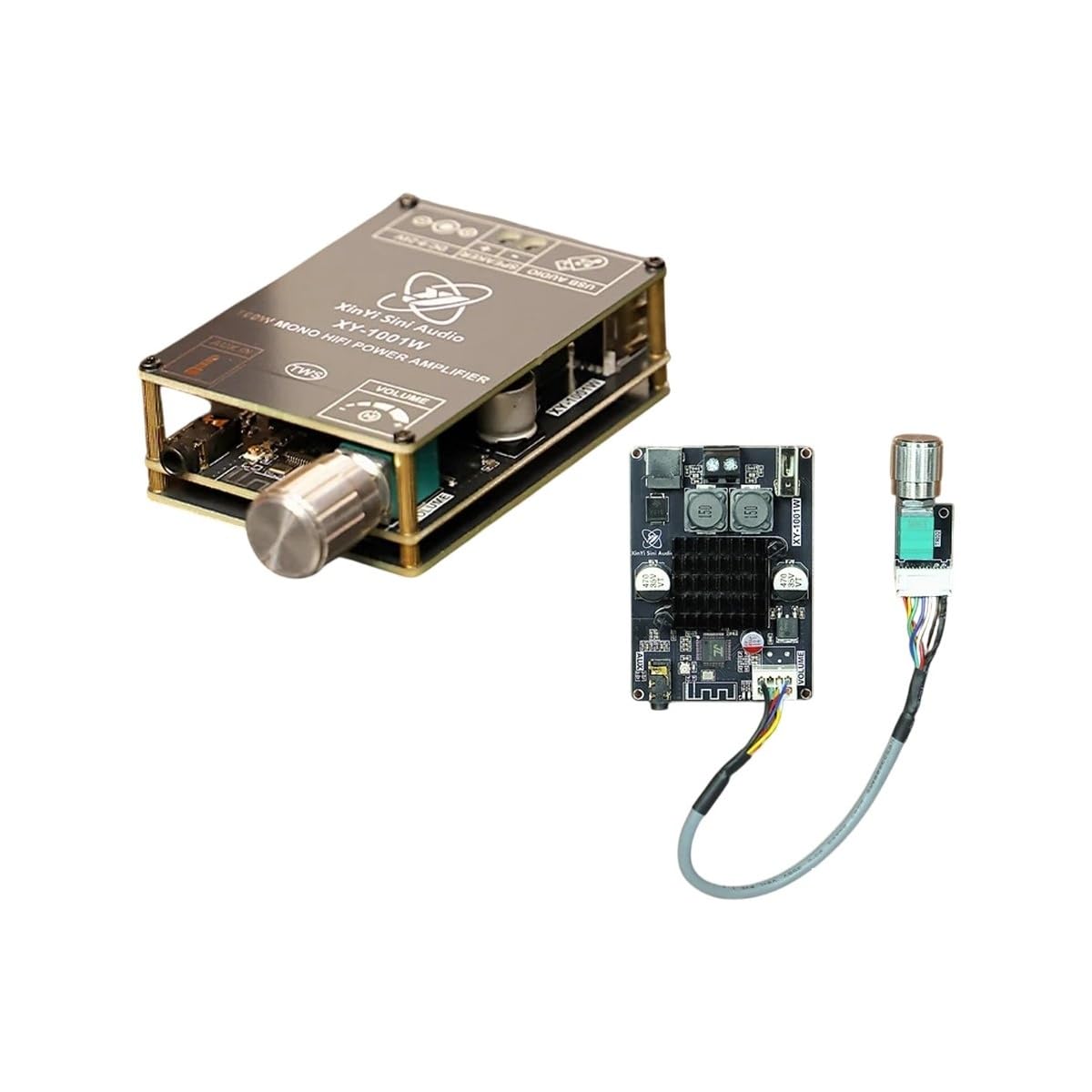
Image 3.1: Front view of the Generic XY-1001W Bluetooth Audio Amplifier Module, showing the main board and the volume control knob.
4. Specifications
| Feature | Specification |
|---|---|
| Model Number | XY-1001W |
| Amplifier Chip | TPA3116 |
| Channels | Single Channel |
| Output Power | 100W |
| Input Voltage | DC 9-24V |
| Connectivity | Bluetooth |
| Special Features | TWS Support |
| Material | Electronic components, Metal |
5. Setup Instructions
Follow these steps to correctly set up your XY-1001W amplifier module:

Image 5.1: The XY-1001W module with its separate control board and connecting wires, illustrating the components involved in setup.
- Power Supply Connection:
- Identify the DC power input terminals on the module.
- Connect a DC 9-24V power supply, ensuring the positive (+) and negative (-) terminals are correctly matched. Incorrect polarity can damage the module.
- Speaker Connection:
- Locate the speaker output terminals on the module.
- Connect your single speaker to these terminals. Ensure the speaker's impedance is compatible with the amplifier's output.
- Bluetooth Pairing:
- Once powered on, the module will enter Bluetooth pairing mode, indicated by an LED (if present).
- On your audio source device (e.g., smartphone, tablet), search for Bluetooth devices.
- Select the device named 'XY-1001W' (or similar) from the list to pair. A confirmation tone or LED change may indicate successful pairing.
- TWS (True Wireless Stereo) Function (Optional):
- If you have two XY-1001W modules and wish to use them in TWS mode, power on both modules.
- Follow the specific TWS pairing instructions provided with your modules (often involves a button press on one module to initiate TWS pairing with another).
- Once paired in TWS mode, they will function as left and right channels for stereo audio.
6. Operating Instructions
After successful setup, operate your amplifier module as follows:
- Power On: Connect the DC power supply to the module. The module will automatically power on and enter Bluetooth pairing mode.
- Volume Control: Use the rotary knob on the module to adjust the output volume. Turn clockwise to increase volume and counter-clockwise to decrease.
- Audio Playback: Once your device is paired via Bluetooth, begin playing audio from your source. The sound will be amplified and played through the connected speaker.
- Power Off: Disconnect the DC power supply from the module to power it off.
7. Maintenance
Proper maintenance ensures the longevity and performance of your amplifier module:
- Cleaning: Use a soft, dry cloth to gently wipe the module. Do not use liquid cleaners or solvents.
- Storage: Store the module in a dry, cool place away from direct sunlight and extreme temperatures when not in use.
- Inspection: Periodically check for any loose connections or visible damage to the components.
8. Troubleshooting
If you encounter issues with your XY-1001W module, refer to the following common problems and solutions:
| Problem | Possible Cause | Solution |
|---|---|---|
| No sound output |
|
|
| Cannot pair via Bluetooth |
|
|
| Distorted or poor sound quality |
|
|
9. Warranty and Support
This product is backed by a commitment to quality and customer satisfaction. Should you have any questions, concerns, or require assistance with your XY-1001W module, please contact our customer support team. We strive to provide knowledgeable support to address your inquiries. Additionally, this product may be covered by a money-back guarantee, reflecting our confidence in its performance and reliability.


