
Introduction
Thank you for choosing the HARDELL 180W Corded Rotary Tool and 618-Piece Accessory Kit. This versatile tool is designed for a wide range of applications, including carving, sanding, polishing, cutting, and drilling. This manual provides essential information for safe and effective operation, setup, maintenance, and troubleshooting to ensure optimal performance and longevity of your tool.
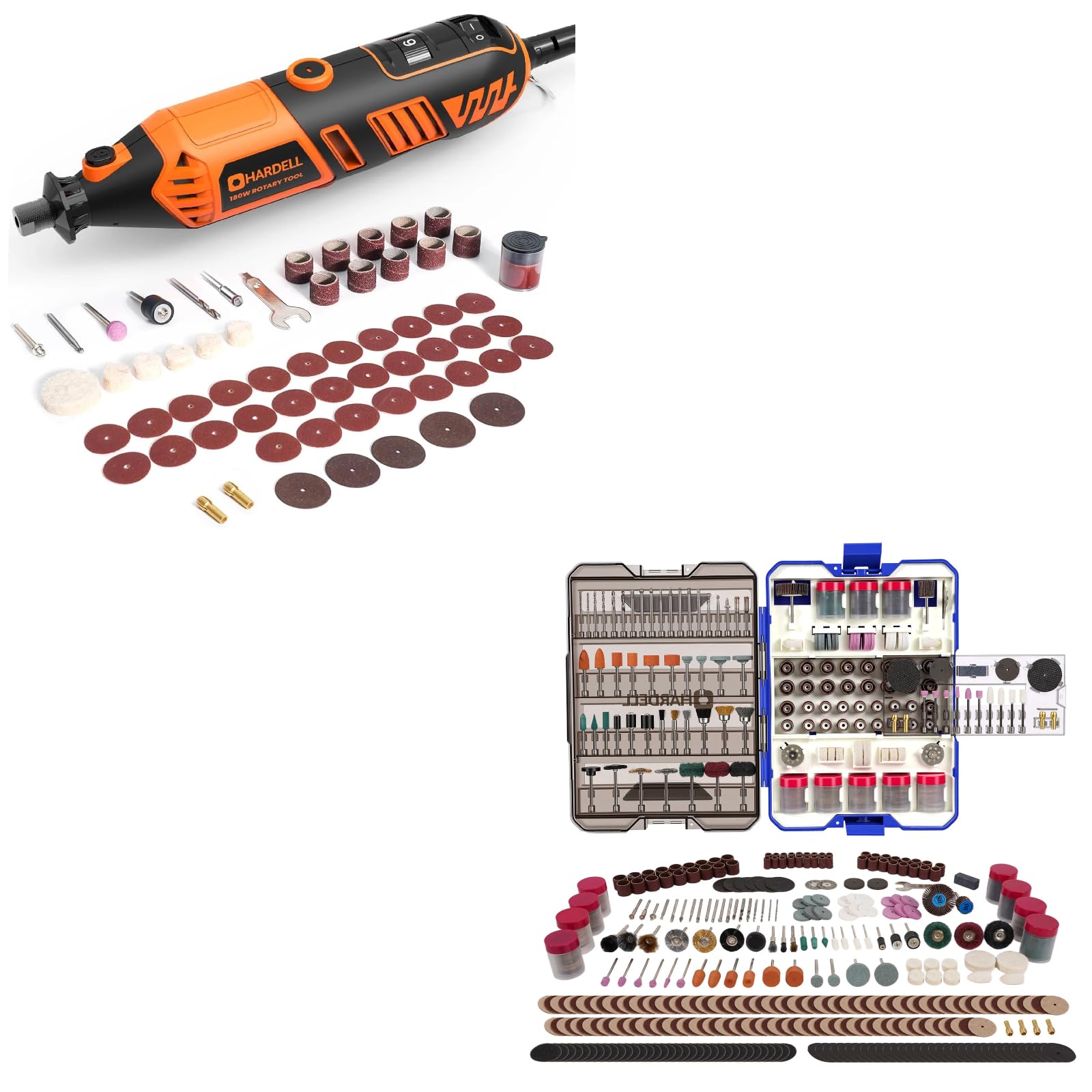
Image: The HARDELL 180W Corded Rotary Tool displayed with various accessories like sanding bands, cutting discs, and polishing wheels.
Important Safety Instructions
Always follow basic safety precautions when using electrical tools to reduce the risk of fire, electric shock, and personal injury.
- Read all instructions: Familiarize yourself with the tool's operation and safety guidelines before use.
- Wear eye protection: Always wear safety goggles or safety glasses with side shields.
- Wear hearing protection: Use earplugs or earmuffs during extended operation.
- Secure workpiece: Always clamp or otherwise secure the workpiece to prevent movement during operation.
- Keep work area clean: Cluttered areas invite accidents.
- Avoid accidental starting: Ensure the switch is in the OFF position before plugging in the tool.
- Do not overreach: Maintain proper footing and balance at all times.
- Disconnect power: Always unplug the tool before changing accessories, making adjustments, or performing maintenance.
- Use correct accessories: Only use accessories designed for this rotary tool and ensure they are properly installed.
- Store idle tools: When not in use, tools should be stored in a dry, high, or locked-up place, out of reach of children.
Package Contents
Upon unpacking, please verify that all items listed below are present and undamaged:
- HARDELL 180W Corded Rotary Tool
- 618-Piece Rotary Tool Accessories Kit (in storage case)
- Four Collets (1/16", 3/32", 1/8" x2)
- Wrench for collet changes
- User Manual

Image: The comprehensive 618-piece accessory kit, neatly organized in a transparent, pull-out storage case.
Product Overview
Familiarize yourself with the components of your HARDELL Rotary Tool:

Image: A detailed view of the rotary tool highlighting its key features: ON/OFF switch, 6-speed fine adjustment gear, spindle lock button, replaceable carbon brushes, and replaceable chuck design.
- ON/OFF Switch: Controls power to the tool.
- 6-Speed Fine Adjustment Speed Gear: Dial for selecting desired RPM.
- Spindle Lock: Button to lock the spindle for accessory changes.
- Replaceable Carbon Brushes: Access point for brush replacement.
- Replaceable Chuck Design: Front end where collets and accessories are inserted.
Setup
Attaching Accessories
Always ensure the tool is unplugged before changing accessories.
- Select the correct collet: Choose a collet that matches the shank size of the accessory you intend to use (1/16", 3/32", or 1/8").
- Insert collet: Unscrew the collet nut and insert the appropriate collet into the chuck.
- Insert accessory: Insert the shank of the desired accessory into the collet. Ensure it is inserted as far as possible without bottoming out.
- Lock spindle: Press and hold the spindle lock button.
- Tighten collet nut: While holding the spindle lock, use the provided wrench to firmly tighten the collet nut. Do not overtighten.

Image: A display of different collet sizes (1/16", 3/32", 1/8") and various rotary tool bits, demonstrating their universal fit for different rotary tool brands.
Operating Instructions
Powering On/Off
- To turn the tool ON, slide the ON/OFF switch to the "I" position.
- To turn the tool OFF, slide the ON/OFF switch to the "O" position.
Speed Adjustment
The HARDELL Rotary Tool features a 6-speed adjustment dial, allowing you to select the optimal RPM for your task and material.

Image: A user operating the rotary tool, with an overlay illustrating the 6-speed settings and their corresponding RPM ranges: 1 (8000 RPM) to 6 (35000 RPM).
- Speed 1: 8000 RPM (Lowest speed, suitable for delicate work or polishing)
- Speed 2: 15000 RPM
- Speed 3: 20000 RPM
- Speed 4: 25000 RPM
- Speed 5: 30000 RPM
- Speed 6: 35000 RPM (Highest speed, suitable for aggressive material removal or cutting)
Rotate the speed adjustment dial to the desired setting before starting the tool. Always test on a scrap piece of material to ensure the chosen speed is appropriate for your application.
General Usage Tips
- Apply light pressure; let the tool do the work. Excessive pressure can cause the motor to overheat or the accessory to break.
- Move the tool smoothly and consistently across the workpiece.
- For best results, use the appropriate accessory for each task.
Maintenance
Regular maintenance ensures the longevity and optimal performance of your rotary tool. Always unplug the tool before performing any maintenance.
Cleaning
- After each use, wipe down the tool with a clean, damp cloth.
- Use a soft brush or compressed air to clear dust and debris from the ventilation openings.
- Do not use harsh chemicals or abrasive cleaners.
Carbon Brush Replacement
The carbon brushes are wear items and will need periodic replacement. Refer to the "Product Overview" section for the location of the replaceable carbon brushes.
- Unplug the tool from the power source.
- Locate the brush caps on the sides of the motor housing.
- Unscrew the brush caps using a flathead screwdriver or the provided wrench.
- Remove the old carbon brushes.
- Insert new carbon brushes, ensuring they are oriented correctly.
- Screw the brush caps back on firmly.
Accessory Storage
The 618-piece accessory kit comes in a compact case with a pull-out design and hidden handle for organized storage and easy transport.

Image: The 618-piece rotary tool accessories kit case, showcasing its pull-out design, portable handle, and neatly compartmentalized storage, suitable for wall mounting or on-the-go projects.
- Always return accessories to their designated compartments after use to prevent loss and damage.
- Store the accessory case in a dry environment to protect contents from moisture.
Troubleshooting
If you encounter issues with your HARDELL Rotary Tool, refer to the following common problems and solutions:
| Problem | Possible Cause | Solution |
|---|---|---|
| Tool does not start | No power supply; ON/OFF switch not engaged; Worn carbon brushes. | Check power outlet and cord; Ensure switch is in "I" position; Replace carbon brushes. |
| Tool loses power or runs intermittently | Loose power connection; Overheating; Worn carbon brushes. | Check connections; Allow tool to cool down; Replace carbon brushes. |
| Excessive vibration or noise | Accessory not properly seated or bent; Damaged accessory. | Ensure accessory is fully inserted and collet nut is tightened; Replace damaged accessory. |
| Accessory slips in collet | Collet nut not tight enough; Incorrect collet size. | Tighten collet nut firmly; Use the correct collet size for the accessory shank. |
If the problem persists after attempting these solutions, please contact HARDELL customer support.
Specifications
Key technical specifications for the HARDELL 180W Corded Rotary Tool:
- Power: 180W
- Speed Settings: 6-speed adjustment
- No-Load Speed: 8,000 - 35,000 RPM
- Collet Sizes: 1/16" (1.6mm), 3/32" (2.3mm), 1/8" (3.2mm)
- Accessory Count: 618 pieces

Image: An internal view of the rotary tool's motor, emphasizing its 180W high power and maximum speed of 35000 RPM.
Warranty and Support
HARDELL products are manufactured to high-quality standards. For warranty information, technical support, or to inquire about replacement parts, please refer to the contact information provided with your purchase or visit the official HARDELL website. Please retain your proof of purchase for warranty claims.