
1. Introduction
This manual provides detailed instructions for the assembly, operation, and maintenance of your HLDIRECT 55x31 Inch Electric Standing Desk. Please read this manual thoroughly before assembly and use to ensure proper function and safety. Keep this manual for future reference.
2. Safety Information
- Always ensure the desk is properly anchored to the floor to prevent tipping.
- Do not exceed the maximum weight recommendation of 176 lbs (80 kg) to maintain stability.
- Keep the desk area clear of obstructions to prevent accidents during height adjustment.
- Ensure all cables are properly managed to avoid entanglement or damage during desk movement.
- Do not allow children to operate the desk without adult supervision.
- Avoid placing liquids directly on the desk surface, especially near the power panel.
3. Package Contents
Please verify that all components are present before beginning assembly. Refer to the packaging list for a complete inventory of parts and hardware. If any parts are missing or damaged, contact customer support.
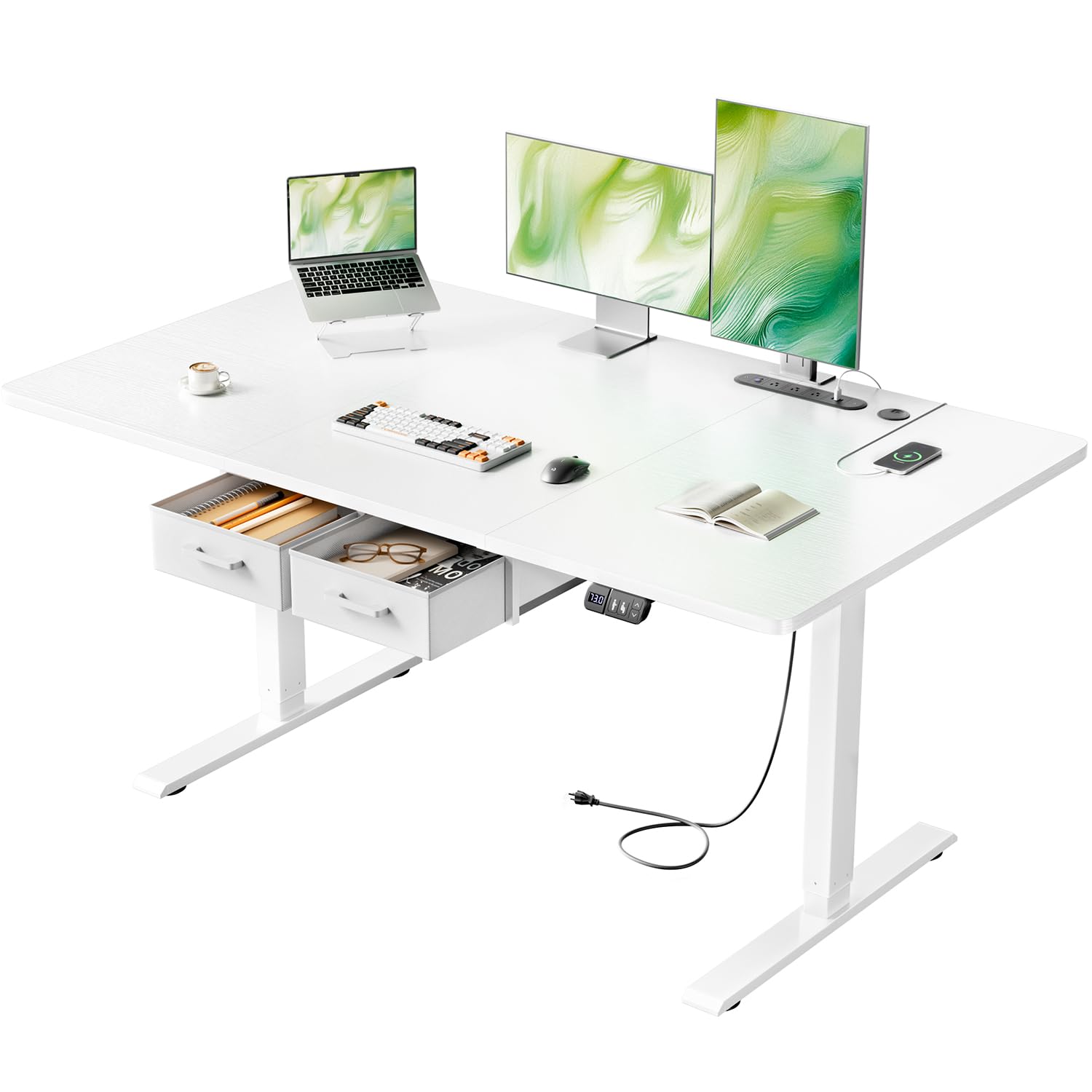
Image: Overview of the HLDIRECT 55x31 Inch Electric Standing Desk, showing the desktop, legs, and control panel.
4. Assembly Instructions
Follow these steps carefully to assemble your electric standing desk. It is recommended to have two people for assembly.
Assembly Video Guide
Video: A detailed animation demonstrating the step-by-step assembly process of the HLDIRECT Electric Standing Desk.
Step-by-Step Assembly (Refer to the video for visual guidance)
- Attach Feet to Legs: Secure the base feet to the bottom of each desk leg using the provided screws. Ensure they are firmly attached.
- Connect Drive Rod: Insert the drive rod into the motor mechanism on one leg, then extend it to connect to the other leg. Ensure the rod is properly seated in both mechanisms.
- Install Crossbar: Attach the crossbar between the two legs, securing it with screws. This provides structural stability.
- Mount Desktop Supports: Fasten the desktop support brackets to the top of the leg assembly.
- Attach Desktop: Carefully place the desktop onto the assembled frame, aligning the pre-drilled holes. Secure the desktop to the frame using the appropriate screws.
- Install Control Panel: Mount the control panel to the underside of the desktop in the designated area. Connect the necessary cables from the motor and power supply to the control panel.
- Install Drawers: Insert the fabric drawers into their designated slots beneath the desktop.
- Cable Management: Use the integrated cable management features to organize and secure all power and data cables.

Image: An illustration showing a person assembling the desk, highlighting the ease of quick assembly.
5. Operating Instructions
Height Adjustment
The desk allows for seamless height adjustment from 28 to 46 inches. Use the up and down arrows on the control panel to adjust the desk to your desired height.

Image: Close-up of the smart control panel, showing the LED display, up/down arrows, and memory preset buttons.
Memory Presets
The control panel features memory functionality for one-touch switching between preset heights. To set a memory position:
- Adjust the desk to your desired height using the up/down arrows.
- Press the "S" button (Set) followed by one of the numbered memory buttons (1, 2, or 3). The height is now saved to that preset.
- To recall a saved height, simply press the corresponding numbered button.
Anti-Collision Rebound
The desk is equipped with an anti-collision system. If the desk encounters an obstruction during movement, it will automatically stop and reverse slightly to prevent damage.

Image: Illustration showing the integrated power strip, rounded desk edges, and cable management grommet.
Integrated Power Panel
The desk includes a multi-function power panel for convenient charging and power access:
- 3 Standard Sockets: For powering devices requiring AC power (120V/12A).
- 2 USB-A Ports: For charging USB-A compatible devices (5V/2A).
- 1 USB-C Port: For charging USB-C compatible devices (5V/2A).
Ensure devices are compatible with the specified voltage and amperage. Use the pre-drilled cable management holes to keep wires organized.

Image: Close-up of the integrated power strip, showing the various outlets and ports.
Storage Drawers
The desk features two independent fabric drawers for storage. These drawers are removable to suit your organizational needs.

Image: Illustration of the two fabric drawers, highlighting their design and features.
6. Maintenance
- Cleaning: Wipe the desk surface with a soft, damp cloth. Avoid abrasive cleaners or harsh chemicals.
- Regular Checks: Periodically check all screws and connections to ensure they are tight. Retighten if necessary.
- Cable Inspection: Inspect power cords and cables for any signs of wear or damage. Replace immediately if damage is found.
- Motor Care: The motor is designed for durability. Avoid overloading the desk beyond its specified weight capacity.
7. Troubleshooting
If you encounter issues with your HLDIRECT Electric Standing Desk, refer to the following common problems and solutions:
| Problem | Possible Cause | Solution |
|---|---|---|
| Desk does not move. | Power cable disconnected, motor cable loose, overload. | Check all power and motor connections. Reduce weight on the desk if overloaded. Perform a reset (refer to control panel instructions if available). |
| Uneven height adjustment. | Uneven load, loose connections. | Distribute weight evenly on the desktop. Check and tighten all assembly screws. |
| Desk stops during adjustment. | Anti-collision activated, motor overheating. | Remove any obstructions. Allow the motor to cool down if it has been used continuously for an extended period. |
| Control panel not responding. | Power issue, control panel cable loose. | Ensure the desk is plugged into a working power outlet. Check the connection of the control panel cable to the motor unit. |
If the problem persists after attempting these solutions, please contact HLDIRECT customer support for further assistance.
8. Specifications
| Feature | Detail |
|---|---|
| Brand | HLDIRECT |
| Model Number | ca-SZ04US |
| Colour | White |
| Product Dimensions (L x W x H) | 140 x 80 x 71-117 cm (55 x 31 x 28-46 inches) |
| Material | Engineered Wood (Desktop), Alloy Steel (Base) |
| Special Features | Adjustable Height, Electric, Memory Presets, Integrated Power Outlets, Drawers, Anti-collision |
| Item Weight | 27.7 kg (61.07 lbs) |
| Maximum Load Capacity | 176 lbs (80 kg) |
| Noise Level (Operation) | Below 50 decibels |
| Power Panel | 3x 120V/12A Sockets, 2x 5V/2A USB-A Ports, 1x 5V/2A USB-C Port |

Image: Diagram illustrating the product dimensions, including height, width, and depth.
9. Warranty and Support
For warranty information, please refer to the documentation included with your purchase or visit the official HLDIRECT website. If you require technical assistance, have questions about assembly, or need to report a missing/damaged part, please contact HLDIRECT customer support. Contact details can typically be found on the product packaging or the brand's official website.
Note: This product is eligible for return or refund within 30 days of receipt.