
Introduction
Thank you for choosing the HLDIRECT Electric Standing Desk. This manual provides detailed instructions for the assembly, operation, and maintenance of your new 55x31 inch height-adjustable desk. Designed for ergonomic comfort and productivity, this desk features seamless height adjustment, memory presets, integrated power outlets, and convenient storage drawers. Please read this manual thoroughly before assembly and use to ensure proper function and safety.
Safety Information
- Always ensure the desk is properly anchored to the floor to prevent tipping.
- Do not exceed the maximum weight recommendation of 176 lbs (80 kg) to maintain stability.
- Keep the desk area clear of obstacles to prevent accidents during height adjustment.
- Ensure all cables are properly managed and secured to avoid entanglement or damage.
Assembly Instructions
Your HLDIRECT Electric Standing Desk comes with clear, detailed assembly instructions and a complete toolkit for easy setup. Follow the steps below, referring to the included diagrams for visual guidance.
- Unpack Components: Carefully remove all parts from the packaging and verify against the parts list.
- Attach Feet to Legs: Secure the base feet to the bottom of each lifting column (leg) using the provided screws. Ensure they are firmly attached.
- Install Drive Rod: Insert the hexagonal drive rod into the slot hole of the motor and connect it to the other leg. Ensure the protruding pieces are on the same side.
- Connect Crossbar: Attach the crossbar components between the two lifting columns. This forms the main frame of the desk.
- Secure Desktop Panels: Place the desktop panels onto the assembled frame. Align the pre-drilled holes and secure the panels using the designated screws.
- Install Control Box and Power Strip: Mount the control box and integrated power strip to the underside of the desktop as indicated in the instructions.
- Connect Cables: Connect all necessary cables from the motor, control panel, and power strip to the control box. Ensure connections are secure.
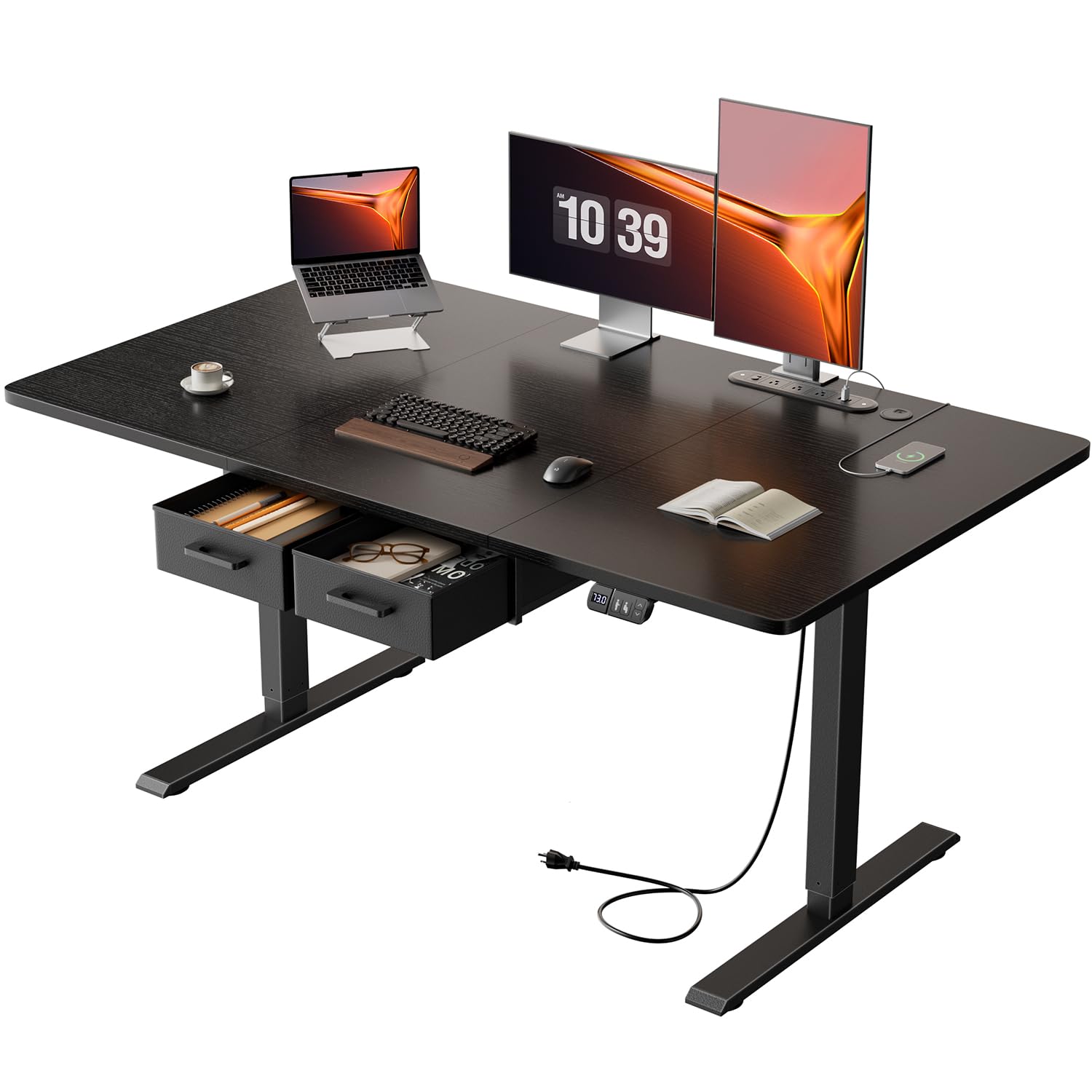
- Install Drawers: Assemble and install the two fabric drawers into their designated slots beneath the desktop.
- Final Checks: Double-check all connections and screws to ensure everything is tight and stable.

Operating Instructions
Height Adjustment
The desk allows for seamless electric height adjustment between 28 inches and 46 inches. Use the control panel located on the front edge of the desk.
- Press the Up arrow button to raise the desk.
- Press the Down arrow button to lower the desk.
- Release the button at your desired height. The current height is displayed on the LED screen.
Memory Presets
The desk features memory functionality to store and recall your preferred sitting and standing heights.
- Adjust the desk to your desired height using the Up/Down arrows.
- Press the 'S' button (Set).
- Immediately press one of the numbered memory buttons (1, 2, or 3) to save the current height to that preset.
- To recall a saved height, simply press the corresponding numbered memory button. The desk will automatically move to the stored position.

Integrated Power Panel
The desk includes a multi-function power panel for convenient device charging.
- It provides 3 standard sockets (120V/12A), 2 USB-A ports (5V/2A), and 1 USB-C port (5V/2A).
- Use these ports to charge smartphones, gaming devices, or other accessories.
- Pre-drilled cable management holes help keep wires organized and out of sight.

Storage Drawers
The desk is equipped with two independent fabric drawers for efficient storage.
- These drawers are removable, allowing for flexible storage solutions.
- Store frequently used items within easy reach to boost productivity.

Maintenance
- Cleaning: Wipe the desktop and frame with a soft, damp cloth. Avoid abrasive cleaners or harsh chemicals that could damage the finish.
- Regular Checks: Periodically check all screws and connections to ensure they remain tight. Tighten any loose fasteners as needed.
- Cable Management: Ensure cables are always neatly organized and not pinched or tangled, especially during height adjustments.
Troubleshooting
| Problem | Possible Cause | Solution |
|---|---|---|
| Desk is uneven or wobbly. | Uneven floor surface; loose feet. | Adjust the leveling feet at the bottom of the desk legs. Ensure all screws are tightened. |
| Desk does not adjust height. | Power not connected; motor cable loose; overload. | Check power connection. Ensure all motor cables are securely plugged into the control box. Reduce weight on the desk (do not exceed 176 lbs). |
| Desk stops during adjustment. | Anti-collision feature activated; obstruction. | Remove any obstructions in the desk's path. The anti-collision rebound feature will stop movement if an object is detected. |
| Unusual noise during operation. | Loose components; obstruction. | Check for any loose screws or objects interfering with the lifting mechanism. The motor operates below 50 decibels, so loud noises indicate an issue. |
If you encounter any issues that cannot be resolved using the troubleshooting guide, please contact HLDIRECT customer support for professional assistance.
Specifications
| Brand | HLDIRECT |
| Model Number | SZ04 |
| Desktop Dimensions | 55 x 31 inches |
| Height Adjustment Range | 28 to 46 inches |
| Weight Capacity | 176 lbs (80 kg) |
| Material | Engineered Wood (Desktop), Alloy Steel (Base) |
| Color | Black |
| Power Outlets | 3 Standard Sockets, 2 USB-A Ports, 1 USB-C Port |
| Number of Drawers | 2 (Fabric, Removable) |
| Noise Level | Below 50 dB |
| Assembly Required | Yes (Tools Included) |
Warranty and Support
HLDIRECT provides customer support for any questions or issues you may encounter with your electric standing desk. For assistance with assembly, operation, or troubleshooting, please refer to the contact information provided with your purchase or visit the official HLDIRECT website.
The product is eligible for return, refund, or replacement within 30 days of receipt, as per Amazon's policy.