
1. Introduction
Thank you for purchasing the Monster S380 Portable Bluetooth Speaker. This manual provides essential information for setting up, operating, and maintaining your speaker. Please read it carefully before use to ensure optimal performance and longevity of your device.
The Monster S380 delivers powerful 40W stereo sound with deep bass and clear highs, featuring Bluetooth 6.0 for stable connectivity, TWS pairing for an immersive stereo experience, and IPX6 waterproofing for outdoor use. Enjoy up to 20 hours of playtime and versatile input options including AUX and TF card.
2. What's in the Box
Please check the package contents to ensure all items are present:
- Monster S380 Bluetooth Speaker ×1
- Charging Cable ×1
- Portable Rope ×1
- Quick Start Guide ×1

Image: Contents of the Monster S380 package, including the speaker, charging cable, portable rope, and quick start guide.
3. Product Overview
3.1 Speaker Components

Image: Front view of the Monster S380 Bluetooth Speaker, highlighting its design and speaker grilles.
3.2 Control Buttons
The Monster S380 features intuitive control buttons located on the top surface for easy operation:

Image: Diagram illustrating the function of each control button on the Monster S380 speaker.
- Mode Switching (M): Press to cycle through input modes (Bluetooth, AUX, TF Card).
- Play/Pause: Press to play or pause audio.
- Power On/Off: Press and hold to power the speaker on or off.
- Volume Down / Previous Song (-): Press to decrease volume. Press and hold for previous track.
- Volume Up / Next Song (+): Press to increase volume. Press and hold for next track.
3.3 Input Ports
The speaker includes multiple input ports for versatile connectivity:
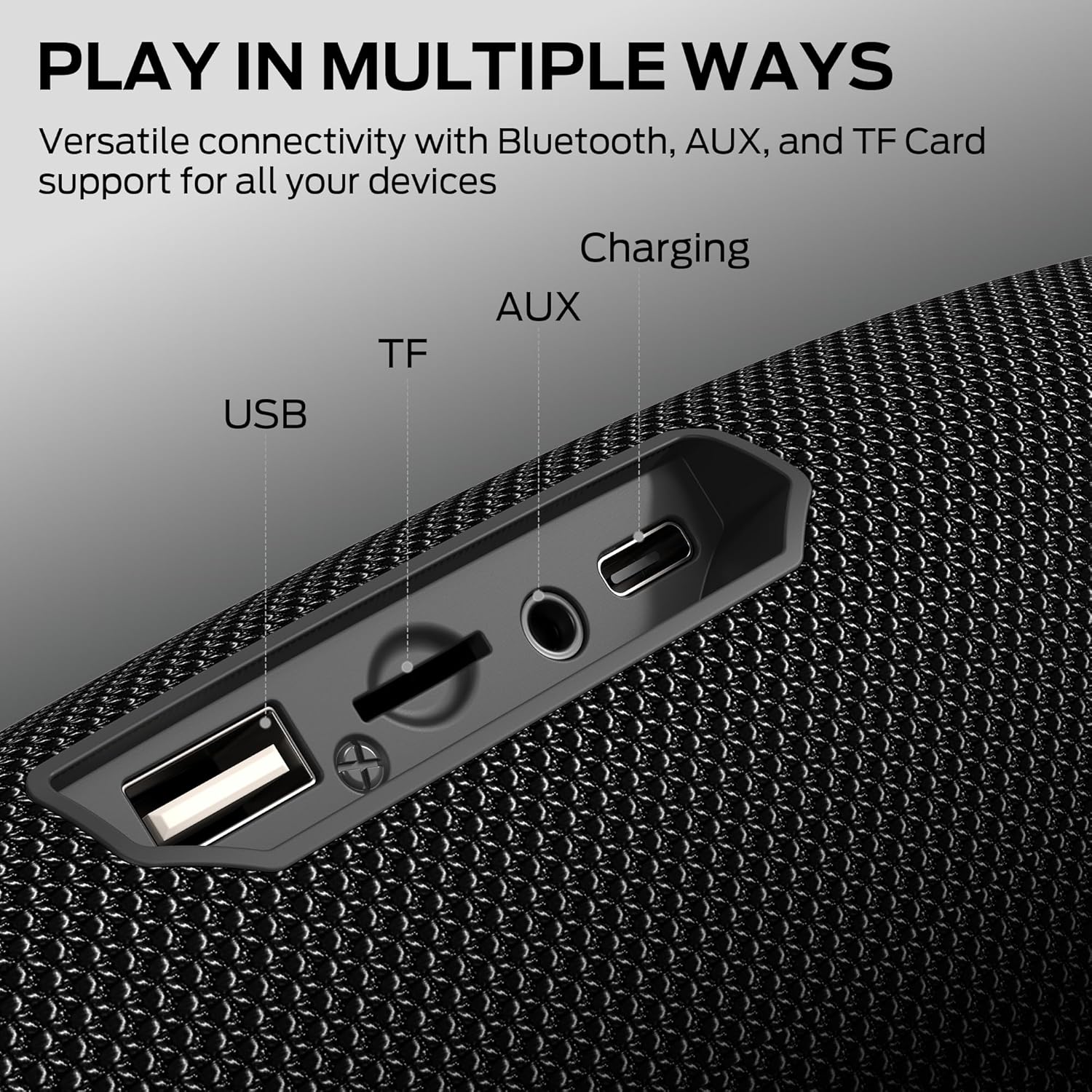
Image: Close-up view of the Monster S380's input ports, including USB, TF card slot, AUX, and charging port.
- USB Port: For charging or connecting USB devices.
- TF Card Slot: Insert a TF (MicroSD) card for direct audio playback.
- AUX Input: Connect external audio devices via a 3.5mm audio cable.
- DC 5V Charging Port: Connect the provided charging cable to power the speaker.
4. Setup
4.1 Charging the Speaker
Before first use, fully charge the speaker. Connect the provided charging cable to the DC 5V port on the speaker and the other end to a USB power adapter (not included) or a computer's USB port. The charging indicator light will show the charging status.
A full charge provides up to 20 hours of playtime, depending on volume level and audio content.

Image: The Monster S380 speaker shown with a graphic indicating 20 hours of playtime.
4.2 Powering On/Off
To power on the speaker, press and hold the Power button until you hear an audible prompt or see the indicator light illuminate. To power off, press and hold the Power button again.
5. Operating Instructions
5.1 Bluetooth Pairing
The Monster S380 features advanced Bluetooth 6.0 for a stable and efficient wireless connection.
- Ensure the speaker is powered on and in Bluetooth mode (indicated by a flashing blue LED). If not, press the Mode (M) button to switch to Bluetooth mode.
- On your device (smartphone, tablet, etc.), enable Bluetooth and search for available devices.
- Select "Monster S380" from the list of devices.
- Once paired, the speaker will emit an audible confirmation, and the LED indicator will turn solid blue.

Image: The Monster S380 speaker displaying a graphic for Bluetooth 6.0 connectivity.
5.2 True Wireless Stereo (TWS) Pairing
For an enhanced stereo experience, you can pair two Monster S380 speakers together.
- Ensure both Monster S380 speakers are powered on and in Bluetooth pairing mode (flashing blue LED).
- On one of the speakers, press and hold the Mode (M) button for 2-3 seconds. You will hear a prompt indicating TWS pairing mode.
- The two speakers will automatically connect to each other. Once connected, you will hear a confirmation sound, and the LED on one speaker will be solid blue (master), while the other will continue to flash (slave).
- Now, connect your device to the master speaker via Bluetooth as described in Section 5.1.

Image: Two Monster S380 speakers shown wirelessly connected, illustrating the TWS pairing feature.
5.3 AUX Input
To play audio from devices without Bluetooth, use the AUX input:
- Connect one end of a 3.5mm audio cable (not included) to the AUX port on the speaker.
- Connect the other end to the audio output jack of your device.
- The speaker will automatically switch to AUX mode, or you may need to press the Mode (M) button to select AUX.
5.4 TF Card Playback
To play music directly from a TF (MicroSD) card:
- Insert a TF card with audio files into the TF card slot on the speaker.
- The speaker will automatically switch to TF card mode and begin playback, or you may need to press the Mode (M) button to select TF card mode.
5.5 Hands-Free Calling
The built-in microphone allows for hands-free calls when connected via Bluetooth.
- Answer Call: Press the Play/Pause button once to answer an incoming call.
- End Call: Press the Play/Pause button once to end an ongoing call.
- Reject Call: Press and hold the Play/Pause button for 2 seconds to reject an incoming call.

Image: A person using the Monster S380 speaker for a hands-free call while working on a laptop.
6. Maintenance
6.1 Waterproofing (IPX6)
The Monster S380 is IPX6 waterproof, meaning it can withstand powerful water jets. It is suitable for use outdoors and near water, but it should not be submerged in water.
- Ensure the rubber flap covering the ports is securely closed before exposing the speaker to water.
- Do not intentionally submerge the speaker.
- After exposure to water, wipe the speaker dry with a soft cloth.

Image: The Monster S380 speaker placed near a swimming pool, demonstrating its IPX6 waterproof capability.
6.2 Cleaning
To clean your speaker, use a soft, dry, lint-free cloth. Do not use abrasive cleaners, alcohol, or chemical solvents, as these may damage the surface of the speaker.
6.3 Storage
When not in use for extended periods, store the speaker in a cool, dry place away from direct sunlight and extreme temperatures. Charge the speaker periodically to maintain battery health.
7. Troubleshooting
| Problem | Possible Cause | Solution |
|---|---|---|
| Speaker does not power on. | Low battery. | Charge the speaker fully. |
| Cannot pair via Bluetooth. | Speaker not in pairing mode; device Bluetooth off; too far from speaker. | Ensure speaker is in Bluetooth pairing mode. Turn on Bluetooth on your device. Move device closer to speaker (within 33 feet). |
| No sound. | Volume too low; incorrect input mode; device not playing. | Increase speaker and device volume. Press 'M' to select correct input mode. Ensure audio is playing on your device. |
| TWS pairing fails. | Speakers too far apart; one speaker already paired to a device. | Ensure speakers are close to each other. Disconnect any Bluetooth devices from both speakers before TWS pairing. |
| Poor sound quality. | Low battery; interference; source audio quality. | Charge the speaker. Move away from other wireless devices. Try a different audio source. |
8. Specifications
- Model Name: S380
- Speaker Type: Outdoor
- Connectivity Technology: Bluetooth 6.0, AUX, USB, TF Card
- Speaker Maximum Output Power: 40 Watts
- Playtime: Up to 20 Hours
- Charging Time: Approximately 3-4 Hours (based on typical charging rates)
- Water Resistance Level: IPX6
- Bluetooth Range: Up to 33 Feet (10 meters)
- Product Dimensions: 2.9"D x 8.6"W x 3.5"H
- Item Weight: 1.94 pounds
- Material: Plastic
- Control Method: Push Button
- Included Components: Monster S380 Bluetooth Speaker, Charging Cable, Portable Rope, Quick Start Guide
9. Safety Information
- Do not expose the speaker to extreme temperatures (hot or cold) or high humidity.
- Avoid dropping or subjecting the speaker to strong impacts.
- Do not disassemble, repair, or modify the speaker yourself. Contact qualified service personnel for any repairs.
- Keep the speaker away from medical devices, as it may cause interference.
- Dispose of the speaker and its battery responsibly according to local regulations.
- Do not use the speaker at excessively high volumes for prolonged periods, as this may cause hearing damage.
10. Warranty and Support
The Monster S380 Bluetooth Speaker comes with a limited warranty. Please refer to the warranty card included in your package or visit the official Monster website for detailed warranty terms and conditions.
For technical support, troubleshooting assistance, or warranty claims, please contact Monster customer service through their official channels. Keep your purchase receipt as proof of purchase for warranty services.
Online Support: Visit the official Monster website for FAQs and support resources.
Email Support: Refer to your Quick Start Guide for specific contact information.


