
1. Introduction
Thank you for choosing the Audizio Arco Active Tower Speaker. This manual provides essential information for the safe and correct operation of your new audio system. Please read it thoroughly before use and retain it for future reference.
2. Safety Instructions
- Power Supply: Ensure the power supply voltage matches the requirements specified on the speaker.
- Ventilation: Do not block any ventilation openings. Install in accordance with the manufacturer's instructions.
- Water and Moisture: Do not expose this appliance to rain or moisture. Do not place objects filled with liquids, such as vases, on the apparatus.
- Heat Sources: Do not install near any heat sources such as radiators, heat registers, stoves, or other apparatus (including amplifiers) that produce heat.
- Cleaning: Clean only with a dry cloth.
- Servicing: Refer all servicing to qualified service personnel. Servicing is required when the apparatus has been damaged in any way.
3. Package Contents
Carefully unpack the box and ensure all items are present and in good condition. If any item is missing or damaged, contact your retailer immediately.
- Audizio Arco Active Speaker
- Front Panel (Speaker Grille)
- Speaker Stand
- Remote Control
- Power Cable
- Instruction Manual (this document)
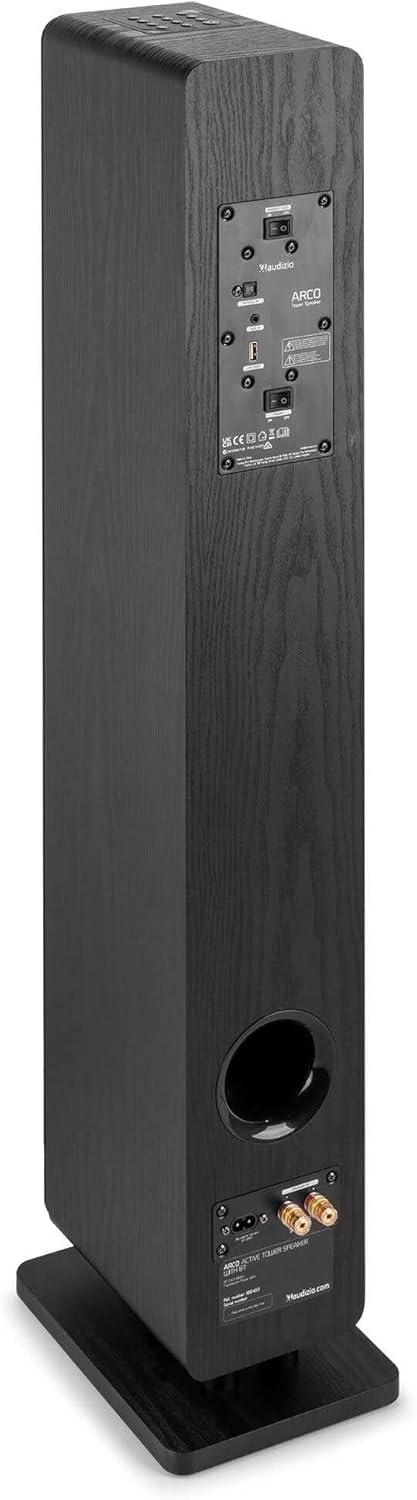
Image: All components included in the Audizio Arco package, including the speaker, remote control, and various connection cables.
4. Product Overview
Front View (with Grille)

Image: The Audizio Arco speaker from the front, with the black fabric grille covering the drivers. The top panel shows control buttons, and the base features subtle LED lighting.
Front View (without Grille)

Image: The Audizio Arco speaker with the front grille removed, showcasing the tweeter and three 4-inch woofer/subwoofer drivers. The top panel controls and LED-lit base are also visible.
Rear View (Connections and Controls)

Image: The back panel of the Audizio Arco speaker, featuring the power input, optical input, AUX input, USB port, and speaker output terminals for passive speakers. Control switches are also visible.
Remote Control

Image: A detailed view of the Audizio Arco remote control, showing buttons for power, mute, Bluetooth, link (TWS), input selection, playback controls, volume adjustment, and bass/treble settings.
Base LED Lighting

Image: A close-up of the speaker's base, illustrating the integrated ambient LED lighting feature that illuminates the area beneath the speaker.
5. Setup
5.1 Assembling the Speaker
- Carefully remove the speaker and its stand from the packaging.
- Attach the speaker stand to the base of the speaker using the provided screws. Ensure it is securely fastened.
- If desired, attach the front panel (grille) to the front of the speaker. It is held in place magnetically.
5.2 Power Connection
- Connect the power cable to the AC IN port on the rear of the speaker.
- Plug the other end of the power cable into a suitable wall outlet.
5.3 Initial Placement
Place the speaker on a stable, flat surface. For optimal sound, position it in a location where sound can propagate freely without obstruction. Avoid placing it directly against a wall if possible, to allow for better bass response.
6. Operating Instructions
6.1 Power On/Off
Press the Power button on the top panel of the speaker or on the remote control to turn the speaker on or off.
6.2 Input Selection
Press the Input button on the top panel or the remote control to cycle through available input sources: Bluetooth, USB, AUX, Optical.
6.3 Bluetooth Connection
- Select Bluetooth as the input source. The speaker will enter pairing mode, indicated by a flashing LED.
- On your mobile device (smartphone, tablet, etc.), enable Bluetooth and search for available devices.
- Select "Audizio ARCO" from the list of devices.
- Once paired, the LED indicator will stop flashing and remain solid. You can now stream audio from your device.
6.4 USB Playback
- Insert a USB flash drive containing audio files into the USB port on the rear of the speaker.
- Select USB as the input source.
- The speaker will automatically begin playing audio files from the USB drive. Use the remote control for playback functions (play/pause, skip track).
6.5 AUX Input
- Connect an external audio device (e.g., MP3 player, CD player) to the AUX IN (3.5mm) port on the rear of the speaker using an appropriate audio cable.
- Select AUX as the input source.
- Audio from your connected device will now play through the speaker.
6.6 Optical Input
- Connect your TV or other audio source with an optical output to the OPTICAL IN (Toslink) port on the rear of the speaker using an optical cable.
- Select Optical as the input source.
- Ensure your TV's audio output settings are configured for PCM stereo output if you experience no sound.
6.7 True Wireless Stereo (TWS) Pairing
The Audizio Arco speaker supports TWS functionality, allowing you to pair two Arco speakers wirelessly for a stereo sound experience.
- Ensure both Audizio Arco speakers are powered on and not connected to any Bluetooth device.
- On one speaker (this will be the primary speaker), press and hold the LINK button on the remote control or the TWS button on the top panel until you hear a pairing tone.
- The primary speaker will search for the secondary speaker. Once connected, you will hear a confirmation tone, and the LED indicators on both speakers will synchronize.
- Now, connect your Bluetooth device to the primary speaker as described in section 6.3. Audio will play in stereo through both speakers.
6.8 LED Light Control
The ambient LED light at the base of the speaker can be controlled via the remote control. Refer to the remote control diagram for the specific button.
6.9 Tone Control (Remote Control)
Use the BASS+ / BASS- and TBL+ / TBL- buttons on the remote control to adjust the bass and treble levels to your preference. The FLAT button resets the tone settings to default.
7. Maintenance
7.1 Cleaning
- Always unplug the speaker from the power outlet before cleaning.
- Use a soft, dry cloth to wipe the exterior surfaces of the speaker.
- Do not use liquid cleaners, aerosols, or abrasive chemicals, as these may damage the finish.
- For the speaker grille, use a soft brush or vacuum cleaner with a brush attachment to gently remove dust.
7.2 Storage
If storing the speaker for an extended period, unplug it from the power source and store it in a cool, dry place, away from direct sunlight and extreme temperatures.
8. Troubleshooting
| Problem | Possible Cause | Solution |
|---|---|---|
| No power | Power cable not connected; Power outlet not active. | Ensure power cable is securely connected to speaker and outlet. Test outlet with another device. |
| No sound | Incorrect input selected; Volume too low; Mute activated; Source device issue. | Select correct input. Increase volume. Deactivate mute. Check audio output of source device. |
| Bluetooth pairing fails | Speaker not in pairing mode; Device too far; Already paired to another device. | Ensure speaker is in Bluetooth pairing mode. Move device closer. Disconnect from other devices. |
| No sound from Optical input | TV audio output settings incorrect; Optical cable damaged. | Set TV audio output to PCM stereo. Check optical cable for damage and ensure secure connection. |
| TWS pairing fails | Speakers not in TWS pairing mode; Too far apart. | Ensure both speakers are in TWS pairing mode (not connected to Bluetooth). Move speakers closer. |
9. Specifications
| Feature | Specification |
|---|---|
| Brand | Audizio |
| Model Name | ARCO Active Tower |
| Speaker Type | Active Hi-Fi Speaker (Floor-standing) |
| Max Output Power | 160 Watt |
| Connectivity Technology | Bluetooth 5.4, Optical (Toslink), USB, AUX (3.5mm) |
| Audio Output Mode | Stereo |
| Frequency Response | 20000 Hz (Upper limit, typical for full-range speakers) |
| Woofer Driver Size | 3 x 4 inches |
| Input Voltage | 230 Volt |
| Control Method | Remote Control, On-device buttons |
| Special Features | Ambient LED light, TWS (True Wireless Stereo) function |
| Dimensions (D x W x H) | 24 cm x 17 cm x 95.5 cm |
| Item Weight | 9.85 Kilograms |
| Compatible Devices | Smartphones, Televisions, Tablets |
10. Warranty & Support
10.1 Warranty Information
Audizio products are manufactured to high quality standards. This product is covered by a manufacturer's warranty, the terms of which may vary by region. Please refer to your purchase documentation or contact your local retailer for specific warranty details.
10.2 Customer Support
Should you require technical assistance or have questions regarding your Audizio Arco speaker, please contact your retailer or visit the official Audizio website for support resources and contact information.

