
1. Product Overview
The ANMEATE 5" HD Video Baby Monitor (Model DY549) provides a secure and reliable way to monitor your baby. This system operates on a private 2.4GHz FHSS wireless connection, ensuring 100% privacy without requiring Wi-Fi or a mobile application. It features a 5-inch high-definition display, remote pan, tilt, and zoom capabilities, two-way audio communication, automatic infrared night vision, and a built-in room temperature sensor.
Key features include:
- 5-inch HD Display: Provides a clear, real-time video feed of your nursery.
- Remote Pan, Tilt, and Zoom: Control the camera's viewing angle (355° horizontal, 120° vertical) and zoom up to 4x directly from the parent unit.
- Two-Way Talk: Communicate with your baby through the monitor's built-in microphone and speaker.
- Automatic Night Vision: Infrared LEDs activate automatically in low-light conditions for clear viewing in the dark.
- Room Temperature Monitoring: Displays the nursery's temperature on the parent unit.
- Lullabies & White Noise: Built-in soothing sounds to help your baby sleep.
- Long Battery Life: The 5000mAh rechargeable battery offers up to 12 hours in display mode and 48 hours in audio/VOX mode.
- Secure Connection: Operates on a closed-loop system, eliminating external interference and hacking risks.
- Expandable System: Supports connection of up to two cameras for monitoring multiple areas.

2. Package Contents
Please check the package contents to ensure all items are present:
- Parent Unit (Monitor)
- Baby Unit (Camera)
- Power Adapter for Parent Unit
- Power Adapter for Baby Unit
- User Manual
- Mounting Kit (screws and wall anchors)
3. Setup Guide
3.1 Charging the Parent Unit
- Connect the smaller end of the parent unit power adapter to the charging port on the side of the parent unit.
- Plug the larger end of the power adapter into a power outlet.
- The LED indicator on the parent unit will illuminate, indicating it is charging. Charge the unit for at least 4 hours before first use to ensure optimal battery performance.
3.2 Powering the Baby Unit (Camera)
- Connect the smaller end of the baby unit power adapter to the power port on the back of the baby unit.
- Plug the larger end of the power adapter into a power outlet.
- The baby unit will power on automatically.
3.3 Positioning the Baby Unit
Place the baby unit in a location that provides a clear view of your baby. Ensure it is at least 3 feet (1 meter) away from your baby to avoid potential hazards and to ensure a clear signal. The camera can be placed on a flat surface or mounted to a wall or ceiling using the provided mounting kit.

3.4 Pairing (If necessary)
The parent unit and baby unit are pre-paired at the factory. If the connection is lost or you are adding an additional camera, follow these steps:
- Ensure both units are powered on.
- On the parent unit, press the Menu button.
- Navigate to the Camera icon and select it.
- Choose an available camera channel (e.g., Camera 1, Camera 2).
- Press the Pair option. The parent unit will search for the baby unit.
- Within 10 seconds, press the Pair button on the back of the baby unit.
- Once successfully paired, the image from the baby unit will appear on the parent unit screen.
4. Operating Instructions
4.1 Parent Unit Controls
Familiarize yourself with the buttons on the parent unit:
- Power Button: Press and hold to turn the unit on/off. Press briefly to turn the screen on/off.
- Menu Button: Access monitor settings and features.
- Navigation Buttons (Up/Down/Left/Right/OK): Used to navigate menus and control camera pan/tilt/zoom.
- Volume Buttons: Adjust the audio volume from the baby unit.
- Brightness Buttons: Adjust the screen brightness.
- Talk Button: Press and hold to speak to your baby through the camera.
- Zoom Button: Magnify the image on the screen.
4.2 Pan, Tilt, and Zoom
Use the navigation buttons on the parent unit to remotely adjust the camera's view:
- Press the Up/Down/Left/Right buttons to pan (move horizontally) or tilt (move vertically) the camera.
- Press the Zoom button to cycle through zoom levels (e.g., 1x, 2x, 4x).

4.3 Two-Way Talk
To speak to your baby, press and hold the Talk button on the parent unit. Release the button to stop speaking and listen to your baby.

4.4 Night Vision
The baby unit automatically activates infrared night vision in low-light conditions, providing a clear black-and-white image on the parent unit. No manual adjustment is required.

4.5 Room Temperature Monitoring
The baby unit includes a temperature sensor. The current room temperature is displayed on the parent unit's screen, allowing you to ensure a comfortable environment for your baby.

4.6 Lullabies and White Noise
Access the menu on the parent unit to select and play built-in lullabies or white noise to soothe your baby.
4.7 VOX Mode (Voice Activated)
VOX mode conserves battery by turning off the parent unit screen when no sound is detected from the baby unit. The screen will automatically reactivate when sound above a set threshold is detected. Adjust VOX sensitivity in the menu settings.
4.8 Multi-Camera Support
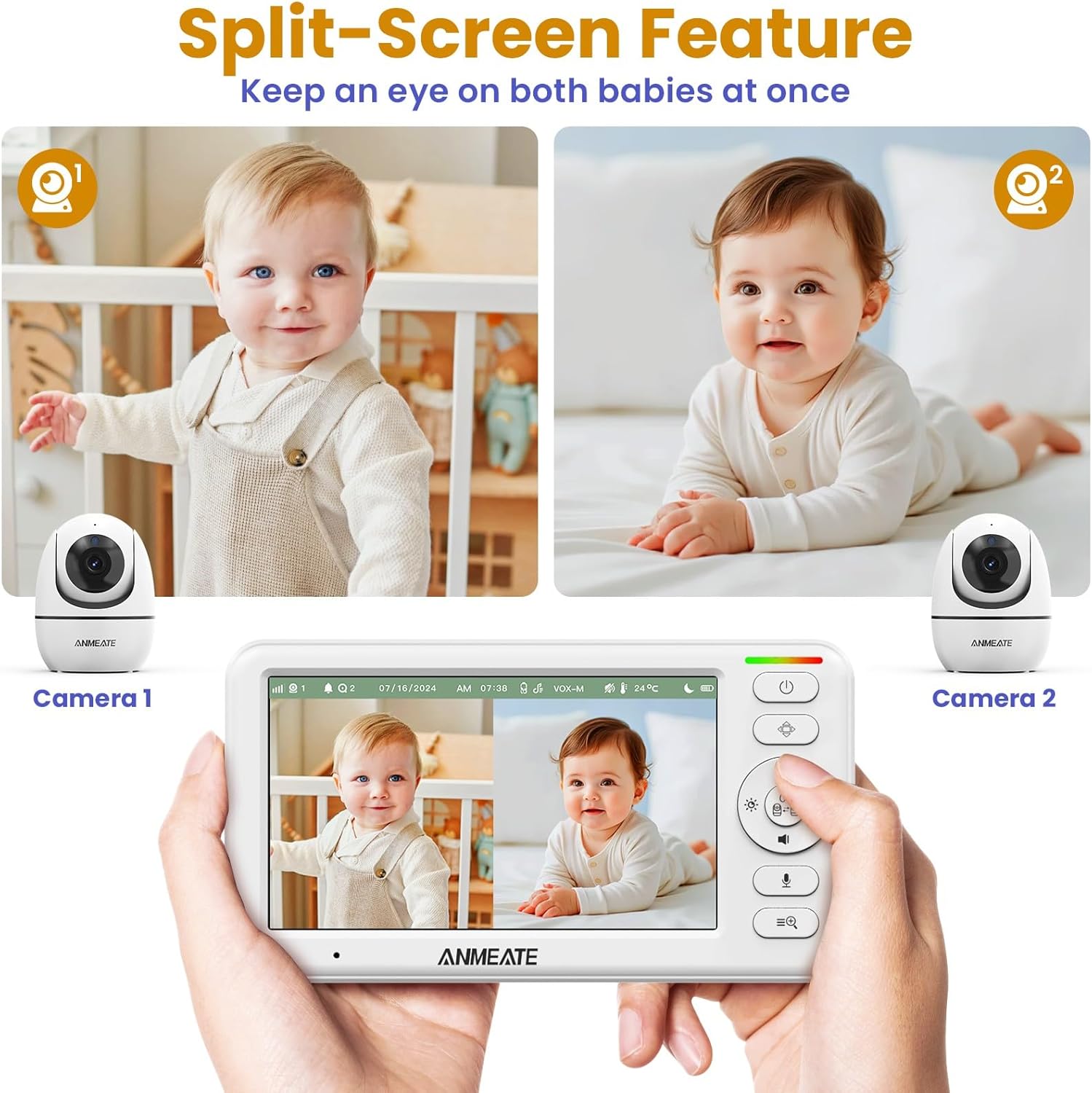
The ANMEATE monitor supports up to two cameras. You can view a single camera or use the split-screen feature to view both cameras simultaneously. Switch between cameras or activate scan mode (which cycles through connected cameras) via the menu.
5. Maintenance
Proper maintenance ensures the longevity and optimal performance of your baby monitor.
- Cleaning: Use a soft, dry cloth to clean the surfaces of the parent and baby units. Do not use abrasive cleaners or solvents.
- Lens Care: Gently wipe the camera lens with a soft, lint-free cloth. Avoid touching the lens directly with your fingers.
- Battery Care: To prolong battery life, avoid fully discharging the parent unit frequently. Charge it regularly. If storing the unit for an extended period, charge it fully and then store in a cool, dry place.
- Storage: Store the monitor in a dry, dust-free environment away from direct sunlight and extreme temperatures.
6. Troubleshooting
If you encounter issues with your ANMEATE baby monitor, refer to the following common solutions:
- No Picture/Sound on Parent Unit:
- Ensure both the parent unit and baby unit are powered on and properly connected to their power adapters.
- Check if the parent unit's battery is charged.
- Verify that the units are within range (up to 1000ft in open spaces). Obstacles like walls and furniture can reduce range.
- Try re-pairing the units as described in Section 3.4.
- Poor Image Quality:
- Ensure the camera lens is clean.
- Adjust the brightness settings on the parent unit.
- Move the baby unit closer to the parent unit to improve signal strength.
- Audio Feedback/Static:
- Move the parent unit further away from the baby unit.
- Reduce the volume on the parent unit.
- Ensure no other electronic devices are causing interference.
- Parent Unit Battery Drains Quickly:
- Ensure the unit is fully charged before use.
- Activate VOX mode to conserve battery life by turning off the screen when quiet.
- Reduce screen brightness.
7. Specifications
| Feature | Detail |
|---|---|
| Brand | ANMEATE |
| Model Number | DY549 |
| Screen Size | 5 inches |
| Video Resolution | 720P (Effective Video Resolution: 1080) |
| Connectivity Technology | Wireless (2.4GHz FHSS) |
| Battery Capacity | 5000mAh |
| Battery Life (Display On) | Up to 12 hours |
| Battery Life (Audio/VOX Mode) | Up to 48 hours |
| Range | Up to 1000ft (open space) |
| Pan Angle | 355 degrees |
| Tilt Angle | 120 degrees |
| Zoom | Up to 4x Digital Zoom |
| Night Vision Range | 15 Feet |
| Temperature Sensor | Yes |
| Two-Way Talk | Yes |
| Lullabies/White Noise | Yes |
| Expandable Cameras | Up to 2 cameras |
| Material | Plastic |
| Item Dimensions | 6 x 4 x 3 inches |
| Item Weight | 0.7 Pounds |
| UPC | 732827196399 |
8. Warranty and Support
For warranty information and technical support, please refer to the warranty card included in your product packaging or contact ANMEATE customer service directly. Contact details are typically available on the manufacturer's official website or through the retailer where the product was purchased.
