
Introduction
The QUANSHENG TG-FR1 two-way radio set delivers reliable communication without requiring a license, operating on FCC-compliant FRS 22 channels and PMR446 16 channels for immediate use. Each radio features a 1.3-inch HD color display paired with an intuitive knob interface, allowing users to quickly check channels and battery status while accessing convenient shortcuts. The device includes 10 NOAA weather channels for emergency alerts, VOX hands-free operation for convenient communication, and 38 CTCSS plus 82 DCS codes to minimize interference and ensure clear conversations. Equipped with a powerful flashlight for low-light conditions, these walkie talkies are powered by 1200mAh rechargeable batteries with modern Type-C charging capability. The compact design and durable construction make these radios suitable for outdoor activities like camping and hiking, as well as professional worksite applications.
Safety Information
- Battery Safety: Use only the provided 1200mAh rechargeable battery. Do not attempt to charge standard AA batteries within the device. Forcibly charging non-rechargeable batteries may cause safety hazards including fire or explosion.
- Operating Temperature: Operate the radio within the specified temperature range of -20°C to +50°C.
- Water Resistance: This device is not water resistant. Avoid exposure to water or high humidity.
- Antenna Care: Do not use the radio if the antenna is damaged. Contact with a damaged antenna may result in minor burns.
Package Contents
The standard package includes the following items:
- QUANSHENG TG-FR1 Two-Way Radio Unit (2 units)
- 1200mAh Rechargeable Battery (2 units)
- Belt Clip (2 units)
- Lanyard (2 units)
- Type-C Charging Cable (2 units)
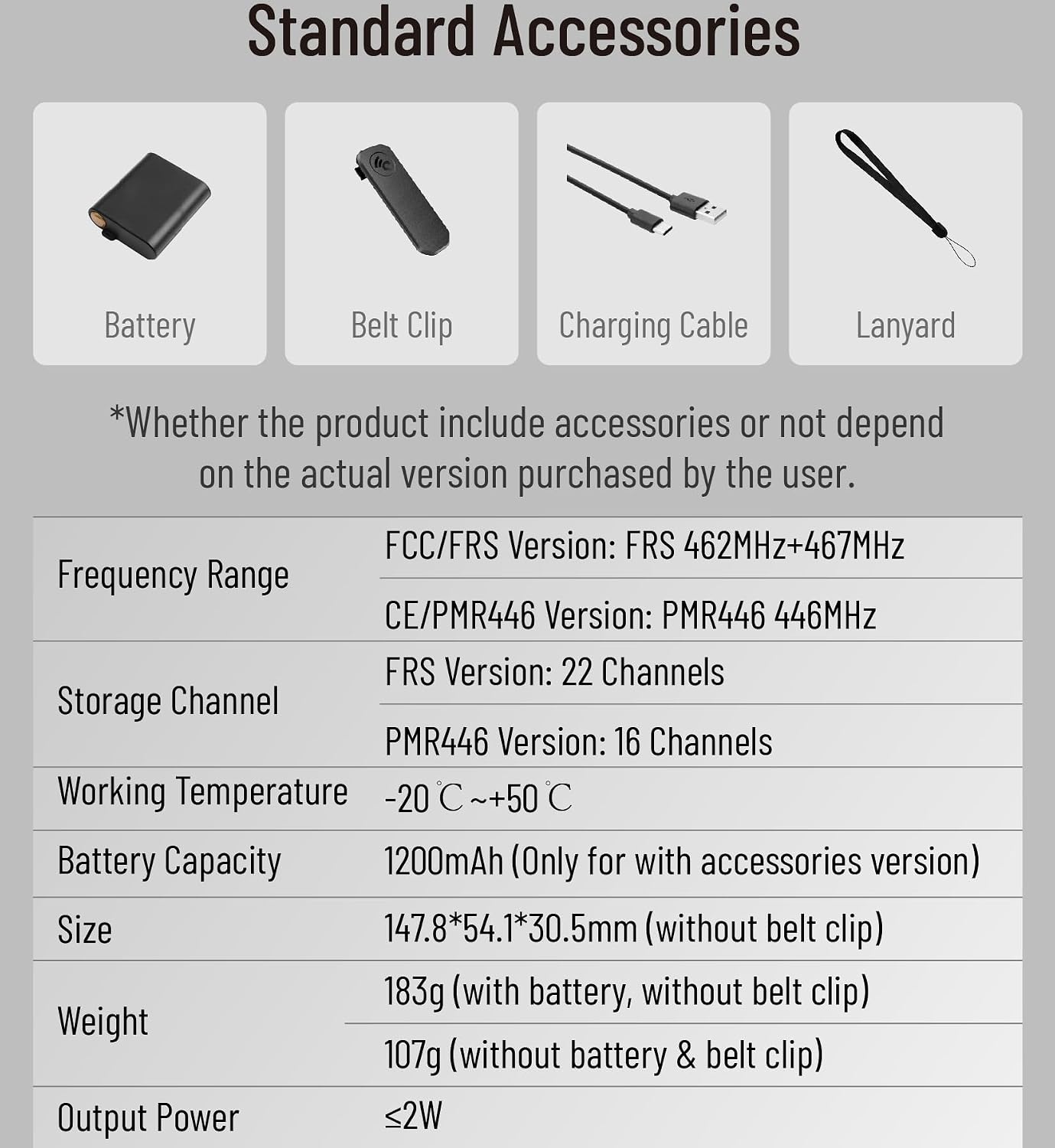
Figure 1: Standard accessories included with the QUANSHENG TG-FR1 radio. This image displays a battery, a belt clip, a charging cable, and a lanyard, which are typically provided with the product.
Product Overview
The QUANSHENG TG-FR1 features a user-friendly design with essential communication functions.
Key Features:
- HD Color Display: 1.3-inch screen for clear visibility of channels, battery status, and other indicators.
- Practical Knob: Intuitive control for channel selection and volume adjustment.
- License-Free Operation: Supports FRS 22 channels and PMR446 16 channels.
- Type-C Charging: Modern and convenient charging interface.
- Strong Flashlight: Integrated for illumination in low-light conditions.
- NOAA Weather Channels: Access to 10 NOAA channels for weather alerts.
- VOX Hands-Free: Voice-activated transmission for convenient communication.
- CTCSS/DCS Codes: 38 CTCSS and 82 DCS codes to enhance privacy and reduce interference.

Figure 2: The QUANSHENG TG-FR1 radio's HD color display. The display shows channel numbers, VOX status, battery level, and CTCSS/DCS indicators, providing a vivid and clear user experience.
Setup
1. Battery Installation
The QUANSHENG TG-FR1 uses a 1200mAh rechargeable battery. Ensure the battery is correctly inserted into the battery compartment on the back of the radio, aligning the contacts. Close the battery cover securely.
2. Charging the Battery
Connect the provided Type-C charging cable to the radio's Type-C port and the other end to a compatible USB power adapter (not included) or a computer USB port. The charging indicator on the radio will show the charging status. A full charge typically takes approximately 3 hours.

Figure 3: Charging the QUANSHENG TG-FR1 radio. The image illustrates the Type-C charging port and cable connection. A warning is present, reminding users not to charge AA batteries in this device.

Figure 4: Battery specifications for the QUANSHENG TG-FR1. This image highlights the 1200mAh battery capacity and indicates a standby time of 85 hours, usage time of 10 hours, and a charging time of 3 hours.
3. Power On/Off
To power on the radio, rotate the power/volume knob clockwise until you hear a click and the display illuminates. To power off, rotate the knob counter-clockwise until it clicks off.
Operating Instructions
1. Channel Selection
The QUANSHENG TG-FR1 supports 22 FRS channels and 16 PMR446 channels. Rotate the channel knob on the top of the radio to select your desired channel. Ensure all radios in your group are set to the same channel for communication.

Figure 5: Channel options for the QUANSHENG TG-FR1. This image visually represents the availability of 22 FRS channels and 16 PMR446 channels for communication.
2. Adjusting Volume
Rotate the power/volume knob clockwise to increase the volume and counter-clockwise to decrease it.
3. Transmitting and Receiving
To transmit, press and hold the Push-to-Talk (PTT) button on the side of the radio. Speak clearly into the microphone. Release the PTT button to receive. The display will indicate when you are transmitting or receiving.
4. VOX Hands-Free Operation
The VOX (Voice Operated Exchange) feature allows for hands-free transmission. When VOX is enabled, the radio will automatically transmit when it detects your voice. Refer to the on-screen menu or specific button functions to activate and adjust VOX sensitivity.
5. NOAA Weather Channels
Access the 10 built-in NOAA weather channels to receive real-time weather alerts and forecasts. Consult the radio's menu or dedicated button for NOAA channel access.
6. Flashlight Function
The radio includes a strong flashlight. Locate the flashlight button (often marked with a flashlight icon) and press it to turn the light on or off.
7. CTCSS/DCS Codes
CTCSS (Continuous Tone-Coded Squelch System) and DCS (Digitally Coded Squelch) codes help filter out unwanted conversations on a channel. By setting a specific CTCSS or DCS code, you will only hear transmissions from radios using the same code on that channel. Refer to the radio's menu for setting these codes.
Maintenance
- Cleaning: Use a soft, damp cloth to clean the radio's exterior. Do not use harsh chemicals or abrasive cleaners.
- Battery Care: To prolong battery life, avoid fully discharging the battery frequently. Store the radio and battery in a cool, dry place when not in use for extended periods.
- Storage: Store the radio in a dry environment, away from direct sunlight and extreme temperatures.
Troubleshooting
No Power
- Ensure the battery is correctly installed and fully charged.
- Check if the power/volume knob is rotated clockwise to the 'on' position.
Cannot Transmit or Receive
- Verify that all radios are set to the same channel.
- Check if CTCSS/DCS codes are enabled and match on all radios.
- Ensure you are within the effective communication range.
- Confirm the battery has sufficient charge.
Poor Audio Quality or Interference
- Adjust the volume level.
- Try switching to a different channel.
- Ensure there are no obstructions (buildings, hills) between radios.
- Check for sources of electromagnetic interference.
Specifications
| Feature | Specification |
|---|---|
| Model Number | TG-FR1 |
| Frequency Range (FRS Version) | FRS 462MHz + 467MHz |
| Frequency Range (PMR446 Version) | PMR446 446MHz |
| Storage Channels (FRS) | 22 Channels |
| Storage Channels (PMR446) | 16 Channels |
| Battery Capacity | 1200mAh |
| Operating Temperature | -20°C to +50°C |
| Dimensions (without belt clip) | 147.8 x 54.1 x 30.5mm |
| Weight (with battery, without belt clip) | 183g |
| Output Power | ≤2W |
| Talking Range Maximum | 5 Kilometers (under optimal conditions) |
| Water Resistance Level | Not Water Resistant |
Warranty and Support
Specific warranty information and customer support contact details are not provided within this document. Please refer to the product packaging, the retailer's website, or contact QUANSHENG directly for warranty claims and technical assistance.


