
1. Important Safety Information
Please read and understand all instructions before installing or operating this product. Failure to follow these instructions may result in electric shock, fire, serious injury, or death.
- Always disconnect power to the pump before performing any service or maintenance.
- Installation must be performed by a qualified professional and comply with all local and national electrical and plumbing codes.
- Ensure the pump is properly grounded to prevent electric shock.
- Do not operate the pump if it is damaged or has exposed wiring.
- Keep children and pets away from the pump and pool area during operation.
- This pump is designed for use with swimming pools and spas. Do not use for other purposes.
2. Product Overview
The VEVOR 1.5 HP Variable Speed Pool Pump is designed for efficient and quiet filtration of inground and above-ground swimming pools and spas. It features a permanent magnet motor, smart APP control, and multiple programmable modes to optimize energy consumption and maintain crystal-clear water.
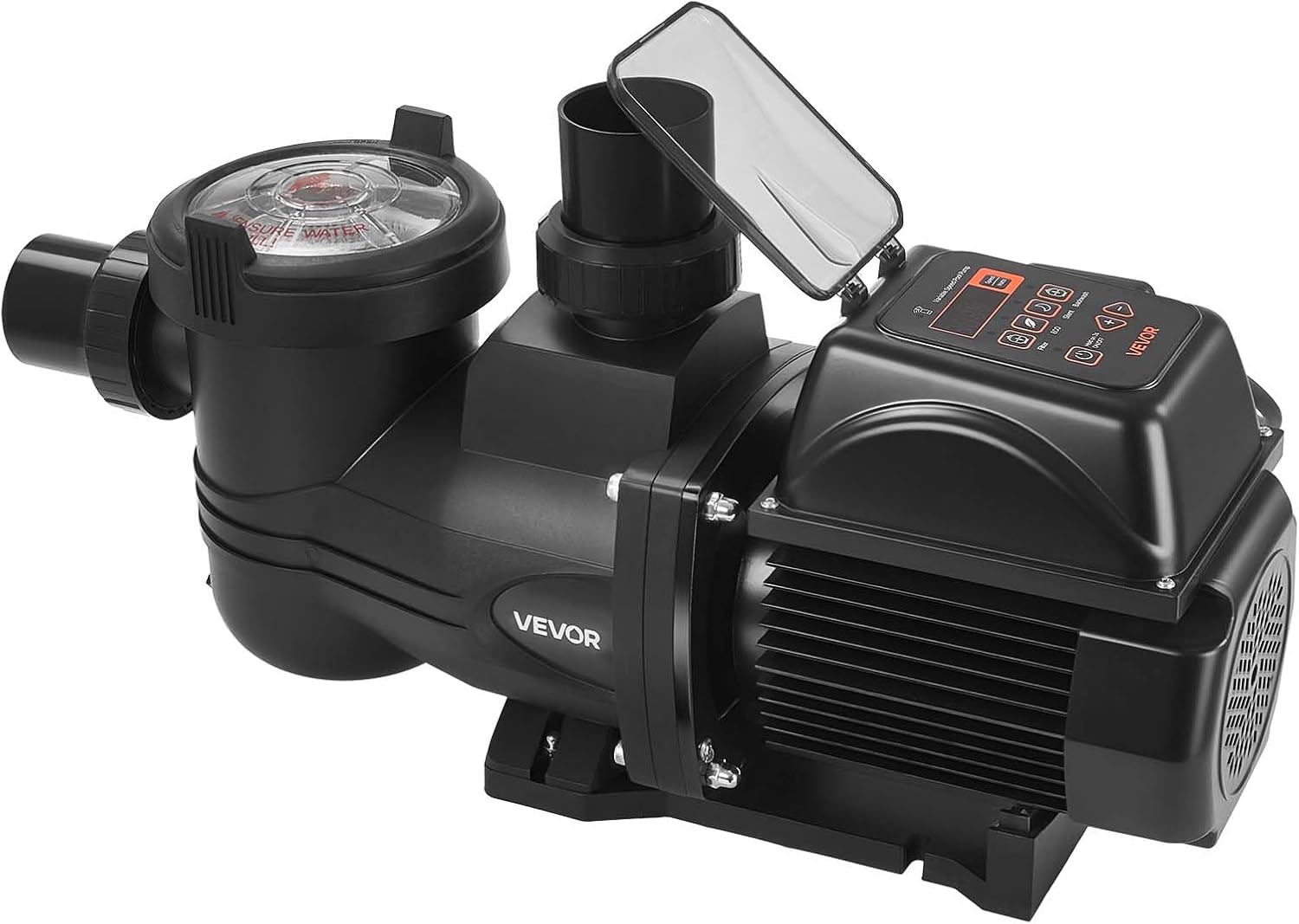
Image: VEVOR 1.5 HP Variable Speed Pool Pump, showing its compact design and integrated filter basket.
Key Features:
- Variable Speed Technology: Adjusts pump speed based on pool size and usage, reducing energy consumption by up to 89% compared to single-speed pumps.
- High-Efficiency Filtration: 1.5 HP max power, 52 ft max head, 132 GPM max flow rate, with a variable speed range of 1000–2900 RPM.
- Smart APP Remote Control: Manage pump settings, monitor status, adjust speed, and set timers from your smartphone.
- Durable Construction: Built with a permanent magnet motor for smooth, quiet operation, reinforced housing, and IPX5 waterproof rating.
- Detachable Filter Basket: Easily captures large debris like leaves and hair, preventing clogs and simplifying cleaning.
- Quiet Operation: Engineered for low noise levels, ensuring uninterrupted enjoyment of your outdoor space.

Image: Comparison illustrating the energy savings of a variable speed pool pump over a traditional single-speed pump.

Image: Diagram showing the low noise level (45 dB at 1400 RPM) of the VEVOR pool pump compared to common sounds.
3. Specifications
| Specification | Value |
|---|---|
| Brand | VEVOR |
| Model Number | HLVSP150US |
| Horsepower | 1.5 HP |
| Voltage / Frequency | AC 220-240V, 50/60Hz |
| Maximum Flow Rate | 132 GPM (30 m³/h) |
| Maximum Head Lift | 52 ft (16 m) |
| Variable Speed Range | 1000–2900 RPM |
| Housing Material | Polypropylene (PP-GF30 Plastic) |
| Item Weight | 27.56 lbs (12.50 kg) |
| Product Dimensions (L x W x H) | 22.76 x 8.19 x 11.34 inches (578 x 208 x 288 mm) |
| Operating Temperature (Liquid) | 0 to 50°C / 0 to 122°F |
| Waterproof Rating | IPX5 |

Image: Detailed dimensions and included components of the VEVOR Variable Speed Pool Pump.
4. Setup and Installation
Proper installation is crucial for the safe and efficient operation of your VEVOR Variable Speed Pool Pump. Refer to the following guidelines:
4.1 Site Selection
- Install the pump on a solid, level surface, preferably concrete, to minimize vibration and noise.
- Ensure adequate ventilation around the pump motor for cooling.
- Locate the pump as close to the pool as possible to reduce friction loss in plumbing.
- Protect the pump from direct sunlight, excessive moisture, and freezing temperatures.
4.2 Plumbing Connections
The pump features 2-inch inlet/outlet connections. Adapters for 1.5-inch PVC pipes are included.
- Use appropriate PVC pipes and fittings for your pool system.
- Apply thread sealant to all threaded connections to prevent leaks.
- Ensure all connections are tight but do not overtighten.

Image: Visual guide for connecting PVC pipes to the pump's inlet and outlet, including options for 1.5-inch and 2-inch connections.
4.3 Electrical Connections
- Connect the pump to a dedicated, properly grounded electrical circuit.
- Verify that the power supply voltage matches the pump's requirements (AC 220-240V).
- All wiring must comply with local electrical codes and be performed by a licensed electrician.
5. Operating Instructions
Your VEVOR Variable Speed Pool Pump offers both manual control via the integrated panel and remote control via a smartphone application.
5.1 Control Panel Operation
The control panel allows direct management of pump functions and monitoring of its status.

Image: Detailed view of the pump's control panel, highlighting the display, mode buttons (Filter, ECO, Silent, Backwash), and speed adjustment controls.
- Power On/Off: Long-press the power button for 3 seconds to turn the pump on or off.
- Speed/Power Shift: Press the 'Speed/Watts' button to toggle between displaying current speed (RPM) and output power (Watts).
- Speed Adjustment: Use the '+' and '-' buttons to increase or decrease the RPM. Short press adjusts by 50 RPM, long press by 100 RPM.
- Preset Modes: Select from Filter, ECO, Silent, or Backwash modes. Each mode has a predefined speed setting.
- Indicator Lights: Observe the WiFi indicator for connectivity status (solid green for connected, flashing for pairing mode, off if not connected but still functional). Mode indicators light up white when active.
5.2 Smart APP Remote Control
Control your pump conveniently from your smartphone using the dedicated APP.

Image: Smartphone screen displaying the VEVOR app interface for remote control of the pool pump, showing real-time status and control options.
- APP Pairing: Simultaneously press and hold the '+' and '-' buttons on the control panel for 3 seconds to enter pairing mode (WiFi indicator flashes). Follow the app instructions to add the device.
- Mode Selection: Select Filter, ECO, Silent, or Backwash modes directly from the app.
- Custom Speed Adjustment: Swipe left or right within the app to precisely adjust the target speed (RPM).
- Scheduling: Set custom timers and schedules for pump operation, allowing automated pool care.
- Energy Monitoring: View energy consumption curves and real-time power usage within the app.
Video: This video demonstrates the operation methods for the VEVOR Variable Speed Pool Pump, including control panel functions and smartphone app integration for speed adjustment, mode selection, and scheduling.
6. Maintenance
Regular maintenance ensures the longevity and optimal performance of your pool pump.
6.1 Filter Basket Cleaning
The detachable filter basket collects debris and should be cleaned regularly.

Image: Hand removing the detachable filter basket from the pump, showing collected leaves and debris, emphasizing ease of cleaning.
- Turn off the pump and disconnect power.
- Open the clear lid of the filter basket.
- Remove the basket and empty any collected debris.
- Rinse the basket thoroughly with water.
- Inspect the O-ring on the lid for damage and ensure it is clean and properly seated before reattaching the lid.
6.2 General Care
- Periodically inspect the pump for any signs of wear, damage, or leaks.
- Keep the pump motor free from dirt and debris to ensure proper cooling.
- In freezing conditions, drain the pump completely or take appropriate winterization steps to prevent damage.
7. Troubleshooting
If you encounter issues with your VEVOR Variable Speed Pool Pump, refer to the following common troubleshooting steps:
| Problem | Possible Cause | Solution |
|---|---|---|
| Pump does not start | No power, tripped breaker, motor overload, faulty wiring. | Check power supply, reset breaker, inspect wiring, ensure proper voltage. |
| Low water flow | Clogged filter basket, air leak in suction line, low water level, clogged impeller. | Clean filter basket, check for air leaks, ensure adequate water level, inspect impeller for blockages. |
| Pump is noisy | Air in system, cavitation, worn bearings, pump not securely mounted. | Bleed air from system, check for suction leaks, ensure proper water flow, verify secure mounting. |
| Water leaks | Loose connections, damaged O-rings/seals, cracked housing. | Tighten connections, replace O-rings/seals, inspect housing for damage. |
| APP connectivity issues | Weak WiFi signal, incorrect pairing, app outdated. | Ensure strong WiFi signal, re-pair device, update app to latest version. |
For persistent issues or error codes displayed on the control panel, please contact VEVOR customer support.
8. Warranty and Support
VEVOR products are designed for durability and performance. For specific warranty details, please refer to the warranty card included with your product or visit the official VEVOR website.
Customer Support:
If you require assistance with installation, operation, maintenance, or troubleshooting, please contact VEVOR customer support through the following channels:
- Official Website: www.vevor.com
- Email Support: Refer to your product documentation for specific contact information.
- Phone Support: Refer to your product documentation for specific contact information.
Please have your model number (HLVSP150US) and purchase date ready when contacting support.