
1. Introduction
This manual provides detailed instructions for the assembly, operation, and maintenance of your PVWIIK Queen Size Murphy Bed with Desk and Removable Shelves. This multifunctional furniture piece is designed to optimize space, converting between a compact cabinet with a desk and a comfortable queen-size bed. It features integrated charging capabilities and convenient removable shelves.

Image 1.1: The PVWIIK Queen Size Murphy Bed in its open, bed configuration, complete with bedding.

Image 1.2: The PVWIIK Queen Size Murphy Bed in its closed, cabinet configuration, showcasing the integrated desktop.
2. Safety Guidelines
Please read and understand all safety instructions before assembly and use. Failure to follow these guidelines may result in injury or product damage.
- Adult Assembly Required: This product requires assembly by at least two adults.
- Secure Installation: Ensure the Murphy bed is securely anchored to a wall according to the assembly instructions to prevent tipping.
- Weight Capacity: Do not exceed the maximum weight recommendation for the bed (100 pounds, excluding mattress).
- Clearance: Maintain adequate clearance around the bed when opening and closing to avoid obstruction or injury.
- Children and Pets: Keep children and pets away from the unit during assembly and operation. Do not allow children to play on or around the bed when it is being opened or closed.
- Electrical Safety: When using the charging station, ensure all devices and cables are in good condition and used according to their manufacturer's guidelines. Do not overload the outlets.
- Mattress Compatibility: Use only a queen-size mattress that fits within the bed frame dimensions. Mattress is not included.
3. Package Contents
Your PVWIIK Murphy Bed is shipped in two packages. Carefully unpack all components and verify that all parts and hardware are present before beginning assembly. Refer to the included parts list in your separate assembly manual.
Note: While an assembly video clip may be available from the manufacturer, it is not embedded in this document. Please refer to the comprehensive assembly instructions provided with your product for detailed step-by-step guidance.
4. Assembly Instructions
Assembly of this Murphy bed requires significant time and effort. It is strongly recommended that two adults perform the assembly. A power drill is highly recommended due to the number of screws involved.
- Preparation: Clear a large, open workspace. Lay out all parts and hardware. Identify each component using the labels and the parts list in the separate assembly manual.
- Follow Manual Closely: Adhere strictly to the step-by-step instructions in the provided assembly manual. Pay close attention to diagrams, especially regarding the orientation of pieces and the location of pre-drilled holes.
- Component Identification: Some labels on parts may be missing or faded. Use the images and diagrams in the assembly manual to correctly identify components.
- Secure Fasteners: Ensure all screws, bolts, and other fasteners are tightened securely. Do not overtighten to avoid damaging the wood.
- Wall Anchoring: Once assembled, securely anchor the cabinet portion of the Murphy bed to a sturdy wall using the provided hardware. This step is critical for safety and stability.
- Mattress Placement: After assembly, place your queen-size mattress directly onto the bed platform. A box spring is not required.
5. Operation
5.1 Converting Between Cabinet and Bed
The Murphy bed is designed for easy conversion. To transform the cabinet into a bed:
- Ensure the area in front of the cabinet is clear of obstructions.
- Unlock any securing latches on the cabinet doors (if present).
- Gently pull the bed frame outwards and downwards. The support legs will automatically extend.
- Ensure the bed frame is fully extended and the legs are stable on the floor before use.
To convert the bed back into a cabinet:
- Remove any bedding or items that would prevent the bed from folding.
- Lift the bed frame upwards, guiding the support legs to retract.
- Push the bed frame fully into the cabinet until it is securely closed. Engage any latches to keep it in the cabinet position.
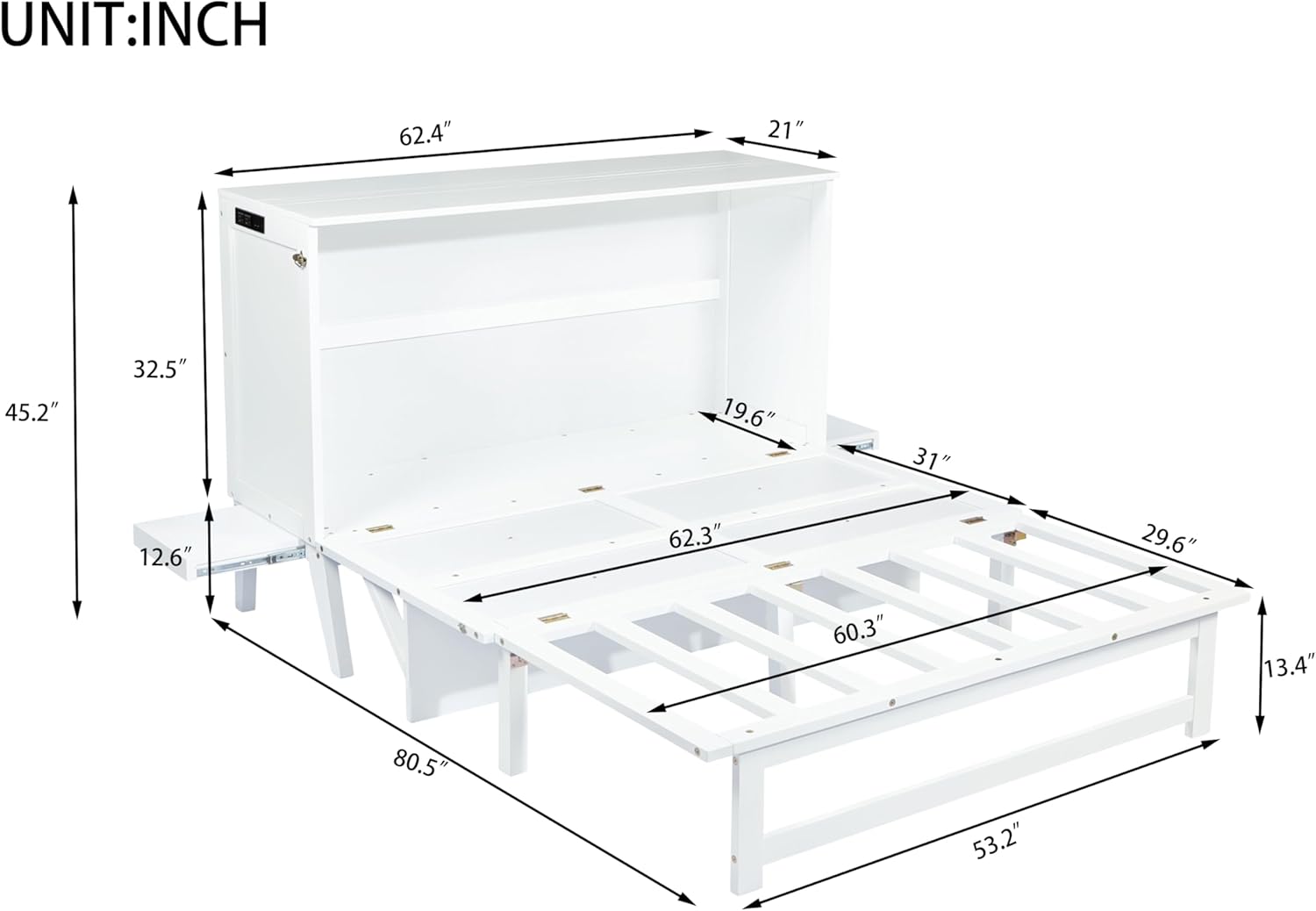
Image 5.1: The Murphy bed in a partially open state, illustrating the mechanism for conversion.
5.2 Using the Removable Shelves
The unit includes two removable shelves with smooth guide rails, located on either side of the bed when it is in the open position. These shelves can be pulled out for use as a bedside surface for items like lamps, books, or personal gadgets.
- To extend a shelf, gently pull it outwards from the side of the cabinet.
- To retract a shelf, push it back into the cabinet until it is flush with the side.
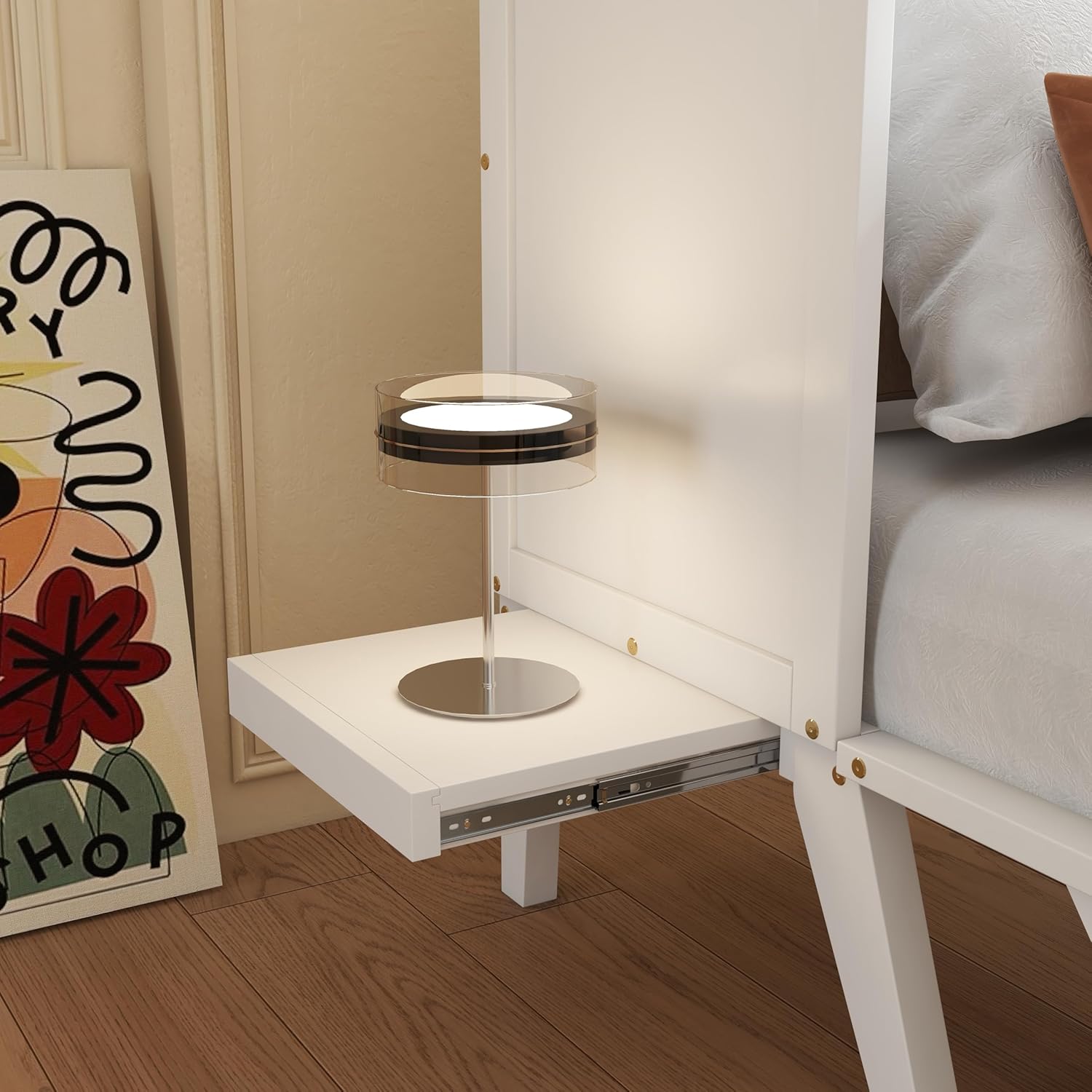
Image 5.2: A detailed view of an extended removable shelf, demonstrating its functionality as a bedside table.
5.3 Utilizing the Charging Station
A built-in charging station is located on the unit, featuring two power outlets and two USB ports. This allows for convenient charging of electronic devices such as phones and laptops.
- Plug the Murphy bed's power cord into a standard wall outlet.
- Connect your devices to the available power outlets or USB ports.
- Ensure the charging station is not overloaded. Refer to the power ratings if available.

Image 5.3: A close-up of the charging station, highlighting the power outlets and USB ports.
5.4 Using the Desktop
When the bed is in its closed, cabinet configuration, the top surface functions as a full-length desktop. This provides a sturdy surface for work, study, or display.
- Ensure the bed is fully closed and secured before placing heavy items on the desktop.
- Avoid placing liquids directly on the wood surface without protective coasters.
6. Care and Maintenance
Proper care will ensure the longevity and appearance of your Murphy bed.
- Cleaning: Wipe surfaces with a soft, damp cloth. Avoid harsh chemicals or abrasive cleaners, which can damage the finish.
- Spills: Clean up spills immediately to prevent staining or damage to the wood.
- Hardware: Periodically check all screws and fasteners to ensure they remain tight. Retighten as necessary.
- Moving the Unit: If you need to move the entire unit, ensure the bed is in the closed position and secured. Lift the unit rather than dragging it to prevent damage to the legs or floor.
- Environmental Conditions: Avoid exposing the furniture to extreme temperatures or humidity, which can cause warping or cracking.
7. Troubleshooting
This section addresses common issues you might encounter.
- Issue: Difficulty during assembly.
- Solution: Ensure you have correctly identified all parts. Some labels may be faded; refer closely to the diagrams in the assembly manual. Verify the orientation of each piece before fastening. Using a power drill can significantly ease the process due to the number of screws.
- Issue: Bed does not open or close smoothly.
- Solution: Check for any obstructions in the path of the bed frame or legs. Ensure all hinges and mechanisms are free of debris. Verify that all assembly steps related to the bed mechanism were followed correctly and fasteners are appropriately tightened.
- Issue: Unit feels unstable.
- Solution: Confirm that the unit is securely anchored to a wall as per the assembly instructions. Check that all screws and bolts are fully tightened. Ensure the unit is placed on a level surface.
- Issue: Charging station not working.
- Solution: Verify that the main power cord for the Murphy bed is securely plugged into a functional wall outlet. Check if the devices you are trying to charge are working correctly with other power sources. Avoid overloading the charging station.
8. Product Specifications
| Attribute | Detail |
|---|---|
| Product Type | Murphy Bed with Desk and Removable Shelves |
| Size | Queen |
| Color | White |
| Material (Main) | Pine Wood, PB (Particle Board), MDF (Medium-Density Fiberboard) |
| Product Dimensions (L x W x H) | 80.5" x 62.4" x 45.2" (inches) |
| Item Weight | 30 pounds |
| Maximum Weight Recommendation | 100 pounds (excluding mattress) |
| Compatible Mattress Size | Queen |
| Spring Box Required | No |
| Assembly Required | Yes |
| Special Features | Space Saving, Integrated Desk, Removable Shelves, Charging Station (2 Power Outlets, 2 USB Ports) |

Image 8.1: Dimensional diagram of the PVWIIK Queen Size Murphy Bed, illustrating key measurements.
9. Warranty and Support
For warranty information and customer support, please refer to the documentation included with your purchase or contact PVWIIK directly through their official channels. Keep your purchase receipt for any warranty claims.
Manufacturer: PVWIIK
Model Number: PVWIIK
ASIN: B0GJ5D81DH
GTIN/UPC: 742937030360