
Introduction
This manual provides instructions for the setup, operation, and maintenance of your XINFUTE YKR-T series remote control. This remote is designed for use with AUX Q Smart Plus LCD Air Conditioner units. Please read this manual thoroughly before using the remote control to ensure proper function and longevity.
Setup
Battery Installation
- Locate the battery compartment cover on the back of the remote control.
- Slide the cover downwards or press the latch and lift to open.
- Insert two (2) AAA batteries, ensuring the positive (+) and negative (-) terminals match the diagrams inside the compartment. Batteries are not included.
- Replace the battery compartment cover, ensuring it clicks securely into place.

Figure 1: Back of the remote control with battery compartment. This image displays the rear of the remote, highlighting the area where batteries are inserted and the model identification sticker.
Initial Use
Once batteries are installed, the remote control is ready for use. Point the remote directly at the indoor unit of your AUX Q Smart Plus air conditioner.
Operating Instructions
The remote control features various buttons for controlling your air conditioner. Refer to the image below for button identification.
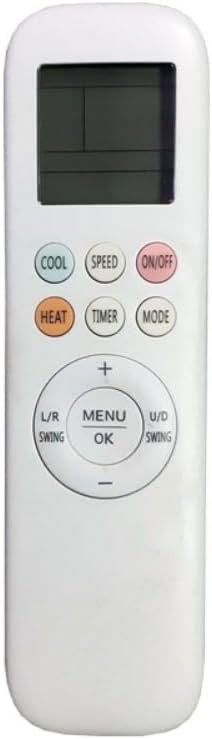
Figure 2: Front view of the remote control. This image shows the LCD display and all operational buttons, including power, mode, temperature, and fan controls.
- ON/OFF: Press to turn the air conditioner on or off.
- COOL: Activates cooling mode.
- HEAT: Activates heating mode.
- MODE: Cycles through available operating modes (e.g., Auto, Cool, Dry, Fan, Heat).
- SPEED: Adjusts the fan speed (e.g., Low, Medium, High, Auto).
- TIMER: Sets the timer for automatic on/off operations.
- MENU/OK: Used to confirm selections within menu options.
- +/- Buttons: Adjusts temperature settings, timer values, or navigates menu options.
- L/R SWING: Controls the horizontal airflow direction.
- U/D SWING: Controls the vertical airflow direction.
Maintenance
Battery Replacement
Replace batteries when the remote control's display becomes dim or the remote fails to operate the air conditioner. Always replace both batteries simultaneously with new AAA batteries. Do not mix old and new batteries or different types of batteries.
Cleaning
Wipe the remote control with a soft, dry cloth. Do not use liquid cleaners, abrasive cleaners, or chemical solvents, as these may damage the remote's surface or internal components.
Storage
If the remote control will not be used for an extended period, remove the batteries to prevent leakage and potential damage.
Troubleshooting
- Remote not responding:
- Check if the batteries are correctly inserted with the correct polarity.
- Replace old batteries with new AAA batteries.
- Ensure there are no obstructions between the remote control and the air conditioner's receiver.
- Confirm you are within the effective operating range of the air conditioner.
- Air conditioner not responding to commands:
- Verify the air conditioner unit is powered on.
- Ensure the remote control model (YKR-T/021E, YKR-T/121E, YKR-T/131E) is compatible with your AUX Q Smart Plus LCD AC unit.
Specifications
| Brand | XINFUTE |
| Model Numbers | YKR-T/021E, YKR-T/121E, YKR-T/131E (also compatible with YKR-T/012E) |
| Compatibility | AUX Q Smart Plus LCD Air Conditioners |
| Power Source | 2 x AAA Batteries (not included) |
| Material | ABS Material |
| Item Weight | 2.4 ounces |
| GTIN (UPC) | 784853025754 |
Warranty
XINFUTE offers a one-year warranty on all purchases of this remote control. Please retain your proof of purchase for warranty claims.
Support
If you are not satisfied with your purchase or encounter any issues, please contact the seller, Xinfute, within 24 hours of receiving your product. All goods are inspected before shipment to ensure quality.
For further assistance, you may visit the XINFUTE Store on Amazon.