
1. Introduction
This manual provides detailed instructions for the installation, operation, and maintenance of your Road Top 12.3-inch CarPlay Screen. This device upgrades your vehicle's multimedia system, offering enhanced connectivity and features while retaining original car functionalities.
2. Vehicle Compatibility
This CarPlay Android Auto screen upgrade is specifically designed for Mercedes-Benz E-Class W212 models manufactured between 2015 and 2016, equipped with the NTG5.0 system.
Important Compatibility Notes:
- Not compatible with NTG4.0, NTG4.5, or NTG4.7 systems.
- Not compatible with E-Class Coupe models.
- Please verify your dashboard layout and system interface against the provided images before purchase to ensure compatibility.

Image: Visual guide for checking dashboard and NTG system compatibility. Shows correct dashboard layout and NTG 5.0 system, and incompatible layouts/systems (NTG 4.0, 4.5, 4.7).
3. Package Contents
Upon opening the package, please ensure all the following items are present:
- 12.3-inch CarPlay Screen
- Power Cable
- LVDS/USB Cable
- Mounting Bracket

Image: Displays the 12.3-inch screen, power cable, LVDS/USB cable, and mounting bracket, along with a representation of the product's homescreen display.
4. Setup and Installation
Installation of the Road Top CarPlay Screen requires removal of the vehicle's dashboard components and connection of wiring. This process is standard for car stereo upgrade systems.
General Installation Advice:
- It is highly recommended to seek professional installation to ensure correct wiring and system integration.
- Before reinstalling the dashboard, always test all functions, including Apple CarPlay, Android Auto, and MirrorLink, to confirm proper operation.
- Refer to the wiring diagrams provided with your product for specific connection details.

Image: Shows the vehicle's dashboard before installation with the original screen, and after installation with the new 12.3-inch CarPlay screen displaying various app icons.
5. Operating Instructions
5.1. Wireless CarPlay & Android Auto
The unit supports both wireless and wired Apple CarPlay and Android Auto. This allows for seamless integration of your smartphone's navigation, calls, messages, music, and apps directly onto the car's display. Voice control is available via Siri and Google Assistant.

Image: Illustrates the CarPlay interface on the screen with an iPhone, and the Android Auto interface with an Android phone, highlighting wireless connectivity.
5.2. OEM System Retention
This upgrade retains all original vehicle functions, including the factory radio and amplifier, parking sensors, OEM reverse camera, and vehicle information display. No coding or ECU modification is required.

Image: Shows various original car system features that are retained, such as iDrive system, amplifier, original car information display, backup camera, steering wheel controls, CD player, radio, and Bluetooth.
5.3. Audio Transmission Methods
Audio output from the new system is transmitted via AUX or Bluetooth for stable and clear sound, especially important for NTG5.0 systems.
- AUX Cable Transmission: If your car lacks an AUX/AMI port, connect the audio cable to the power cable. If an AUX/AMI port is present, disconnect the original audio cable and connect the new audio cable to the AUX/AMI port.
- Bluetooth Transmission: Pair your phone with the car via Bluetooth. Activate the 'Use Car's BT Channel' switch in the system settings and set Bluetooth as the audio transmission method.

Image: Detailed instructions and diagrams for connecting audio via AUX cable (with and without AMI port) and setting up Bluetooth audio transmission through the system menu.
5.4. Reverse Camera & Parking System Support
The unit supports various camera systems, including OEM factory reverse cameras, aftermarket backup cameras, front view cameras, and DVR video input (CVBS signal). It also integrates with parking radar displays. Note: Aftermarket 360 camera systems are not supported.

Image: Shows a simulated reverse camera view with parking guidelines displayed on the new screen.
5.5. Control Integration
The system supports multiple control methods for user convenience:
- Touchscreen Operation: Direct interaction with the 12.3-inch HD display.
- Steering Wheel Buttons: Utilize your existing Mercedes-Benz steering wheel controls.
- Voice Control: Activate functions via voice commands.
- Tel / Call Control: Manage phone calls directly from the unit.
5.6. Day & Night Mode
The display features an automatic brightness adjustment function. It intelligently switches between Day mode (for bright environments) and Night mode (for comfortable night driving) based on the vehicle's headlight status, improving visibility and driving safety.
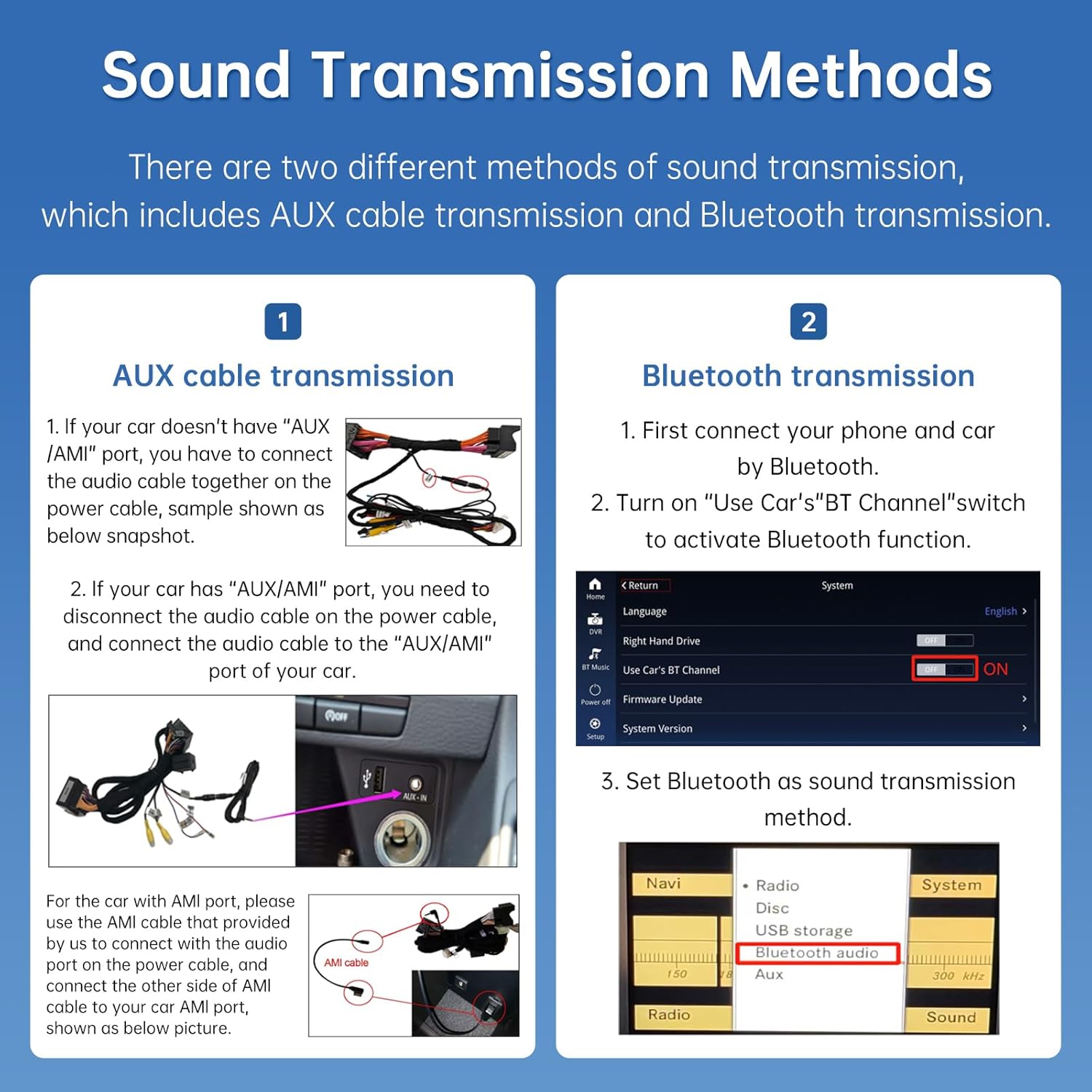
Image: Depicts the screen interface transitioning from a bright 'Too Light' setting to a darker 'Too Dark' setting, with 'WDR' (Wide Dynamic Range) in the middle, illustrating the automatic brightness adjustment.
5.7. Switching Between Systems
You can seamlessly switch between the original OEM Radio System and the Road Top Linux System (which hosts CarPlay, Android Auto, etc.) as needed.

Image: Shows the new screen displaying the OEM radio interface, with an arrow pointing down to the Road Top system's main menu icons (OEM Car Info, CarPlay, Android Auto, HiCar, Autolink), indicating the ability to switch between them.
6. Maintenance
To ensure the longevity and optimal performance of your Road Top CarPlay Screen, follow these maintenance guidelines:
- Cleaning: Use a soft, lint-free cloth to gently wipe the screen. For stubborn smudges, slightly dampen the cloth with water or a screen-safe cleaner. Avoid harsh chemicals, abrasive materials, or excessive moisture.
- Temperature: Avoid exposing the unit to extreme temperatures, both hot and cold, for extended periods.
- Physical Damage: Protect the screen from direct impact or sharp objects.
- Software Updates: Periodically check the manufacturer's website or contact support for any available software updates to ensure the best performance and compatibility.
7. Troubleshooting
If you encounter issues with your CarPlay screen, consider the following common solutions:
- No Power/Display: Check all power connections. Ensure the vehicle's ignition is on.
- No Audio: Verify the audio transmission method (AUX or Bluetooth) is correctly configured in the system settings and on your phone. Ensure the car's original AUX input is selected if using an AUX cable.
- CarPlay/Android Auto Not Connecting: Ensure your phone's Bluetooth and Wi-Fi are enabled. For wired connections, check the USB cable. Try restarting both your phone and the car's system.
- Touchscreen Unresponsive: Perform a system reset if available (refer to specific product documentation for reset procedures).
- Intermittent Issues: Many issues can stem from incorrect wiring or system mismatch during installation. Double-check all connections or consult with a professional installer.
For persistent issues or complex problems, please contact Road Top technical support. Provide details of your vehicle model, NTG system version, and a clear description of the problem.
8. Specifications
| Feature | Description |
|---|---|
| Brand | Road Top |
| Model Compatibility | Mercedes-Benz E-Class W212 (2015-2016) with NTG 5.0 system |
| Screen Size | 12.3 inches |
| Display Resolution | HD 1920x720P (IPS Screen) |
| Connectivity Technology | Bluetooth |
| Special Features | Wireless Apple CarPlay, Wireless Android Auto, MirrorLink, Automatic Brightness Adjustment |
| Compatible Devices | Smartphone |
| Audio Output Mode | Stereo (via AUX or Bluetooth) |
| Control Method | Touchscreen, Push Button (Steering Wheel Controls) |
| OEM System Retention | Retains original radio, amplifier, parking sensors, OEM reverse camera, iDrive system, CD player, Bluetooth |
| Camera Support | OEM factory reverse camera, Aftermarket backup camera, Front view camera, DVR video input (CVBS signal) |
9. Warranty and Support
9.1. Warranty Information
The Road Top CarPlay Screen comes with a 1-year warranty from the date of purchase. Additionally, a 30-day return and exchange policy is offered. Please retain your proof of purchase for warranty claims.
9.2. Technical Support
Road Top provides full technical support for troubleshooting and installation assistance. If you have questions or encounter issues, please contact our technical team. You can typically find contact information on the product packaging, the seller's page, or the official Road Top website.
When contacting support, be prepared to provide:
- Your order number or proof of purchase.
- The specific model of your Road Top CarPlay Screen.
- Details of your vehicle (make, model, year, and original NTG system version).
- A clear description of the issue, including any steps you have already taken to troubleshoot.