
Introduction
Thank you for choosing the CubiCubi 48 x 24 Electric One-Piece Standing Desk. This manual provides essential information for the safe assembly, operation, and maintenance of your new desk. Please read it thoroughly before use and retain it for future reference.
This electric standing desk is designed to offer a versatile workspace, allowing seamless transitions between sitting and standing positions. Its ergonomic design aims to reduce discomfort during prolonged work sessions, promoting better posture and focus. The desk features a durable one-piece desktop, a robust steel frame, and an advanced motor system for smooth, quiet height adjustments.
Safety Information
- Ensure all connections are secure before operating the desk.
- Keep hands and objects clear of moving parts during height adjustment to prevent injury or damage.
- Do not overload the desk. The maximum weight capacity is 176 lbs (80 kg).
- Keep children and pets away from the desk during operation. The child lock feature should be used when not in use.
- Only use the provided power adapter.
- If any unusual noise, smell, or smoke occurs, immediately unplug the power cord and contact support.
- Do not disassemble or modify the desk components.
Package Contents
Please check that all components are present and undamaged before assembly. If anything is missing or damaged, contact customer support.
- One-Piece Desktop
- Desk Legs (2)
- Crossbeam
- Control Panel
- Motor System
- Adjustable Feet
- Headphone Hooks (2)
- Power Adapter and Cable
- Assembly Hardware (screws, wrench, etc.)
- Instruction Manual
Setup
Assembly of the CubiCubi Electric Standing Desk is designed to be straightforward, typically taking about 30 minutes. Follow these steps carefully:
- Attach the Crossbeam: Securely attach the crossbeam to the sturdy desk legs using the provided hardware.
- Install Adjustable Feet: Screw in the adjustable feet to the bottom of the desk legs to ensure stability and level positioning.
- Assemble Frame Structure: Connect the crossbeam and side wings to form the complete frame structure.
- Secure Desktop: Carefully place the one-piece desktop onto the assembled frame and secure it with the appropriate screws.
- Connect Control Panel and Power: Attach the control panel to the underside of the desktop and connect all necessary cables to the motor system and power adapter. Plug the power adapter into a wall outlet.
For visual guidance, refer to the installation diagram below:

Figure 1: Quick Installation Guide
The desk features a high-strength frame made from aerospace-grade cold-rolled steel, designed for enhanced stability and safety. This includes longer side wings, a wider base frame, and a thicker cross-section compared to other desks, contributing to 50%+ increased stability.
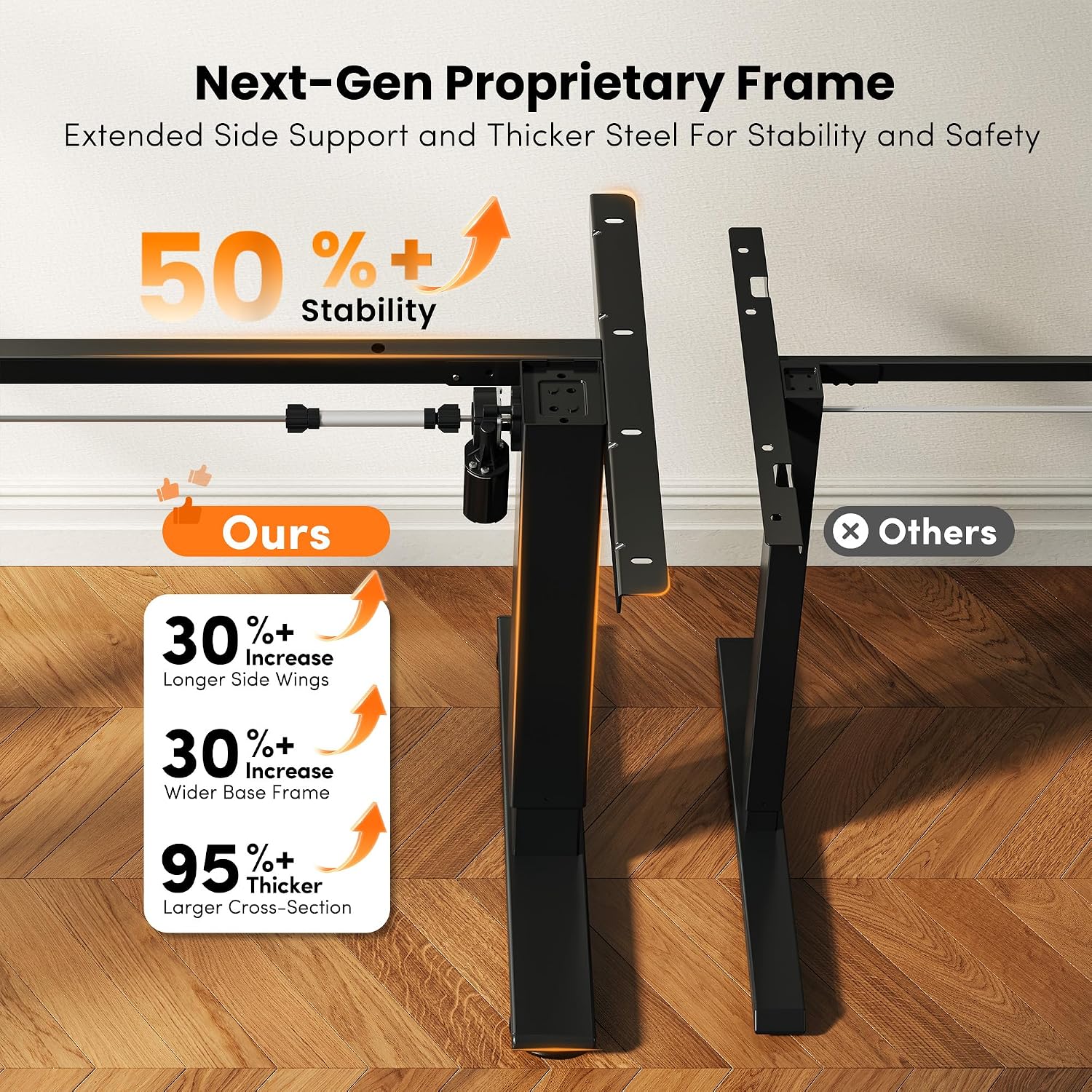
Figure 2: Next-Gen Proprietary Frame Design
The one-piece desktop design ensures a seamless, stable, and durable surface, avoiding the gaps and weak spots often found in spliced desktops.

Figure 3: One-Piece Desktop Advantage
Operating Instructions
Your CubiCubi Electric Standing Desk features an intelligent lifting system with a programmable control panel for easy height adjustment.

Figure 4: Programmable Control Panel and Height Presets
Height Adjustment
- Use the Up (▲) and Down (▼) buttons on the control panel to manually adjust the desk height. The height range is from 28.3 inches to 46.5 inches.
Memory Presets
The desk allows you to save up to three preferred height settings:
- Adjust the desk to your desired height using the Up/Down buttons.
- Press the M button (or similar memory set button, if present) followed by one of the numbered preset buttons (1, 2, or 3). The display will confirm the setting.
- To recall a saved height, simply press the corresponding numbered preset button (1, 2, or 3). The desk will automatically move to that height.
Child Lock
To prevent accidental adjustments, especially by children, activate the child lock feature. Consult your control panel's specific instructions for activation, typically involving a long press on a designated button (e.g., 'M' or 'Lock' icon).
Anti-Collision System
The desk is equipped with an anti-collision system. If the desk encounters an obstacle during height adjustment, it will automatically retract slightly to prevent damage or injury. Ensure the area around the desk is clear before and during operation.
The advanced motor system operates quietly (under 45 dB) and provides smooth, stable lifting, even under its maximum load capacity of 176 lbs.

Figure 5: Powerful Motor System and Load Capacity
Maintenance
- Cleaning: Wipe the desktop and frame with a soft, damp cloth. Avoid harsh chemicals or abrasive cleaners.
- Cable Management: Periodically check and organize cables to prevent tangles and damage.
- Inspections: Regularly inspect all screws and connections to ensure they are tight. Tighten if necessary.
- Motor Care: The motor system is designed for durability and requires no special maintenance. Avoid exposing it to excessive moisture or extreme temperatures.
Troubleshooting
If you encounter issues with your desk, refer to the following common problems and solutions:
| Problem | Possible Cause | Solution |
|---|---|---|
| Desk does not move. | Power cable unplugged, control panel cable loose, child lock active. | Check power connection. Ensure all cables are securely plugged in. Deactivate child lock. |
| Desk moves unevenly or makes unusual noise. | Overload, loose connections, obstruction. | Reduce weight on the desk. Check for loose screws or obstructions. Unplug and replug power. |
| Error code displayed. | Specific system fault. | Refer to the specific error code in a more detailed manual (if provided) or contact customer support. Often, unplugging for 10 seconds and replugging can reset the system. |
| Anti-collision system triggers too easily/not at all. | Sensitivity setting, obstruction. | Ensure no permanent obstructions are present. Some models allow sensitivity adjustment (refer to specific control panel instructions). |
If the problem persists after attempting these solutions, please contact CubiCubi customer support.
Specifications
| Feature | Detail |
|---|---|
| Brand | CubiCubi |
| Model | 48 X 24 |
| Color | Black Walnut |
| Desk Design | Standing Desk |
| Product Dimensions (D x W x H) | 24"D x 48"W x 28"H |
| Minimum Height | 28.3 inches |
| Maximum Height | 46.5 inches |
| Weight Capacity | 176 lbs (80 kg) |
| Top Material Type | Engineered Wood (One-Piece Desktop) |
| Base Material | Alloy Steel |
| Motor Noise Level | Under 45 dB |
| Special Features | Electric Height Adjustable, Ergonomic, Headphone Hooks, One-Piece Desktop, Memory Presets, Child Lock, Anti-Collision System |
Note: All dimensions are approximate and subject to minor manufacturing variations.

Figure 6: Product Dimensions
Warranty and Support
CubiCubi provides a 2-Year Support for this product. If you encounter any shipping issues or product quality concerns, please reach out to us immediately. We are committed to resolving any problems quickly and professionally.

Figure 7: CubiCubi 2-Year Support Information
For assistance, please contact CubiCubi customer service through the platform where you purchased the product or visit the official CubiCubi store for contact information.
Online Store: CubiCubi Store on Amazon