
Introduction
Thank you for choosing the Osawalla GG06 AI Smart Glasses. These glasses combine advanced electrochromic lens technology with open-ear audio and AI translation capabilities. This manual provides essential information for setup, operation, and maintenance to ensure optimal performance and user experience.
What's in the Box
- Smart Electrochromic Glasses x1
- Charging Cable x1
- User Manual x1
Product Overview
The Osawalla GG06 AI Smart Glasses feature electrochromic lenses with adjustable tint, open-ear audio for music and calls, and AI translation. The lightweight TR90 frame with silicone anti-slip temples ensures comfort for extended wear.

Image: One-Touch Tint Control. A user demonstrates adjusting the lens tint of the smart glasses with a simple touch, highlighting the four available tint levels from clear to dark.

Image: Instant Clarity for Safer Driving. The smart glasses provide instant tint adjustment, unlike traditional photochromic lenses, ensuring optimal vision in varying light conditions, including inside a car.

Image: Feature Comparison. A table comparing the Osawalla Electrochromic Smart Glasses with traditional photochromic audio glasses, emphasizing active tint control, in-car functionality, 0.5s reaction speed, and 4 adjustable tint levels.

Image: Audio Features. A user interacting with the smart glasses for music playback and calls, showing gesture controls for play/pause, volume up, and volume down. Dual-sided directional sound and ENC noise reduction are highlighted.

Image: Bluetooth Audio. A woman cycling outdoors while wearing the smart glasses, illustrating the open-ear audio experience for music and calls.

Image: AI Translation Modes. An illustration of the AI translation app interface, showcasing simultaneous interpretation and dual ear/headset modes for various scenarios like travel, business, and learning.

Image: Built-in AI Real-Time Translation. A couple using the smart glasses for translation, indicating support for over 130 languages for various communication needs.

Image: Fitness-Favored Anti-Slip Temples. A detailed view of the silicone anti-slip temples, designed for a secure fit during active lifestyles like running and cycling.

Image: Ultra-Light Comfort. A user demonstrating the comfortable fit of the 39g ultra-light TR90 frame with silicone anti-slip temples for all-day wear.

Image: Dual Noise-Canceling Mics. A close-up view of the integrated microphones, designed for clear calls and navigation in noisy environments.
Setup
1. Charging the Glasses
Before first use, fully charge your Osawalla GG06 Smart Glasses. Connect the provided magnetic charging cable to the charging port on the glasses and a USB power source. A full charge takes approximately 1.5 hours.
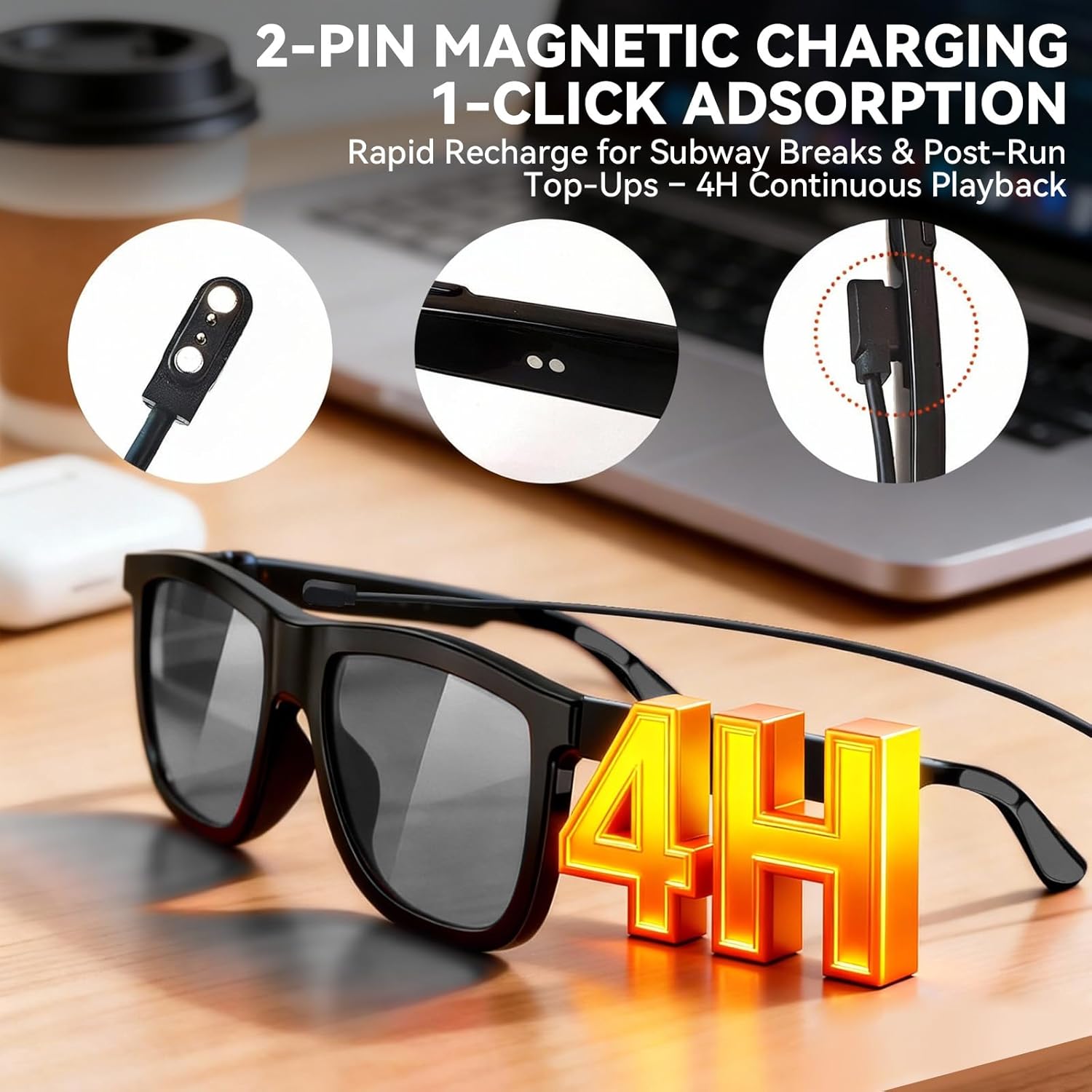
Image: 2-Pin Magnetic Charging. A visual guide to connecting the magnetic charging cable to the smart glasses for rapid recharge.

Image: Long Battery Life. Details on the charging time (1.5 hours for fast charging) and music playback time (4 hours) of the smart glasses.
2. Bluetooth Pairing
- Ensure the glasses are charged and powered on.
- Activate Bluetooth on your smartphone (iOS 14+ or Android 11+).
- Search for available devices and select "GG06" to pair.
- Once connected, you will hear an audio confirmation.
3. App Installation and Connection (for AI Translation)
To utilize the AI translation features, download the dedicated app and connect your glasses.
Video: GG06 Smart Audio Glasses User Guide. This video provides a comprehensive guide on setting up and using the GG06 Smart Audio Glasses, including app installation and device connection for AI translation features.
Image: How to Use Translation Function. Step-by-step guide on downloading the NebulaBuds app, enabling Bluetooth, and binding the GG06 device within the app to activate translation features.
- Download the "NebulaBuds" app from your smartphone's app store.
- Open the app and follow the on-screen instructions to connect your GG06 glasses.
- Ensure Bluetooth is enabled on your phone and the glasses are discoverable.
Operating Instructions
1. Electrochromic Lens Tint Control
The lenses feature active touch control for instant tint adjustment. Unlike passive photochromic lenses, you control the darkness.
Video: Electrochromic Effect Display. This video demonstrates the rapid and adjustable tinting capabilities of the electrochromic lenses, showcasing the transition from clear to dark in 0.5 seconds.
- Adjust Tint: Slide or touch the designated area on the frame (typically near the temple) to cycle through 4 brightness levels.
- Instant Reaction: Lenses change tint in approximately 0.5 seconds.
- Versatile Use: Works effectively inside cars and in various lighting conditions, as it does not rely on UV light.
2. Music and Call Functions
The integrated Bluetooth 5.4 audio system allows for hands-free calls and music playback.
- Play/Pause: Single-click the touch control area.
- Volume Up: Move forward gesture or specific touch.
- Volume Down: Move back gesture or specific touch.
- Answer/End Call: Single-click the touch control area during an incoming call.
- Reject Call: Long press the touch control area during an incoming call.
- Voice Assistant: Activate Siri or other voice assistants via the touch control.
3. AI Translation
The AI translation feature supports over 130 languages for various communication needs. This function requires the dedicated app to be running and connected.
- Activate Translation: Open the NebulaBuds app and select the desired translation mode (e.g., Simultaneous Interpretation, Photo Translation).
- Language Selection: Choose the source and target languages within the app.
- Usage: Speak naturally, and the glasses will provide audio translation. For photo translation, use your phone's camera through the app.
Maintenance
- Cleaning Lenses: Use a soft, clean microfiber cloth specifically designed for lenses. Avoid abrasive materials or harsh chemicals.
- Cleaning Frame: Wipe the frame with a damp cloth and mild soap if necessary. Dry thoroughly.
- Storage: Store the glasses in their protective case when not in use to prevent scratches and damage.
- Water Resistance: The glasses have an IP54 waterproof rating, meaning they are resistant to splashes and light rain. Do not submerge them in water.
Troubleshooting
| Problem | Possible Cause | Solution |
|---|---|---|
| Glasses not powering on | Low battery | Charge the glasses fully (approx. 1.5 hours). |
| Cannot pair via Bluetooth | Bluetooth off on phone; glasses not in pairing mode; out of range | Ensure phone Bluetooth is on. Restart glasses. Move closer to phone. |
| No audio from glasses | Volume too low; not connected; media source paused | Increase volume on glasses/phone. Reconnect Bluetooth. Check media playback. |
| Lens tint not changing | Glasses off; touch control not activated correctly | Ensure glasses are on. Firmly slide/touch the control area. |
| AI translation not working | App not connected; internet connection issue; incorrect language settings | Verify app connection. Check internet. Confirm language settings in app. |
| Short battery life | High volume usage; frequent tint changes; continuous AI translation | Reduce volume. Limit continuous use of power-intensive features. Ensure full charge. |
Specifications
| Feature | Detail |
|---|---|
| Model Name | GG06 |
| Brand | Osawalla |
| Operating System Compatibility | iOS 14+/Android 11+ |
| Memory Storage Capacity | 2 GB |
| Connectivity Technology | Bluetooth 5.4 |
| Battery Capacity | 100 mAh (Lithium Polymer) |
| Battery Charge Time | 1.5 hours |
| Music Playback Time | Up to 4 hours |
| Standby Time | Up to 40 hours |
| Frame Material | TR90 |
| Weight | 39g |
| Water Resistance Level | IP54 (Waterproof) |
| Human Interface Input | Touch Bar |
| Controller Type | Siri (Voice Assistant) |
Warranty and Support
The Osawalla GG06 AI Smart Glasses come with a 1-year limited warranty. For warranty claims or technical support, please contact Osawalla customer service through their official website or the retailer where the product was purchased. Please retain your proof of purchase for warranty validation.