
1. Product Overview
The Wuzhi Audio ZK-1001U is a high-power mono amplifier board designed for various audio projects, including vehicle amplifiers and DIY speaker builds. It features a genuine TPA3116 amplifier chip, delivering up to 100W of output power. This board supports a wide voltage input range of 9-24V and offers versatile connectivity options including Bluetooth, USB, and AUX inputs. It also includes a built-in boost circuit and TWS (True Wireless Stereo) pairing functionality for enhanced audio experiences.
Key Features:
- High-Power Mono Amplifier: Equipped with an authentic TPA3116 amplifier chip, providing up to 100W output power.
- Wide Voltage Input: Supports a 9-24V input voltage, suitable for various power sources.
- TWS Pairing: Enables seamless True Wireless Stereo pairing of two amplifier boards for left/right channel sound.
- Built-In Boost Circuit: Automatically adjusts input voltage (9V/15V) to a stable 19V or 24V (default: 24V) for consistent high performance.
- Precision 3-Knob EQ Control: Dedicated knobs for master volume, bass, and treble adjustments.
- Smart Multifunction Button: The volume knob doubles as a control button for play/pause, next track, TWS toggle, and power on/off.
- Triple Input Modes: Offers flexible connectivity via Bluetooth 5.0, USB, and 3.5mm AUX input.
2. Setup Instructions
Follow these steps to properly set up your ZK-1001U Mono Amplifier Board.
2.1 Component Identification and Connections
Refer to the diagram below for a detailed view of the amplifier board's components and connection points.

Image Description: This diagram illustrates the layout of the ZK-1001U amplifier board. Key features highlighted include the DC 9-24V power input, passive speaker output (3-8Ω, 20-100W), the boost circuit section, Bluetooth 5.3 module, USB input, 3.5mm AUX input, and the three control knobs for Treble, Bass, and a multi-function Volume. The multi-function button operations are also detailed.
- Power Input: Connect a DC 9-24V power supply to the DC female socket (5.5 * 2.1mm) or the wiring terminal. Ensure the power supply can provide at least 4A.
- Speaker Output: Connect your passive speaker(s) to the speaker terminals. The board supports speakers with an impedance of 3-8Ω and a power rating of 20-100W.
- Boost Circuit: The integrated boost circuit automatically adjusts the input voltage. For example, a 9V or 15V input will be boosted to a stable 19V or 24V (default: 24V) to optimize performance for various speakers.
- USB Input: Use the USB port for direct playback from USB flash drives (supports MP3/WMA/WAV/FLAC/APE formats) or as a USB sound card.
- 3.5mm AUX Input: Connect wired audio devices using a 3.5mm audio cable.
3. Operating Instructions
3.1 Power On/Off and Basic Controls
- Power On/Off: Long press the master volume knob to power the unit on or off.
- Volume Control: Rotate the master volume knob to adjust the audio output level.
- Treble Adjustment: Use the 'TRE' knob to adjust the high-frequency response.
- Bass Adjustment: Use the 'BASS' knob to adjust the low-frequency response.
3.2 Multifunction Button Operations
The master volume knob also functions as a smart button for various controls:
- Single Press: Play/Pause audio playback.
- Double Press: Skip to the next track.
- Triple Press: Toggle TWS (True Wireless Stereo) mode on or off.
- Long Press: Power the amplifier board on or off.
3.3 Input Modes
The ZK-1001U supports three primary input modes:

Image Description: This image visually represents the multiple input options available on the ZK-1001U amplifier board: Bluetooth 5.3 for wireless streaming, a 3.5mm AUX input for wired connections, and a USB audio input for direct playback or as a sound card. The amplifier board is shown connected to speakers and a computer, demonstrating its versatility.
- Bluetooth 5.0: For wireless audio streaming. The blue TWS indicator light will flash when in pairing mode. Pair with your device (e.g., smartphone, tablet) by selecting "ZK-1001U" from the Bluetooth device list.
- USB Input: Connect a USB flash drive for direct audio playback or connect to a computer to use the board as a USB sound card.
- 3.5mm AUX Input: Connect external audio sources (e.g., MP3 players, CD players) using a 3.5mm audio cable.
3.4 TWS (True Wireless Stereo) Pairing
The TWS function allows two ZK-1001U amplifier boards to be paired together to create a stereo sound system, with one board acting as the left channel and the other as the right channel.
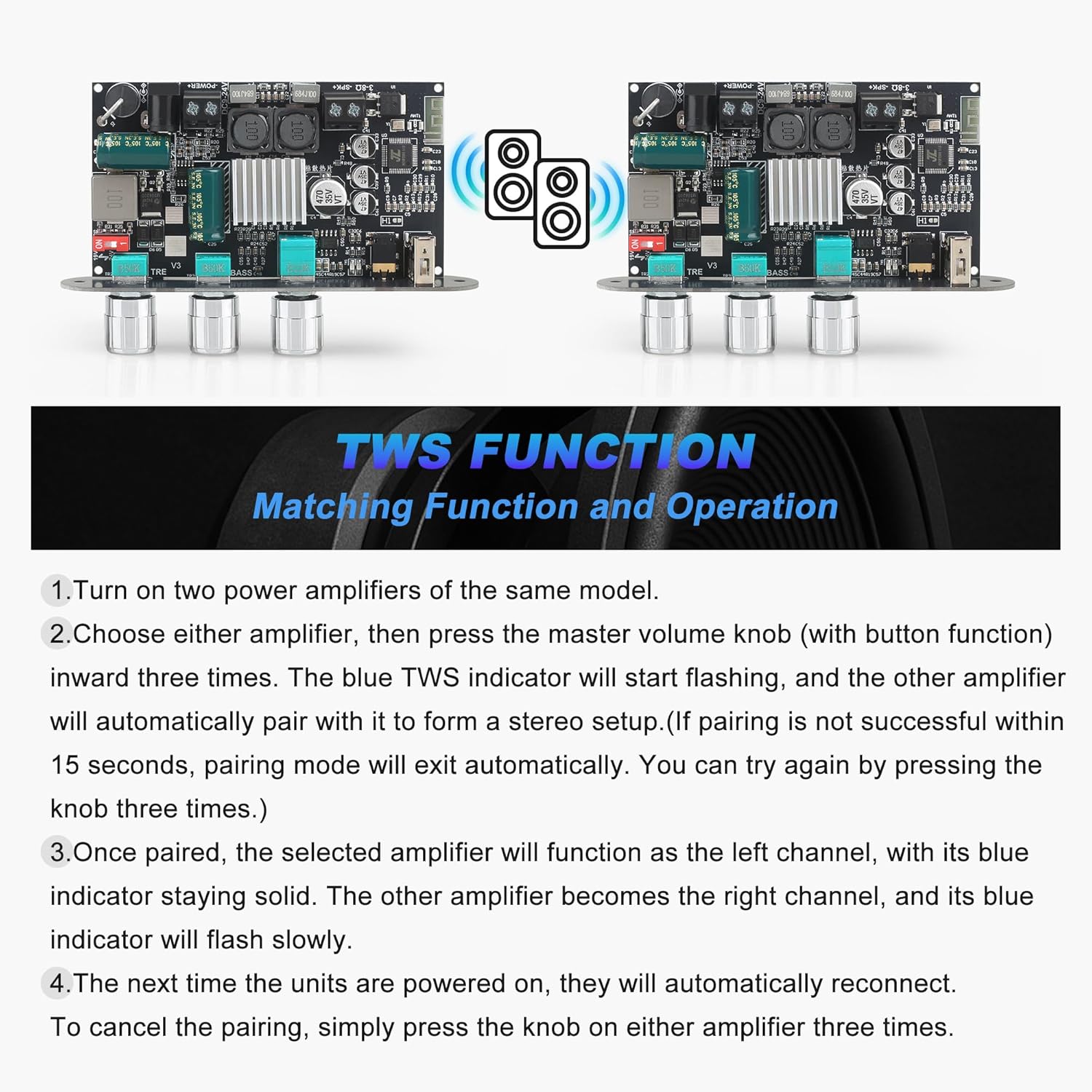
Image Description: This image details the TWS (True Wireless Stereo) pairing process. It shows two identical amplifier boards and outlines four steps: powering on both units, triple-pressing the master volume knob on one to initiate pairing, automatic pairing with the second unit, and the subsequent automatic reconnection. It also explains how to cancel pairing.
- Power On: Turn on two ZK-1001U amplifier boards of the same model.
- Initiate Pairing: Choose either amplifier board and quick-press its master volume knob three times. The blue TWS indicator light on this board will start flashing, indicating it is in pairing mode.
- Automatic Pairing: The other amplifier board will automatically detect and pair with the first one to form a stereo setup. If pairing is not successful within 15 seconds, the pairing mode will exit automatically. You can retry by pressing the knob three times again.
- Channel Assignment: Once paired, the amplifier board on which you initiated the pairing will function as the left channel, with its blue indicator staying solid. The other amplifier board will become the right channel, and its blue indicator will flash slowly.
- Reconnection: The next time the units are powered on, they will automatically reconnect.
- Cancel Pairing: To cancel the TWS pairing, simply triple press the master volume knob on either amplifier board.
4. Maintenance
Proper maintenance ensures the longevity and optimal performance of your amplifier board.
- Cleaning: Gently wipe the board with a dry, soft cloth. Avoid using liquid cleaners or solvents.
- Environment: Keep the amplifier board in a dry environment, away from moisture, dust, and extreme temperatures.
- Ventilation: Ensure adequate airflow around the board, especially around the heatsink, to prevent overheating.
- Handling: Handle the board by its edges to avoid touching components, which could cause damage or static discharge.
5. Troubleshooting
If you encounter issues with your ZK-1001U amplifier board, refer to the following common problems and solutions.
- No Sound Output:
- Check if the power supply is correctly connected and providing the specified voltage (DC 9-24V).
- Ensure speakers are properly connected to the output terminals.
- Verify the input source (Bluetooth, USB, AUX) is active and correctly selected.
- Increase the master volume knob.
- Distorted Sound:
- Reduce the input volume from your source device.
- Check speaker impedance and power rating to ensure compatibility (3-8Ω, 20-100W).
- Ensure power supply is stable and sufficient.
- Adjust bass and treble knobs to neutral positions and re-evaluate.
- Bluetooth Pairing Issues:
- Ensure the amplifier board is in Bluetooth pairing mode (blue TWS indicator flashing).
- Disable and re-enable Bluetooth on your source device.
- Move the source device closer to the amplifier board.
- Clear previous Bluetooth connections on your source device.
- TWS Pairing Failure:
- Ensure both amplifier boards are the same model and powered on.
- Retry the triple-press action on the master volume knob to re-initiate pairing.
- Ensure no other Bluetooth devices are interfering with the pairing process.
- Unit Overheating:
- Ensure adequate ventilation around the heatsink.
- Reduce the output volume or check for short circuits in speaker wiring.
- Verify speaker impedance is within the supported range.
6. Specifications
Detailed technical specifications for the ZK-1001U Mono Amplifier Board.

Image Description: This image provides a comprehensive list of specifications for the ZK-1001U amplifier board. It highlights the Bluetooth Chip (TPA3116D2), input modes (Bluetooth + 3.5mm AUX + USB), mono 100W audio output, DC 9-24V input voltage, compatible speaker range (20-100W, 3-8Ω), various protection features, and physical dimensions.
| Feature | Specification |
|---|---|
| Model | ZK-1001U |
| Brand | Wuzhi Audio |
| Bluetooth Chip | TPA3116D2 (Bluetooth 5.0/5.3) |
| Audio Output | Mono 100W |
| Input Voltage | DC 9-24V, ≥4A |
| Compatible Speakers | 20-100W, 3-8Ω |
| Input Modes | Bluetooth, USB, 3.5mm AUX |
| Protection Features | Reverse polarity protection, over-temperature protection, over-current protection, short circuit protection, anti-static protection |
| Product Dimensions | 99 x 75 x 22.8 mm |
| Product Weight | 82g (106g with packaging) |
| Operating Temperature | Up to 40 °C |

Image Description: This image provides a detailed technical drawing of the ZK-1001U amplifier board, illustrating its precise dimensions. Measurements such as 115.5mm, 99mm, 75mm, 55mm, 22.8mm, and various hole diameters are clearly labeled, which is useful for integration into custom enclosures.
7. Warranty and Support
Wuzhi Audio products are designed for reliability and performance. For specific warranty information, please refer to the product packaging or the retailer's terms of sale.
Customer Support:
If you have any questions, require technical assistance, or need to report an issue, please contact Wuzhi Audio customer support through the platform where you purchased the product. Provide your model number (ZK-1001U) and a detailed description of your inquiry for efficient service.