1. Introduction and Overview
Welcome to the Samsung Galaxy A07 5G. This smartphone is designed to provide a comprehensive mobile experience with advanced features and robust performance. Key highlights include a 6.7-inch 120Hz immersive display, a massive 6000mAh battery, a 50MP True Dual Camera system, and enhanced security with Knox Vault. This manual provides essential information for setting up, operating, and maintaining your device.

Figure 1.1: Overview of Samsung Galaxy A07 5G key features.
2. Device Setup
2.1 What's in the Box
Before you begin, ensure all components are present:
- Smartphone (Samsung Galaxy A07 5G)
- Data Cable (USB-C to USB-C)
- SIM Ejection PIN
- Quick Start Guide

Figure 2.1: Items included with your Samsung Galaxy A07 5G.
2.2 Inserting the SIM Card
- Locate the SIM card tray on the side of your device.
- Insert the SIM ejection pin into the small hole next to the tray and press gently until the tray pops out.
- Place your Nano-SIM card(s) and/or microSD card into the tray with the gold contacts facing down.
- Carefully reinsert the tray into the slot.
2.3 Initial Power On and Data Transfer
Press and hold the Power button until the Samsung logo appears. Follow the on-screen prompts to complete the initial setup. If you are transferring data from an old device, use the Smart Switch feature for a seamless transition of photos, videos, contacts, and apps.

Figure 2.2: Using Smart Switch for easy data transfer.
3. Operating Instructions
3.1 Basic Navigation
The Galaxy A07 5G features a responsive touchscreen. Use gestures like tapping, swiping, pinching, and spreading to navigate the interface, open apps, and interact with content.
3.2 One UI 8 Interface
Experience an intuitive and upgraded user interface with One UI 8, designed for ease of use and enhanced functionality.

Figure 3.1: The new One UI 8 interface.
3.3 Quick Share
Effortlessly share files between Samsung Galaxy devices, and even with iOS and PC devices, using the Quick Share feature.

Figure 3.2: Quick Share functionality.
4. Camera Features
The Galaxy A07 5G is equipped with a versatile camera system to capture your moments.
- 50MP Main Camera: For clear and detailed photos.
- 2MP Depth Camera: Enhances portraits by separating the subject from the background.
- 8MP Front Camera: For high-resolution selfies and video calls.

Figure 4.1: Pro-grade camera system.

Figure 4.2: Depth Camera for enhanced portraits.

Figure 4.3: 8MP Selfie Camera.
5. Battery Management
The Galaxy A07 5G is powered by a massive 6000mAh battery, designed for extended usage. It also supports 25W fast charging to quickly power up your device.

Figure 5.1: Long-lasting 6000mAh battery.
5.1 Tips for Extending Battery Life
- Adjust screen brightness to a lower level.
- Enable power-saving modes when not in active use.
- Close background applications that consume excessive power.
- Disable Wi-Fi, Bluetooth, and GPS when not needed.
6. Display Features
Enjoy a vibrant visual experience on the 6.7-inch immersive display with a 120Hz refresh rate for smooth scrolling and an 800 nits High Brightness Mode (HBM) for clear viewing even in bright outdoor conditions.

Figure 6.1: Immersive 120Hz display.
7. Connectivity
The Galaxy A07 5G supports superfast 5G speeds with up to 12 5G bands, ensuring swift and reliable connectivity for streaming, gaming, and downloading. It also includes standard connectivity options such as Bluetooth, USB, and Wi-Fi.
8. Software Updates and Security
Your Galaxy A07 5G is designed for long-term relevance and security, offering 6 generations of OS upgrades and 6 years of security updates from the first global launch date.

Figure 8.1: Extended OS upgrade support.
8.1 Samsung Knox Vault
The device features Samsung Knox Vault (EAL5+ certified), providing advanced security to protect your private information from unauthorized access.
9. Physical Design and Durability
The Galaxy A07 5G boasts a slim, modern design with an 8.2mm thickness. It also offers IP54-rated protection against dust and splashes, ensuring durability in various conditions.

Figure 9.1: IP54-rated protection against spills and splashes.
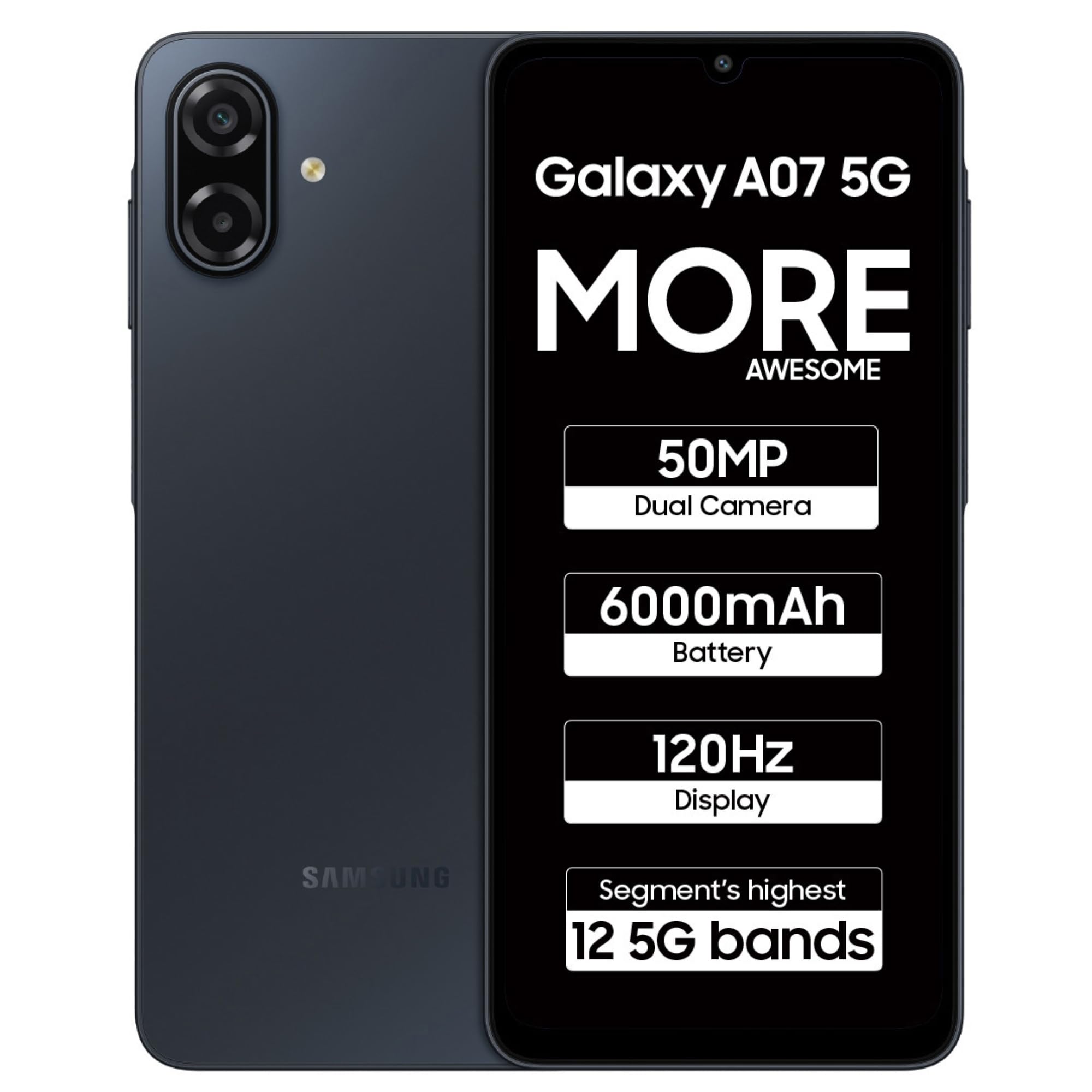
Figure 9.2: Samsung Galaxy A07 5G (Black).
10. Maintenance
To ensure optimal performance and longevity of your Samsung Galaxy A07 5G, follow these maintenance guidelines:
- Software Updates: Regularly check for and install software updates to benefit from the latest features, security patches, and performance improvements.
- Cleaning: Use a soft, lint-free cloth to clean the screen and body of the device. Avoid harsh chemicals or abrasive materials.
- Storage Management: Periodically clear unnecessary files and apps to free up storage space and maintain device speed.
- Battery Care: Avoid extreme temperatures and do not let the battery completely drain frequently.
11. Troubleshooting
If you encounter issues with your device, try these common troubleshooting steps:
- Device Not Responding: Press and hold the Power button for about 10 seconds to force restart the device.
- App Issues: Clear the cache and data of the problematic app, or uninstall and reinstall it.
- Connectivity Problems: Toggle Wi-Fi or Bluetooth off and on. For mobile data, ensure your SIM card is properly inserted and your plan is active.
- Slow Performance: Close unused apps, clear cache, and ensure sufficient storage space. Consider a factory reset as a last resort (back up your data first).
- Charging Issues: Ensure the data cable and charger are securely connected and undamaged. Try a different charger or cable if available.
12. Specifications
Detailed technical specifications for the Samsung Galaxy A07 5G (Model: SM-A076B).
| Feature | Specification |
|---|---|
| Operating System | Android 16.0 |
| Product Dimensions | 0.82 x 7.74 x 16.74 cm; 199 g |
| Item Model Number | SM-A076B |
| Connectivity Technologies | Bluetooth, USB, Wi-Fi |
| GPS | True (Built-In GPS) |
| Special Features | Dual SIM, Expandable Memory, Mobile Hotspot Capability, Supports USB OTG |
| Display Features | Wireless, Touchscreen, 720 x 1600 Resolution, 120Hz Refresh Rate, 800 nits HBM |
| Camera Features | Front (8MP), Rear (50MP Main, 2MP Depth) |
| Audio Jack | 3.5 mm |
| Form Factor | Bar |
| Color | Black |
| Battery Power Rating | 6000 Milliamp Hours |
| RAM Memory Installed Size | 4 GB |
| CPU Model | Mediatek Dimensity 6300 |
| CPU Speed | 2.4 GHz |
| IP Rating | IP54 |
13. Warranty and Support
For warranty information and customer support, please refer to the official Samsung website or contact Samsung customer service. Samsung provides extensive support with over 3300 service touchpoints.

Figure 13.1: Samsung service center network.
You can also visit the Samsung Store on Amazon for more product information and accessories.


