
1. Introduction
Thank you for choosing the HLDIRECT 47-Inch Electric Gaming Standing Desk. This manual provides essential information for the safe assembly, operation, and maintenance of your new desk. Please read these instructions carefully before use and retain them for future reference.
Safety Information
- Always ensure the desk is properly anchored to the floor to prevent tipping.
- Do not exceed the maximum weight limit of 180 pounds (81.6 kg) on the desktop.
- Use the LED lights in a well-lit environment and avoid prolonged, direct eye contact with the lights to prevent eye strain.
- Keep children and pets away from the desk during height adjustment.
- Ensure no obstacles are in the path of the desk during movement to prevent damage or injury.

2. Product Overview
The HLDIRECT Electric Gaming Standing Desk is designed to enhance your gaming and work experience with its adjustable height, integrated LED lighting, and robust construction. It features a carbon fiber surface for durability and a smart control panel for easy operation.
Key Features
- Spacious Desktop: 47 x 23.7 inch thickened desktop.
- Sturdy Construction: Reinforced heavy-duty metal frame and solid leg structure, supporting up to 180 lbs.
- Adjustable LED Lights: Built-in RGB LED atmosphere lights with multiple modes and brightness levels.
- Quiet Motor: High-performance silent motor for smooth height adjustment (below 50dB).
- Memory Presets: Intelligent control chip with 3 custom height memory presets.
- Safety Features: Rounded corners and anti-collision function.
- Cable Management: Built-in cable management hole for a tidy workspace.
- Included Accessories: Headphone hook.
Product Dimensions
- Desktop Size: 47 inches (Width) x 23.7 inches (Depth)
- Adjustable Height Range: 27.8 inches (Minimum) to 44.5 inches (Maximum)
- Overall Dimensions (D x W x H): 23.7"D x 47"W x 44.5"H
- Tabletop Thickness: 0.63 inches
- Item Weight: 45 Pounds

3. Setup and Assembly
Your HLDIRECT gaming desk requires assembly. All necessary tools and detailed instructions are included in the packaging. Please follow the steps carefully to ensure proper and safe setup.
Assembly Steps Overview
- Unpack all components and verify against the parts list.
- Assemble the desk frame, including the legs and crossbeam.
- Attach the desktop panels to the assembled frame.
- Install the control panel and connect all electrical components.
- Attach the headphone hook and manage cables using the integrated cable hole.
For a visual guide, please refer to the official installation video below:
4. Operating Instructions
Height Adjustment
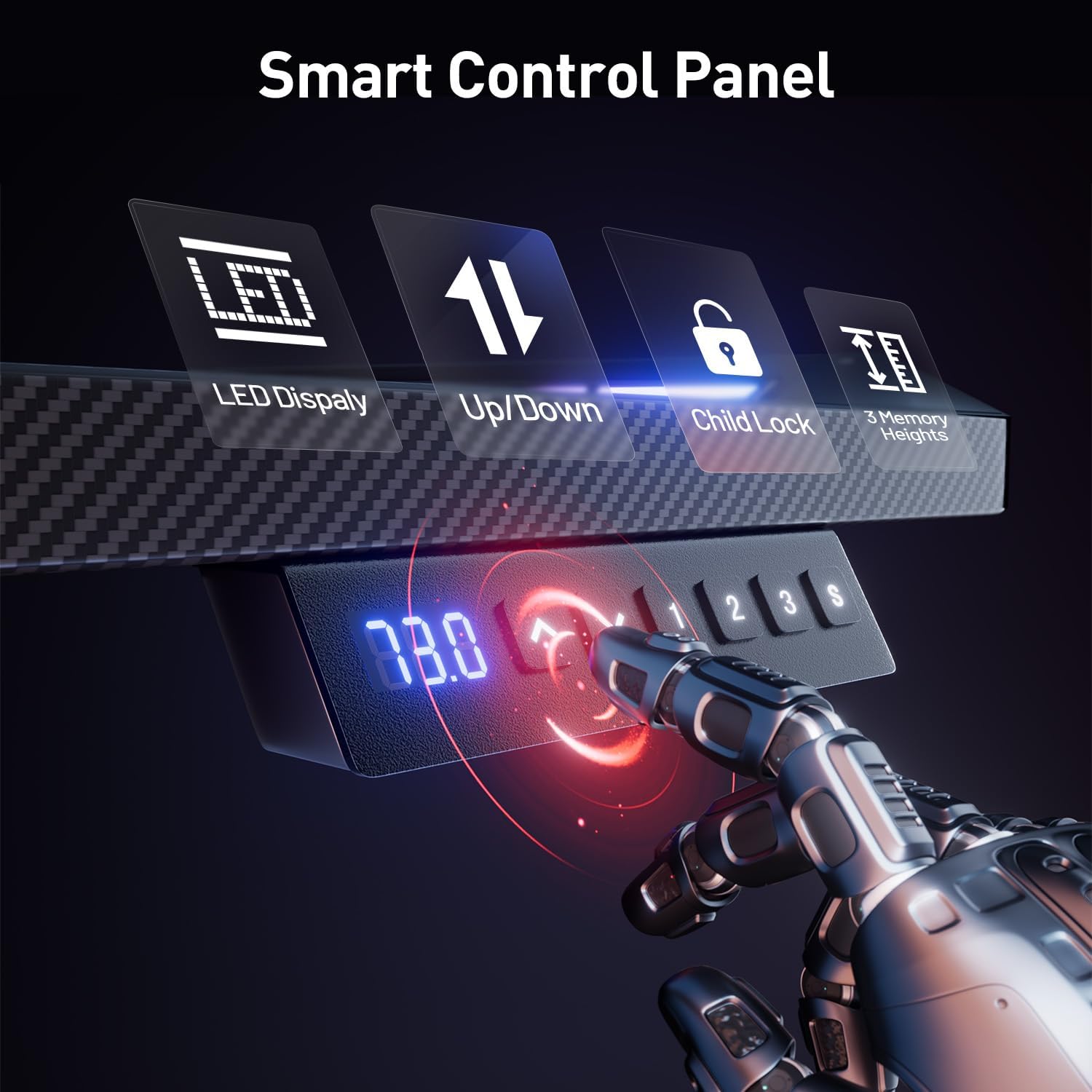
The desk features an electric height adjustment system allowing you to switch between sitting and standing positions smoothly and quietly. Use the control panel located on the front edge of the desk.
- Up/Down Buttons: Press the Up or Down arrow buttons to manually adjust the desk height.
- Memory Presets: The control panel has three memory buttons (1, 2, 3). To save a height, adjust the desk to your desired position, then press the S button followed by the desired memory button (1, 2, or 3). To recall a saved height, simply press the corresponding memory button.

LED Lights Operation
The integrated RGB LED lights can be customized to create an immersive gaming atmosphere.
- Power On/Off: Use the dedicated LED button on the control panel or remote control (if included) to turn the lights on or off.
- Mode Selection: Cycle through various lighting modes, including multi-color gradient, single-color cycling, and static color, by pressing the mode button.
- Brightness Adjustment: Adjust the brightness levels to your preference using the brightness control buttons.

Anti-Collision Function
The desk is equipped with an intelligent anti-collision detection system. If the desk encounters an obstacle during height adjustment, it will automatically stop and reverse slightly to prevent damage to the desk or objects.

Low-Noise Motor
The desk utilizes a high-performance, low-noise motor for height adjustments. The operating noise level is typically below 50dB, ensuring a quiet environment for work or gaming.

5. Maintenance
Regular maintenance helps ensure the longevity and optimal performance of your HLDIRECT gaming desk.
- Cleaning: Wipe the desktop and frame with a soft, damp cloth. Avoid abrasive cleaners or harsh chemicals that could damage the carbon fiber surface or LED components.
- Cable Management: Periodically check and reorganize cables to prevent tangles and ensure they do not interfere with the desk's movement.
- Fastener Check: Occasionally check all screws and fasteners to ensure they are tight. Retighten if necessary.
- Motor Inspection: Listen for any unusual noises during height adjustment. If you notice any issues, refer to the troubleshooting section or contact customer support.
6. Troubleshooting
If you encounter any issues with your HLDIRECT gaming desk, please refer to the following common problems and solutions:
| Problem | Possible Cause | Solution |
|---|---|---|
| Desk does not move when buttons are pressed. | Power cable disconnected; control panel locked; motor overload. | Check power connection. Ensure child lock is disengaged. Unplug for 10 minutes, then reconnect to reset. Reduce weight on desk. |
| LED lights are not working or flickering. | Loose connection; power issue; LED strip damage. | Check all LED cable connections. Ensure power supply is stable. If issue persists, contact customer support. |
| Desk moves unevenly or makes unusual noises. | Uneven weight distribution; loose fasteners; motor issue. | Distribute weight evenly on the desktop. Check and tighten all assembly screws. If noise persists, contact customer support. |
| Anti-collision function triggers too easily or not at all. | Sensitivity setting; sensor obstruction. | Refer to the control panel instructions for adjusting anti-collision sensitivity. Ensure no objects are near the sensors. |
If you cannot resolve the issue using the information above, please contact HLDIRECT customer support for assistance.
7. Specifications
| Feature | Detail |
|---|---|
| Brand | HLDIRECT |
| Model Number | SZ03 |
| Desk Design | Computer Desk, Standing Desk |
| Shape | T-Shape |
| Product Dimensions (D x W x H) | 23.7"D x 47"W x 44.5"H |
| Desktop Size | 47 Inch (Width) |
| Minimum Height | 27.8 Inches |
| Maximum Height | 44.5 Inches |
| Tabletop Thickness | 0.63 Inches |
| Color | Black |
| Style | Modern |
| Top Material Type | Carbon Fiber |
| Base Material | Alloy Steel |
| Maximum Weight Recommendation | 180 Pounds |
| Special Features | Adjustable Height, Electric, Ergonomic, LED Lights |
| Included Components | Headphone Hook, Assembly Tools |
| Assembly Required | Yes |
| Item Weight | 45 Pounds |
8. Warranty and Support
Warranty Information
HLDIRECT products are manufactured to high-quality standards. For specific warranty details regarding your electric gaming standing desk, please refer to the warranty card included in your product packaging or contact HLDIRECT customer service.
Customer Support
We provide round-the-clock after-sales support. Our professional after-sales service team is available 24 hours a day to respond to your needs. Whether you require installation guidance, usage advice, or have other product-related questions, please do not hesitate to contact us via email.
Contact: Please refer to the contact information provided in your product packaging or on the official HLDIRECT website.