
Introduction
Thank you for choosing the Nerunsa D60 Pro Bluetooth 5.4 In-Ear Headphones. These headphones are designed to provide a superior audio experience with advanced features such as Hi-Fi stereo sound, Environmental Noise Cancelling (ENC) for clear calls, extended playtime, and IP7 waterproof protection. This manual will guide you through the setup, operation, and maintenance of your new headphones.
What's in the Box
- 2 x Nerunsa D60 Pro Bluetooth 5.4 Sport Headphones (Left & Right)
- 1 x Charging Case
- 1 x USB-C Charging Cable
- 1 x Set of Ear Tips (S/M/L sizes)
- 1 x Product Manual
Product Overview
Familiarize yourself with the components of your Nerunsa D60 Pro headphones.

Image: Nerunsa D60 Pro Bluetooth In-Ear Headphones and Charging Case.
Setup
1. Initial Charging
Before first use, fully charge the headphones and the charging case. Connect the provided USB-C cable to the charging port on the case and a power source. The LED display on the charging case will show the battery percentage. A full charge takes approximately 1.5 hours.

Image: Charging case with LED display indicating battery status. A single charge provides up to 8 hours of playtime, and the charging case extends total playtime to 50 hours.
2. Pairing with Your Device
The Nerunsa D60 Pro headphones feature one-step pairing for convenience.
- Ensure the headphones are charged.
- Open the charging case. The headphones will automatically enter pairing mode.
- On your device (smartphone, tablet, laptop), go to Bluetooth settings and turn on Bluetooth.
- Search for available devices and select "D60 Pro" from the list.
- Once connected, the headphones will automatically pair with your device in the future when removed from the case.
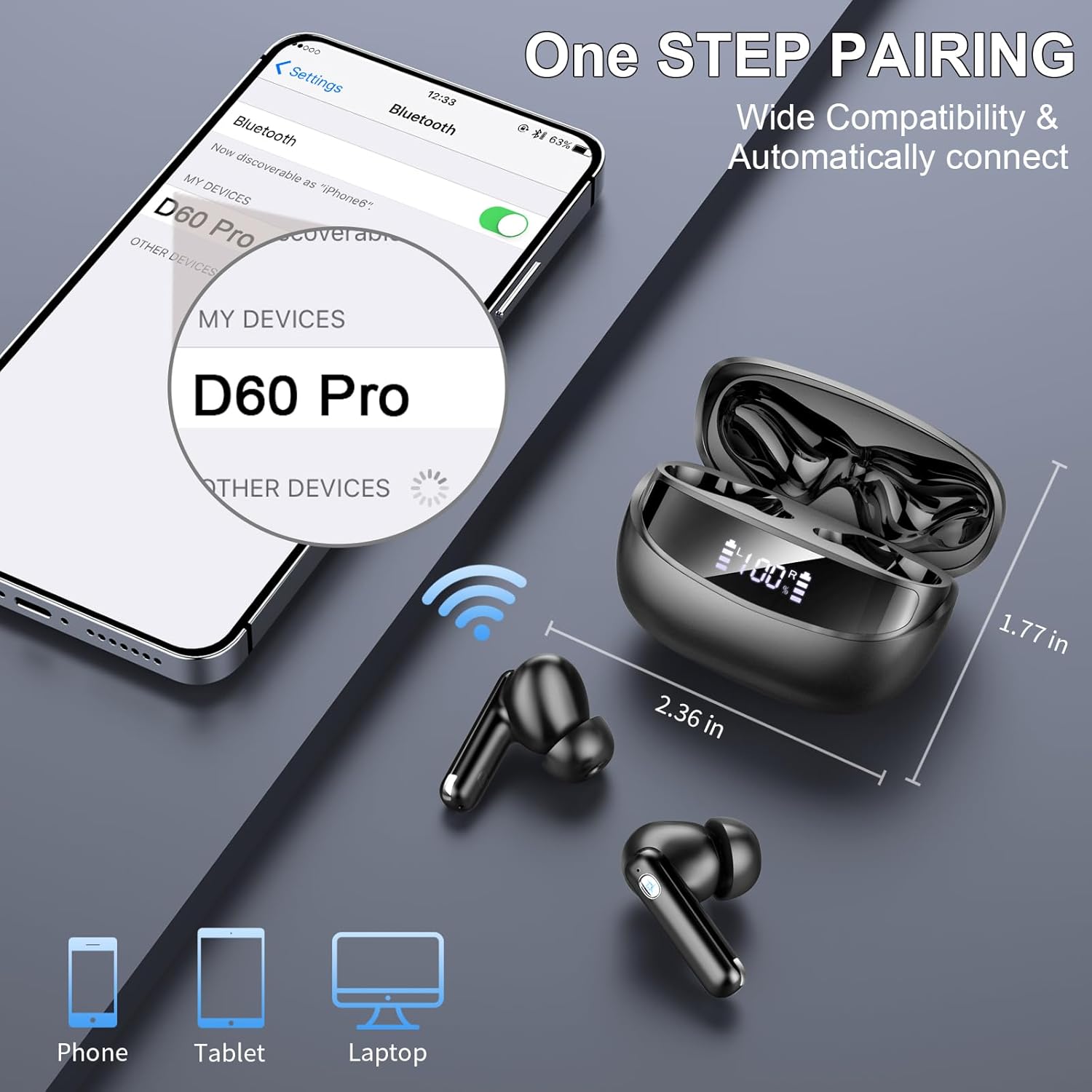
Image: One-step pairing process with a smartphone, showing the 'D60 Pro' device name in the Bluetooth list.
Operating Instructions
1. Wearing the Headphones
The D60 Pro headphones are ergonomically designed for a comfortable and secure fit. Choose the ear tips (S/M/L) that best fit your ear canal for optimal sound quality and comfort.

Image: Ergonomic design of the earbuds with different ear tip sizes for a comfortable fit.
2. Touch Controls
The headphones feature precise touch sensors for easy control of music playback, calls, and voice assistant.
| Action | Function |
|---|---|
| Double tap (L/R) | Play/Pause |
| Hold 2s (R) | Next Song |
| Hold 2s (L) | Previous Song |
| Single tap (R) | Volume Up |
| Single tap (L) | Volume Down |
| Single tap (L/R) | Answer Call |
| Hold 2s (L/R) | End Call |
| Triple tap (L/R) | Voice Assistant |

Image: Visual guide to touch control functions on the earbuds.
3. Environmental Noise Cancelling (ENC)
The D60 Pro features 4 built-in HD microphones with ENC technology, which effectively reduces up to 80% of background noise during calls, ensuring clear conversations even in noisy environments.

Image: Illustration of ENC technology reducing ambient noise during calls.
4. IP7 Waterproof Rating
With an IP7 waterproof rating, your headphones are protected against sweat and rain, making them suitable for sports and outdoor activities. Avoid submerging them in water.

Image: Earbuds with water droplets, demonstrating IP7 waterproof capability.
Maintenance
To ensure the longevity and optimal performance of your Nerunsa D60 Pro headphones, follow these maintenance guidelines:
- Cleaning: Regularly clean the earbuds and charging case with a soft, dry, lint-free cloth. Do not use abrasive cleaners or solvents.
- Ear Tips: Remove and clean the ear tips periodically with mild soap and water. Ensure they are completely dry before reattaching them to the earbuds.
- Storage: When not in use, store the headphones in their charging case to protect them from dust and damage.
- Avoid Extreme Conditions: Do not expose the headphones to extreme temperatures, humidity, or direct sunlight for extended periods.
Troubleshooting
If you encounter any issues with your headphones, refer to the following common solutions:
| Problem | Solution |
|---|---|
| Headphones not pairing | Ensure Bluetooth is enabled on your device. Place both earbuds back into the charging case, close it, then open it again to re-enter pairing mode. Forget "D60 Pro" from your device's Bluetooth list and try pairing again. |
| No sound from one earbud | Check if both earbuds are charged. Try placing both earbuds back in the case and taking them out again. Re-pair the headphones with your device. |
| Charging case not charging | Ensure the USB-C cable is securely connected to both the case and the power source. Try a different charging cable or power adapter. |
| Poor sound quality | Ensure the ear tips provide a good seal in your ear canal. Clean any debris from the earbud nozzles. Move closer to your connected device to avoid interference. |
| Touch controls unresponsive | Ensure your fingers are clean and dry. Try restarting the earbuds by placing them in the case and taking them out. |
Specifications
| Feature | Detail |
|---|---|
| Model Name | D60 |
| Connectivity | Bluetooth 5.4 |
| Wireless Range | Up to 15 meters |
| Audio Drivers | 13mm Dynamic Drivers |
| Noise Control | Environmental Noise Cancelling (ENC) with 4 HD Mics |
| Playtime (Earbuds) | Up to 8 hours per charge |
| Total Playtime (with Case) | Up to 50 hours |
| Charging Time | 1.5 hours (full charge) |
| Fast Charging | 10 minutes charge for 1 hour music |
| Charging Port | USB-C |
| Water Resistance | IP7 Waterproof |
| Weight (per earbud) | Approx. 3.9 grams |
| Control Type | Touch Control |
| Compatible Devices | iOS 4.4+, Android 5.0+, Laptops, Phones |
| Material | Plastic |
Official Product Video
Video: An overview of the Nerunsa D60 Pro Bluetooth Headphones, showcasing features like long battery life, Bluetooth 5.4, ENC noise reduction, Hi-Fi stereo sound, touch controls, and IP7 waterproofing.
Warranty and Support
Nerunsa products are designed for reliability and performance. For warranty information, please refer to the specific terms provided at the point of purchase or contact your retailer. If you require technical support or have questions regarding your D60 Pro headphones, please contact Nerunsa customer service through the official website or your purchase platform.