
Introduction
This manual provides comprehensive instructions for the setup, operation, and maintenance of your FKPCAM Solar 4G Cellular Trail Camera, Model XXTD-FK-10-W1. Designed for outdoor use, this camera offers high-resolution imaging, reliable cellular connectivity, and solar power capabilities, making it ideal for wildlife monitoring, security surveillance, and hunting applications.
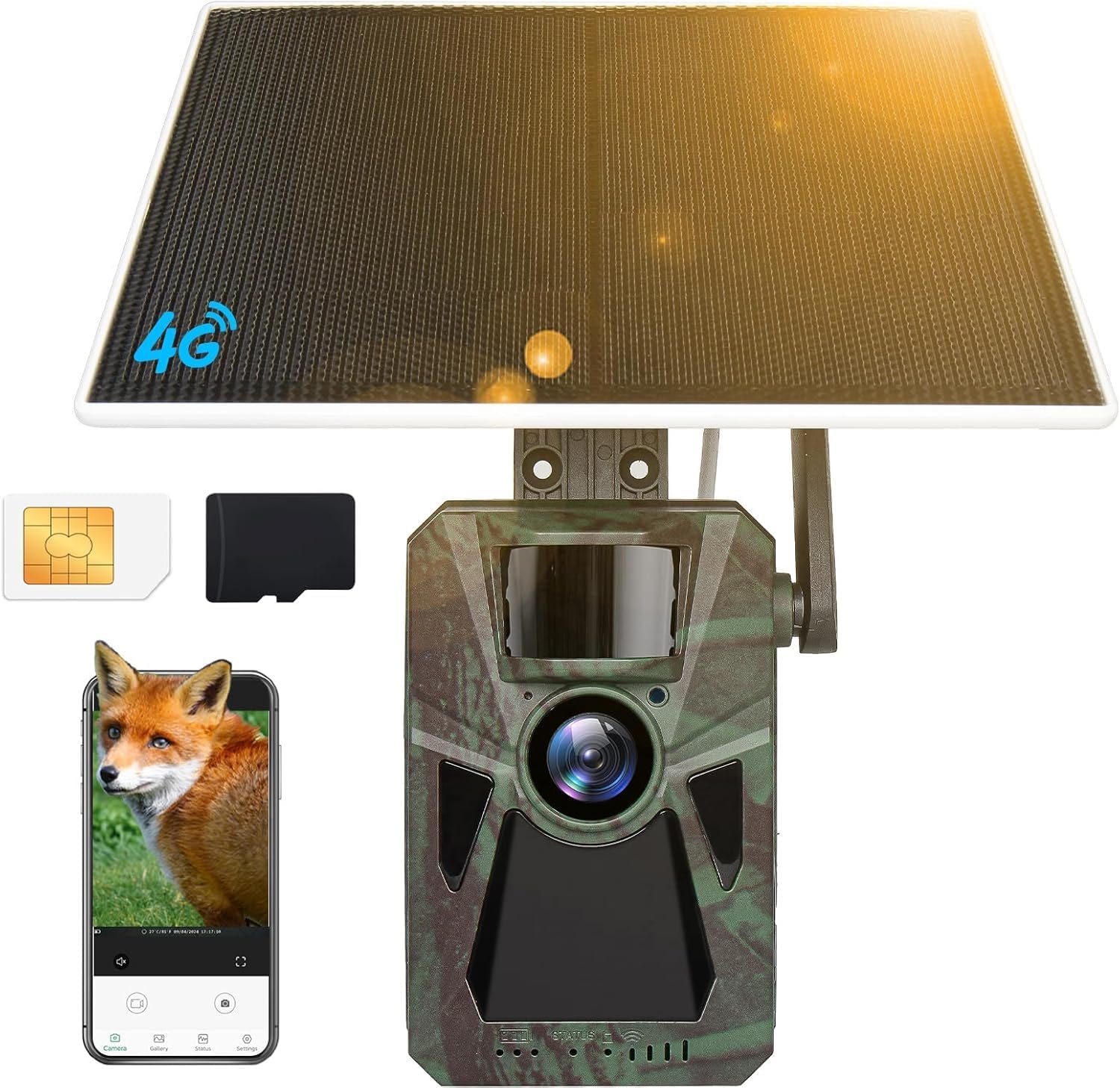
Figure 1: FKPCAM Solar 4G Cellular Trail Camera
Product Overview
Key Features
- High Resolution: Captures 4K video and 48MP still images.
- Solar Powered: Integrated solar panel with a built-in 7500mAh lithium battery for extended operation.
- 4G Cellular Connectivity: Auto nationwide connection with a pre-installed SIM card for remote access and data transfer.
- Night Vision: Features 940nm low-glow infrared LEDs for discreet night recording up to 100 feet.
- Wide-Angle Lens: 130-degree field of view for comprehensive coverage.
- PIR Motion Detection: Passive Infrared sensor with a 0.2-second trigger speed.
- Durable Design: IP67 waterproof rating, suitable for outdoor use in various weather conditions (-22°F to +158°F).
- GPS Functionality: Built-in GPS for location tracking.
- Ucon APP: Compatible with the Ucon mobile application for remote control and viewing.
- Multiple Storage Options: Supports memory card (64GB included) and cloud storage.
- Multi-User Sharing: Allows sharing camera access with multiple accounts.

Figure 2: Key Features Overview
Package Contents
Verify that all items are present in your package:
- 1x Solar 4G Cellular Trail Camera
- 1x Solar Panel & Mounting Bracket
- 1x Base of Stand Set
- 1x Mounting Strap
- 1x 64GB Memory Card
- 1x Bracket
- 1x USB Cable
- 1x User Manual
- Screw Accessories
- Threaded Tripod

Figure 3: Package Contents
Setup
1. Insert SIM Card and Memory Card
The camera comes with a pre-installed SIM card. Ensure it is properly seated. Insert the included 64GB memory card into the designated slot. The SIM card requires activation for 4G network functionality. Follow the instructions provided with the SIM card for initial activation, which may involve a nominal fee for the first 4G network package.

Figure 4: SIM Card and Memory Card Insertion
2. Powering the Camera
The camera is primarily powered by its integrated solar panel, which charges the built-in 7500mAh lithium battery. For initial setup or in low-light conditions, you can charge the camera using the provided USB cable connected to a DC5V power source (adapter not included).

Figure 5: Powering Options
3. Mounting the Camera
Choose a suitable location for your camera, ensuring the solar panel receives adequate sunlight. Use the included mounting strap to secure the camera to a tree or post. Alternatively, use the bracket or threaded tripod for wall or ground installation. Adjust the camera's angle to capture the desired area.

Figure 6: Mounting Examples
4. App Installation and Connection (Ucon APP)
Download and install the 'Ucon' application from your smartphone's app store. Follow the in-app instructions to register an account and add your camera. The camera will connect to the app via its 4G cellular network, allowing for remote viewing and control.
Operating Instructions
1. Capturing Photos and Videos
The camera automatically captures 4K video and 48MP images when motion is detected by the PIR sensor. It features a rapid 0.2-second trigger speed and a 3-shot burst mode for capturing fast-moving subjects. You can configure capture settings via the Ucon app.

Figure 7: Fast Trigger Speed
2. Night Vision Operation
The camera automatically switches to night vision mode in low-light conditions. Its 940nm low-glow infrared LEDs provide clear black-and-white images and videos up to 100 feet without disturbing wildlife.

Figure 8: Clear Night Vision
3. Data Playback and Storage
You can access recorded photos and videos through several methods:
- Via Ucon App: View live feed, playback recordings, and download files directly to your smartphone.
- USB Cable: Connect the camera to a computer using the Type-C USB cable to transfer files.
- SD Card Reader: Remove the memory card and insert it into a computer using a card reader.
The camera supports both local storage on the included 64GB memory card and optional cloud storage for backup and remote access.

Figure 9: Playback Methods
4. Multi-User Sharing
The Ucon app allows you to set up multiple accounts to share access to your trail camera with family and friends, enabling collaborative monitoring.

Figure 10: Multi-User Sharing Feature
5. Product Video Overview
Video 1: General overview of the FKPCAM Solar 4G Cellular Trail Camera's features and functionality.
Maintenance
1. Battery Management
The integrated solar panel continuously charges the internal 7500mAh battery. Ensure the solar panel is kept clean and free from obstructions to maximize charging efficiency. Monitor battery status via the Ucon app. If the camera is deployed in an area with prolonged low sunlight, consider occasional manual charging via the USB port.
2. Weather Resistance
The camera boasts an IP67 waterproof rating, protecting it from dust and immersion in water up to 1 meter for 30 minutes. It is designed to operate reliably in temperatures ranging from -22°F to +158°F. Regularly check seals and covers to ensure they are properly closed to maintain water resistance.

Figure 11: IP67 Waterproof Design
3. Firmware Updates
The camera supports over-the-air firmware updates. Periodically check the Ucon app for available updates to ensure optimal performance and access to new features.
Troubleshooting
Common Issues and Solutions
- No Power/Camera Not Turning On:
- Ensure the solar panel is exposed to direct sunlight.
- Verify the built-in battery is charged; connect to a DC5V power source via USB if needed.
- No 4G Connection:
- Confirm the SIM card is correctly inserted and activated with an active data plan.
- Check for adequate 4G signal coverage in the camera's location.
- Poor Image/Video Quality:
- Clean the camera lens with a soft cloth.
- Ensure the camera is securely mounted and stable to prevent blur from movement.
- Check for any obstructions in the camera's field of view.
- Motion Detection Not Working:
- Ensure the PIR sensor is clear of obstructions.
- Adjust camera placement for optimal detection range and angle.
- Verify motion detection sensitivity settings in the Ucon app.
- App Connectivity Issues:
- Confirm your smartphone has a stable internet connection.
- Restart the Ucon app and the camera.
- Check for available updates for the Ucon app.
Specifications
| Feature | Specification |
|---|---|
| Model Name | XXTD-FK-10-W1 |
| Video Capture Resolution | 4K |
| Image Resolution | 48MP |
| Power Source | Solar Powered, Built-in 7500mAh Battery |
| Connectivity Technology | Wireless (4G Cellular, Bluetooth) |
| Night Vision Range | 100 Feet |
| PIR Sensing Angle | 130 Degrees |
| Trigger Speed | 0.2 Seconds |
| Waterproof Rating | IP67 |
| Operating Temperature | -22°F to +158°F |
| Dimensions (L x W x H) | 5 x 7 x 3 inches |
| Item Weight | 2.03 pounds |
| Recommended Uses | Game & Trail, Security, Surveillance |
| Manufacturer | FKPCAM |
Warranty and Support
Warranty Information
Your FKPCAM Solar 4G Cellular Trail Camera is covered by a 12-month warranty for quality-related issues from the date of purchase. Additionally, a 30-day refund guarantee is provided for any reason after the date of purchase.
Customer Support
For technical assistance, troubleshooting, or warranty claims, please contact FKPCAM customer service. Refer to the contact information provided in your product packaging or on the official FKPCAM website.