
1. Important Safety Instructions
Please read all instructions carefully before using the DREO RO Water Filter 113 Countertop System. Retain this manual for future reference.
- Ensure the unit is placed on a stable, level surface away from direct sunlight or heat sources.
- Do not immerse the main unit in water or other liquids.
- Use only the provided power adapter.
- Keep out of reach of children.
- Do not attempt to disassemble or repair the unit yourself. Contact customer support for assistance.
- Discard wastewater as instructed; do not reuse it.
2. Product Overview
The DREO RO Water Filter 113 is a countertop reverse osmosis filtration system designed to provide clean, purified water. It features a 7-in-1 filtration system, real-time TDS monitoring, auto-fill pitchers, and a self-cleaning function.
Included Components:
- 1 × DREO RO Water Filter 113 Body
- 1 × RO Filter
- 2 × Autofill Water Pitchers
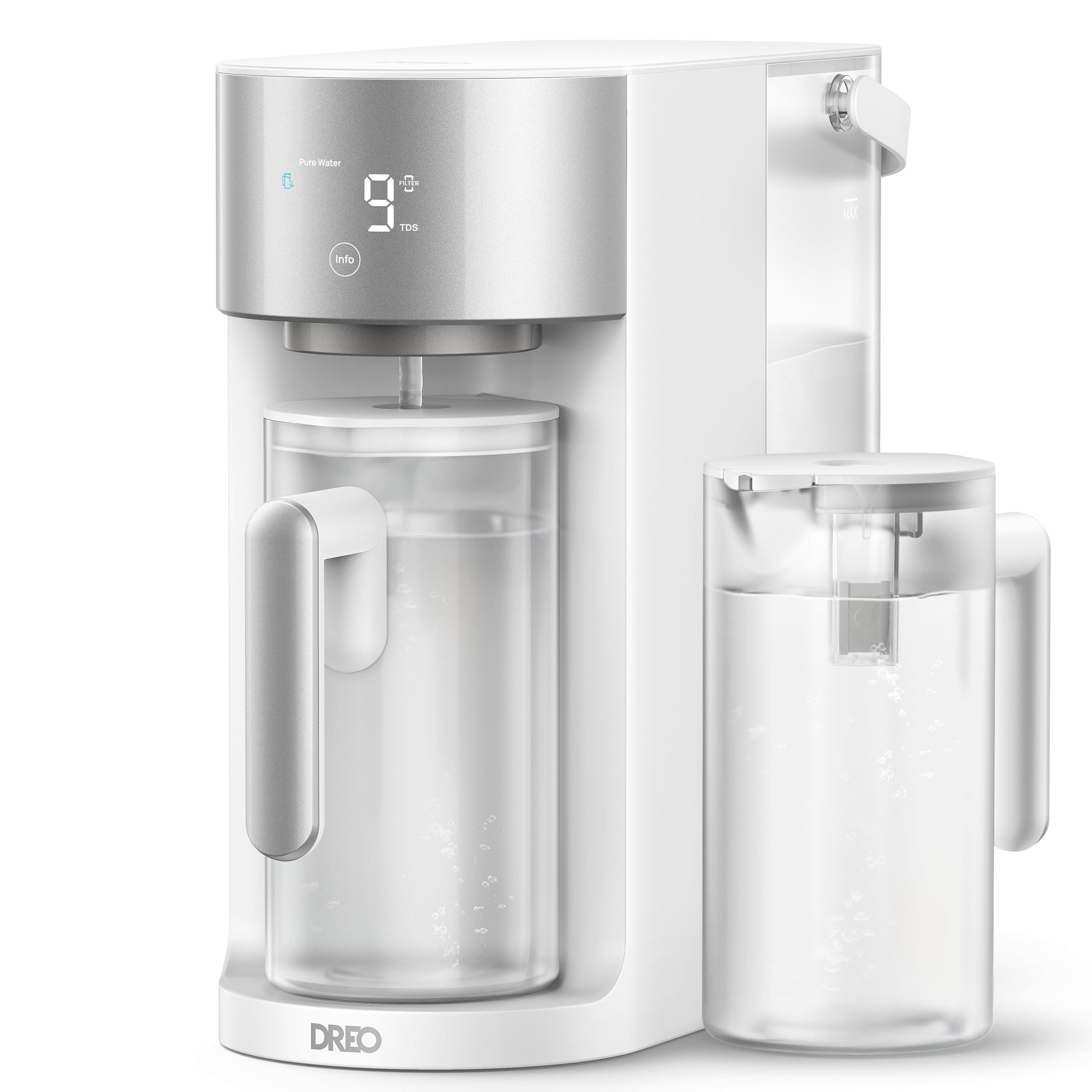
Figure 2.1: DREO RO Water Filter 113 Countertop System with two pitchers.

Figure 2.2: Product dimensions and 3:1 pure to drain ratio.
Filtration System:
The system utilizes a 7-in-1 Reverse Osmosis filtration process to remove up to 99.99% of contaminants, including PFOA, PFOS, chlorine, fluoride, lead, mercury, cadmium, and total coliforms. This system meets NSF/ANSI 58 Standards.

Figure 2.3: Detailed diagram of the 7-stage RO filtration system.
3. Setup Guide
Follow these steps for initial setup before first use.
3.1 Unpacking and Initial Cleaning:
- Remove the water tank, pitchers, and lids from the main unit.
- Rinse all removable parts (water tank, pitchers, lids) with clean water.
- Dry the rinsed parts thoroughly with a clean cloth.
- Place the water tank and pitchers back into their designated positions on the main unit, ensuring they are pressed down firmly.
3.2 First Use and Flushing:
For initial use, the system requires flushing to prepare the filter and ensure optimal water quality. This process involves filtering approximately 4 tanks of tap water.
- Fill the raw water tank with tap water up to the MAX line.
- Plug in the unit. The system will automatically begin filtering water into the pure water pitcher.
- Wait for the system to automatically refill the pitcher. The appearance of white bubbles while expelling air from the filter cartridge is normal.
- Once the pitcher is full, pour out the purified water. This water should be discarded.
- When the 'Empty & Refill' indicator flashes, remove the raw water tank and pour out the wastewater. Note: The wastewater must be discarded; otherwise, it may affect the service life of the filter cartridge.
- Repeat steps 1-5 three more times, for a total of four full tanks of tap water flushed through the system.
- After cleaning four tanks, the water is ready for drinking.
Video 3.1: Quick Start Guide for DREO RO Water Filter WF113. This video demonstrates the initial setup and flushing process.
4. Operation
4.1 Automatic Water Filling:
The DREO water pitchers feature an auto-fill sensor. When a pitcher is placed in the designated slot, the system will automatically detect it and begin filling with purified water. This provides hands-free refills.

Figure 4.1: The auto-filling mechanism for the water pitchers.
4.2 Real-Time TDS Monitoring:
The unit displays Total Dissolved Solids (TDS) levels for both raw water and pure water in real-time. Press the 'Info' button to switch between raw water and pure water TDS readings.

Figure 4.2: Real-time TDS display for raw and pure water.
4.3 Self-Cleaning System:
The DREO RO Water Filter 113 includes a self-cleaning system that automatically flushes internal tubes. This helps maintain consistent water purity and prolongs the filter's lifespan.

Figure 4.3: Illustration of the self-cleaning technology.
5. Maintenance
5.1 Filter Life Reminder:
The unit provides timely filter change reminders to ensure continuous optimal performance and water quality.
5.2 Filter Replacement:
The filter cartridge is designed for easy replacement with a simple twist-to-install mechanism. The filter typically lasts 6 to 12 months, depending on usage and water conditions.

Figure 5.1: Easy filter replacement process.
6. Specifications
| Feature | Detail |
|---|---|
| Brand | DREO |
| Model Name | DREO RO Water Filter 113 |
| Model Number | DR-KWF003 |
| Product Dimensions | 15.7"L x 6.7"W x 13.4"H |
| Material | Acrylonitrile Butadiene Styrene |
| Capacity | 5 Liters (Water Tank) |
| Purification Method | Reverse Osmosis |
| Item Weight | 10.8 Pounds |
| Special Features | Filter Life Reminder, Reduce TDS, TDS Monitor, Touch Control |
| GTIN / UPC | 810142856683 |
7. Troubleshooting
This section provides general guidance for common issues. For detailed troubleshooting steps, please refer to the comprehensive user manual available on the DREO support website.
- No Water Dispensing: Check if the unit is properly plugged in and powered on. Ensure the raw water tank is filled and correctly seated. Verify that the pure water pitcher is correctly positioned.
- Low Water Flow: The filter cartridge might be nearing the end of its lifespan. Check the filter life indicator and replace the filter if necessary.
- Unusual Taste/Odor: Ensure the initial flushing process was completed as described in the Setup Guide. If the issue persists after filter replacement, contact customer support.
- TDS Readings Seem Incorrect: Ensure the TDS sensor is clean. If readings remain inconsistent, contact customer support.
8. Warranty and Support
DREO products come with a manufacturer's warranty. For specific warranty details, product registration, or technical support, please visit the official DREO website or contact their customer service team. Contact information can typically be found on the product packaging or the DREO official website.
Video 8.1: Overview of the DREO WF113 Reverse Osmosis Water Filter, highlighting its features and benefits.


