
Introduction
The TORRAS PolarCircle Lite wireless charger is a high-performance magnetic charging solution featuring the latest Qi2.2 wireless charging technology. It delivers an ultra-fast 25W charging speed, designed to provide a faster, more stable, and cooler charging experience for your smartphone. This charger integrates an active cooling fan and a 360° rotating stand, making it versatile for various scenarios such as a bedside clock, desktop stand, or work assistant. The included 45W IceNano cooling-assist plug further enhances its efficiency and protects your device's battery health.
This manual provides essential information for setting up, operating, and maintaining your TORRAS Qi2.2 25W Wireless Charger.
Package Contents
Please check the package for the following items:
- 1 x TORRAS 25W PolarCircle Lite Wireless Magnetic Charger
- 1 x 5ft USB Type-C Cable
- 1 x 45W IceNano Power Plug
- 1 x Instruction Manual (this document)
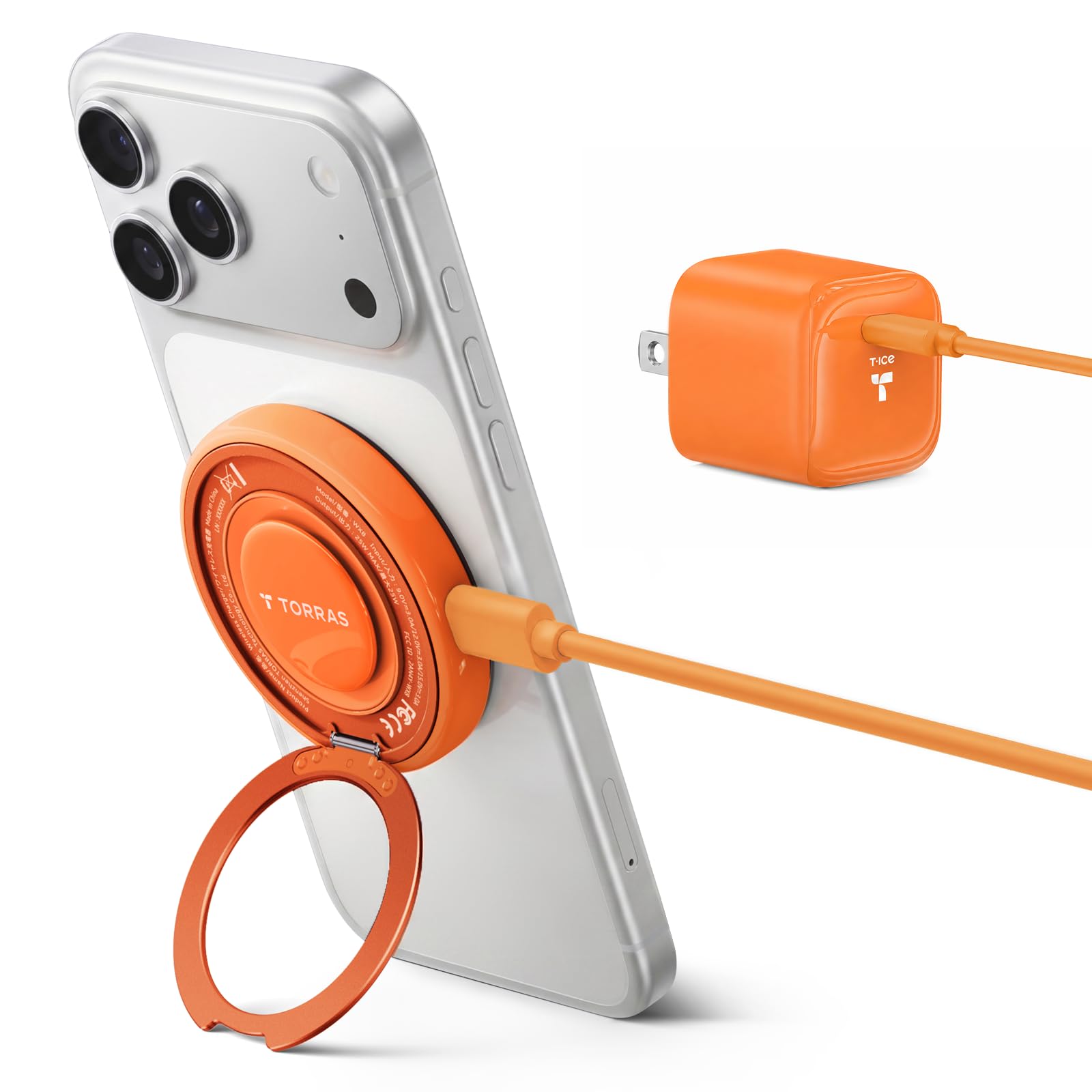
Image: The TORRAS Qi2.2 25W Wireless Charger (Orange 25W-Lite model) with its included 5ft USB-C cable and 45W IceNano power plug.
Setup Instructions
- Connect the Power Plug: Insert the 45W IceNano Power Plug into a standard wall outlet.
- Connect the USB-C Cable: Connect one end of the 5ft USB Type-C cable to the 45W IceNano Power Plug and the other end to the USB-C port on the TORRAS Wireless Charger.
- Power On: The charger is now powered on and ready for use.
- Placement: Place the charger on a stable, flat surface.
Video: An overview of the TORRAS PolarCircle Lite wireless charger, demonstrating its features and setup.
Operating Instructions
Wireless Charging
- Magnetic Attachment: Align your compatible smartphone (e.g., iPhone 17/16/15/14/13 series, Samsung Galaxy S26/S25 series) with the magnetic charging surface of the TORRAS charger. The 12N magnetic force ensures precise alignment and a secure connection.
- Charging Confirmation: Your phone should display a charging indicator. For optimal 25W fast charging, ensure your phone supports Qi2.2 and is placed correctly.
- Recommended Usage: For best performance, use the wireless charger with a power plug of 30W or more. The included 45W IceNano plug is recommended.
Using the 360° Rotating Stand
- The charger features a built-in 360° rotating stand. Gently pull out the stand from the back of the charger.
- Adjust the stand to your desired angle for viewing your phone in either portrait or landscape mode. This is ideal for video calls, gaming, or streaming content.
Active Cooling Fan
- The charger includes an active cooling fan to prevent overheating during fast charging, protecting your phone's battery health.
- To toggle the fan on or off, locate the fan control button (if present, otherwise it operates automatically). The fan typically activates automatically during high-power charging.
- The fan can be toggled off in approximately 3 seconds if complete silence is desired, though this may affect charging efficiency during prolonged use.
Maintenance
- Cleaning: Disconnect the charger from power before cleaning. Use a soft, dry cloth to wipe the surface of the charger. Do not use liquid cleaners or aerosols.
- Storage: When not in use, store the charger in a cool, dry place away from direct sunlight and extreme temperatures.
- Cable Care: Avoid bending or crimping the USB-C cable excessively to prevent damage.
Troubleshooting
| Problem | Possible Cause | Solution |
|---|---|---|
| Phone not charging or charging slowly. |
|
|
| Charger or phone gets warm during charging. |
|
|
| Magnetic connection is weak. |
|
|
Specifications
- Brand: TORRAS
- Model: 25W-Lite
- Wireless Charging Standard: Qi2.2
- Wattage: 25W (Max)
- Input Voltage: 12 Volts (DC)
- Connector Type: USB Type-C
- Special Features: 360° Rotating Stand, Active Cooling Fan, Magnetic Compatible
- Included Components: 1 adapter, 1 USB Type C cable (5ft), 1 power plug (45W IceNano)
- Compatible Devices: Smartphones (iPhone 17/16/15/14/13 series, Samsung Galaxy S26/S25 series, Google Pixel 10/9 series)
Warranty and Support
TORRAS provides an 18-month warranty for this product. For any inquiries or assistance, please contact TORRAS customer support. We offer 7x24 hours lifetime professional support, along with free returns and exchanges for TORRAS magnetic accessories.
This Qi2.2 wireless charger is certified by FCC, UL, TUV, DOE, CEC, and UN, and is RoHS compliant, ensuring product safety and quality.
For further support, please visit the official TORRAS website or contact their customer service directly.


