
Introduction
This manual provides essential information for setting up, operating, maintaining, and troubleshooting your new XIAOMI POCO X8 Pro smartphone. Please read this guide thoroughly to ensure optimal performance and longevity of your device.

Image: The POCO X8 Pro smartphone in black, showcasing its sleek design and camera module.
1. Setup
1.1 What's in the Box
Verify that all items are present in your product packaging:
- POCO X8 Pro Smartphone
- USB Cable (Type-C)
- Phone Case (Silicone)
- Quick Start Guide
- SIM Eject Tool

Image: The POCO X8 Pro smartphone, its black box, a silicone case, a USB-C cable, and a SIM eject tool.
1.2 Inserting the SIM Card
The POCO X8 Pro supports Dual SIM (Nano-SIM) functionality. Follow these steps to insert your SIM card(s):
- Locate the SIM card tray on the side of your device.
- Insert the SIM eject tool into the small hole next to the tray and press gently until the tray pops out.
- Place your Nano-SIM card(s) into the tray with the gold contacts facing down. Ensure they are correctly oriented.
- Carefully push the tray back into the slot until it is flush with the device.
1.3 Initial Charging
Before first use, it is recommended to fully charge your device. The POCO X8 Pro supports 100W HyperCharge for rapid charging.
- Connect the USB-C cable to the charging port at the bottom of the phone.
- Connect the other end of the USB-C cable to a compatible 100W power adapter (not included) and plug it into a power outlet.
- The charging indicator will appear on the screen.

Image: The POCO X8 Pro smartphone connected to a charger, displaying the charging status on its screen.
1.4 Powering On/Off
- To Power On: Press and hold the Power button (located on the right side of the device) until the POCO logo appears.
- To Power Off: Press and hold the Power button, then select "Power off" from the options on the screen.
- To Restart: Press and hold the Power button, then select "Restart" from the options on the screen.
1.5 Initial Device Configuration
Upon first power-on, the device will guide you through the initial setup process for Hyper OS. Follow the on-screen instructions to:
- Select your language and region.
- Connect to a Wi-Fi network.
- Sign in with your Google account or create a new one.
- Set up screen lock (PIN, pattern, password, fingerprint, face unlock).
- Review and accept terms and conditions.
2. Operating Your Device
2.1 Display Features
The POCO X8 Pro features a 6.59-inch 1.5K AMOLED ultra-bright display with a 120Hz refresh rate, offering a smooth and vibrant visual experience.
- Ultra-Bright Display: With a peak brightness of up to 3500 nits, the screen remains clearly visible even under direct sunlight.
- 120Hz Refresh Rate: Provides fluid scrolling and animations, enhancing the user experience, especially in gaming and fast-paced content.
- PWM Dimming at 3840Hz: Reduces eye strain during prolonged use by minimizing screen flickering.
- Ultra-Thin Bezels: Offers an immersive viewing experience with minimal distractions.

Image: The POCO X8 Pro's AMOLED display, highlighting its vibrant colors and narrow bezels.

Image: A person using the POCO X8 Pro outdoors, illustrating the display's high brightness for clear visibility in sunlight.
2.2 Camera System
Capture high-quality photos and videos with the advanced camera system of the POCO X8 Pro.
- 50MP Main Camera with OIS: The Sony IMX882 sensor with Optical Image Stabilization (OIS) ensures sharp, detailed images even in challenging conditions. Features include Ultra Snap for ultra-clear images, portrait bokeh, and HDR fusion.
- Ultra-Wide Camera: Provides a broader perspective for dynamic and engaging landscape or group shots.
- 20MP Front Camera: Designed for clear selfies and video calls, with intelligent wide-angle adjustment for group selfies.
- Advanced Features: Supports up to 120 consecutive shots, enhanced beauty algorithms for cinematic portraits, and natural color reproduction with high detail retention.
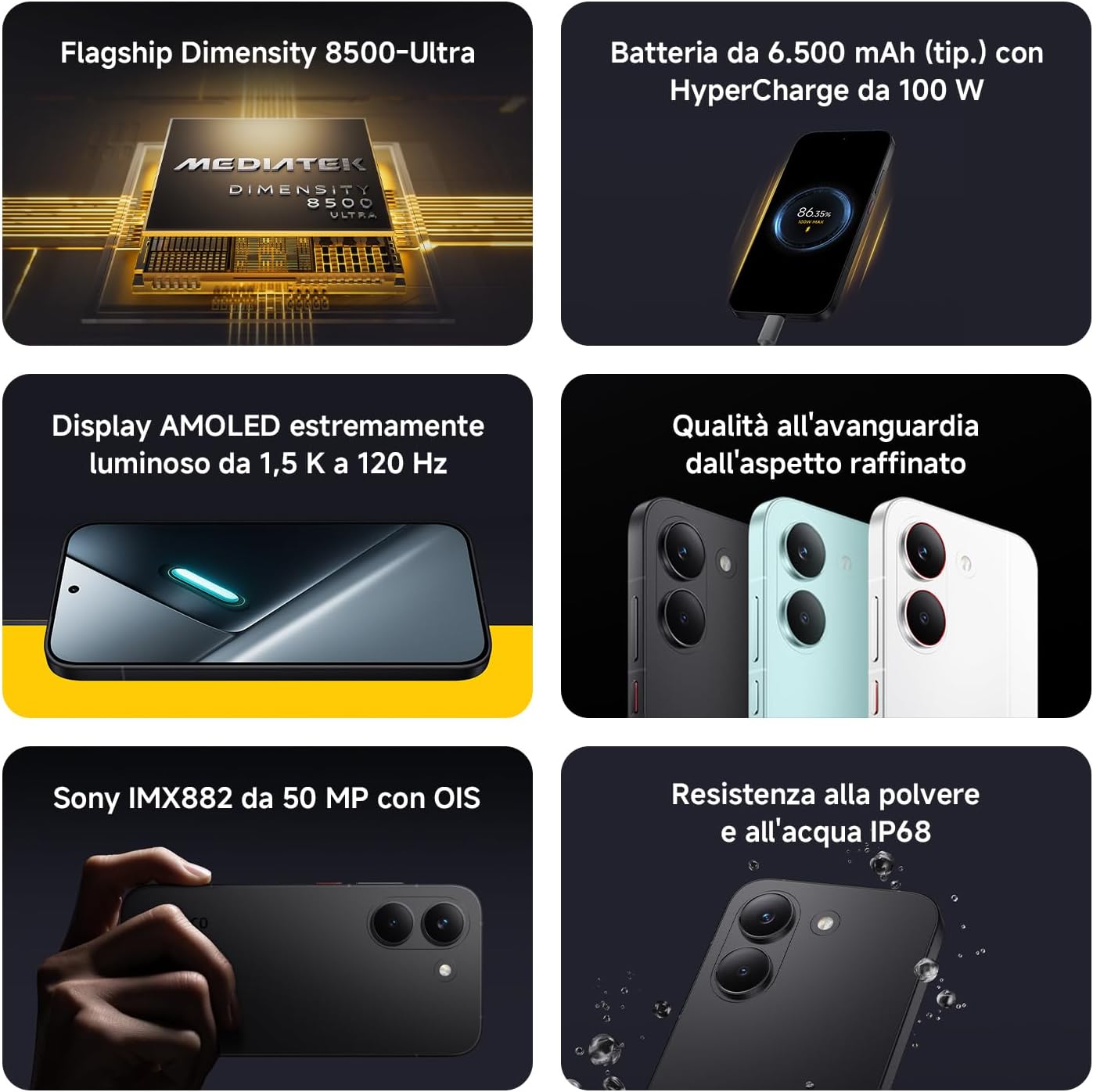
Image: The rear camera module of the POCO X8 Pro, featuring its 50MP main sensor.

Image: Detailed specifications of the POCO X8 Pro's camera system, highlighting the 50MP main and 8MP ultra-wide lenses.

Image: The POCO X8 Pro's 20MP front camera in action, capturing a group selfie.
2.3 Performance and Gaming
The POCO X8 Pro is engineered for high performance, powered by the Dimensity 8500-Ultra processor.
- Flagship Dimensity 8500-Ultra: A 4nm TSMC process processor with All-Big-Core architecture, clocking up to 3.4 GHz, ensuring smooth multitasking and demanding gaming.
- High-End Memory & Storage: Equipped with LPDDR5X RAM and UFS 4.1 storage for fast data access and application loading.
- POCO 3D IceLoop Cooling System: A dual-layer cooling system with a large 5300 mm² graphite area efficiently dissipates heat, maintaining optimal performance during intense use.
- Gaming Enhancements: Supports Smart Frame Rate, 1.5K super resolution, and Game HDR for an optimized gaming experience.

Image: A graphic detailing the POCO X8 Pro's performance features, including the Dimensity 8500-Ultra processor.

Image: A diagram illustrating the POCO 3D IceLoop dual-layer cooling system.
2.4 Audio Quality
The device offers excellent audio quality with rich bass and clear mid-tones, providing an immersive sound experience for media consumption and calls.
2.5 Connectivity
The POCO X8 Pro supports a range of connectivity options:
- 5G & 4G LTE: For high-speed mobile data.
- Wi-Fi: For wireless internet access.
- Bluetooth: For connecting to wireless accessories.
2.6 Hyper OS User Interface
The POCO X8 Pro runs on Hyper OS, offering a fast, fluid, and customizable user experience. The operating system is designed for efficiency and intuitive navigation.

Image: The Xiaomi HyperOS 3 logo, representing the device's operating system.
3. Maintenance
3.1 Battery Care
To maximize your battery's lifespan and performance:
- Avoid extreme temperatures.
- Use the provided USB-C cable and a compatible charger for optimal charging.
- The 6500mAh silicon-carbon battery is designed for extended use, offering over 9 hours of gaming, 12 hours of video calls, or 20 hours of social media use.
- The device supports 27W wired reverse charging, allowing it to act as a portable power bank for other devices.
- Smart charging features help control temperature during charging, ensuring a stable and fluid experience.

Image: A diagram illustrating the internal structure and capacity of the POCO X8 Pro's 6500mAh silicon-carbon battery.

Image: The POCO X8 Pro demonstrating its 27W reverse charging capability by charging another smartphone.
3.2 Cleaning Your Device
To clean your POCO X8 Pro:
- Power off the device and disconnect all cables.
- Use a soft, lint-free cloth to gently wipe the screen and body.
- Avoid using abrasive cleaners, solvents, or aerosol sprays.
3.3 Water and Dust Resistance (IP68)
The POCO X8 Pro is rated IP68 for dust and water resistance. This means it is protected against dust ingress and can withstand immersion in fresh water up to 1.5 meters for a maximum of 30 minutes, under specific laboratory conditions. This resistance is not permanent and may decrease over time with normal wear. Do not test the device yourself. Avoid charging the device, pressing physical buttons, or removing the SIM tray when wet. Refer to the user manual for safety information. Warranty does not cover liquid damage caused by use outside of IP68 test conditions.

Image: The POCO X8 Pro smartphone with water droplets on its surface, illustrating its IP68 water resistance.
4. Troubleshooting
This section addresses common issues you might encounter with your POCO X8 Pro.
4.1 Common Questions & Solutions
- Q: What is the battery life of the POCO X8 Pro? How fast does it charge?
- A: The POCO X8 Pro features a 6500mAh battery. It supports 100W HyperCharge, allowing it to charge from 0% to 100% in approximately 48 minutes under optimal conditions (using a 100W charger in a 25°C environment). Actual charging times may vary.
- Q: Does the POCO X8 Pro series support dual SIM and memory expansion?
- A: The POCO X8 Pro supports dual SIM (nano-SIM + nano-SIM) dual standby. It does not support microSD card expansion, but it offers ample storage with up to 512GB internal memory.
- Q: How do I activate the light strip on the POCO X8 Pro?
- A: To activate the rear light effects, go to Settings > Other settings > Rear light effects. You can choose between "Active" and "Only when the screen is off and the phone is face down."
- Q: How do I activate reverse charging on the POCO X8 Pro?
- A: To activate reverse charging on your POCO X8 Pro:
- Connect another device that supports the PPS 100W charging protocol using a USB-C cable.
- Pull down the notification bar and tap "Use USB."
- Select "Reverse charging."
- Pull down the notification bar again and confirm "Reverse charging" to start high-power charging.
- Q: Does the POCO X8 Pro series support bypass charging?
- A: Yes, the POCO X8 Pro supports bypass charging technology. By activating "Smart charging" in the "Charging settings" section, the system can automatically manage power based on the device's temperature and app usage, distributing power between the system and the battery. In certain conditions, the system may reduce charging speed or temporarily suspend charging when system power consumption is similar to the power provided by the charger, ensuring stable system operation.

Image: A visual representation of the Frequently Asked Questions section for the POCO X8 Pro.
5. Specifications
Below are the key technical specifications for the XIAOMI POCO X8 Pro smartphone:
| Feature | Specification |
|---|---|
| Brand | XIAOMI |
| Model Name | POCO X8 Pro |
| Operating System | Hyper OS |
| RAM Size | 8 GB |
| CPU Model | Mediatek Dimensity 8500-Ultra |
| Storage Capacity | 256 GB |
| Screen Size | 6.59 Inches |
| Resolution | 2756 x 1268 (1.5K) |
| Refresh Rate | 120 Hz |
| Display Type | AMOLED |
| Pixel Density | 311 PPI |
| Wireless Provider | Unlocked |
| Color | Black |
| SIM Card Slots | Dual SIM |
| SIM Card Format | Nano |
| Water Resistance Level | IP68 (Protected against dust and temporary immersion in fresh water) |
| Headphone Jack | No headphone jack |
| Rear Camera Resolution | 50 MP |
| Battery Capacity | 6500 mAh |
| Video Capture Resolution | 4K, 1080p |
| Cellular Technology | 5G |
| Connectivity Technology | 5G, 4G LTE, Bluetooth, Wi-Fi |
| Model Year | 2026 |
| Country of Origin | China |
| Specific Product Uses | Gaming, Multitasking |

Image: A detailed product information sheet outlining various specifications and compliance details for the POCO X8 Pro.

Image: The EU Energy Label for the POCO X8 Pro, indicating its energy efficiency and other ratings.
6. Warranty Information
Your XIAOMI POCO X8 Pro smartphone comes with a 3-year manufacturer's warranty. This includes the standard 2-year manufacturer warranty plus an additional 1-year extended warranty. Please retain your proof of purchase for warranty claims.
The warranty covers manufacturing defects. It does not cover damage caused by misuse, accidents, unauthorized modifications, or use outside of specified conditions (e.g., liquid damage not covered by IP68 rating).
7. Support and Further Information
For further assistance, technical support, or detailed information, please refer to the following resources:
- Official XIAOMI Support: Visit the official XIAOMI website for FAQs, troubleshooting guides, and contact information for customer service.
- Included Documents:
- Online Resources: Check for software updates and additional user guides on the official product support pages.


