
1. Product Overview
The XIAOMI POCO X8 Pro is a high-performance smartphone designed for a comprehensive mobile experience. It features a powerful processor, a vibrant display, advanced camera capabilities, and a long-lasting battery.

Image: The POCO X8 Pro Series smartphone, highlighting its speed and performance capabilities.
- Processor: Dimensity 8500-Ultra for flagship performance.
- Display: 6.59-inch 1.5K 120Hz AMOLED ultra-bright screen.
- Battery: 6500 mAh (typical) with 100W HyperCharge.
- Camera: Sony IMX882 50 MP sensor with Optical Image Stabilization (OIS).
- Design: Premium quality with a metallic frame and glass back cover.
- Durability: IP68 water and dust resistance.
2. Initial Setup
2.1. Package Contents
Verify that your package contains the following items:
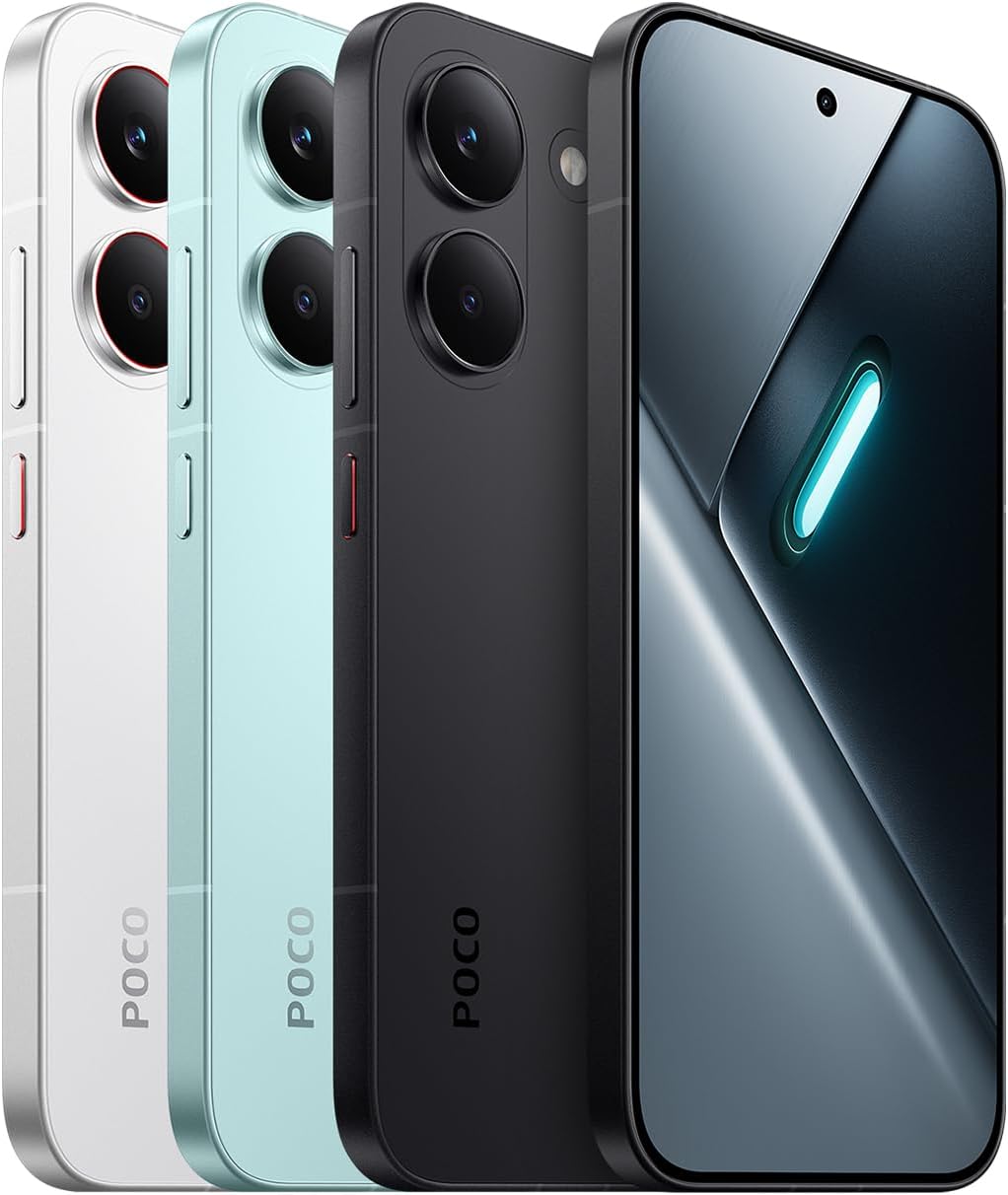
Image: The POCO X8 Pro smartphone, a USB-C cable, a protective case, and a SIM ejector tool, as found in the retail box.
- XIAOMI POCO X8 Pro Smartphone
- USB-C Cable
- Protective Case (Funda)
- SIM Ejector Tool (SIM-Pin)
- Note: Charger is not included.
2.2. Inserting the SIM Card
- Locate the SIM card tray on the side of the device.
- Insert the SIM ejector tool into the small hole next to the tray and press gently until the tray pops out.
- Place your Nano-SIM card(s) into the tray with the gold contacts facing down. The device supports Dual SIM.
- Carefully reinsert the tray into the phone.
2.3. Powering On and Initial Configuration
- Press and hold the Power button until the screen lights up.
- Follow the on-screen instructions to select your language, connect to Wi-Fi, and set up your Google account.
- You may be prompted to transfer data from an old device.
3. Operating Instructions
3.1. Display Features
The POCO X8 Pro features a 6.59-inch AMOLED display with a 1.5K resolution and a 120Hz refresh rate for smooth visuals.

Image: A person using the POCO X8 Pro outdoors, demonstrating the screen's high brightness of 3500 nits for clear visibility under direct sunlight.
- High Brightness: Up to 3500 nits peak brightness for excellent outdoor visibility.
- PWM Dimming: 3840Hz PWM dimming for flicker-free viewing and reduced eye strain.
- Ultra-thin Bezels: Provides an immersive viewing experience with a high screen-to-body ratio.
3.2. Performance and Gaming
Equipped with the Dimensity 8500-Ultra processor, the device offers robust performance for demanding applications and gaming.

Image: Diagram illustrating the POCO 3D dual-layer IceLoop cooling system, designed to maintain optimal device temperature during intensive use.
- IceLoop Cooling: POCO 3D dual-layer IceLoop cooling system for efficient heat dissipation.
- WildBoost Optimization: Dynamic frequency scaling for stable frame rates and reduced power consumption during gaming.
- Game HDR: Enhanced visuals with more vivid colors and contrast in supported games.
- Super Resolution Touch: 24x more precise touch response for improved gaming control.
3.3. Camera System
The device features a 50MP main camera with OIS for clear and stable photos.

Image: Close-up of the POCO X8 Pro's rear camera module, highlighting the 50MP main sensor with OIS and an 8MP ultra-wide camera.
- Main Camera: 50MP Sony IMX882 sensor with f/1.5 aperture and OIS.
- UltraSnap: Capture fast-moving moments with clarity, including portrait mode with up to 120 consecutive shots.
- AI Features: Includes AI beautification, AI cutouts for subject recognition, and AI reflection removal.
3.4. Battery and Charging
The 6500 mAh silicon-carbon battery provides extended usage, complemented by fast charging capabilities.

Image: The POCO X8 Pro displaying its battery charging interface, indicating long-lasting battery performance for gaming, video calls, and social media.
- 100W HyperCharge: Rapid charging, reaching 100% in approximately 48 minutes with a compatible 100W adapter.
- 27W Reverse Charging: Allows the smartphone to charge other devices like earbuds or smartwatches.
- Smart Charging: Intelligent system to control device temperature during charging and dynamically adjust speed.
3.5. Software and Connectivity
The POCO X8 Pro runs on Xiaomi HyperOS 3, offering a refined user experience.

Image: A smartphone screen showing an incoming call with the "Xiaomi Offline Communication" indicator, demonstrating the ability to make calls without network signal.
- Xiaomi HyperOS 3: The operating system providing a smooth and intuitive interface.
- Xiaomi Offline Communication: Enables calls in areas with weak or no signal, requiring a Xiaomi SIM card and account.
- Connectivity: Supports 5G, Bluetooth, LTE, and Wi-Fi.
3.6. Design and Aesthetics
The device features a premium build with attention to detail.

Image: Three POCO X8 Pro smartphones in white, black, and mint green, showcasing the minimalist design with a metallic central frame and glass back cover.
- Premium Build: Metallic central frame and glass back cover.
- Dynamic RGB Light: Customizable RGB light effects for incoming calls and notifications.
4. Maintenance
4.1. Cleaning Your Device
- Use a soft, lint-free cloth to clean the screen and body.
- Avoid using harsh chemicals, abrasive materials, or aerosol sprays.
- For stubborn smudges, slightly dampen the cloth with water.
4.2. Software Updates
- Regularly check for and install system updates to ensure optimal performance and security.
- Navigate to Settings > About phone > MIUI version (or HyperOS version) to check for updates.
4.3. Battery Care
- Avoid extreme temperatures, as they can degrade battery life.
- Do not leave the device fully charged or fully discharged for extended periods.
- Use the provided USB-C cable and compatible chargers for optimal charging.
5. Troubleshooting
5.1. Common Issues and Solutions
| Issue | Solution |
|---|---|
| Device does not turn on | Ensure the battery is charged. Connect to a charger for at least 10 minutes, then try powering on again. |
| Screen is unresponsive | Perform a force restart by pressing and holding the Power button for about 10-15 seconds. |
| Apps are crashing or freezing | Clear the cache of the problematic app (Settings > Apps > Manage apps > [App Name] > Clear data > Clear cache). If the issue persists, reinstall the app. |
| Poor battery life | Check battery usage in Settings to identify power-hungry apps. Reduce screen brightness, disable unnecessary features (GPS, Bluetooth, Wi-Fi when not in use). |
| Network connectivity issues | Toggle Airplane mode on and off. Restart the device. Check SIM card insertion. Reset network settings (Settings > Connection & sharing > Reset Wi-Fi, mobile networks & Bluetooth). |
5.2. Factory Reset
If troubleshooting steps do not resolve the issue, a factory reset may be necessary. This will erase all data on your device, so ensure you have backed up important information.
- Go to Settings > About phone > Factory reset.
- Follow the on-screen prompts to confirm the reset.
6. Technical Specifications
Below are the detailed technical specifications for the XIAOMI POCO X8 Pro:

Image: Official product information sheet detailing various specifications and energy labeling for the POCO X8 Pro.
| Feature | Detail |
|---|---|
| Model Name | POCO X8 Pro |
| Processor | Dimensity 8500-Ultra (3.4 GHz CPU Speed) |
| Operating System | Hyper OS |
| RAM | 12 GB |
| Internal Storage | 512 GB |
| Display Size | 6.59 Inches |
| Display Type | AMOLED |
| Display Resolution | 1536 x 720 pixels (403 PPI) |
| Refresh Rate | 120 Hz |
| Rear Camera | 50 MP |
| Front Camera | 20 MP |
| Video Recording | 4K, 1080p |
| Battery Capacity | 6500 mAh |
| SIM Card Slot | Dual SIM (Nano) |
| Connectivity | 5G, Bluetooth, LTE, Wi-Fi |
| Biometric Security | Fingerprint Recognition |
| Water Resistance | IP68 |
| Dimensions | 18.4 x 9.5 x 4.4 cm; 560 g |
| Color | Black |
| Included in Box | USB Cable |
Note on IP68 rating: The device has been tested under specific laboratory conditions for splash, water, and dust resistance with an IP68 rating. This protection is not permanent and may decrease over time with normal wear. Do not charge the device if wet. Consult the user manual for detailed safety information. Liquid damage caused outside of test conditions is not covered by warranty.
7. Warranty and Support
7.1. Manufacturer's Warranty
The XIAOMI POCO X8 Pro comes with a manufacturer's warranty. The product features a 3-year manufacturer's warranty, with an additional 1-year extended warranty, totaling 4 years. No activation is required for this warranty.
- Warranty Period: 4 years (3 years standard + 1 year extended).
- Coverage: Covers manufacturing defects under normal use.
- Exclusions: Does not cover damage from misuse, accidents, unauthorized repairs, or liquid damage outside of specified IP68 test conditions.
7.2. Support and Service
For technical assistance, warranty claims, or service, please contact XIAOMI customer support or visit their official website. Refer to the official documentation for contact details.
- Official Documents:


