
Introduction
This manual provides detailed instructions for the safe operation, installation, and maintenance of your FODEXAZY 65W Moving Head LED Disco Stage Light. Please read this manual thoroughly before use to ensure optimal performance and to prevent damage.
Safety Instructions
Always observe the following safety precautions:
- Ensure the power supply voltage matches the device's requirements.
- Do not open the device casing; there are no user-serviceable parts inside.
- Keep the device away from water, moisture, and extreme temperatures.
- Ensure proper ventilation to prevent overheating.
- Avoid direct eye exposure to the light source.
- Disconnect power before cleaning or maintenance.
- Mount the device securely to prevent accidental falls.
Package Contents
Verify that all items are present in the package:
- Power Cable x 1
- Moving Head Light x 1
- Remote Control x 1
- Mounting Bracket + Screws x 1 set
- Instruction Manual x 1

Product Overview
The FODEXAZY 65W Moving Head LED Disco Stage Light is a versatile lighting fixture designed for various events. It combines multiple lighting effects and offers flexible control options.
Key Features:
- Integrated Light Effects: Combines 4-in-1 RGBW LED beams, magic ball effects, colorful light strips, and dynamic dot light effects.
- Flexible Control: Supports Automatic, Sound-activated, Master-Slave, Remote Control, and professional 19-channel DMX512/RDM modes.
- Dynamic Movement: Features a 2-arm motor for smooth 540° horizontal and 180° vertical rotation.
- Easy Setup: Pre-programmed show modes for quick atmosphere creation.
- Durable Design: Metal casing, IP20 protection, suitable for -20℃ to 40℃ operating temperatures.
Components:
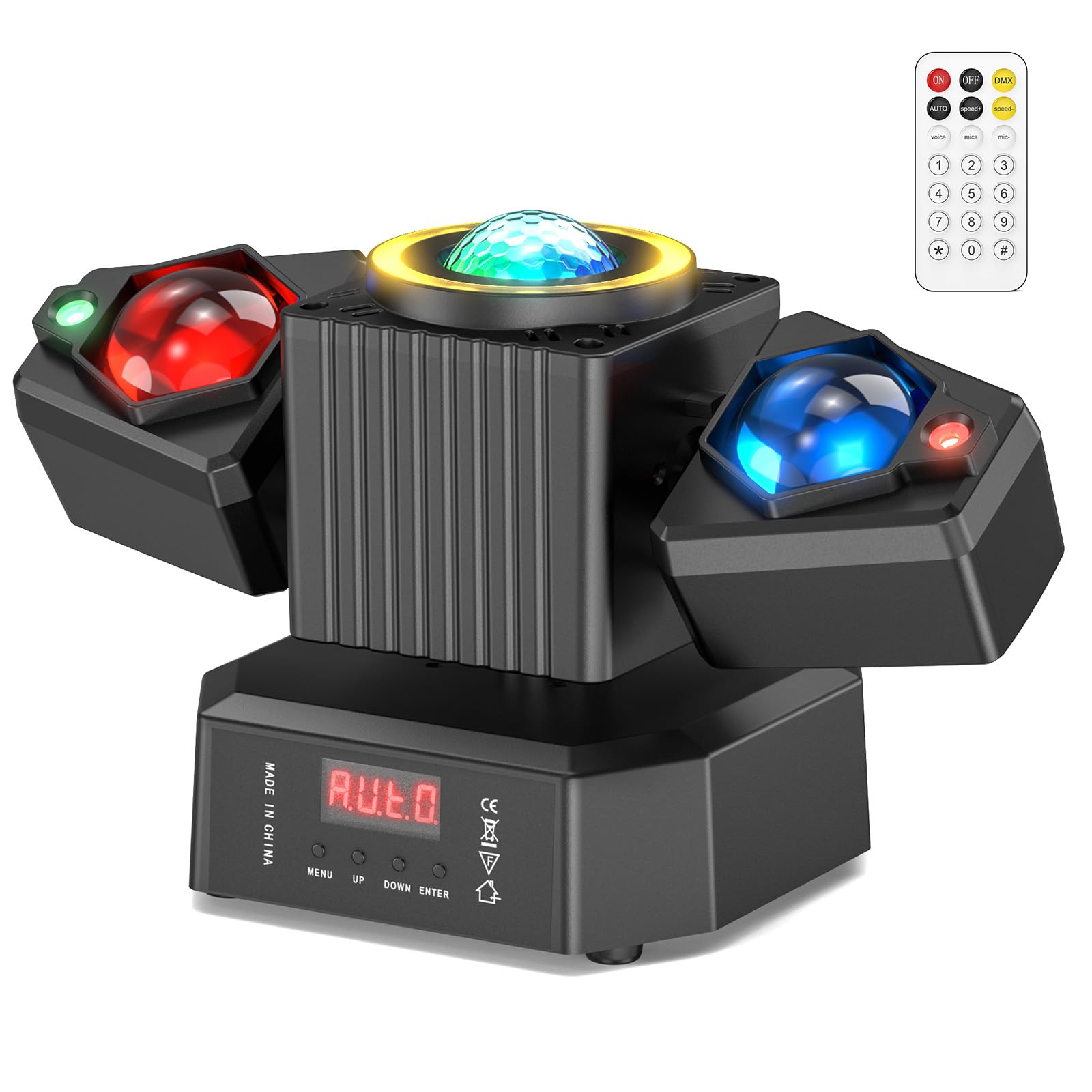


Setup
Mounting:
The device can be mounted using the included bracket. Ensure the mounting surface is stable and can support the weight of the fixture. Use appropriate screws and safety cables if mounting overhead.

Connections:
Connect the power cable to a suitable power outlet. For DMX control, connect DMX IN and DMX OUT cables as required.

Operating Modes
The FODEXAZY Moving Head Light offers several operating modes:
- Automatic Mode (AUTO): The light cycles through pre-programmed patterns and colors automatically.
- Sound-Activated Mode (VOICE): The light reacts to music or sound, changing patterns and intensity with the beat.
- Master-Slave Mode: Connect multiple units. One unit acts as the master, controlling all other slave units for synchronized effects.
- Remote Control Mode: Use the included remote control to select modes, colors, and effects.
- DMX512/RDM Mode: For professional control, connect to a DMX controller to precisely manage each fixture's parameters.

Remote Control Functions
The included remote control allows for convenient operation. Refer to the table below for button functions:
| Button | Function |
|---|---|
| OFF/ON | Turns the light off/on. |
| AUTO | Activates Automatic Mode. |
| speed+/- | Adjusts the speed of Automatic Mode. |
| voice | Activates Sound-Activated Mode. |
| mic+/- | Adjusts the sound sensitivity in Sound-Activated Mode. |
| 1-4 | Selects Red/Green/Blue/White Beam effects. |
| 5 | Selects Red and Green Light effect. |
| 6-7 | Activates 2 different Self-driving Modes. |
| 8-9 | Activates 2 different Sound-activated Modes. |
DMX Control
For advanced control, the fixture supports 19-channel DMX512/RDM mode. Connect the DMX OUT of your controller to the DMX IN of the first fixture. Daisy-chain subsequent fixtures using DMX OUT to DMX IN connections. Refer to a DMX channel chart (not provided in this manual) for specific channel assignments and functions.

Maintenance
Regular maintenance ensures the longevity and optimal performance of your light fixture.
- Cleaning: Periodically clean the lenses and exterior with a soft, dry cloth. Do not use abrasive cleaners or solvents.
- Inspection: Regularly check power cables, DMX cables, and mounting hardware for any signs of wear or damage.
- Ventilation: Ensure ventilation openings are clear of dust and debris to prevent overheating.
- Storage: When not in use for extended periods, store the device in a dry, dust-free environment.
Troubleshooting
If you encounter issues with your light fixture, refer to the following common problems and solutions:
| Problem | Possible Cause | Solution |
|---|---|---|
| No power | Power cable not connected, faulty outlet, or device switch off. | Check power cable connection, try a different outlet, ensure power switch is ON. |
| Light not responding to remote | Remote batteries low/dead, remote not aimed at sensor, or obstruction. | Replace remote batteries, ensure clear line of sight to the device's IR sensor. |
| DMX control not working | Incorrect DMX cabling, wrong DMX address, or faulty DMX controller. | Verify DMX cable connections, check DMX address settings on the fixture and controller, test with a different DMX cable/controller. |
| Overheating | Blocked ventilation, prolonged use in high ambient temperature. | Ensure clear airflow around the device, allow for cooling periods, operate within specified temperature range. |
Specifications
| Feature | Detail |
|---|---|
| Brand | FODEXAZY |
| Model Number | ZQ02624EU |
| Power Consumption | 65 Watts |
| Light Source Type | LED (Light Emitting Diode) |
| Maximum Light Output | 1000 Lumens |
| Number of Light Sources | 4 |
| Color | Colorful (RGBW) |
| Material | Metal |
| Surface Type | Brushed |
| Power Source Type | Corded Electric |
| Mounting Type | Bracket Mount |
| Beam Angle | 540 Degrees (Horizontal Rotation) |
| Vertical Rotation | 180 Degrees |
| Operating Temperature | -20℃ to 40℃ |
| IP Protection | IP20 |
| Batteries Included | No |
| Item Dimensions (approx.) | 24cm (9.4in) width, 15.3cm (6in) height, 12.8cm (5in) depth |
| Item Weight (approx.) | 0.8kg (1.76lb) |

Warranty and Support
For any questions or concerns regarding your FODEXAZY 65W Moving Head LED Disco Stage Light, please contact the seller directly. The manufacturer provides a warranty as per local regulations. Please retain your proof of purchase for warranty claims.
