1. Introduction
Thank you for purchasing the AIWA LPS-25BK Turntable. This device is designed to provide high-quality audio playback from vinyl records, as well as offering modern connectivity options such as Bluetooth, USB, and FM radio. Please read this manual carefully before using the product to ensure proper operation and to maximize its lifespan.
2. Safety Instructions
- Power Source: Use only the provided AC adapter. Ensure the voltage matches the requirements specified on the adapter.
- Water and Moisture: Do not expose the unit to rain, moisture, or liquids. Do not place objects filled with liquids, such as vases, on the unit.
- Heat: Do not place the unit near heat sources such as radiators, heat registers, stoves, or other apparatus (including amplifiers) that produce heat.
- Ventilation: Ensure adequate ventilation. Do not block any ventilation openings.
- Cleaning: Unplug the unit from the power outlet before cleaning. Use a soft, dry cloth. Do not use liquid cleaners or aerosol cleaners.
- Servicing: Do not attempt to service this product yourself. Refer all servicing to qualified service personnel.
- Placement: Place the unit on a stable, flat surface to prevent damage from falling.
3. Package Contents
Please check that all items are present in the package:
- AIWA LPS-25BK Turntable Unit
- AC Power Adapter
- User Manual (this document)
- Dust Cover
- Platter Mat
4. Product Overview
Familiarize yourself with the components of your AIWA LPS-25BK Turntable.
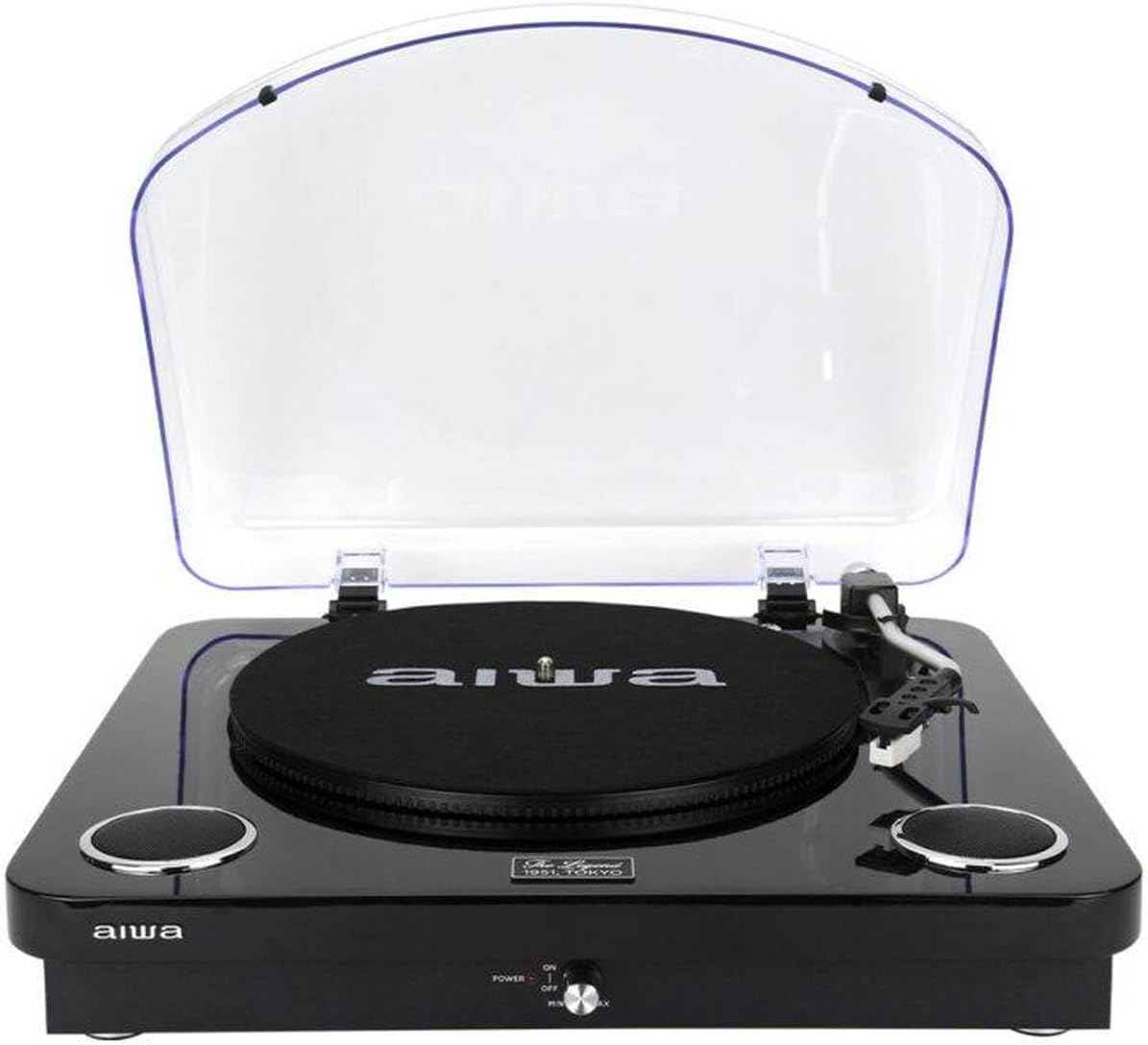
Figure 4.1: Front view of the AIWA LPS-25BK Turntable with the dust cover open, revealing the record platter, tonearm assembly, and integrated speakers on either side.

Figure 4.2: Front view of the AIWA LPS-25BK Turntable with the transparent dust cover closed, protecting the internal components.

Figure 4.3: Side view of the AIWA LPS-25BK Turntable, highlighting the USB port, SD card slot, and playback control buttons.
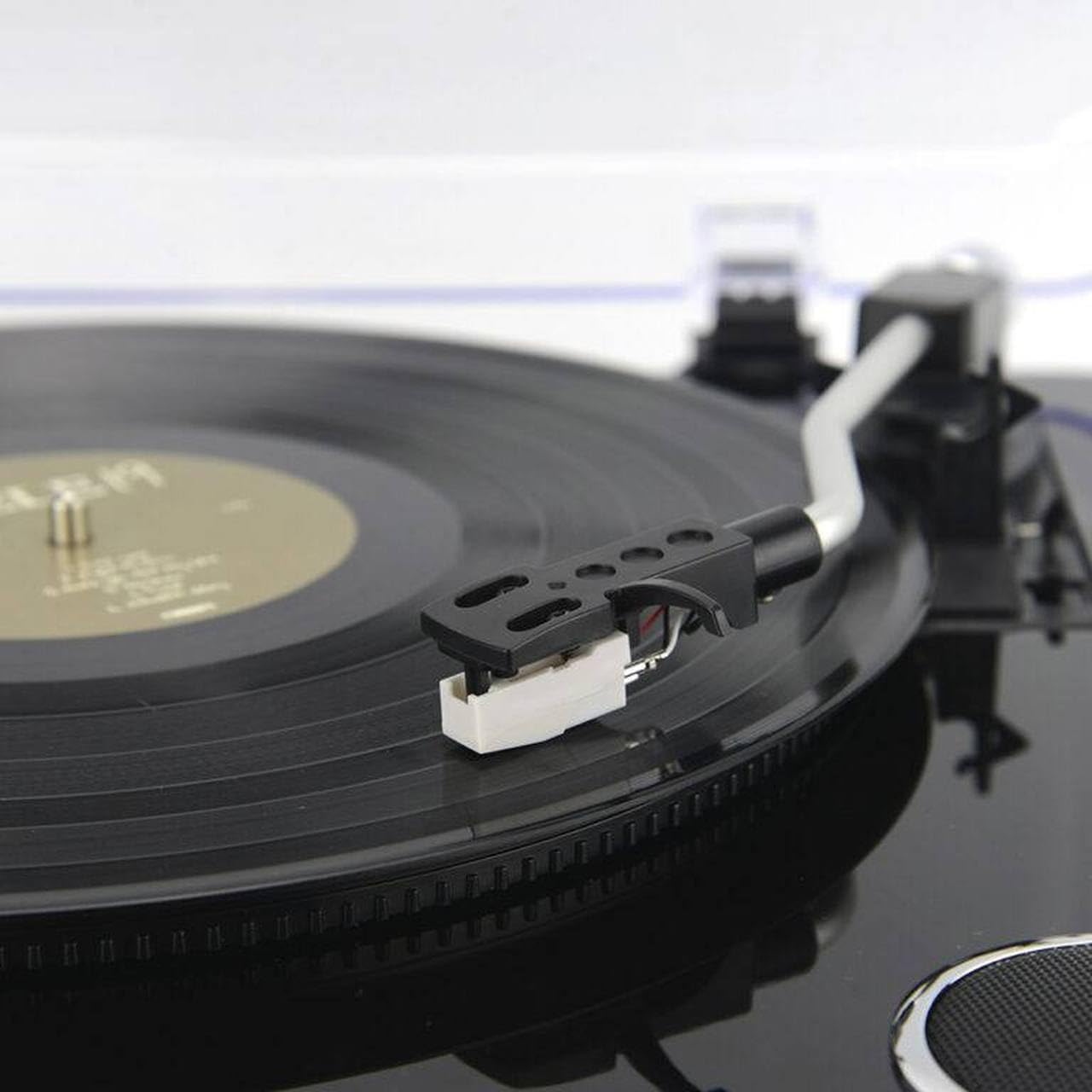
Figure 4.4: Detailed view of the tonearm and cartridge with the stylus, positioned over a vinyl record on the platter.
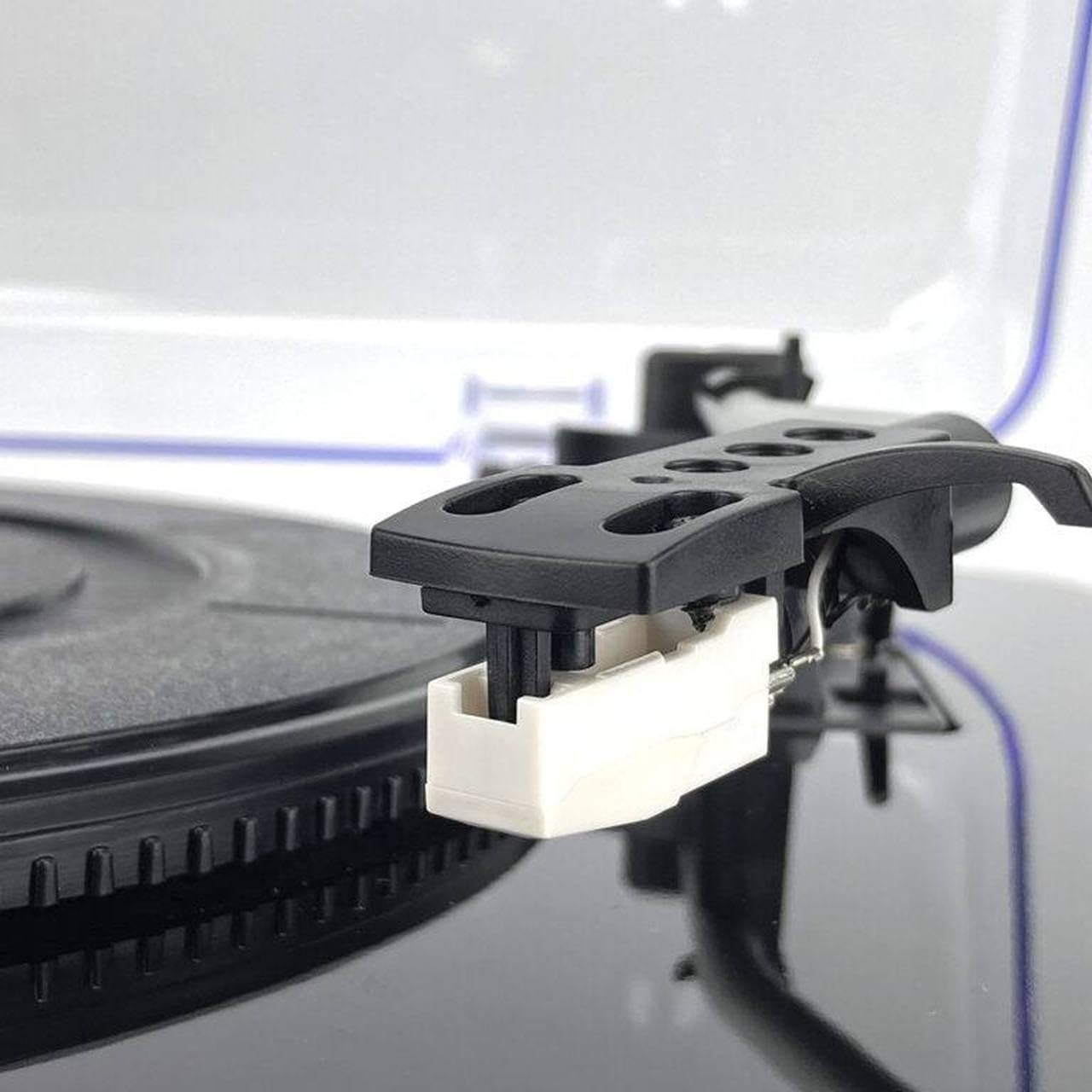
Figure 4.5: Close-up of the white stylus (needle) attached to the cartridge, ready to play a record.

Figure 4.6: Detail of the power switch and volume control knob, labeled 'POWER ON/OFF' and 'MIN/MAX', with a red indicator light.

Figure 4.7: Detailed view of the USB port, SD card slot, and control buttons including SCAN, K/DEL (Previous/Delete), M/REC (Next/Mode/Record).
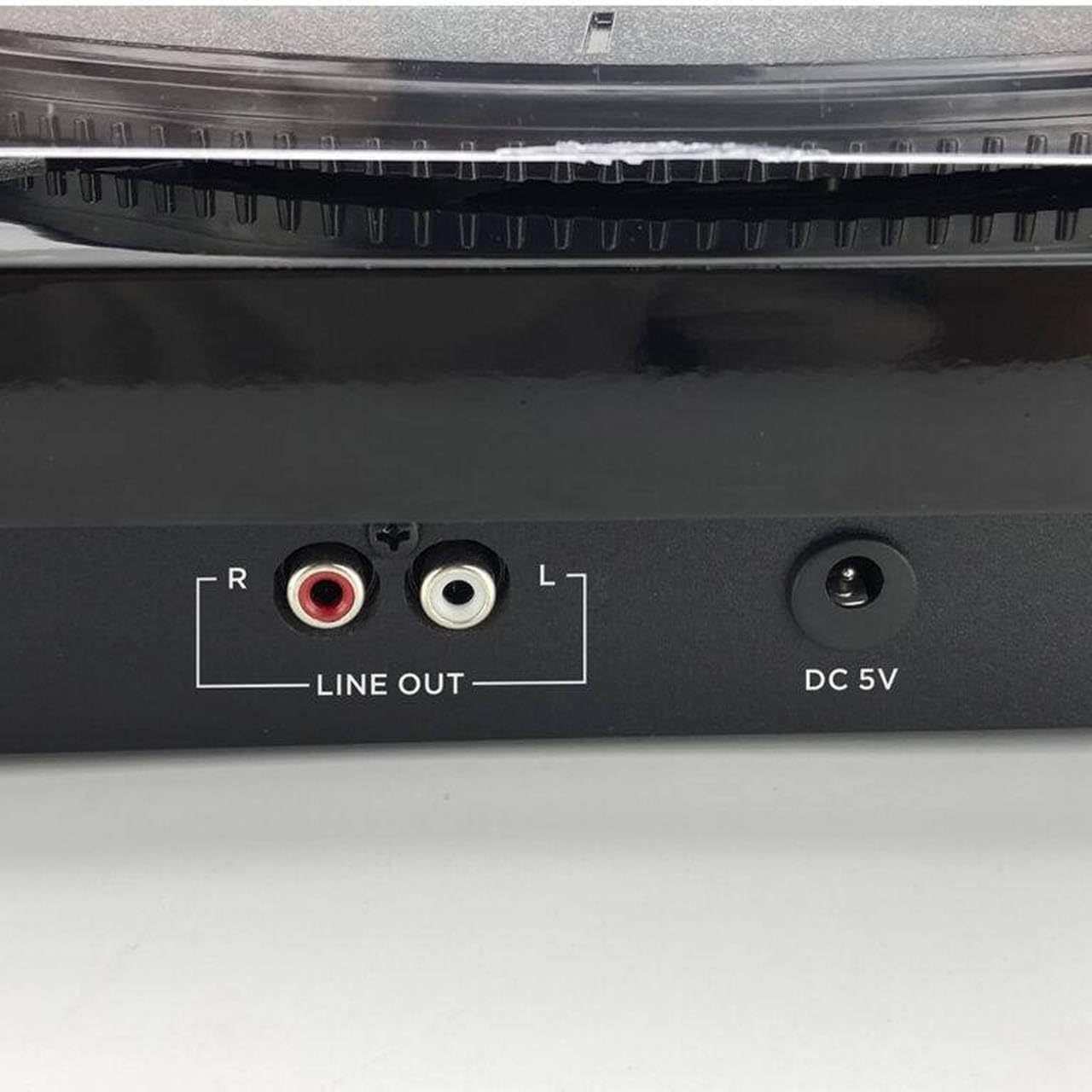
Figure 4.8: Rear panel connections, showing the red and white RCA 'LINE OUT' ports for external audio connection and the 'DC 5V' power input jack.
5. Setup
- Unpack the Unit: Carefully remove the turntable from its packaging. Retain the packaging for future transport or storage.
- Place the Platter Mat: Place the felt platter mat onto the turntable platter.
- Install the Dust Cover: Insert the hinges of the dust cover into the slots at the back of the turntable unit.
- Connect Power: Insert the DC plug of the AC adapter into the 'DC 5V' input jack on the back of the turntable. Plug the AC adapter into a wall outlet.
- Remove Stylus Protector: Before playing a record, carefully remove the clear plastic stylus protector from the cartridge.
6. Operating Instructions
6.1 Playing Records
- Power On: Turn the 'POWER' knob clockwise to the 'ON' position. The power indicator light will illuminate.
- Select Speed: Set the speed selector switch (usually located near the tonearm base) to the appropriate speed for your record (33, 45, or 78 RPM). For 45 RPM records, you may need to use a 45 RPM adapter (not included).
- Place Record: Place a vinyl record on the platter, centered on the spindle.
- Lift Tonearm: Gently lift the tonearm using the cueing lever.
- Position Tonearm: Move the tonearm over the desired starting groove of the record.
- Lower Tonearm: Slowly lower the tonearm using the cueing lever. The stylus will make contact with the record, and playback will begin through the integrated speakers.
- Adjust Volume: Adjust the volume using the 'POWER/VOLUME' knob.
- Automatic Return: At the end of the record, the tonearm will automatically return to its rest position.
6.2 Bluetooth Mode
- Power On: Turn the 'POWER' knob clockwise to the 'ON' position.
- Select Mode: Press the 'MODE/REC' button repeatedly until the Bluetooth indicator light flashes, indicating pairing mode.
- Pair Device: On your Bluetooth-enabled device (e.g., smartphone, tablet), search for available Bluetooth devices and select 'AIWA LPS-25BK'.
- Playback: Once paired, the Bluetooth indicator will stop flashing and remain solid. You can now stream audio from your device to the turntable's integrated speakers.
6.3 USB Playback and Recording
- Insert USB Drive: Insert a USB flash drive into the USB port on the side of the unit.
- Select Mode: Press the 'MODE/REC' button to switch to USB mode.
- Playback: Use the 'K/DEL' (Previous) and 'M/REC' (Next) buttons to navigate tracks. Press the 'K/DEL' button to play/pause.
- Recording (from Vinyl/FM): While playing a record or listening to FM radio, press and hold the 'M/REC' button to start recording to the USB drive. Press it again to stop recording. Recorded files will be saved in MP3 format.
6.4 FM Radio
- Power On: Turn the 'POWER' knob clockwise to the 'ON' position.
- Select Mode: Press the 'MODE/REC' button repeatedly until FM radio mode is selected.
- Scan Stations: Press the 'SCAN' button to automatically scan and save available FM radio stations.
- Tune Stations: Use the 'K/DEL' and 'M/REC' buttons to cycle through the saved stations.
6.5 RCA Audio Output
To connect the turntable to an external amplifier or powered speakers:
- Connect an RCA audio cable (not included) to the 'LINE OUT' ports (red for right, white for left) on the back of the turntable.
- Connect the other end of the RCA cable to the corresponding audio input on your amplifier or powered speakers.
- Ensure your external audio system is set to the correct input source.
7. Maintenance
- Stylus Cleaning: Gently clean the stylus regularly using a soft brush designed for stylus cleaning, brushing from back to front. Avoid touching the stylus with your fingers.
- Unit Cleaning: Wipe the turntable unit with a soft, dry, lint-free cloth. Do not use abrasive cleaners, waxes, or solvents.
- Dust Cover: Keep the dust cover closed when not in use to protect the platter and tonearm from dust. Clean the dust cover with a soft, damp cloth.
- Record Care: Keep your records clean and free of dust to ensure optimal sound quality and to prolong stylus life.
8. Troubleshooting
If you encounter issues with your AIWA LPS-25BK Turntable, please refer to the following common problems and solutions:
| Problem | Possible Cause | Solution |
|---|---|---|
| No power | Power adapter not connected; Power outlet not working; Power knob off. | Ensure AC adapter is securely connected to the unit and a working power outlet. Turn the power knob to 'ON'. |
| No sound from speakers | Volume too low; Incorrect mode selected; Stylus protector still on. | Increase volume. Ensure correct mode (Phono, Bluetooth, USB, FM) is selected. Remove stylus protector. |
| Record skipping | Record is dirty or scratched; Turntable not on a stable surface; Stylus is dirty or worn. | Clean the record. Place the turntable on a stable, level surface. Clean or replace the stylus. |
| Bluetooth not connecting | Turntable not in pairing mode; Device too far; Incorrect device selected. | Ensure turntable is in Bluetooth pairing mode (flashing indicator). Move device closer. Select 'AIWA LPS-25BK' from your device's Bluetooth list. |
| Poor FM reception | Weak signal; Unit placement. | Adjust the position of the unit to improve reception. |
9. Specifications
- Model Name: LPS-25BK
- Brand: Aiwa
- Rotation Speeds: 33 1/3, 45, 78 RPM
- Maximum Rotation Speed: 78 RPM
- Bluetooth Version: 5.4
- Integrated Speakers: 2 x 5W RMS
- Connectivity: Bluetooth, USB, RCA Line Out
- Additional Features: FM Radio, Automatic Tonearm Return, USB Playback/Recording
- Power Input: DC 5V (via AC Adapter)
- Material: Metal (chassis components)
- Product Weight: 4 Kilograms
- Color: Black
- Compatible Devices: Amplifier, Speakers, Personal Computer, Bluetooth Speaker
10. Warranty and Support
The AIWA LPS-25BK Turntable comes with a standard manufacturer's warranty. Please refer to the warranty card included in your package or contact your retailer for specific warranty terms and conditions. For technical support or service inquiries, please contact the AIWA customer service department or your authorized dealer.