
1. Introduction
This manual provides detailed instructions for the assembly, operation, and maintenance of your Lvifur Glass Display Cabinet (Model B0GH6TL6HH). This cabinet is designed to showcase your collectibles, books, and other items, featuring a high-gloss finish, durable glass shelves, adjustable LED lighting, and a human body sensor for enhanced functionality. Please read this manual thoroughly before assembly and use to ensure proper installation and safe operation.
2. Safety Information
Caution:
- This cabinet is equipped with a human body sensor for automatic lighting. Be aware of the sensor's range to avoid unexpected light activation.
- The cabinet is made of glass, which can shatter if not handled with care. Always use caution when installing, using, and maintaining the cabinet to prevent injuries or damage.
- Ensure the cabinet is placed on a stable, level surface to prevent tipping.
- Do not overload shelves beyond their specified weight capacity.
3. Package Contents
Verify that all components are present and undamaged before beginning assembly. All parts and accessories are labeled for easy identification. If any items are missing or damaged, please contact customer support.
Typical contents include:
- FSC-certified wood frame components
- High-definition glass doors
- Glass shelves (5 total)
- LED light strips
- Human body sensor module
- Lock mechanism and keys
- Assembly hardware (screws, dowels, connectors)
- Instruction manual
4. Specifications
| Feature | Detail |
|---|---|
| Brand | Lvifur |
| Model | B0GH6TL6HH |
| Color | White |
| Material | Wood (Frame), Glass (Shelves, Doors) |
| Product Dimensions (D x W x H) | 14.9"D x 47.2"W x 33.4"H |
| Number of Shelves | 5 |
| Lighting | 3-Color LED (Blue, Yellow, White), Adjustable Brightness |
| Sensor | Human Body Sensor for Automatic Light Activation |
| Door Style | Pop-up Glass Doors with Lock |
| Assembly Required | Yes |
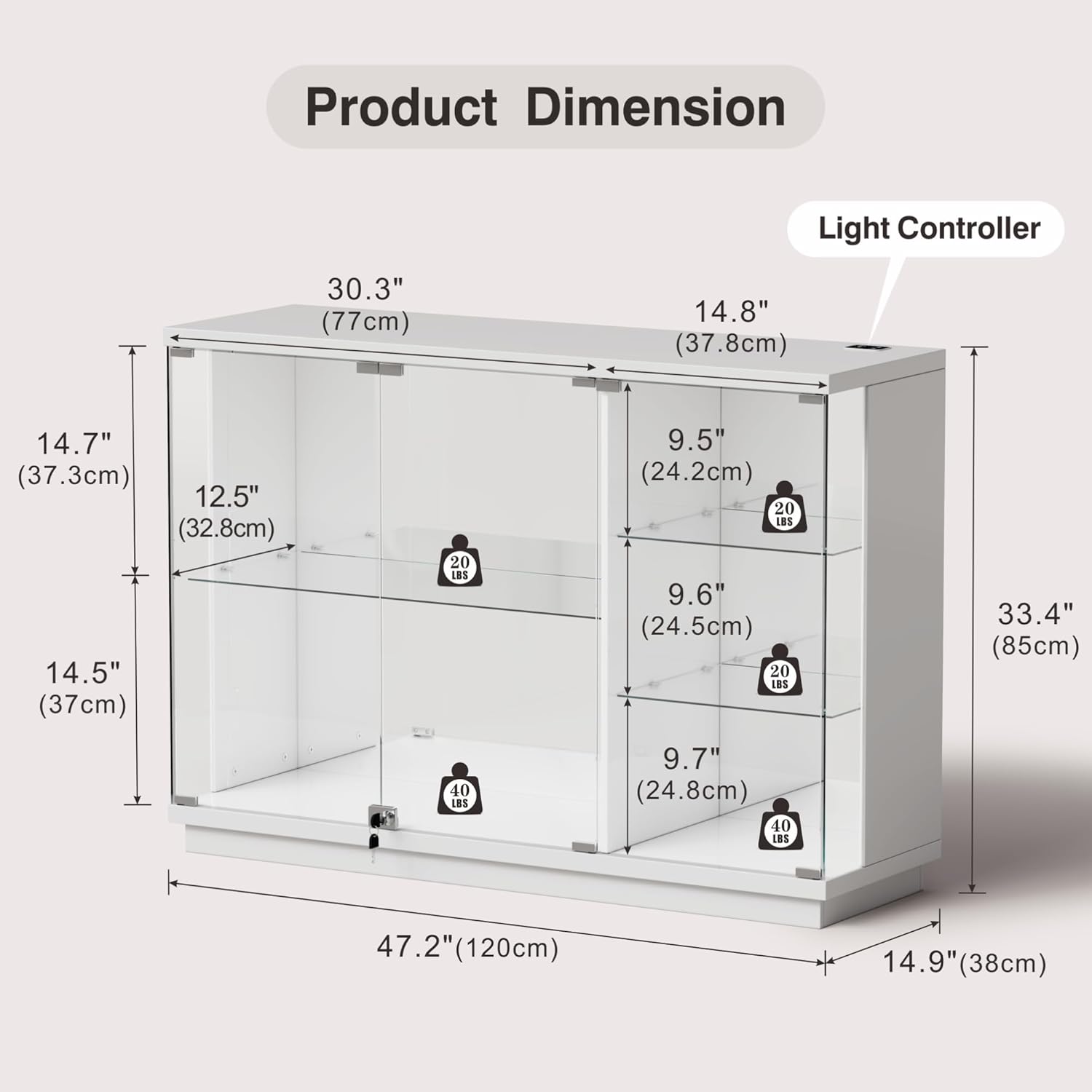
Figure 1: Product Dimensions Overview
5. Assembly Instructions
Follow these steps carefully for proper assembly. It is recommended to have a second person assist with certain steps.
5.1. Assembly Video Guide
Video 1: Detailed installation guide for the Lvifur Glass Display Cabinet. This video demonstrates each step of the assembly process, from unboxing to final setup.
5.2. Step-by-Step Assembly
- Prepare the Base: Assemble the base frame using parts B and C, securing them with the provided screws (1x8). Ensure all connections are tight.
- Attach the Bottom Panel: Secure panel A to the assembled base using screws (1x10).
- Install Side and Middle Panels: Attach panels D, E, and F to the bottom panel using screws (2x6). Ensure they are correctly oriented.
- Insert Back Panels: Slide back panels G1 and G2 into the grooves of the side and middle panels.
- Attach the Top Panel: Secure the top panel (I) to the assembled structure. Install the door hinges (7x1) and magnetic catches (6x1) on the underside of the top panel before attaching it.
- Install Glass Side Panels: Carefully insert the glass side panels (H) into their designated slots. Secure them with dowels (3x4).
- Install Glass Shelves: Place the shelf supports (8x12) at the desired heights. Carefully slide the glass shelves (J, K) into place.
- Attach Glass Doors: Mount the glass doors (L) to the hinges installed on the top panel. Ensure the side with the pad faces the screw in the bottom right position.
- Install Lock: Align the black adhesive tape with the lock position and install the lock mechanism (9x1) on the glass door.
- Secure Back Panel: Use screws (10x10) to secure the back panel to the frame.
6. Operating Instructions
6.1. LED Lighting Control
Your display cabinet is equipped with LED light strips offering three adjustable color modes and brightness control.
- Change Color Mode: Touch the switch located on the top panel to cycle through the three light modes: Blue, Yellow, and White.
- Adjust Brightness: Long press the touch switch to adjust the brightness level. Release when the desired brightness is achieved.
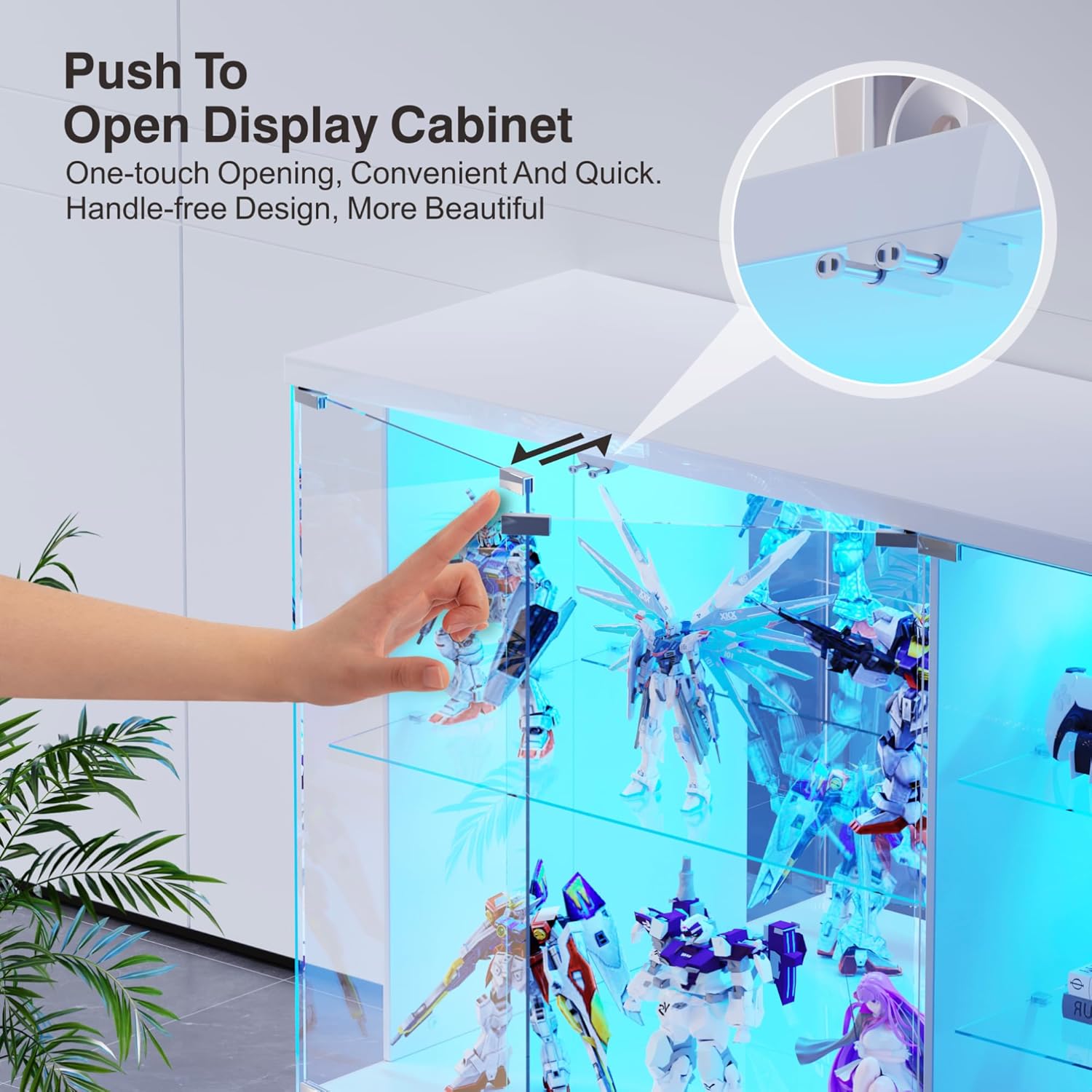
Figure 2: LED Light Modes and Brightness Adjustment
6.2. Human Body Sensor
The cabinet features a smart human body sensor that automatically activates the lights when you approach and turns them off when you leave. Ensure the sensor is unobstructed for optimal performance.
Video 2: Demonstration of the human body sensor activating the cabinet lights automatically.
6.3. Pop-up Glass Doors and Lock
- Opening Doors: The glass doors feature a one-touch pop-up mechanism for convenient and quick access. Gently press the door to release the latch.
- Locking Doors: Use the provided key to lock the cabinet doors, securing your displayed items.
Figure 3: Push-to-Open Glass Door Mechanism
6.4. Adjustable Glass Shelves
The glass compartments are removable, allowing you to adjust the shelf height or remove shelves entirely to accommodate items of various sizes.
7. Maintenance
To keep your Lvifur Glass Display Cabinet in optimal condition, follow these maintenance guidelines:
- Cleaning Surfaces: Wipe the high-gloss wood surfaces and glass panels with a soft, damp cloth. Avoid using abrasive cleaners, harsh chemicals, or rough sponges, as these can scratch or damage the finish.
- Glass Care: For streak-free glass, use a glass cleaner specifically designed for glass surfaces and a microfiber cloth.
- Dusting: Regularly dust the cabinet and its contents to maintain clarity and appearance.
- Avoid Direct Sunlight: Prolonged exposure to direct sunlight can cause fading or damage to the cabinet's finish.
8. Troubleshooting
If you encounter any issues with your display cabinet, please refer to the following common solutions:
- Lights Not Turning On: Check if the power adapter is securely connected. Ensure the human body sensor is not obstructed. If using manual mode, verify the touch switch is functioning.
- Doors Not Closing/Opening Smoothly: Inspect hinges and magnetic catches for any obstructions or misalignment. Ensure the cabinet is on a level surface.
- Wobbly Cabinet: Re-check all assembly screws and connections to ensure they are tightened properly. Ensure the cabinet is on a flat, stable floor.
For persistent issues or further assistance, please contact Lvifur customer support.
9. Warranty and Support
For detailed warranty information, including coverage periods and terms, please refer to the warranty card or documentation included with your purchase. For customer support, technical assistance, or to report missing/damaged parts, please contact Lvifur customer service through the retailer where you purchased the product or visit the official Lvifur website.
Video 3: Overview of the Lvifur Glass Display Cabinet, showcasing its features and design.