
Introduction
The NORTH EDGE Fortress is a robust analog-digital watch designed for men seeking functionality and durability. This manual provides detailed instructions for setting up, operating, and maintaining your watch, ensuring optimal performance for daily use, travel, and outdoor activities.
Key Features
- Dual Display: Combines classic analog hands with a clear digital screen for versatile timekeeping.
- World Time Function: Easily track time across multiple time zones.
- Essential Sports Functions: Includes 1/100 second stopwatch, countdown timer, and alarm.
- LED Backlight: Ensures readability in low-light conditions.
- 5ATM Water Resistance: Suitable for daily water exposure like rain, splashes, and hand washing.
- Durable Design: Lightweight 46mm case with a comfortable resin strap.

Image: The watch dial highlighting its various functions including 12/24-hour time, alarm, snooze, hourly chime, stopwatch, countdown, LED backlight, and world time capabilities.
Watch Components
Your NORTH EDGE Fortress watch features four primary buttons for navigation and setting:
- LIGHT (Top Left): Activates the LED backlight.
- MODE (Bottom Left): Cycles through different modes (Time, Stopwatch, Countdown, Alarm, World Time).
- ADJUST (Top Right): Used to enter/exit setting modes and confirm selections.
- SEARCH (Bottom Right): Used to start/stop functions or change values during setting.
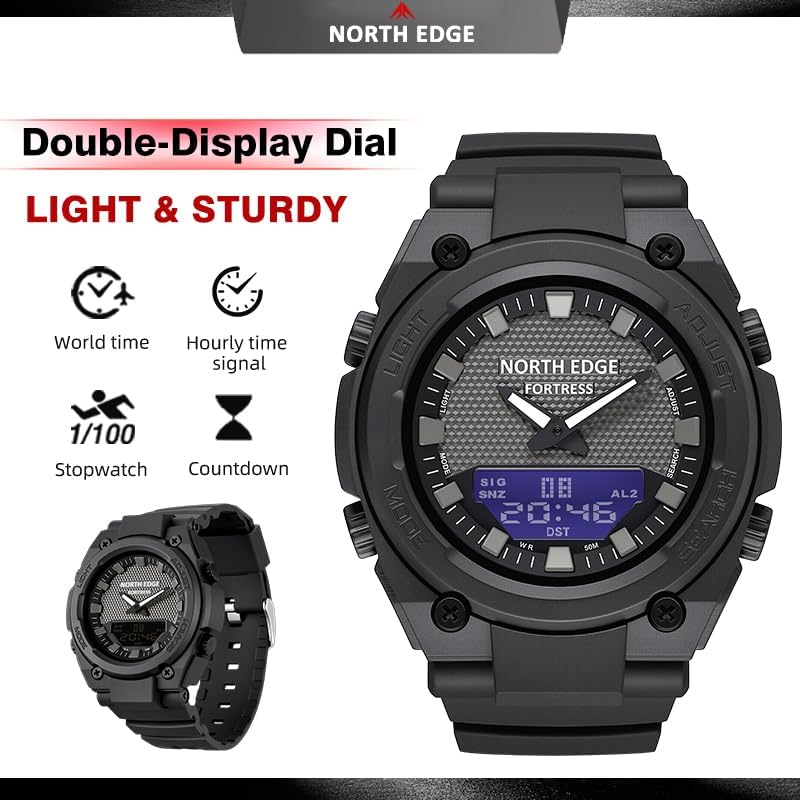
Image: The watch face displaying the analog and digital elements, with labels indicating the functions of the four control buttons.
Setup and Initial Configuration
Setting Time and Date
- In Timekeeping Mode, press and hold the ADJUST button until the digital display starts flashing, indicating setting mode.
- Press the MODE button to cycle through the settings: Seconds → Hour → Minute → Year → Month → Day.
- Use the SEARCH button to increase the flashing value. Hold SEARCH to rapidly advance.
- Once all settings are correct, press the ADJUST button to exit the setting mode. The analog hands will automatically synchronize with the digital time.
12/24-Hour Format
While in Timekeeping Mode, press the SEARCH button to toggle between 12-hour and 24-hour (military) time formats.
World Time Setting
- Press the MODE button repeatedly until you reach the World Time mode.
- Press the ADJUST button to enter setting mode. The city code will flash.
- Use the SEARCH button to select your desired world time zone/city.
- Press ADJUST to confirm and exit.
Operating Modes
Stopwatch Function
- Press the MODE button until 'STW' or 'STOP' appears on the digital display.
- Press SEARCH to start the stopwatch.
- Press SEARCH again to stop.
- Press ADJUST to reset the stopwatch to zero.
Countdown Timer
- Press the MODE button until 'TMR' or 'TIMER' appears.
- Press and hold ADJUST to enter setting mode. The hour/minute will flash.
- Use MODE to select hours or minutes, and SEARCH to adjust the value.
- Press ADJUST to confirm the setting.
- Press SEARCH to start the countdown. An alarm will sound when the timer reaches zero.
Alarm and Hourly Chime
- Press the MODE button until 'ALM' or 'ALARM' appears.
- Press and hold ADJUST to enter alarm setting mode. The hour will flash.
- Use MODE to select hours or minutes, and SEARCH to adjust the value.
- Press ADJUST to confirm the alarm time.
- In Alarm mode, press SEARCH to toggle the alarm ON/OFF. A small alarm icon will appear when active.
- To activate/deactivate the hourly chime (SIG), press MODE to cycle to the alarm screen, then press ADJUST and SEARCH simultaneously.
LED Backlight
Press the LIGHT button (top left) to illuminate the digital display for a few seconds, enhancing visibility in dark environments.

Image: The watch face demonstrating the LED backlight feature, illuminating the digital display for clear reading in low light.
Water Resistance (5ATM)
The NORTH EDGE Fortress watch is rated for 5ATM (50 meters / 164 feet) water resistance. This means it is suitable for:
- Daily use and exposure to water splashes.
- Rain.
- Hand washing.
It is not recommended for showering, swimming, diving, or any activities involving prolonged submersion or high-pressure water exposure. Do not operate buttons while the watch is wet or submerged.
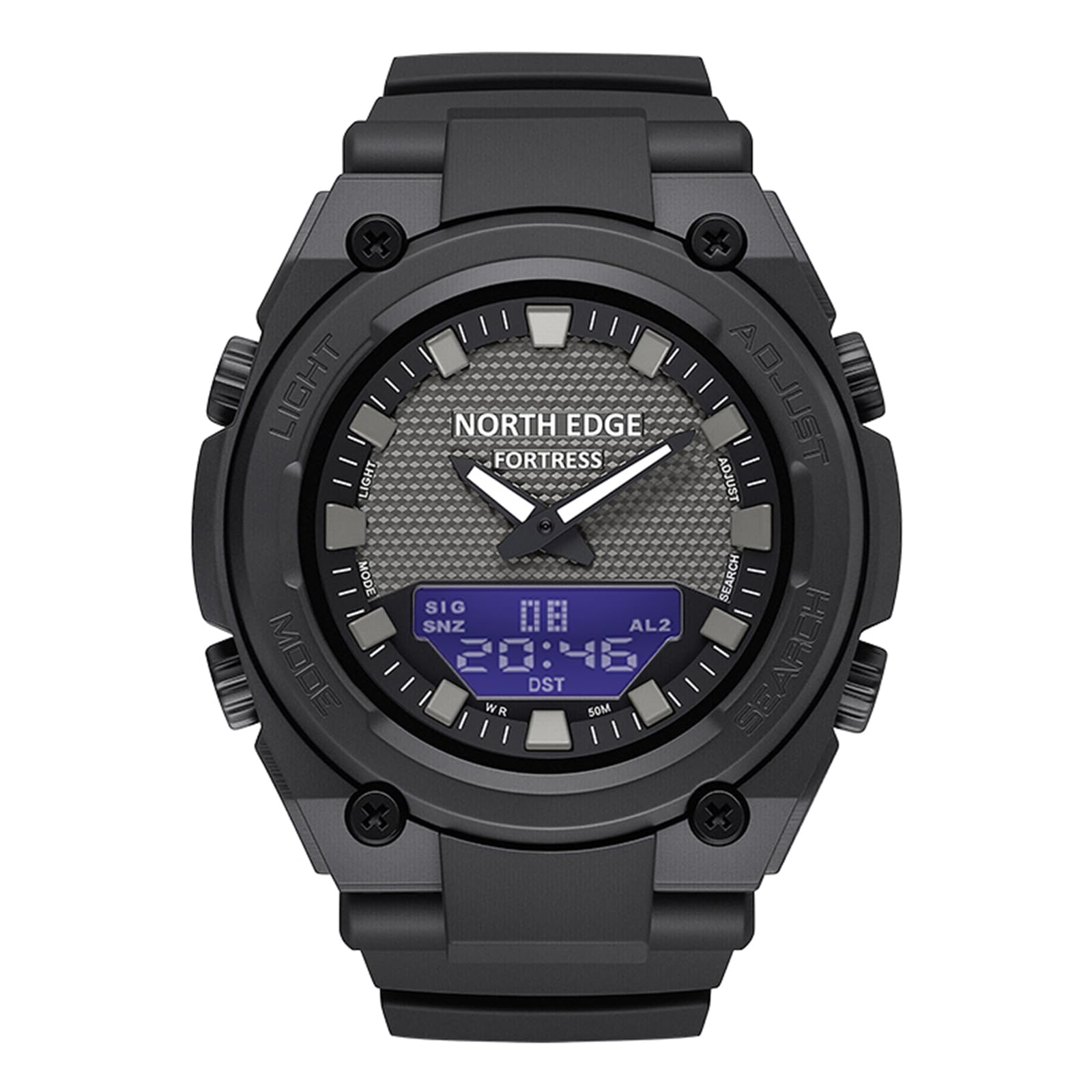
Image: The back casing of the watch, clearly marked with 'WR 164FT 50M', confirming its water resistance rating.
Battery Information
The NORTH EDGE Fortress watch uses a CR2016 battery. The battery is included and pre-installed. Battery life can vary depending on usage, especially frequent use of the backlight and alarm functions.
When the digital display becomes dim or functions become erratic, it may be time to replace the battery. Battery replacement should ideally be performed by a qualified watch technician to ensure proper sealing and maintain water resistance.
Image: The back casing of the watch, indicating the battery type 'CR 2016' required for operation.
Maintenance and Care
- Cleaning: Wipe the watch regularly with a soft, dry cloth. For stubborn dirt, use a slightly damp cloth and mild soap, then rinse and dry thoroughly.
- Avoid Chemicals: Do not expose the watch to solvents, detergents, perfumes, or cosmetics, as these can damage the case, strap, or seals.
- Temperature Extremes: Avoid exposing the watch to extreme temperatures (hot or cold) or sudden temperature changes, which can affect its accuracy and water resistance.
- Impact: While durable, avoid strong impacts or dropping the watch.
Troubleshooting
Analog Hands Not Matching Digital Time
If the analog hands do not align with the digital time after setting, ensure you have completed the digital time setting process correctly. The analog hands should automatically synchronize. If not, try resetting the watch (refer to the full manual if available for specific reset procedures, or remove and reinsert the battery if comfortable doing so, which will require re-setting all functions).
Digital Display Not Visible or Dim
This usually indicates a low battery. Replace the CR2016 battery. If the issue persists after battery replacement, contact customer support.
Backlight Not Working
Check the battery. If the battery is low, the backlight may not function or may be very dim. If the battery is new and the backlight still doesn't work, there may be an internal issue requiring professional service.
Specifications
| Feature | Specification |
|---|---|
| Model Number | Fortress |
| Display Type | Analog-Digital |
| Case Diameter | 46.1 mm (1.81 inches) |
| Case Thickness | 15.4 mm (0.61 inches) |
| Band Width | 26.5 mm (1.04 inches) |
| Band Length | 220 mm (8.7 inches) |
| Weight | 51g (0.11 lbs) |
| Water Resistance | 5ATM (50 meters / 164 feet) |
| Movement Type | Quartz |
| Battery Type | CR2016 |
| Band Material | Resin |

Image: A detailed diagram illustrating the key dimensions of the watch, such as case diameter, strap width, and overall length.
Warranty and Support
The NORTH EDGE Fortress watch comes with a 1-year manufacturer's warranty covering defects in materials and workmanship from the date of purchase. This warranty does not cover damage caused by improper use, accidents, unauthorized repairs, or normal wear and tear.
For warranty claims, technical support, or further assistance, please contact NORTH EDGE customer service through your original point of purchase or visit the official NORTH EDGE website for contact information.
