Introduction
Thank you for choosing the Tineco Floor ONE S5 Cordless Hardwood Floors Vacuum Cleaner. This innovative appliance is designed to simplify your floor cleaning routine by combining vacuuming and mopping functions into one efficient device. Featuring iLoop Smart Sensor Technology, it intelligently adjusts suction power and water flow to effectively clean both wet and dry messes on various hard floor surfaces. Please read this manual thoroughly before first use to ensure proper operation and maintenance.
Important Safety Instructions
When using an electrical appliance, basic precautions should always be followed, including the following:
- Read all instructions before using this appliance.
- Do not use outdoors or on wet surfaces.
- Do not allow to be used as a toy. Close attention is necessary when used by or near children.
- Use only as described in this manual. Use only manufacturer's recommended attachments.
- Do not use with damaged cord or plug. If appliance is not working as it should, has been dropped, damaged, left outdoors, or dropped into water, return it to a service center.
- Do not pull or carry by cord, use cord as a handle, close a door on cord, or pull cord around sharp edges or corners. Do not run appliance over cord. Keep cord away from heated surfaces.
- Do not unplug by pulling on cord. To unplug, grasp the plug, not the cord.
- Do not handle plug or appliance with wet hands.
- Do not put any object into openings. Do not use with any opening blocked; keep free of dust, lint, hair, and anything that may reduce air flow.
- Keep hair, loose clothing, fingers, and all parts of body away from openings and moving parts.
- Turn off all controls before unplugging.
- Use extra care when cleaning on stairs.
- Do not use to pick up flammable or combustible liquids, such as gasoline, or use in areas where they may be present.
- Do not pick up anything that is burning or smoking, such as cigarettes, matches, or hot ashes.
- Do not use without filters in place.
- Prevent unintentional starting. Ensure the switch is in the off-position before connecting to battery pack, picking up or carrying the appliance.
- Recharge only with the charger specified by the manufacturer. A charger that is suitable for one type of battery pack may create a risk of fire when used with another battery pack.
- Under abusive conditions, liquid may be ejected from the battery; avoid contact. If contact accidentally occurs, flush with water. If liquid contacts eyes, additionally seek medical help. Liquid ejected from the battery may cause irritation or burns.
- Do not use an appliance that is damaged or modified. Damaged or modified batteries may exhibit unpredictable behavior resulting in fire, explosion or risk of injury.
- Do not expose an appliance to fire or excessive temperature. Exposure to fire or temperature above 130°C (265°F) may cause explosion.
- Follow all charging instructions and do not charge the appliance outside of the temperature range specified in the instructions. Charging improperly or at temperatures outside of the specified range may damage the battery and increase the risk of fire.
- Have servicing performed by a qualified repair person using only identical replacement parts. This will ensure that the safety of the product is maintained.
- Do not modify or attempt to repair the appliance or the battery pack (as applicable) except as indicated in the instructions for use and care.
What's Included
The Tineco Floor ONE S5 package includes the following components:

Image Description: Included accessories for the Tineco Floor ONE S5: Replacement Brush Roller, Deodorizing & Cleaning Solution, Recharging Base, 3-in-1 Cleaning Tool, and Filter.
- Main Unit: The cordless vacuum and mop cleaner.
- Replacement Brush Roller: An additional brush roller for future use.
- Deodorizing & Cleaning Solution: Specially formulated solution for effective cleaning.
- Recharging Base: For convenient charging and storage.
- 3-in-1 Cleaning Tool: A versatile tool for maintaining the device.
- Filter: An additional filter for replacement.
Assembly and Initial Setup
Before using your Tineco Floor ONE S5, please follow these steps for assembly and initial preparation:
- Assemble the Handle: Insert the handle into the main body of the vacuum until it clicks securely into place. Ensure it is firmly fixed.
- Initial Charge: Place the assembled unit onto the recharging base. Connect the power adapter to the base and plug it into a wall outlet. Allow the unit to fully charge before its first use. The display will indicate charging status.
- Fill the Clean Water Tank: Remove the clean water tank from the unit. Fill it with clean water and add a small amount of the provided deodorizing and cleaning solution as per the instructions on the solution bottle. Reattach the tank securely.

Image Description: The Tineco Floor ONE S5 stored neatly on its charging and storage docking station, illustrating easy charging and tidy storage.
Operation
The Tineco Floor ONE S5 is designed for efficient wet and dry cleaning on hard floors. Here’s how to operate it:
1. Powering On and Cleaning Modes
- Press the power button to turn on the unit.
- The device will typically start in AUTO mode, which utilizes the iLoop Smart Sensor Technology.
- The iLoop Smart Sensor automatically detects the mess level and adjusts suction power and water flow accordingly for optimal cleaning.

Image Description: The Tineco Floor ONE S5 display showing iLoop Smart Sensor Technology. A red light indicates detected dirt, while a blue light indicates dirt has been removed. The display also shows remaining runtime, adjustable suction settings, and the auto-cleaning icon.
2. Cleaning Performance
- The exclusive brush roller is designed to clean close to baseboards, ensuring thorough cleaning of hard-to-reach corners.
- Your floors will become dry and streak-free within minutes after cleaning.

Image Description: The Tineco Floor ONE S5 demonstrating improved edge cleaning, showing the brush roller effectively cleaning within 1 cm of baseboards.

Image Description: The Tineco Floor ONE S5 effectively vacuums and mops various messes, including milk, ketchup, egg, pet hair, pet food, and rough debris, from different hard floor types such as wood, tile, marble, and epoxy, all in a single pass.
3. Dual-Tank System
- The unit features a dual-tank system that keeps clean water/solution separate from dirty water. This ensures you are always cleaning with fresh water.
- The clean water tank is 30% larger than previous models, allowing for longer cleaning sessions without interruption (up to 35 minutes runtime).
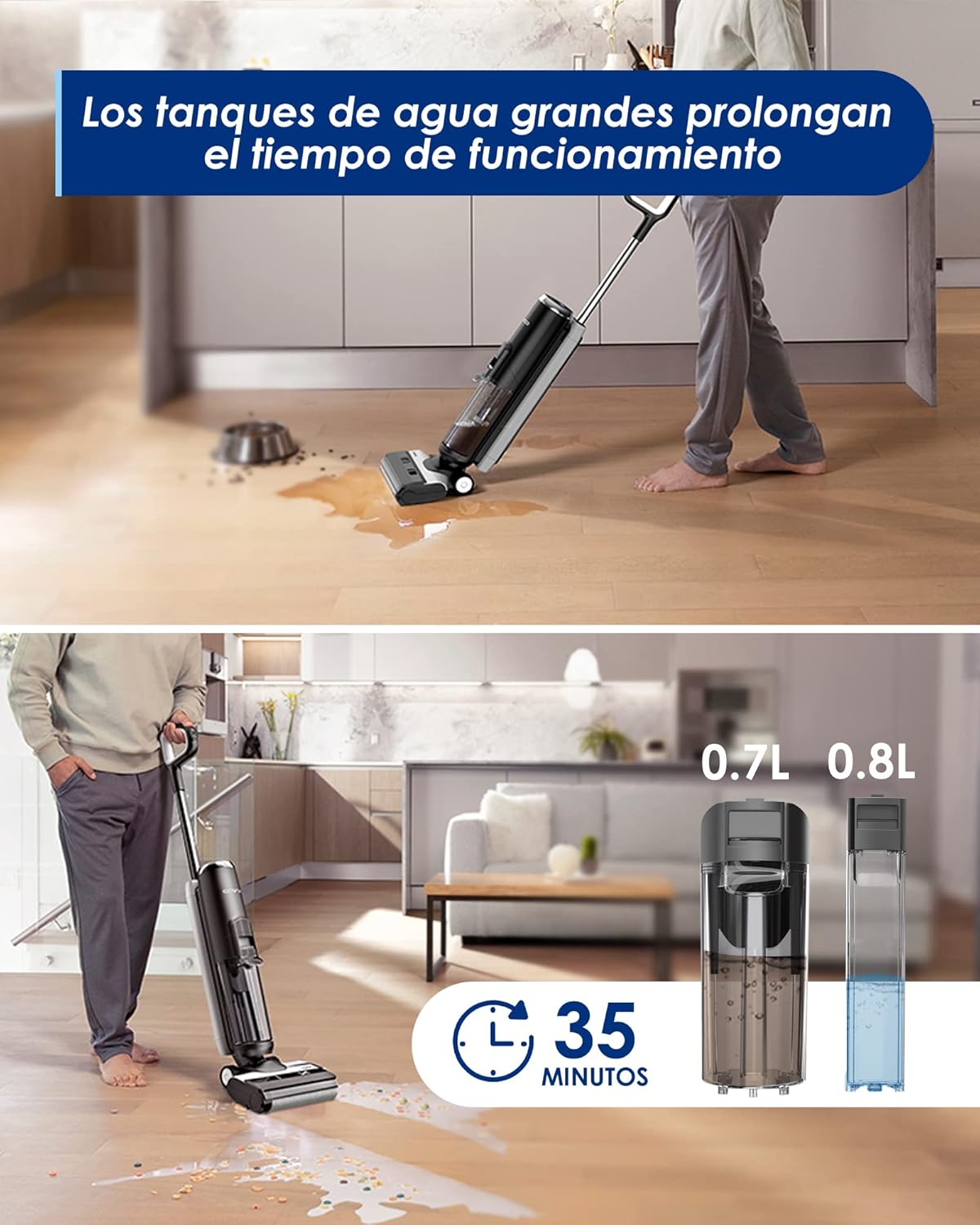
Image Description: The Tineco Floor ONE S5 features large clean (0.8L) and dirty (0.7L) water tanks, which contribute to an extended operating time of up to 35 minutes on a single charge.
4. App Connection
- Connect your Floor ONE S5 to the Tineco app for additional features, monitoring, and support.
- The app provides real-time information on battery life, tank status, and maintenance reminders.

Image Description: A smartphone screen displaying the Tineco app connected to the Floor ONE S5, showing battery level, clean water tank status, dirty water tank status, and brush roll status.
Maintenance
Regular maintenance ensures optimal performance and extends the lifespan of your Tineco Floor ONE S5.
1. Hands-Free Self-Cleaning
- After each use, place the unit on its docking station.
- Press the self-cleaning button (usually indicated by an icon on the handle or display).
- The self-cleaning cycle automatically flushes the inner tubing and brush roller, removing dirt and debris.
- Centrifugal drying effectively removes water from the roller, preventing odors and mildew.

Image Description: A hand initiating the hands-free self-cleaning function on the Tineco Floor ONE S5 by pressing a button on the handle. An inset shows the brush roller undergoing the cleaning process.
2. Dirty Water Tank Cleaning
- Empty the dirty water tank after each use.
- Rinse the tank thoroughly with clean water.
- Clean the detection pin of the dirty water tank to prevent false alarms.
- The pet hair strainer inside the dirty water tank makes pet hair removal quick and easy.
3. Filter and HEPA Maintenance
- Clean the filter and HEPA filter once a month to maintain optimal suction and stability.
- Refer to the user guide for detailed instructions on how to remove and clean these components. Ensure they are completely dry before reinserting.
4. Brush Roller Maintenance
- Periodically check the brush roller for tangled hair or debris.
- Use the provided 3-in-1 cleaning tool to remove any obstructions.
- Replace the brush roller when it shows signs of wear or damage.
Troubleshooting
If you encounter any issues with your Tineco Floor ONE S5, please refer to the common problems and solutions below:
| Problem | Possible Cause | Solution |
|---|---|---|
| Unit does not power on. | Battery is not charged. | Place the unit on the charging base and ensure it is fully charged. |
| Poor suction or cleaning performance. | Dirty water tank is full or clogged. Filter is dirty or wet. Brush roller is tangled or worn. | Empty and clean the dirty water tank. Clean and dry the filter and HEPA filter. Clean the brush roller or replace if necessary. |
| Water leakage. | Water tanks are not properly installed. Seals are damaged or missing. | Ensure both clean and dirty water tanks are securely in place. Check seals for damage and contact support if replacement is needed. |
| False dirty water tank alarm. | Detection pin is dirty. | Clean the detection pin of the dirty water tank after emptying. |
| Unit stops unexpectedly. | Overheating due to blocked airflow. Battery low. | Check for blockages in the brush roller, tanks, and air ducts. Allow unit to cool. Recharge the battery. |
If the problem persists after trying these solutions, please contact Tineco Customer Support.
Specifications
| Feature | Detail |
|---|---|
| Brand | Tineco |
| Model Name | CRTTINECOS5RB |
| Special Features | Dual-Tank Water System, Exclusive Edge Cleaning Design, Self-Cleaning Function, Smart iLoop™ Sensor Technology, Wet and Dry Cleaning in One Step |
| Filter Type | Disk |
| Included Components | Cleaning tool |
| Cordless | Yes |
| Clean Water Tank Capacity | 0.8 Liters |
| Wattage | 220 watts |
| Recommended Uses | Bare Floor, Hard Floor, Rug (Note: Primarily designed for hard floors) |
| Form Factor | Upright |
| Color | Blue |
| Product Dimensions | 10.24"L x 9.8"W x 43.3"H |
| Battery Type | Lithium-Ion |
| Noise Level | 78 Decibels |
| Amperage | 7.2 Amps |
| Battery Life | Up to 35 minutes |
| Item Weight | 9.9 pounds |
| Power Source | Battery Powered |
| Indoor/Outdoor Usage | Indoor |
Warranty Information
This Tineco Floor ONE S5 (Renewed) product comes with a 90-day limited warranty. This warranty covers defects in materials and workmanship under normal use. Please retain your proof of purchase for warranty claims.
For detailed warranty terms and conditions, or to initiate a warranty claim, please refer to the official Tineco website or contact customer support.
Customer Support
For further assistance, technical support, or inquiries regarding your Tineco Floor ONE S5, please contact Tineco Customer Service through their official website or the Tineco mobile application.
- Online Support: Visit the official Tineco website for FAQs, troubleshooting guides, and contact forms.
- Tineco App: Use the Tineco app for direct support, product registration, and access to digital manuals.