
1. Introduction
Thank you for purchasing the Godox V1 Mid TTL Round Head Camera Flash. This professional speedlite is designed to provide soft, even, and natural light for various photography needs. Featuring a compact design, fast recycle time, and intuitive touchscreen control, the V1 Mid S is optimized for Sony cameras, offering seamless integration with the Godox 2.4G wireless X system. This manual will guide you through the setup, operation, and maintenance of your flash unit.
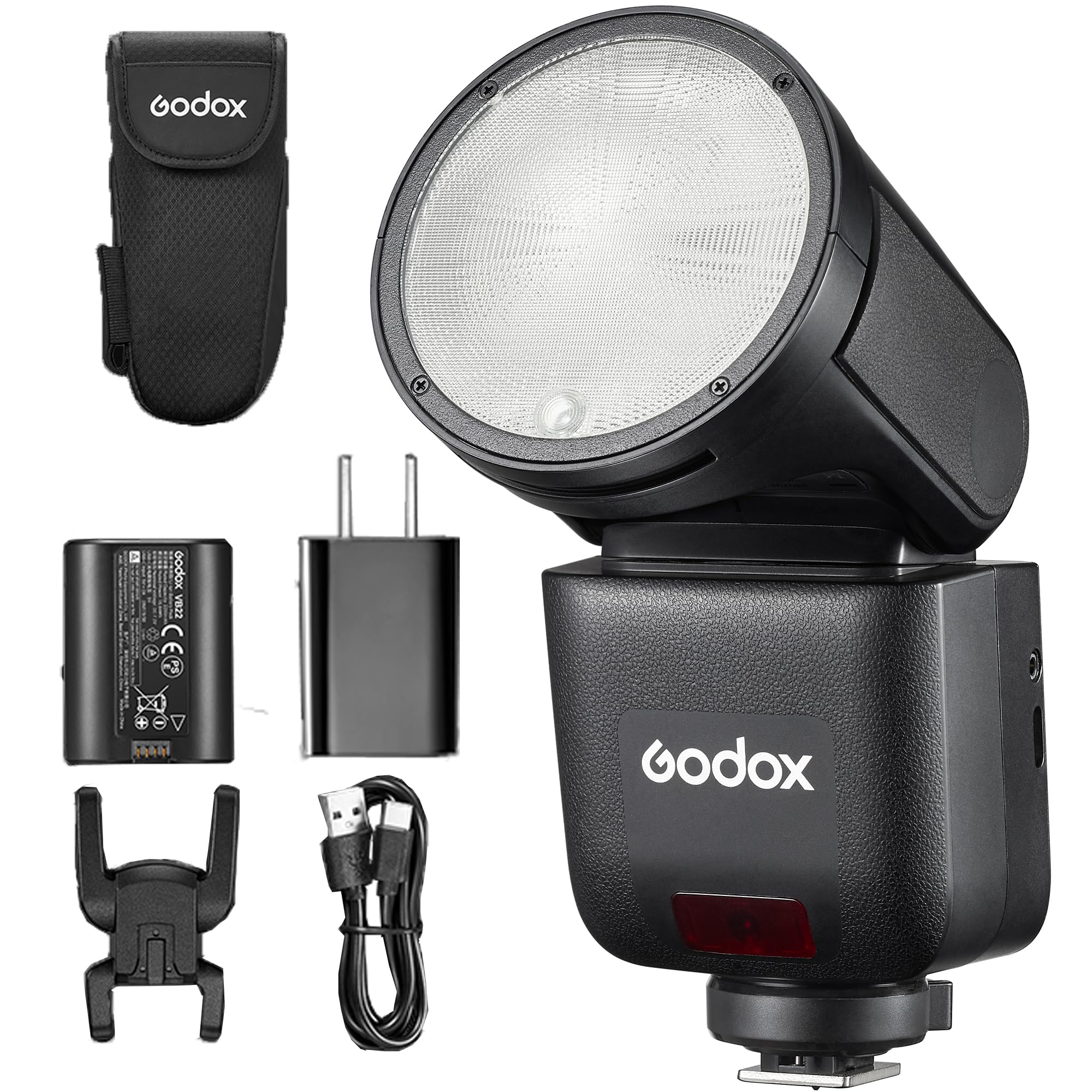
Figure 1.1: Godox V1 Mid TTL Round Head Camera Flash.
2. Safety Information
- Do not disassemble or modify this product. If the product fails, it must be repaired by an authorized maintenance center.
- Keep this product dry. Do not handle with wet hands or immerse in water.
- Keep out of reach of children.
- Do not use the flash unit in the presence of flammable gases, chemicals, or other materials.
- Do not touch the flash tube after use to avoid burns.
- Use only the specified battery and charger.
- Protect the flash unit from sudden impacts or strong vibrations.
3. Package Contents
The Godox V1 Mid S package typically includes the following items:
- Godox V1 Mid S Flash Unit
- Lithium-ion Battery
- Battery Charger
- USB Type-C Cable
- Mini Stand
- Protective Case
- Instruction Manual

Figure 3.1: Typical contents of the Godox V1 Mid S package.
4. Product Overview
The Godox V1 Mid S features a round flash head for soft, even light distribution, a built-in LED modeling lamp, and a user-friendly touchscreen interface. It is designed for portability and efficient workflow.
4.1 Key Features
- Round Flash Head: Creates uniform and soft light effects.
- Integrated LED Modeling Lamp: 10 adjustable brightness levels for precise light effect preview.
- Compact and Balanced Design: Reduces carrying fatigue for long shooting sessions.
- Fast Recycle Time: Approximately 1.7 seconds at full power.
- High-Performance Li-Ion Battery: Provides up to 650 full-power flashes per charge.
- Built-in Godox 2.4G Wireless X System: Supports TTL, Manual, and Multi modes, with one-tap switching between transmitter and receiver units.
- Intuitive Touchscreen Control: For quick and effortless adjustments.
- USB Type-C Charging: Offers flexible charging options.
- Magnetic Accessory Mount: Compatible with the AK-R1 Round Head Accessory Kit for creative light shaping.

Figure 4.1: The V1 Mid S optical system for refined light output.

Figure 4.2: The compact design of the V1 Mid S for enhanced mobility.
5. Setup
5.1 Battery Installation and Charging
- Open the battery compartment cover located on the side of the flash unit.
- Insert the provided lithium-ion battery, ensuring the contacts align correctly.
- Close the battery compartment cover securely.
- To charge the battery, connect the USB Type-C cable to the flash unit's USB-C port and to a power adapter or power bank. The battery can also be charged using the external charger provided.

Figure 5.1: Battery installation and USB Type-C charging port.
5.2 Mounting on Camera
- Slide the flash unit's hot shoe into your camera's hot shoe mount.
- Rotate the locking ring or lever on the flash unit to secure it firmly to the camera.
5.3 Powering On/Off
Press and hold the power button to turn the flash unit on or off. The touchscreen will illuminate upon power-on.
6. Operating the Flash
6.1 Basic Flash Modes
The V1 Mid S supports various flash modes to suit different shooting scenarios:
- TTL (Through-The-Lens) Mode: The flash automatically adjusts its output for correct exposure.
- Manual (M) Mode: Allows you to manually set the flash power output from 1/1 to 1/256.
- Multi (Stroboscopic) Mode: Fires a series of rapid flashes during a single exposure to capture multiple movements of a subject.

Figure 6.1: Professional flash modes and synchronization options.
6.2 High-Speed Sync (HSS)
High-Speed Sync allows the flash to synchronize with shutter speeds faster than the camera's native sync speed, enabling you to use flash with wide apertures in bright conditions.
6.3 Godox 2.4G Wireless X System
The V1 Mid S has a built-in 2.4G wireless X system, allowing it to function as a master or slave unit. This enables seamless integration with other Godox X system flashes and triggers for multi-light setups. Use the one-tap switch to toggle between transmitter and receiver modes.
6.4 Touchscreen Control
The intuitive touchscreen interface provides quick access to all settings. Tap icons to select modes, adjust power levels, and navigate menus. The simplified keys complement the touchscreen for efficient operation.

Figure 6.2: Intuitive touchscreen control for fast and precise adjustments.
6.5 Using Accessories
The V1 Mid S is compatible with the Godox AK-R1 Round Head Accessory Kit, which includes a dome diffuser, diffuser plate, four-wing reflector, bounce card, snoot, honeycomb, and color filters. These magnetic accessories attach quickly to the flash head for versatile light shaping. Additionally, it supports Bowens-mount modifiers when paired with the S3 Speedlite Bracket.
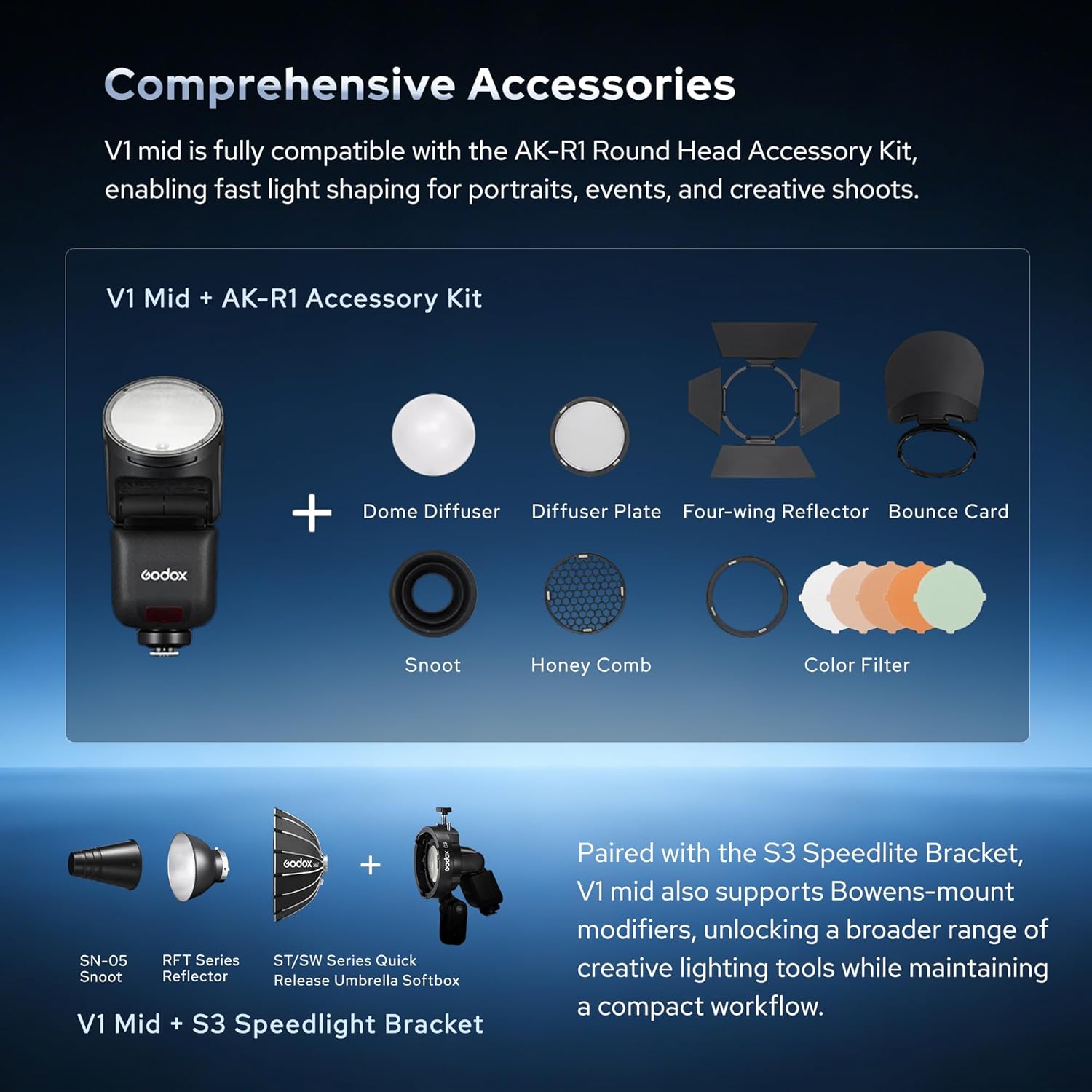
Figure 6.3: Comprehensive accessories for the Godox V1 Mid S.
7. Official Product Videos
7.1 Godox V1 Mid S Flash Overview
Video 7.1: This video provides an overview of the Godox V1 Mid S Flash, highlighting its features and capabilities as a 55Ws TTL High Speed Speedlite.
7.2 Godox V1 Flash Introduction
Video 7.2: An introductory video showcasing the Godox V1 Flash, demonstrating its design and basic functions.
7.3 GODOX V1 MID Camera Flash Features
Video 7.3: This video details various features of the GODOX V1 MID Camera Flash, including its performance and ease of use.
8. Maintenance
8.1 Cleaning
Regularly clean the flash unit with a soft, dry cloth. For stubborn dirt, use a slightly damp cloth with a mild detergent, then wipe dry. Avoid using solvents or abrasive cleaners.
8.2 Battery Care
- Store the battery in a cool, dry place when not in use.
- If storing for extended periods, charge the battery to approximately 50% capacity.
- Avoid fully discharging the battery frequently.
8.3 Storage
When not in use, store the flash unit in its protective case in a dry, dust-free environment, away from direct sunlight and extreme temperatures.
9. Troubleshooting
| Problem | Possible Cause | Solution |
|---|---|---|
| Flash does not fire. | Low battery; incorrect settings; flash not securely mounted. | Charge battery; check flash mode and power settings; ensure flash is securely mounted on camera hot shoe. |
| Flash output is inconsistent. | Battery low; flash tube overheating; interference in wireless mode. | Recharge or replace battery; allow flash to cool down; check wireless channel/ID settings. |
| Flash does not sync with camera. | Incorrect sync mode; camera settings. | Ensure flash is in TTL or appropriate manual sync mode; check camera's flash settings. |
| Touchscreen unresponsive. | Temporary software glitch. | Restart the flash unit. If problem persists, contact support. |
10. Specifications
| Feature | Detail |
|---|---|
| Brand | GODOX |
| Model Number | V1 Mid S-For Sony |
| Compatible Mounts | Sony |
| Flash Type | External Camera Flash |
| Exposure Control Type | TTL |
| Wireless Technology | Radiofrequency (2.4G) |
| Max Shutter Speed Sync | 1/250 seconds |
| Battery Type | 1 x 12V Lithium-ion (included) |
| Battery Life (Full Power Flashes) | Approx. 650 |
| Color | Black |
| Water Resistance Level | Not water resistant |
| GTIN / UPC | 850077598418 |
11. Warranty Information
Godox products are typically covered by a limited warranty against defects in materials and workmanship for a period of one year from the original date of purchase. This warranty does not cover damage caused by misuse, unauthorized modifications, accidents, or normal wear and tear. Please retain your proof of purchase for warranty claims. For specific warranty terms and conditions, refer to the warranty card included with your product or visit the official Godox website.
12. Customer Support
For technical assistance, troubleshooting, or service inquiries, please contact Godox customer support. You can usually find contact information on the official Godox website or through your local distributor. When contacting support, please have your product model number (V1 Mid S) and purchase details ready.


