
1. Introduction
This manual provides detailed instructions for the installation, operation, and maintenance of your SAMA G850P Fully Modular ATX 3.1 Power Supply. The SAMA G850P is designed to deliver stable and efficient power to high-performance PC systems, featuring 80PLUS Gold certification, a fully modular design, and advanced protection mechanisms.
2. Safety Information
- Electrical Hazard: Do not open the power supply unit. High voltages are present inside, even when disconnected from power.
- Ventilation: Ensure adequate airflow around the power supply. Do not block ventilation openings.
- Moisture: Keep the power supply away from water or high humidity environments.
- Installation: Install the power supply according to the instructions provided in this manual and your PC case manual.
- Grounding: Always use a grounded power cord.
- Cable Management: Ensure all cables are properly connected and routed to prevent damage or interference.
3. Package Contents
Verify that all items are present in the package:
- SAMA G850P Fully Modular ATX 3.1 Power Supply
- Modular Cable Set (including 12V-2x6, CPU, PCIe, SATA, Molex cables)
- AC Power Cord
- Mounting Screws
- User Manual
4. Features
- ATX 3.1 Compliance: Designed to meet the Intel ATX 3.1 standard for enhanced stability and efficiency.
- Native 12V-2x6 Connector: Equipped with a durable, heat-resistant 12V-2x6 connector for NVIDIA GeForce RTX 50 Series graphics cards.
- 80PLUS Gold Certified: Achieves up to 90% conversion efficiency at typical load, minimizing energy waste.
- Temperature Adaption with Silent Cooling Fan: Features a 120mm Fluid Dynamic Bearing (FDB) fan that adjusts speed based on temperature, ensuring quiet operation at low loads and efficient cooling under stress.
- Fully Modular Design: Allows for connection of only necessary cables, reducing clutter and improving airflow.
- Taiwanese Main Capacitor: Ensures stable power output and long-term reliability.
- Multiple Protections: Includes Over Power Protection (OPP), Over Voltage Protection (OVP), Under Voltage Protection (UVP), Over Current Protection (OCP), Over Temperature Protection (OTP), Short Circuit Protection (SCP), No Load Operation (NLO), and Surge & Inrush Protection (SIP) to safeguard components.
5. Setup and Installation
5.1 Pre-Installation Checklist
- Ensure your PC case is compatible with ATX form factor power supplies.
- Verify that your motherboard and components are compatible with the power connectors provided.
- Unplug the computer from the wall outlet before installation.
5.2 Physical Installation
- Mount the SAMA G850P power supply into the designated PSU bay in your PC case. Ensure the fan is oriented correctly for optimal airflow (typically facing down if there's a bottom vent, or up if not).
- Secure the power supply to the case using the provided mounting screws.
5.3 Connecting Modular Cables
The SAMA G850P is a fully modular power supply. Connect only the cables required for your system components.
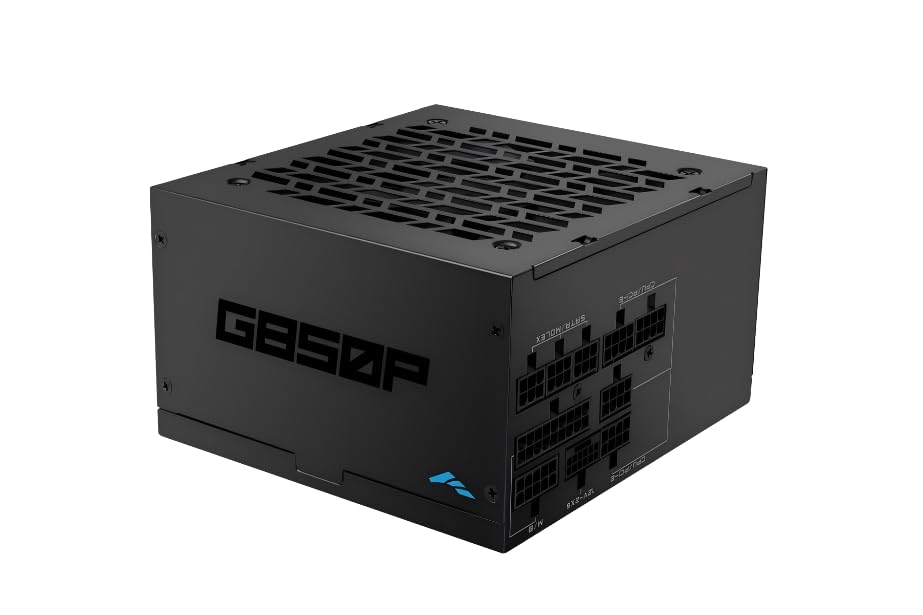
Image: SAMA G850P Power Supply with clearly labeled modular cable ports for mainboard, CPU, PCIe, SATA, and Molex connections.
- Mainboard Power: Connect the 24-pin ATX cable from the power supply to the corresponding port on your motherboard.
- CPU Power: Connect the 4+4-pin or 8-pin CPU power cable(s) to the CPU power connector(s) on your motherboard.
- PCIe Power (GPU): Connect the appropriate PCIe cables (e.g., 6+2-pin, 12V-2x6) to your graphics card(s). Ensure the native 12V-2x6 connector is used for compatible GPUs.
- SATA Power: Connect SATA power cables to your SSDs, HDDs, and other SATA-powered devices.
- Molex Power: Connect Molex cables for any peripherals requiring this type of power.
5.4 Connecting to Wall Power
- Ensure the power switch on the back of the PSU is in the OFF (0) position.
- Connect the AC power cord to the power supply and then to a grounded wall outlet.
6. Operating Instructions
- After all components are securely installed and cables connected, flip the power switch on the back of the SAMA G850P to the ON (I) position.
- Press the power button on your computer case to start the system.
- The power supply will provide stable power to your components. The 120mm FDB fan will operate quietly, adjusting its speed as needed based on the internal temperature.
7. Maintenance
- Dust Removal: Periodically clean the exterior of the power supply and its fan grille to prevent dust buildup, which can impede airflow and cooling performance. Use compressed air or a soft brush. Ensure the power supply is disconnected from the wall outlet before cleaning.
- Cable Inspection: Occasionally check all modular cable connections to ensure they are secure and free from damage.
- Environment: Operate the power supply in a well-ventilated, dry environment within its specified temperature range.
8. Troubleshooting
If you encounter issues with your SAMA G850P power supply, refer to the following common problems and solutions:
- No Power:
- Check if the AC power cord is securely connected to both the power supply and the wall outlet.
- Ensure the power switch on the PSU is in the ON (I) position.
- Verify that the 24-pin ATX and CPU power cables are correctly seated on the motherboard.
- Test the wall outlet with another device to confirm it has power.
- System Instability/Random Shutdowns:
- This could indicate an overloaded power supply or a component issue. Ensure your system's power requirements do not exceed the PSU's capacity.
- Check for proper ventilation and ensure the PSU fan is spinning. Overheating can trigger protection mechanisms.
- The SAMA G850P includes multiple protection features (OPP, OVP, UVP, OCP, OTP, SCP, NLO, SIP) that will shut down the unit to prevent damage if an issue is detected.
- Fan Noise:
- The FDB fan is designed for quiet operation. If excessive noise occurs, ensure no cables are obstructing the fan blades.
- Clean any dust buildup from the fan and grille.
If problems persist after attempting these steps, contact SAMA customer support.
9. Specifications
| Feature | Specification |
|---|---|
| Model Number | HAT-850yzB1-GP |
| Form Factor | ATX |
| Output Wattage | 850 Watts |
| Efficiency Certification | 80 PLUS Gold |
| Cooling Method | Air (120mm FDB Fan) |
| Power Supply Design | Fully Modular |
| Dimensions (L x W x H) | 9.45 x 7.48 x 4.33 inches |
| Item Weight | 6.6 pounds (3 Kilograms) |
| Connector Type | ATX |
| Protections | OPP, OVP, UVP, OCP, OTP, SCP, NLO, SIP |
10. Warranty and Support
The SAMA G850P Power Supply comes with a 5-year warranty from the date of purchase. This warranty covers defects in materials and workmanship under normal use.
For technical support, warranty claims, or further assistance, please refer to the official SAMA website or contact your local retailer. Keep your proof of purchase for warranty service.