
Introduction
This manual provides instructions for the XINFUTE PR3-UQ replacement remote control, designed for use with the Element Xumo Stream Box. This remote functions as a direct replacement for your original unit, ensuring seamless operation of your device.
Product Overview
The XINFUTE PR3-UQ is an infrared (IR) remote control constructed from durable ABS material. It is specifically compatible with the Element Xumo Stream Box. The remote is designed for ergonomic handling and provides button control for various television functions.

Figure 1: Front view of the XINFUTE PR3-UQ remote control.
Setup
Battery Installation
- Locate the battery compartment on the back of the remote control.
- Slide the battery cover downwards or press the latch and lift to open.
- Insert two (2) AA alkaline batteries, ensuring the positive (+) and negative (-) terminals align correctly with the indicators inside the compartment.
- Replace the battery cover by sliding it back into position until it clicks securely.
Note: Batteries are not included with the remote control. Always use new AA alkaline batteries for optimal performance.
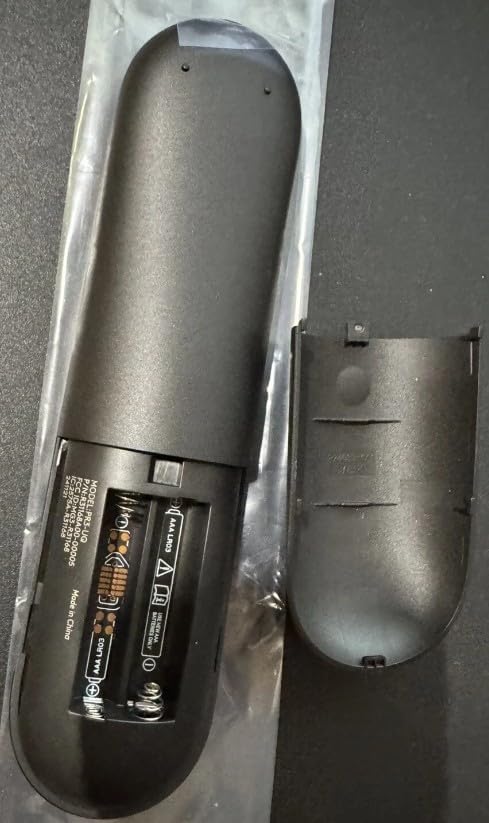
Figure 2: Battery compartment with AA batteries installed.
Operating Instructions
This remote control is pre-programmed to work with the Element Xumo Stream Box. No additional programming is typically required. Point the remote directly at your Element Xumo Stream Box for best signal transmission.
Basic Functions:
- Power Button: Turns the Element Xumo Stream Box on or off.
- Volume Buttons: Adjusts the volume level of your television or connected audio device.
- Channel Buttons: Navigates through channels (if applicable to your setup).
- Navigation Pad: Use the directional arrows (Up, Down, Left, Right) to move through menus and content. The central button typically acts as 'OK' or 'Select'.
- Back/Home Buttons: Returns to the previous screen or the main home interface.
- Playback Controls: (e.g., Play, Pause, Fast Forward, Rewind) for media playback.
Refer to your Element Xumo Stream Box user manual for specific button functionalities and advanced features.
Maintenance
Cleaning the Remote
- Wipe the remote control with a soft, dry cloth.
- For stubborn dirt, slightly dampen the cloth with water or a mild, non-abrasive cleaner.
- Do not use harsh chemicals, solvents, or abrasive cleaning pads, as these can damage the remote's surface or internal components.
Battery Replacement
If the remote control becomes unresponsive or its range decreases significantly, the batteries may need to be replaced. Follow the battery installation steps outlined in the "Setup" section.
- Remove old batteries promptly to prevent leakage.
- Dispose of used batteries according to local regulations.
Troubleshooting
| Problem | Possible Cause | Solution |
|---|---|---|
| Remote not responding. | Dead or incorrectly installed batteries. | Replace batteries with new AA alkaline batteries, ensuring correct polarity. |
| Remote range is poor. | Weak batteries; Obstruction between remote and device. | Replace batteries. Ensure a clear line of sight to the Element Xumo Stream Box. |
| Certain buttons do not work. | Remote malfunction; Device incompatibility. | Ensure the remote is compatible with your specific Element Xumo Stream Box model. If issues persist, contact support. |
Specifications
- Model Number: PR3-UQ
- Brand: XINFUTE
- Compatible Devices: Element Xumo Stream Box (Television)
- Connectivity Technology: Infrared (IR)
- Controller Type: Button Control
- Maximum Number of Supported Devices: 1
- Maximum Range: 5 Meters (approximately 16 feet)
- Power Source: 2 x AA Batteries (Alkaline recommended)
- Material: ABS Material
- Item Weight: 0.08 Kilograms (approximately 2.8 ounces)
- Item Dimensions (L x W x H): 6"L x 3"W x 1"H (approximately 15.24 cm x 7.62 cm x 2.54 cm)
- Special Feature: Ergonomic design
Warranty and Support
Warranty Description: Enjoy a one-year warranty on all purchases from XINFUTE. This warranty covers manufacturing defects and ensures your satisfaction with the product.
Customer Support: All products are inspected before shipment. If you are not satisfied with your purchase or encounter any issues, please contact XINFUTE customer support within 24 hours of receiving your product for assistance. For further support, please refer to the seller's contact information on the platform where the purchase was made.