
Introduction
This user manual provides comprehensive instructions for the safe and effective use of your Godox IT32 GN18 Flash and X5S Trigger system. Please read this manual thoroughly before operating the device to ensure optimal performance and to prevent damage. Keep this manual for future reference.
Product Overview
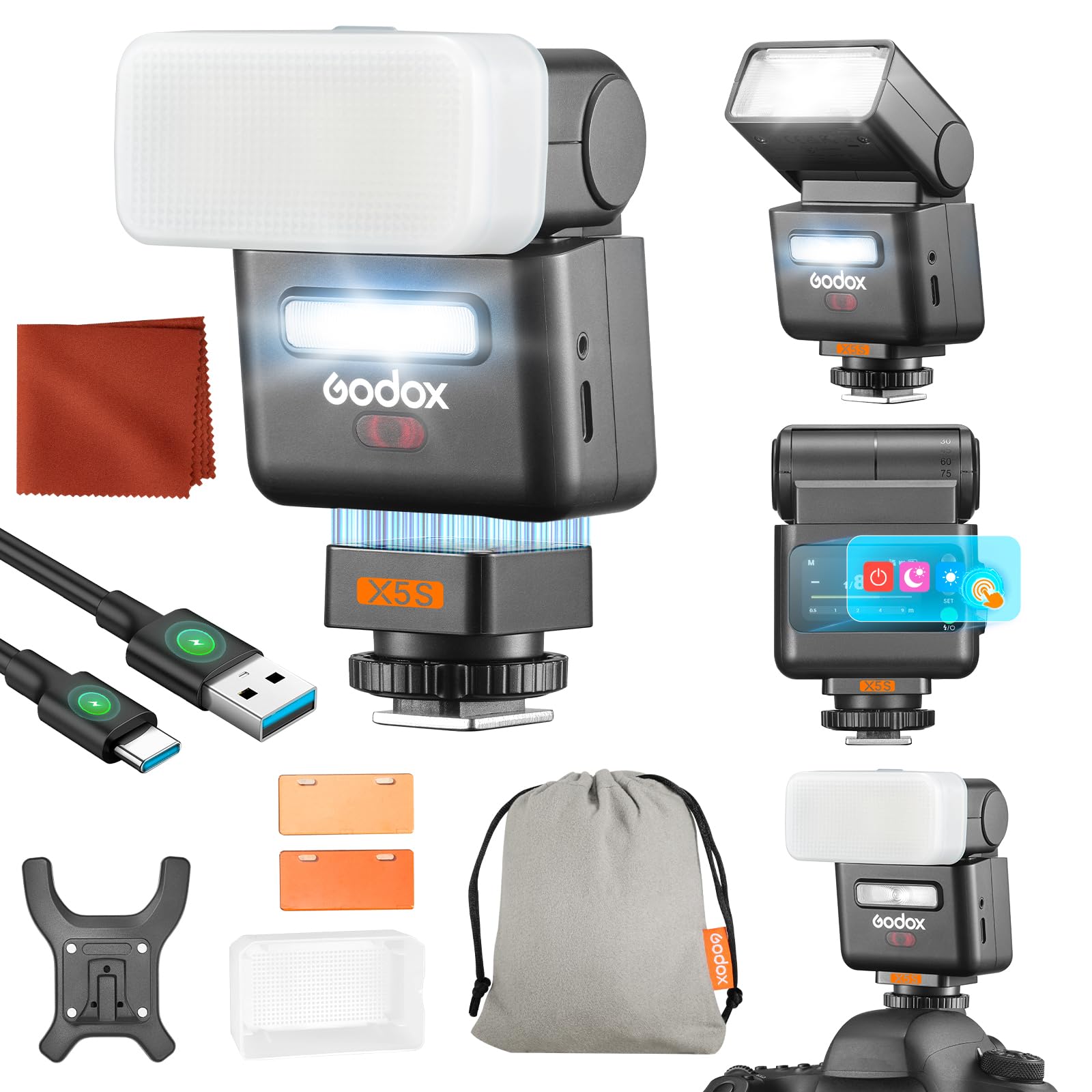
Package Contents
Verify that all items listed below are included in your package:
- IT32 Flash Unit (x1)
- X5S Trigger (x1)
- 1/1 CTO Color Filter (x1)
- 1/2 CTO Color Filter (x1)
- Diffuser (x1)
- Cleaning Cloth (x1)
- Magnetic Base (x1)
- USB Type-C Charging Cable (x1)
- Storage Bag (x1)

Key Features
- Multi-Brand Compatibility: The IT32 features trigger detection, allowing it to work with various X5 Hot-Shoe Triggers for compatibility across major camera brands.
- Magnetic & Rotational Design: The GODOX IT32 with X5S connects magnetically, enabling seamless switching between on-camera and off-camera modes. The flash head offers 270° horizontal rotation and 90° tilt for versatile bounce flash angles.
- Professional Shooting Modes: Supports automatic TTL flash for precise exposure, 8-step manual adjustment (1/128 to 1/1 with 1/3 stop FEC compensation), High-Speed Sync (HSS), and front/rear curtain synchronization.
- Integrated 2.4G Wireless X-System: Features a built-in 2.4G transmitter-receiver for wireless synchronization with other triggers and flashes. The GODOX X5 Trigger can control multiple IT32/IT30Pro units via its touchscreen.
- Versatile Accessories: Includes an LED modeling lamp for light preview, magnetic color filters for creative effects, an integrated reflector for catchlights, and a white diffuser for soft light.

Setup
1. Mounting the Flash and Trigger
The Godox IT32 flash unit is designed to be used with the X5S trigger. The X5S trigger mounts onto your Sony camera's hot shoe, and the IT32 flash unit then attaches magnetically to the X5S trigger.
- Attach X5S Trigger: Slide the X5S trigger onto your Sony camera's hot shoe mount until it clicks into place. Secure it using the locking mechanism if available.
- Attach IT32 Flash: Align the IT32 flash unit with the magnetic base of the X5S trigger. The flash unit will snap into place magnetically. This allows for quick attachment and detachment, and easy switching between on-camera and off-camera use.

2. Powering On
Press and hold the power button on both the IT32 flash and the X5S trigger to turn them on. Ensure both devices are fully charged before use.
Operating Instructions
1. Flash Modes (TTL, Manual, HSS)
The Godox IT32 supports various flash modes for different shooting scenarios:
- TTL (Through-The-Lens) Mode: This mode automatically adjusts the flash output for correct exposure by measuring the light through the camera's lens. To activate, select TTL mode on the X5S trigger's touchscreen.
- Manual Mode (M): Allows you to manually set the flash output from 1/128 to 1/1 power, with fine adjustments in 1/3 stop increments. Use the X5S trigger's interface to adjust the power level.
- High-Speed Sync (HSS): Enables flash synchronization at shutter speeds faster than the camera's native sync speed, useful for freezing motion or using wide apertures in bright conditions. Activate HSS through the X5S trigger settings.
- Front/Rear Curtain Sync: Controls whether the flash fires at the beginning (front curtain) or end (rear curtain) of the exposure. This is useful for creative effects with moving subjects.

2. Adjusting the Flash Head
The IT32 flash head can be rotated and tilted to direct light for bounce flash effects, softening shadows and creating more natural-looking illumination.
- Horizontal Rotation: The flash head can rotate up to 270 degrees horizontally.
- Vertical Tilt: The flash head can tilt up to 90 degrees vertically.

3. Using the LED Modeling Lamp
The IT32 features a built-in LED modeling lamp. This lamp provides continuous light to preview lighting effects before shooting, offers auxiliary lighting for video, and assists with focusing in low-light environments. Adjust the intensity of the LED lamp via the flash unit's controls or the X5S trigger.

4. Godox 2.4G Wireless X System
The integrated 2.4G Wireless X System allows the IT32 flash to be triggered wirelessly by the X5S trigger or other compatible Godox X-system devices. The X5S trigger's touchscreen provides control over multiple IT32 or IT30Pro flashes.
- Channels (CH1-CH32): Select a channel to avoid interference with other wireless systems.
- Groups (ABCD): Assign flashes to different groups for individual control.
- IDs (1-99, OFF): Set a unique ID for your system to prevent interference from other Godox users nearby.
- Transmission Range: The system offers a transmission range of approximately 80 meters (262 feet).

5. Using Magnetic Accessories
The IT32 flash head incorporates a magnetic disc for quick attachment of various light modifiers.
- Magnetic Color Filters: Easily snap on color filters (e.g., CTO filters) to adjust the color temperature of your flash output for creative effects or to match ambient light.
- Integrated Reflector: Pull out the built-in reflector to broaden the flash output and create catchlights in subjects' eyes.
- White Diffuser: Attach the included white diffuser to soften the light output, reducing harsh shadows and creating a more even illumination.


Maintenance
- Cleaning: Use a soft, dry cloth to clean the flash unit and trigger. For stubborn dirt, a slightly damp cloth can be used, followed by a dry cloth. Avoid using strong detergents or solvents.
- Lens/Screen Care: Use a lens cleaning cloth for the flash head and trigger screen to avoid scratches.
- Storage: When not in use for extended periods, store the flash and trigger in a cool, dry place, away from direct sunlight and excessive humidity.
- Battery Care: Ensure the integrated battery of the IT32 flash is charged periodically if not used regularly to maintain battery health. Use only the provided USB Type-C charging cable.
Troubleshooting
| Problem | Possible Cause | Solution |
|---|---|---|
| Flash does not fire. | Low battery; incorrect mode; trigger not connected; flash not powered on. | Charge the flash battery. Ensure both flash and trigger are powered on. Check flash mode settings (TTL/Manual). Verify secure connection between flash and trigger, and trigger to camera hot shoe. |
| Incorrect exposure (too dark/bright). | Incorrect flash power setting (Manual mode); FEC not adjusted; subject too far/close. | Adjust manual flash power. Use Flash Exposure Compensation (FEC) in TTL mode. Reposition subject or adjust flash power accordingly. |
| Wireless connection issues. | Incorrect channel/group/ID; out of range; interference. | Ensure flash and trigger are set to the same channel, group, and ID. Reduce distance between units. Change to a different channel/ID to avoid interference. |
| Flash head not rotating/tilting smoothly. | Obstruction or dirt. | Check for any physical obstructions. Clean the rotating/tilting mechanism gently. Do not force movement. |
Specifications
| Feature | Detail |
|---|---|
| Brand | GODOX |
| Model Name | IT32 (Flash), X5S (Trigger) |
| Compatible Devices | Sony cameras (with X5S trigger) |
| Mount Type | Hot Shoe Mount |
| Flash Type | External Camera Flash |
| Connectivity Technology | Wireless (2.4 GHz Radio Frequency) |
| Exposure Control Type | Automatic (TTL) and Manual |
| Dimensions (Package) | 20.6 x 7.6 x 7.15 cm |
| Weight (Package) | 860 g |
| Manufacturer Part Number | IT32X5S |

Warranty and Support
Warranty Information
The Godox IT32 GN18 Flash and X5S Trigger system comes with a 1-year product warranty from the date of purchase. This warranty covers manufacturing defects and malfunctions under normal use. Please retain your proof of purchase for warranty claims.
The warranty does not cover damage caused by misuse, unauthorized modifications, accidents, or natural disasters. For detailed warranty terms and conditions, please refer to the official Godox website or contact customer service.
Customer Support
For technical assistance, troubleshooting, or warranty service, please contact Godox customer support. You can typically find contact information on the official Godox website (www.godox.com) or through your local distributor.


