

Introduction
Thank you for purchasing the Rockville APM6B V2 6.5" Powered Studio Monitor Speakers. This manual provides essential information for the proper setup, operation, and maintenance of your studio monitors. Please read it thoroughly to ensure optimal performance and longevity of your product.
These bi-amped studio monitors deliver 400W Peak / 100W RMS power, featuring a USB soundcard, Bluetooth 5.3, and versatile input options including XLR, TRS, and RCA.
What's in the Box
- 6.5" Studio Monitors (Pair)
- 5-foot Power Cable
- 10-foot (3m) Active/Passive Speaker Cable
- Rubber Feet (8)
- User Manual
Setup
Follow these steps to set up your Rockville APM6B V2 studio monitors:
- Placement: Position the speakers on a stable, flat surface, ideally at ear level and equidistant from your listening position to create an equilateral triangle. Apply the included rubber feet to the bottom of each speaker to minimize vibrations.
- Connect Passive Speaker: Use the provided 10-foot (3m) active/passive speaker cable to connect the passive speaker to the active speaker. The active speaker is the one with the control panel and power input.
- Power Connection: Connect the 5-foot power cable to the active speaker's power input and then to a standard AC outlet.
- Audio Input Connection: Choose your desired audio input method:
- XLR/TRS: Use balanced XLR or 1/4" TRS cables for professional audio interfaces or mixers.
- RCA: Use RCA cables for connecting to consumer audio equipment.
- 3.5mm Aux: Use a 3.5mm auxiliary cable for connecting smartphones, tablets, or other devices.
- USB Soundcard: Connect a USB cable from your computer to the USB port on the active speaker for direct digital audio playback.
- Subwoofer Output (Optional): If you wish to add a subwoofer, connect it to the RCA Line Out port on the active speaker.
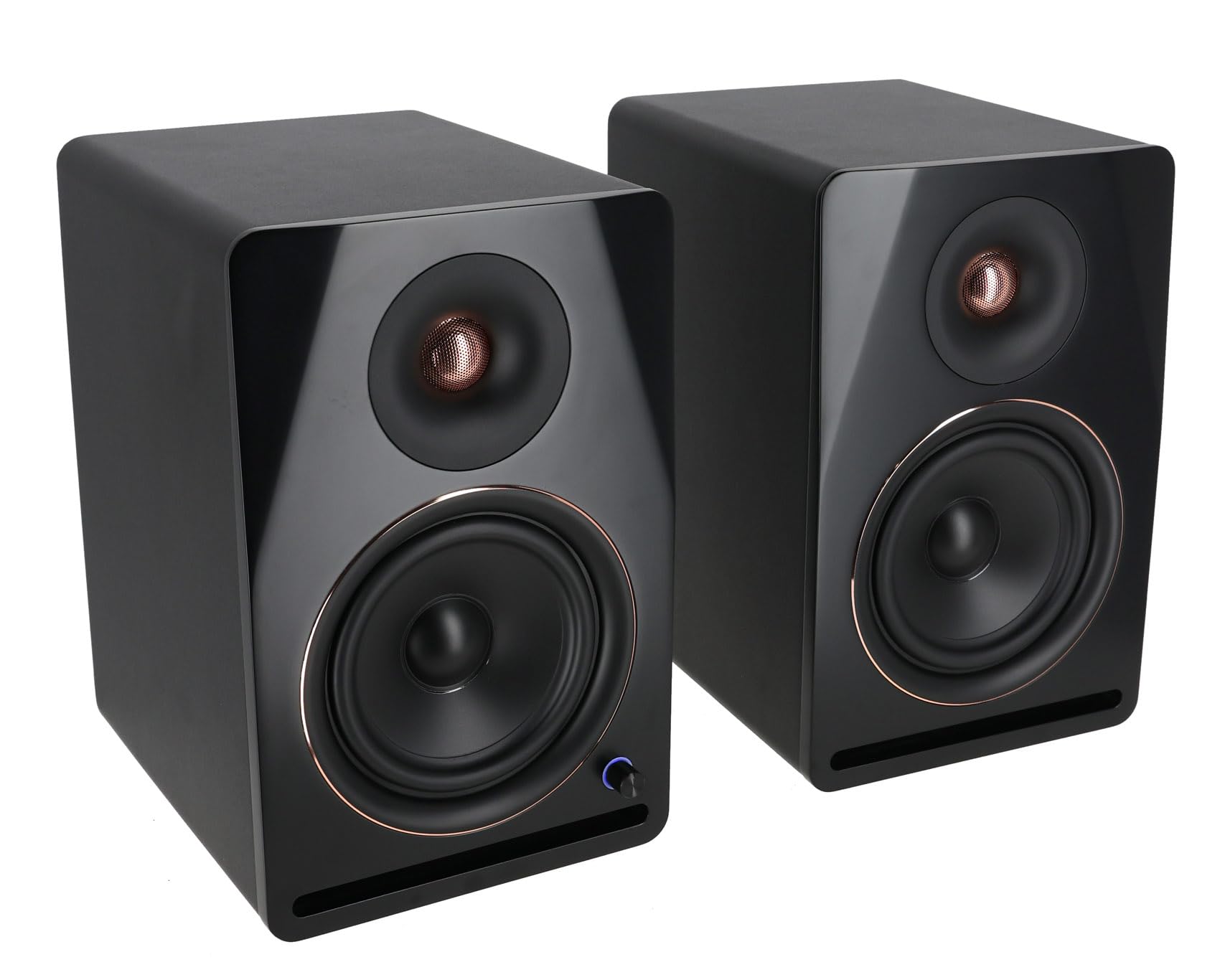
Figure 1: Front view of the Rockville APM6B V2 Studio Monitor Speakers, showcasing the 6.5-inch woofer and 1-inch tweeter.

Figure 2: Rear panel of the active Rockville APM6B V2 speaker, showing XLR/TRS, RCA, Aux, USB inputs, and Bass/Treble controls.
Operating Instructions
- Power On/Off: Locate the power switch on the rear panel of the active speaker and turn it to the "ON" position. The LED ring on the front volume knob will illuminate.
- Volume Control: The front panel rotary knob controls the master volume. Turn clockwise to increase volume and counter-clockwise to decrease.
- Input Selection: Press the front panel rotary knob to cycle through the available input sources (XLR/TRS, RCA, Aux, USB, Bluetooth). The LED ring will change color or pattern to indicate the selected input.
- Bass/Treble Adjustment: Use the "BASS" and "TREBLE" rotary controls on the rear panel of the active speaker to fine-tune the low and high frequencies according to your preference or room acoustics.
- Bluetooth Pairing:
- Select Bluetooth input using the front knob.
- On your Bluetooth-enabled device, search for "APM6B V2" in the list of available devices.
- Select "APM6B V2" to pair. Once connected, the speaker will confirm with an audible tone or LED indicator change.
- The Bluetooth connection has a range of up to 50 feet.
Video 1: An overview of the Rockville APM V2 series, demonstrating features like front volume control, rear bass/treble adjustments, and input selection.
Video 2: A detailed overview of the APM V2 series, highlighting connectivity options and sound customization features.
Maintenance
- Cleaning: Use a soft, dry cloth to clean the speaker cabinets. Avoid using abrasive cleaners, waxes, or solvents as they may damage the finish.
- Environment: Keep the speakers away from direct sunlight, heat sources, and excessive moisture. Ensure proper ventilation around the speakers.
- Handling: Avoid placing heavy objects on the speakers or exposing them to strong impacts.
Troubleshooting
| Problem | Possible Cause | Solution |
|---|---|---|
| No sound from speakers |
|
|
| Bluetooth not connecting |
|
|
| Distorted sound |
|
|
Important Note on Speaker Cable: The active and passive speakers are connected using a specific proprietary cable. If this cable is damaged or lost, a standard replacement cable will not work. Please contact Rockville customer support for assistance with obtaining a replacement.
Specifications
| Feature | Detail |
|---|---|
| Model | APM6B V2 |
| Speaker Type | Powered Studio Monitor (Bi-Amped) |
| Peak Power Output | 400 Watts |
| RMS Power Output | 100 Watts (2 x 50W RMS) |
| Woofer Diameter | 6.5 inches (Polypropylene cone with rubber surround) |
| Tweeter Diameter | 1 inch (Soft dome) |
| Frequency Response | 43Hz – 22kHz (-3dB) |
| Crossover Frequency | 2,500 Hz |
| Signal-to-Noise Ratio (SNR) | 96dB |
| Total Harmonic Distortion (THD) | <0.1% |
| Connectivity Technology | Auxiliary, Bluetooth 5.3, RCA, USB (Soundcard), XLR/TRS |
| Bluetooth Range | Up to 50 feet |
| Audio Output Mode | Stereo |
| Additional Features | Bass and Treble EQ adjustment, DSP tuning, RCA line output for subwoofer/expansion |
| Enclosure Material | 0.5" MDF enclosure with front-firing port |
| Mounting Type | Tabletop Mount |
| Input Voltage | 100 volts |
| Item Dimensions (D x W x H) | 10.67"D x 8.7"W x 13.46"H |
| Item Weight | 26 pounds (for the pair) |
Warranty
The Rockville APM6B V2 Studio Monitor Speakers are covered by a 1-Year Manufacturer's Limited Warranty. Please retain your proof of purchase for warranty claims. For detailed warranty terms and conditions, refer to the official Rockville website or contact customer support.
Support
For technical assistance, troubleshooting, or information regarding replacement parts (such as the proprietary active/passive speaker cable), please contact Rockville customer support.
You can find contact information on the official Rockville website: www.rockvilleaudio.com