
CANDY BC4S69M6D8J-S
Candy ProWash 400 Built-in Washing Machine User Manual
Model: BC4S69M6D8J-S
1. Introduction
Thank you for choosing the Candy ProWash 400 BC4S69M6D8J-S built-in washing machine. This appliance is designed for optimal performance, efficiency, and seamless integration into your kitchen or laundry space. With a 9 kg capacity and a powerful 1600 RPM spin speed, it handles demanding loads efficiently. Its Class A energy rating ensures reduced consumption, while the Inverter BPM motor provides quiet and durable operation. The Mix Power System and Steam function offer deep and gentle cleaning. Featuring Wi-Fi connectivity and the hOn App, you can control your washing machine remotely and access additional programs for smart laundry management.
This manual provides essential information for the safe installation, operation, and maintenance of your new washing machine. Please read it thoroughly before use and keep it for future reference.
2. Safety Information
Always follow basic safety precautions when using electrical appliances to reduce the risk of fire, electric shock, and injury to persons.
- Read all instructions before using the appliance.
- Ensure the appliance is properly grounded.
- Do not allow children to play on or in the appliance.
- Keep packaging materials out of reach of children.
- Do not install or store this appliance where it will be exposed to the weather.
- Do not repair or replace any part of the appliance or attempt any servicing unless specifically recommended in this manual.
- Always disconnect the appliance from the power supply before cleaning or performing maintenance.
- Do not use flammable liquids or vapors near the appliance.
3. Product Overview
Familiarize yourself with the main components of your Candy ProWash 400 washing machine.
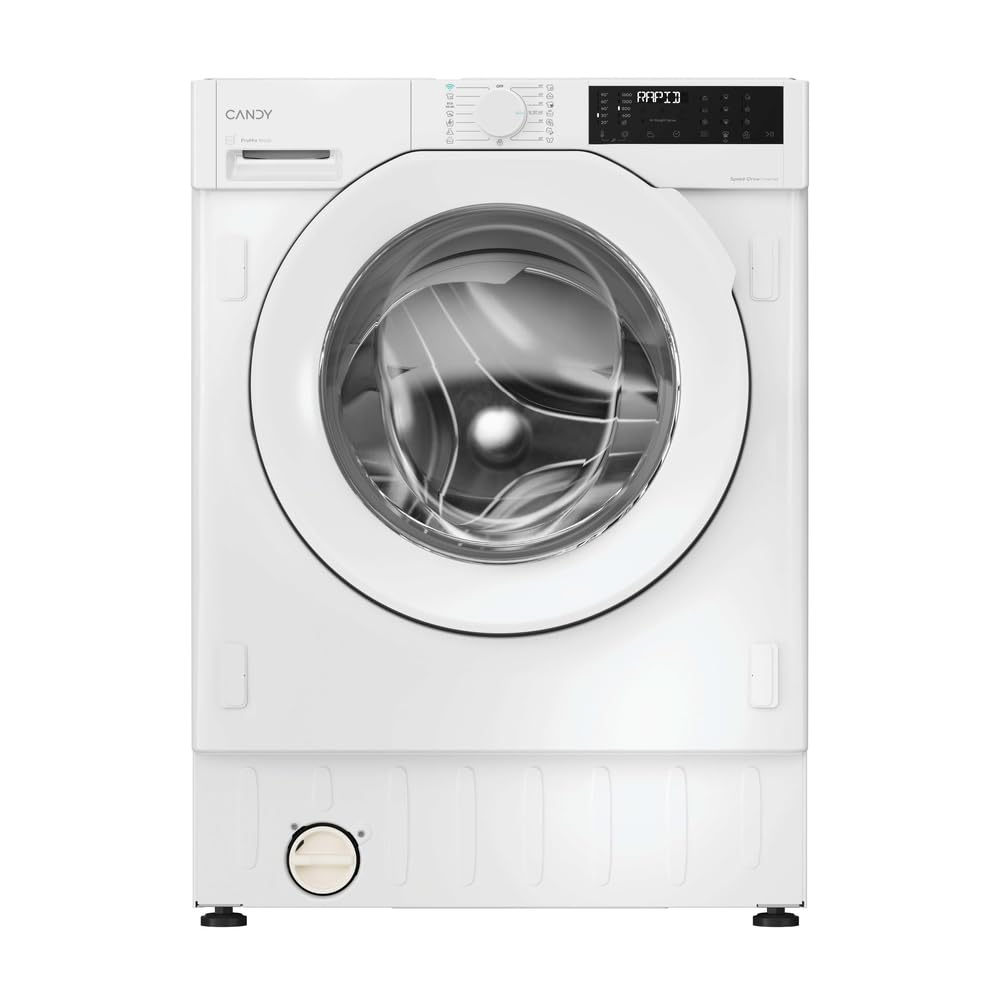
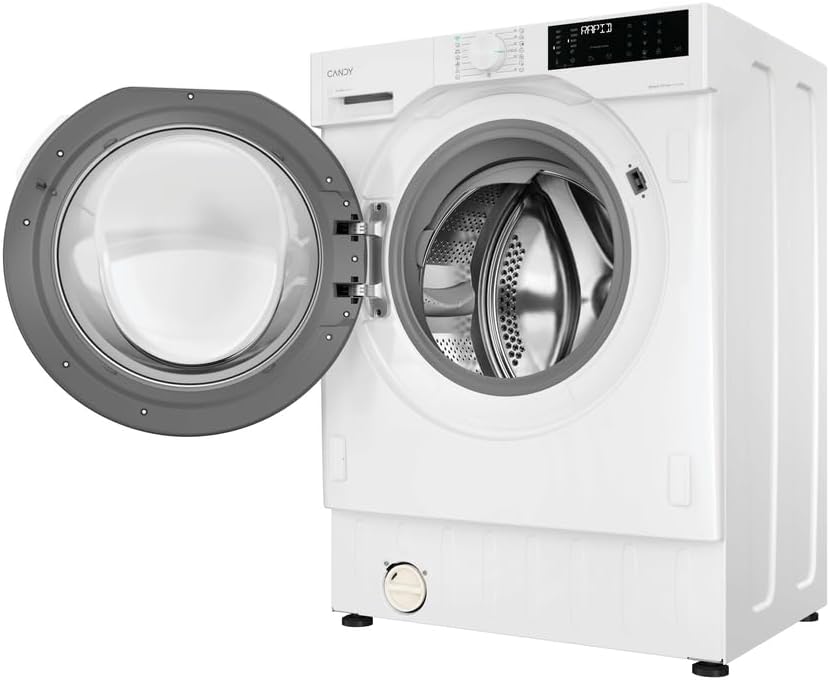


Control Panel
The control panel typically includes:
- Program Selector Dial: To choose the desired wash program.
- Display Screen: Shows program duration, remaining time, error codes, and selected options.
- Option Buttons: For selecting additional functions like temperature, spin speed, steam, or delayed start.
- Start/Pause Button: To begin or temporarily stop a wash cycle.
Detergent Dispenser
Located on the top left, the dispenser drawer has compartments for pre-wash detergent, main wash detergent, and fabric softener.
4. Installation and Setup
Proper installation is crucial for the safe and efficient operation of your washing machine. It is recommended that installation be performed by a qualified technician.
4.1 Unpacking
- Remove all packaging materials, including the polystyrene base and any protective film.
- Remove the transit bolts located at the rear of the machine. These bolts secure the drum during transport and must be removed before use. Keep them for future transport.
- Insert the plastic caps provided into the holes left by the transit bolts.
4.2 Positioning and Leveling
The Candy ProWash 400 is a built-in appliance, designed to be integrated into a cabinet. Ensure the installation space meets the specified dimensions (82x60x52.5 cm HxWxD).
- Place the washing machine on a firm, level floor.
- Adjust the adjustable feet at the bottom of the machine to ensure it is perfectly level. Use a spirit level to verify. Proper leveling prevents excessive vibration and noise during operation.
- Ensure there is adequate ventilation around the appliance.
4.3 Water Connection
- Connect the cold water inlet hose to a cold water tap with a 3/4" thread.
- Ensure the connection is tight to prevent leaks. Do not overtighten.
- Open the water tap fully and check for any leaks.
4.4 Drain Connection
- Position the drain hose at a height between 50 cm and 85 cm from the floor.
- Ensure the drain hose is not kinked or obstructed.
- The drain hose can be hooked over the edge of a sink or connected to a dedicated standpipe.
4.5 Electrical Connection
- Connect the power plug to a properly grounded electrical outlet.
- Ensure the voltage and frequency match the specifications on the appliance rating plate.
- Do not use extension cords or multiple adapters.
5. Operating Instructions
5.1 Before the First Wash
Run a short cycle without laundry and detergent to clean the drum and remove any manufacturing residues.
5.2 Loading Laundry
- Sort laundry by fabric type, color, and degree of soiling.
- Check garment care labels for washing instructions.
- Open the door and load the laundry into the drum, ensuring not to overload. Leave enough space for clothes to tumble freely.
5.3 Adding Detergent and Softener
Pull out the detergent dispenser drawer and add appropriate amounts of detergent and fabric softener to the designated compartments.
- Compartment I: Pre-wash detergent (if selected).
- Compartment II: Main wash detergent.
- Compartment III (Flower symbol): Fabric softener. Do not exceed the 'MAX' level.
The Mix Power System ensures detergent is activated in depth for more effective cleaning.
5.4 Program Selection
Turn the Program Selector Dial to choose one of the 16 available wash programs. The display will show the default temperature and spin speed for the selected program.
Key programs include:
- Cotton: For durable cotton items.
- Eco: Energy-efficient program for normally soiled cottons.
- Synthetics: For synthetic and mixed fabrics.
- Delicates: For fragile items requiring gentle care.
- Wool/Hand Wash: For woolens and hand-washable items.
- Rapid Programs: Quick wash options for lightly soiled items.
- Steam Function: Helps to refresh clothes and reduce wrinkles.
5.5 Adjusting Options
After selecting a program, you can customize settings using the option buttons:
- Temperature: Adjust the wash temperature.
- Spin Speed: Modify the spin speed (up to 1600 RPM).
- Delay Start: Postpone the start of the cycle.
- Steam: Activate the steam function for selected programs.
5.6 Starting a Cycle
Press the Start/Pause button to begin the wash cycle. The indicator light will illuminate, and the display will show the remaining time.
5.7 Wi-Fi and hOn App Connectivity
Your washing machine features Wi-Fi and Bluetooth connectivity, allowing remote control via the hOn App.
- Download the hOn App from your smartphone's app store.
- Follow the in-app instructions to pair your washing machine.
- Once connected, you can start/stop cycles, select additional programs, monitor progress, and receive notifications from anywhere.
6. Maintenance and Care
Regular maintenance ensures the longevity and optimal performance of your appliance.
6.1 Cleaning the Detergent Dispenser
Periodically remove and clean the detergent dispenser drawer to prevent detergent buildup and mold. Rinse it under running water and brush away any residue.
6.2 Cleaning the Filter
The filter, usually located at the bottom front of the machine, should be cleaned regularly (e.g., every 2-3 months) to prevent blockages.
- Place a shallow container under the filter cover to catch any residual water.
- Carefully open the filter cover.
- Unscrew the filter slowly to allow water to drain.
- Remove any lint, coins, or foreign objects from the filter.
- Rinse the filter under running water and screw it back in securely.
- Close the filter cover.
6.3 Cleaning the Drum
Run a maintenance wash (e.g., a hot cycle with no laundry and a descaling agent or washing machine cleaner) monthly to prevent odors and limescale buildup.
6.4 Cleaning the Exterior
Wipe the exterior surfaces with a soft, damp cloth. Do not use abrasive cleaners or solvents.
6.5 Winterization (if applicable)
If the machine is in an unheated area and there's a risk of freezing, drain all water from the hoses and pump. Consult a technician if unsure.
7. Troubleshooting
Before contacting customer service, refer to the following table for common issues and solutions.
| Problem | Possible Cause | Solution |
|---|---|---|
| Machine does not start | No power; Door not closed; Start/Pause button not pressed. | Check power supply; Ensure door is firmly closed; Press Start/Pause. |
| Machine does not fill with water | Water tap closed; Water inlet hose kinked; Water filter blocked. | Open water tap; Straighten hose; Clean water inlet filter. |
| Machine does not drain or spin | Drain hose kinked/blocked; Pump filter blocked; Imbalance in load. | Check/clear drain hose; Clean pump filter; Redistribute laundry. |
| Excessive vibration/noise | Transit bolts not removed; Machine not level; Overloaded drum. | Remove transit bolts; Adjust leveling feet; Reduce load size. |
| Error codes on display | Specific malfunction. | Refer to the full user manual for specific error code meanings or contact support. |
8. Specifications
Technical details for the Candy ProWash 400 BC4S69M6D8J-S washing machine.
| Feature | Detail |
|---|---|
| Model Name | BC4S69M6D8J-S |
| Brand | CANDY |
| Type | Built-in Front Load Washing Machine |
| Capacity | 9 kg |
| Maximum Spin Speed | 1600 RPM |
| Energy Class | A (up to 20% more efficient) |
| Motor Type | Inverter BPM |
| Connectivity | Wi-Fi + Bluetooth (hOn App) |
| Programs | 16 Standard Cycles (e.g., Spin, Cotton, Eco) |
| Special Features | Mix Power System, Steam Function, High Efficiency |
| Noise Level (Spin) | 72 Decibel |
| Dimensions (HxWxD) | 82 x 60 x 52.5 cm |
| Item Weight | 64 kg |
| Drum Material | Stainless Steel |
| Controls Type | Knob |
| Detergent Dispenser Options | Door dispenser |
| EU Spare Parts Availability | 10 Years |

9. Warranty Information
The product warranty information provided is 'Null' in the available data. Please refer to your purchase documentation, retailer, or the official Candy website for specific warranty terms and conditions applicable to your region and purchase date.
10. Customer Support
For technical assistance, spare parts, or further information, please contact Candy customer service or visit their official website.
- Online Support: Visit the official Candy Store on Amazon or the main Candy website.
- Service Centers: Locate authorized service centers in your area through the Candy website.
Related documentsBC4S69M6D8J-S


Ask a question about this manual
Ask about setup, troubleshooting, compatibility, parts, safety, or missing instructions. Manuals+ will review the question and use this page’s manual context to help answer it.