
1. Introduction
This manual provides detailed instructions for the safe and efficient operation of your Fanvace F30-EU Hi-Fi Lossless DSD-DAC MP3 Player. Please read this manual thoroughly before using the device and retain it for future reference. This player is designed for high-fidelity audio playback, supporting various lossless formats and DSD decoding.
2. Safety Information
- Do not expose the device to extreme temperatures, direct sunlight, or high humidity.
- Avoid dropping or subjecting the device to strong impacts.
- Do not attempt to disassemble or modify the device. This will void the warranty.
- Keep the device away from water and other liquids.
- Use only the provided or approved charging cable.
- Listen at moderate volume levels to prevent hearing damage.
3. Package Contents
Verify that all items are present in your package:
- 1 x Fanvace F30-EU Music Player
- 1 x USB-C Charging Cable
- 1 x Audio Cable
- 1 x 64GB Micro SD Card
- 1 x Leather Case
- 1 x User Manual
4. Product Overview
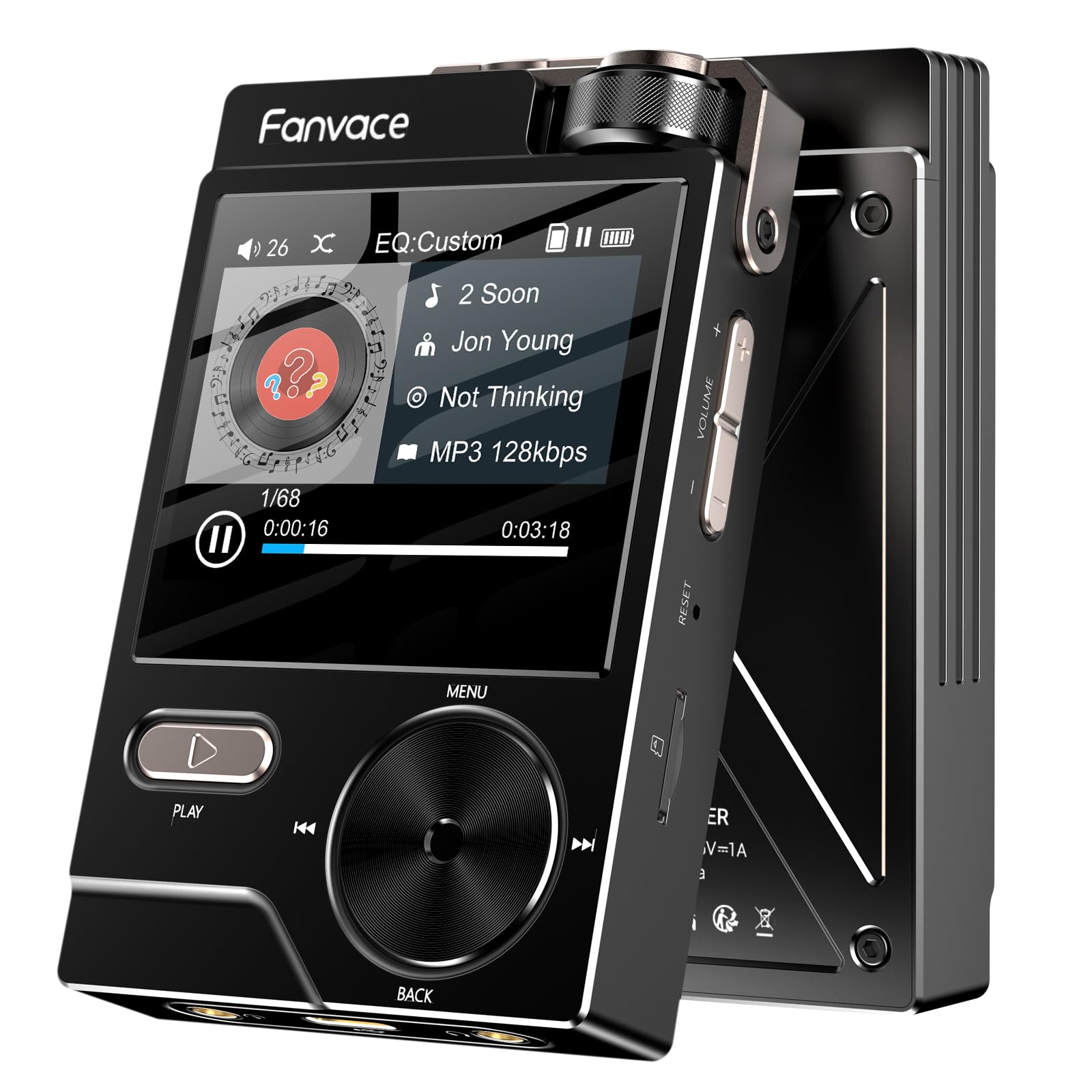
Front view of the Fanvace F30-EU Hi-Fi Lossless DSD-DAC MP3 Player, showcasing its screen and control buttons.
4.1 Physical Features
- Display: 2-inch LCD screen
- Controls: Physical buttons for navigation, playback, and volume. A top-mounted wheel for volume and scrolling.
- Ports: USB-C port for charging and data transfer, 3.5mm audio output, Line-out port.
- Storage: Internal 64GB, expandable via Micro SD card up to 256GB.
4.2 Key Specifications
- Dimensions (Height x Width x Depth): 8.5 cm x 6.9 cm x 1.5 cm
- Weight: 100 Grams
- DAC Chip: ES9018K2M
- Audio Resolution: Up to 24-bit/192 kHz, DSD256 native decoding
- Supported Audio Formats: MP3, AAC, FLAC, APE, WAV, WMA, OGG, DSD, DSD256
- Connectivity: Auxiliary, USB
- Battery Life: Approximately 35 hours (average)
5. Setup
5.1 Charging the Device
Before first use, fully charge the player. Connect the provided USB-C cable to the player's USB-C port and the other end to a USB power adapter (not included) or a computer's USB port. The screen will indicate charging status.
5.2 Inserting a Micro SD Card
The player comes with a 64GB Micro SD card. To insert it, locate the Micro SD card slot on the side of the device. Gently push the card into the slot until it clicks into place. To remove, push the card in again until it springs out.
5.3 Transferring Music Files
- Connect the player to your computer using the USB-C cable.
- The player will appear as a removable disk drive on your computer.
- Drag and drop your desired audio files into the player's internal storage or the Micro SD card folder.
- Once files are transferred, safely eject the device from your computer before disconnecting the cable.
6. Operating the Player
6.1 Power On/Off
- To Power On: Press and hold the Power button until the screen lights up.
- To Power Off: Press and hold the Power button until the power-off prompt appears, then confirm.
6.2 Basic Navigation
The player features a combination of physical buttons and a top-mounted wheel for navigation:
- Directional Buttons: Use the directional buttons around the central 'OK' area to move through menus and lists.
- OK Button: Press the center button to confirm selections.
- Back Button: Typically located below the main navigation area, press to return to the previous screen.
- Top Wheel: Rotate the top wheel to adjust volume or scroll through long lists. Pressing the wheel may also serve as a selection or play/pause function depending on the context.
6.3 Playing Music
- From the main menu, navigate to "Music" or "Browser".
- Select your desired storage (internal or Micro SD).
- Browse by Artist, Album, Song, or Folder.
- Select a song or album to begin playback.
- Use the Play/Pause button to control playback.
- Use the Next/Previous track buttons to skip songs.
6.4 Volume Control
Adjust the playback volume using the dedicated volume buttons or by rotating the top-mounted wheel.
6.5 Settings Menu
Access the settings menu to customize various aspects of your player:
- Equalizer: Adjust audio frequencies to your preference or select from preset modes.
- Display Settings: Adjust brightness, backlight timer.
- System Settings: Language, date/time, factory reset, firmware version.
6.6 Connecting to External Devices
The player can be connected to headphones, speakers, or car audio systems via the 3.5mm audio output or the dedicated line-out port using the provided audio cable.
7. Maintenance
- Cleaning: Use a soft, dry cloth to clean the device. Do not use liquid cleaners or solvents.
- Battery Care: To prolong battery life, avoid fully discharging the battery frequently. Charge the device regularly, even if not in use for extended periods.
- Software Updates: Check the manufacturer's website periodically for firmware updates to ensure optimal performance and new features.
8. Troubleshooting
| Problem | Possible Solution |
|---|---|
| Device does not power on. | Ensure the battery is charged. Connect to a power source and try again. |
| No sound from headphones. | Check headphone connection. Ensure volume is not muted or too low. Test with different headphones. |
| Music files are not recognized. | Verify that the files are in a supported format (MP3, FLAC, WAV, etc.). Ensure the Micro SD card is properly inserted and not corrupted. Re-transfer files if necessary. |
| Navigation is difficult or unresponsive. | Familiarize yourself with the button layout and the function of the top wheel. A system restart might resolve temporary unresponsiveness. |
| Battery drains quickly. | Reduce screen brightness. Close unnecessary applications (if applicable). Ensure no background processes are running. |
9. Specifications
| Feature | Detail |
|---|---|
| Brand | Fanvace |
| Model Number | F30-EU |
| ASIN | B0GGRQ1NF1 |
| Display Size | 2 Inches |
| Display Technology | LCD |
| Memory Storage Capacity | 64 GB (internal) |
| Expandable Storage | Micro SD up to 256 GB |
| Connectivity Technology | Auxiliary, USB |
| Special Feature | High Resolution Audio, DSD-DAC |
| Supported Standards | MP3, AAC, FLAC, APE, WAV, WMA, OGG, DSD, DSD256 |
| Average Battery Life | 35 hours |
| Item Weight | 100 Grams |
| Item Dimensions (Height x Width x Depth) | 8.5 cm x 6.9 cm x 1.5 cm |
| Compatible Devices | Smartphone, Personal Computer, Speaker, Headphones |
10. Warranty and Support
For warranty information and technical support, please refer to the documentation included with your purchase or visit the official Fanvace website. Keep your proof of purchase for warranty claims.
For any issues not covered in this manual, please contact Fanvace customer service.