
1. Introduction
This manual provides essential information for the safe and efficient operation, maintenance, and troubleshooting of your MOVA LiDAX Ultra 3000 AWD Robot Lawn Mower. Please read this manual thoroughly before using the product and retain it for future reference.
2. Package Contents
Verify that all items listed below are included in your package. If any items are missing or damaged, please contact customer support.

Image: Contents of the MOVA LiDAX Ultra 3000 AWD package.
- Robot Lawn Mower (x1)
- Quick Start Guide (x1)
- Screwdriver (x1)
- Charging Station (x1)
- Power Supply (x1)
- Screws / Hex Key (x8 / x1)
- Cleaning Brush (x1)
- User Manual (x1)
- Spare Blades / Screws (x36 / x36)
3. Key Features
3.1 All-Wheel Drive (AWD) for All-Terrain Use
The MOVA LiDAX Ultra 3000 AWD is equipped with four high-torque 116W hub motors, enabling it to handle slopes up to 80% (38.6°) and obstacles up to 2.4 inches (6 cm) with ease. An advanced suspension system prevents tipping, while floating cutting discs adapt to uneven ground, ensuring consistent performance on complex lawns, thick grass, and wet conditions.

Image: The mower's AWD capability on an 80% slope and over a 2.4-inch obstacle.
3.2 RTK-Free, Wire-Free Setup
This robotic mower utilizes 360° 3D LiDAR and AI dual-vision for automatic 3D map creation with centimeter-level precision. No boundary wires or RTK base station are required, simplifying installation. Simply power on the device to initiate mapping and mowing.
Video: An overview of the MOVA LiDAX Ultra Robot Lawn Mower, highlighting its wire-free setup and mapping capabilities.
3.3 High-Efficiency Cutting
A powerful 36V 243Wh battery powers a dual-disc system with 12 razor-sharp blades and a wide 15.8-inch cutting width. Combined with intelligent U-path mowing and automatic recharging, the mower efficiently maintains lawns up to 0.25 acre per charge.

Image: The mower's dual cutting discs and 15.8-inch cutting width for efficient mowing.
3.4 Ultra-Precise Edge Cutting
Advanced grass detection and Edge-Riding technology ensure precise trimming along boundaries. UltraTrim 2.0 reduces uncut edges to just 1.2 inches (3 cm), providing clean and professional-looking lawn edges with minimal manual touch-up.

Image: The mower demonstrating its UltraTrim 2.0 feature for precise edge cutting.
3.5 360° LiDAR + AI Dual Vision
By combining 3D point cloud data with AI dual vision, the mower intelligently detects and avoids over 300 lawn obstacles, including toys, pets, tools, and garden furniture. Continuous algorithm updates improve recognition accuracy and mowing safety.

Image: The mower's AI Dual Vision detecting multiple obstacles on a lawn.
3.6 Anti-Theft Protection & 4G Connectivity
The mower includes 3 years of free 4G connectivity for real-time location tracking and instant theft alerts. It automatically locks and can only be unlocked using a correct PIN. TrueGuard security monitors your garden 24/7.
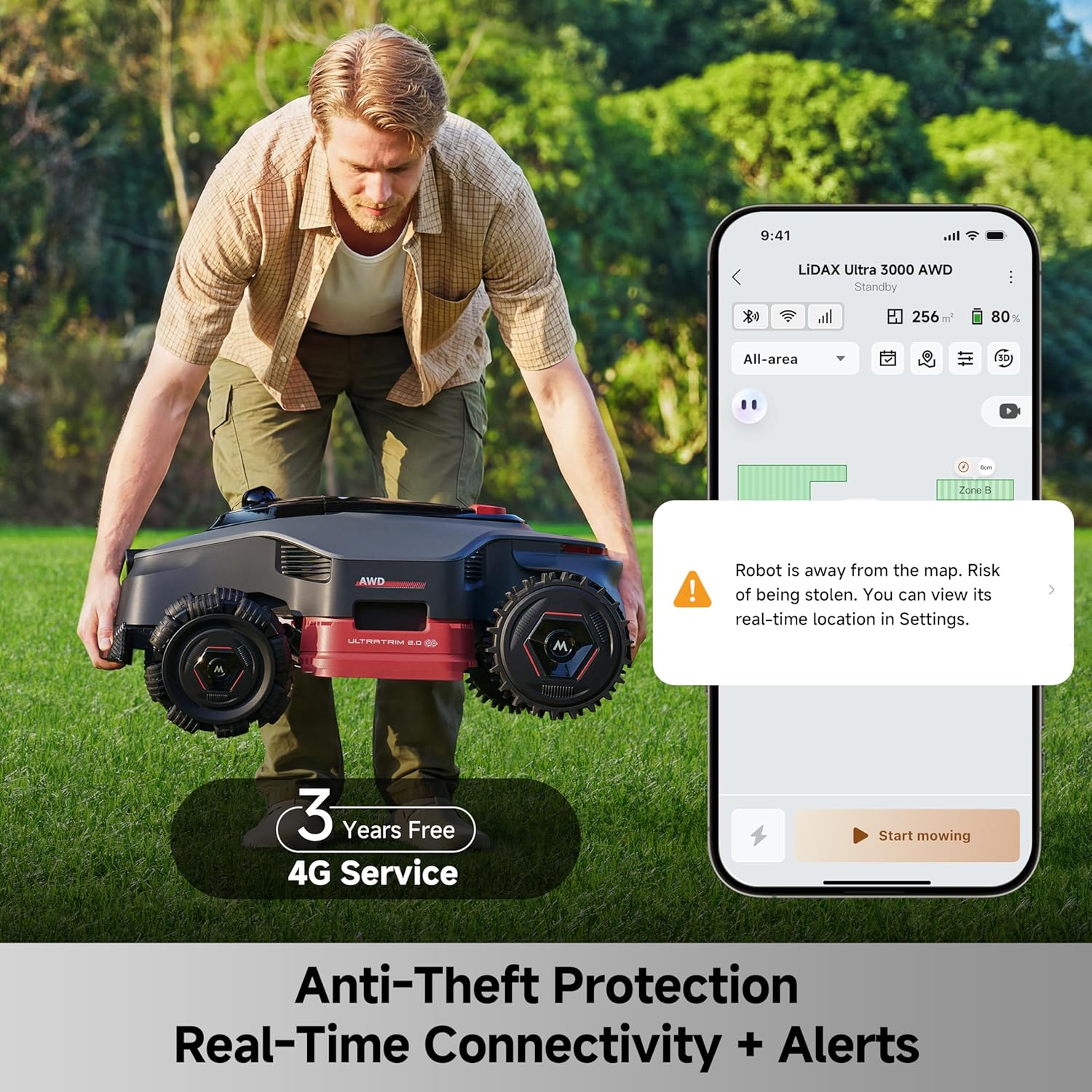
Image: Anti-theft protection features, including real-time alerts via the app.
3.7 Smart App Control & Dual Maps
Manage your lawn care with the dedicated app. Create dual maps for separate yards, manage multiple mowing zones, set different mowing schedules and modes for each zone, and adjust cutting height from 1.2 to 3.9 inches (3-10 cm) for various grass types.
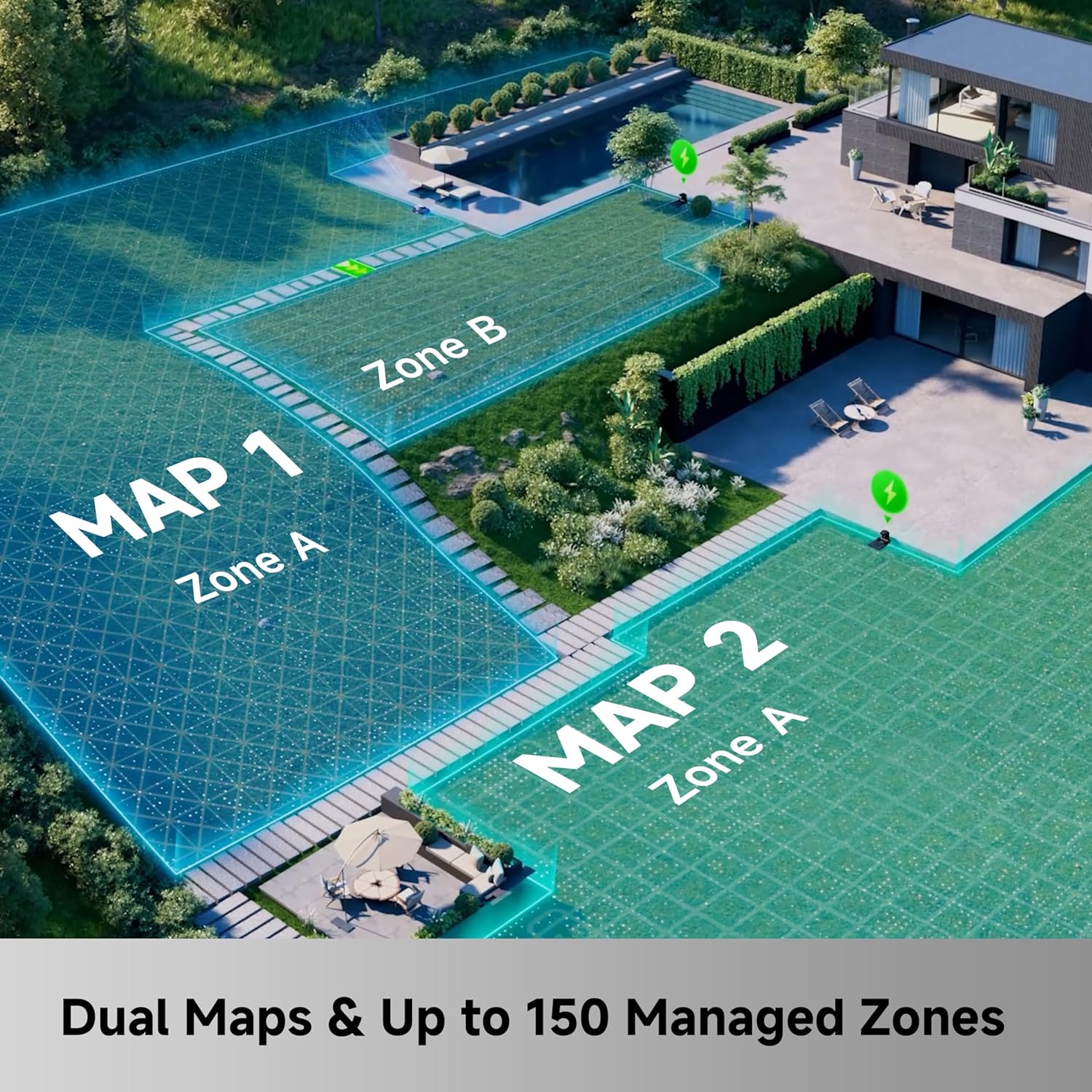
Image: Illustration of dual map and multi-zone control for comprehensive lawn management.

Image: The mower's zero-turn omni wheels and floating discs for all-terrain adaptability and adjustable cutting height.
3.8 Weather Sensing & IPX6 Waterproof
The mower is designed to operate in various weather conditions and features IPX6 waterproofing. It can return to a wash-point automatically for cleaning. Its eco-friendly design minimizes environmental impact.

Image: The mower and its charging station, highlighting IPX6 waterproofing and weather sensing.
4. Setup
4.1 Unpacking and Placement
- Carefully unpack all components and verify against the package contents list.
- Choose a suitable location for the charging station on a flat, level surface with access to a power outlet. Ensure the area around the charging station is clear for the mower to dock easily.
- Connect the power supply to the charging station and plug it into a power outlet.
4.2 Initial Charging
Place the mower on the charging station to allow the battery to fully charge before first use. The indicator lights on the mower will show charging status.
4.3 App Installation and Mapping
- Download the MOVAHome app from your smartphone's app store.
- Follow the in-app instructions to pair your mower.
- Initiate the mapping process through the app. The mower will use its 360° 3D LiDAR and AI dual-vision to automatically create a detailed 3D map of your lawn. This process is wire-free and RTK-free.
- Define mowing zones, no-go zones, and virtual boundaries within the app as needed.
Video: A detailed video showcasing the MOVA LiDAX Ultra AWD's features, including mapping and operation.
5. Operating Instructions
5.1 Starting and Stopping Mowing
- Start Mowing: Use the MOVAHome app to select a mowing zone and schedule, then tap 'Start'. The mower will automatically begin its U-path mowing pattern.
- Pause Mowing: Press the 'Pause' button on the mower or in the app.
- Stop Mowing: Press the 'Stop' button on the mower or in the app. The mower will return to its charging station.
5.2 Adjusting Cutting Height
The cutting height can be adjusted from 1.2 to 3.9 inches (3-10 cm) directly through the MOVAHome app. This allows for customization based on grass type and desired lawn appearance.
5.3 Setting Schedules and Zones
Utilize the MOVAHome app to create customized mowing schedules for different days and times. You can also manage multiple zones, setting specific mowing parameters for each area of your lawn.
5.4 Obstacle Avoidance
The mower's 360° 3D LiDAR and AI dual-vision system will detect and avoid obstacles. For optimal safety, ensure the lawn is clear of small objects before mowing. The mower operates at reduced speed when detecting animals to minimize disturbances.
6. Maintenance
Regular maintenance ensures optimal performance and longevity of your MOVA LiDAX Ultra 3000 AWD.
6.1 Cleaning
- Use the provided cleaning brush to remove grass clippings and debris from the mower's chassis, wheels, and cutting deck.
- The mower features an auto wash-point return for easy cleaning.
- Do not use high-pressure water jets directly on electronic components.
6.2 Blade Replacement
The mower uses 12 razor-sharp blades. Inspect blades regularly for wear and damage. Replace dull or damaged blades using the provided spare blades and screwdriver. Always wear protective gloves when handling blades.
6.3 Software Updates
Ensure your mower's software is up-to-date via the MOVAHome app to benefit from improved features and performance.
7. Troubleshooting
If you encounter issues with your MOVA LiDAX Ultra 3000 AWD, refer to the following common problems and solutions. For more detailed troubleshooting, consult the MOVAHome app or contact customer support.
| Problem | Possible Cause | Solution |
|---|---|---|
| Mower not starting | Low battery; Safety switch off; App command not sent. | Charge battery; Check safety switch; Send 'Start' command via app. |
| Mower gets stuck frequently | Uneven terrain; High grass; Obstacles. | Clear obstacles; Mow more frequently to keep grass shorter; Adjust no-go zones. |
| Poor cutting performance | Dull blades; Incorrect cutting height; Wet grass. | Replace blades; Adjust cutting height in app; Avoid mowing wet grass. |
| Mower not returning to charging station | Charging station obstructed; Signal interference. | Ensure clear path to station; Check for strong Wi-Fi/4G signal. |
| Theft alert triggered | Mower lifted or moved outside designated area. | Verify mower location via app; Enter PIN to unlock. |
8. Specifications
| Feature | Specification |
|---|---|
| Brand | Mova |
| Model Number | MOVA LiDAX Ultra 3000 AWD |
| Power Source | Battery Powered (36V 243Wh) |
| Material | Metal, Plastic |
| Item Weight | 52 Pounds |
| Product Dimensions (D x W x H) | 29" x 21" x 12" |
| Cutting Width | 15.8 Inches |
| Adjustable Cutting Height | 1.2 - 3.9 Inches (3 - 10 cm) |
| Operation Mode | Automatic |
| Slope Capability | Up to 80% (38.6°) |
| Obstacle Clearance | Up to 2.4 Inches (6 cm) |
| Connectivity | 4G (3 years free service) |
| Mapping Technology | 360° 3D LiDAR & AI Dual Vision |
| UPC | 850071220247 |
9. Warranty and Support
The MOVA LiDAX Ultra 3000 AWD Robot Lawn Mower comes with a 3-year manufacturer's warranty. For any product-related inquiries, technical assistance, or warranty claims, please contact MOVA customer support. We offer 24/7 after-sales service to ensure your complete satisfaction.
Additional protection plans are available for purchase:
- 2-Year Protection Plan: $129.99
- 3-Year Protection Plan: $169.99
- Complete Protect: $16.99/month (covers all eligible past and future purchases)
For further assistance, please visit the Mova Store on Amazon or refer to the contact information provided in your Quick Start Guide.


