
1. Introduction
Thank you for choosing the DUMOS 40-Inch Gaming Computer Desk. This desk is designed to enhance your home office, study, or gaming setup with its integrated features, including a monitor stand, power outlets, LED lighting, and convenient storage drawers. This manual provides essential information for safe assembly, proper operation, and maintenance to ensure long-lasting use of your product.
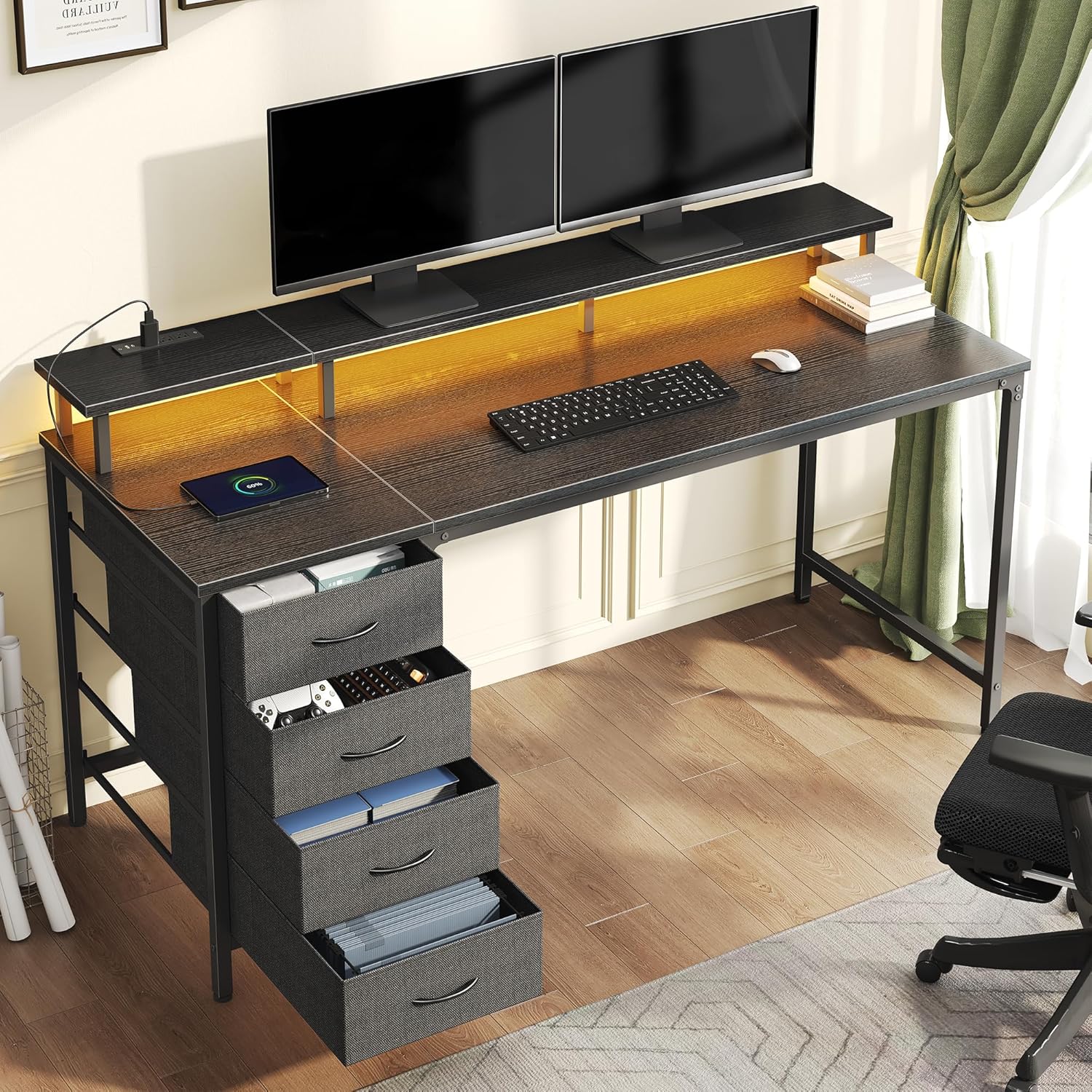
Image 1.1: Overview of the DUMOS 40-Inch Gaming Computer Desk with its features.
2. Safety Information
- Read all instructions carefully before assembly and use.
- Keep all packaging materials away from children to prevent choking hazards.
- Ensure all screws and fasteners are securely tightened before use. Periodically check and re-tighten as necessary.
- Do not overload the desk or monitor stand. Refer to specifications for weight limits.
- Keep liquids away from the power outlets and LED strip to prevent electrical shock.
- Use only the provided power adapter for the LED lights and power hub.
- Assemble the desk on a soft, clean surface to prevent scratches.
3. Package Contents
Verify that all components are present before beginning assembly. If any parts are missing or damaged, contact DUMOS customer support.
- Desk Top Panels (Engineered Wood)
- Metal Frame Components (Legs, Support Bars)
- Monitor Riser Components
- 4 Fabric Drawers
- Power Hub with AC Outlets, USB, and Type-C Ports
- RGB LED Light Strip with Controller
- Assembly Hardware (Screws, Bolts, Allen Wrench)
- Instruction Manual
4. Setup and Assembly
Assembly typically takes less than an hour. Follow the numbered steps in the included assembly guide. Ensure you have adequate space and a soft surface for assembly.
4.1 Product Dimensions
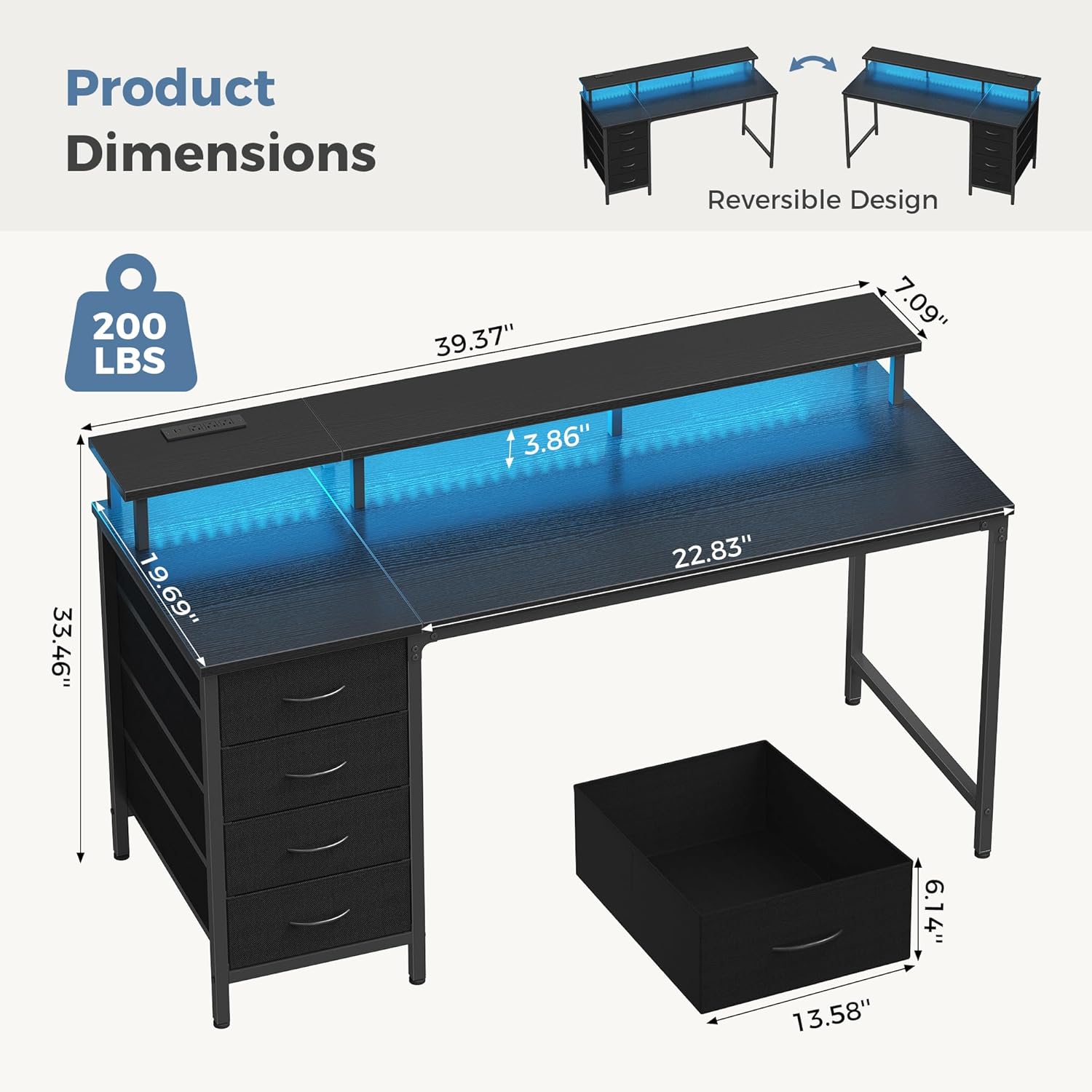
Image 4.1: Desk dimensions for planning your space.
- Overall Length: Approximately 39.37 inches
- Overall Height: Approximately 33.46 inches (including monitor stand)
- Main Desk Surface Depth: Approximately 22.83 inches
- Monitor Stand Depth: Approximately 7.09 inches
- Monitor Stand Height: Approximately 3.86 inches (from desk surface)
- Drawer Unit Width: Approximately 19.69 inches
- Individual Drawer Dimensions: Approximately 13.58 inches (width) x 6.14 inches (height)
4.2 Assembly Steps (General Guide)
- Unpack and Identify Parts: Lay out all components and hardware. Refer to the parts list in your separate assembly guide to ensure everything is present.
- Assemble the Metal Frame: Attach the desk legs to the main support bars using the provided screws and Allen wrench. Do not fully tighten screws until all components are loosely assembled.
- Attach Desk Panels: Secure the engineered wood desk panels to the metal frame.
- Install Monitor Riser: Attach the monitor riser supports and the riser panel to the main desk surface.
- Install Power Hub: Mount the power hub into the designated slot on the monitor riser.
- Attach LED Light Strip: Adhere the RGB LED light strip to the underside of the monitor riser. Connect it to the power hub.
- Assemble Drawer Unit: Construct the frame for the fabric drawers. The design is reversible, allowing you to mount the drawer unit on either the left or right side of the desk.
- Insert Fabric Drawers: Place the four fabric drawers into the assembled drawer unit.
- Final Tightening: Once all components are in place and aligned, fully tighten all screws.
- Adjust Leveling Feet: Adjust the desk's leveling feet to ensure stability on uneven floors.

Image 4.2: The reversible design allows flexible placement of the drawer unit.
5. Operating Instructions
5.1 RGB LED Light Strip & App Control
The integrated RGB LED light strip offers customizable lighting for your workspace.
- Controller Operation: Use the included physical controller to switch the lights on/off, select from 12 preset modes, and adjust brightness.
- App Control: Download the free companion app (refer to your separate LED manual for app name and QR code) to unlock advanced features:
- Access over 60,000 colors.
- Synchronize lights with music.
- Set timers for automatic on/off.
- Ensure the USB power cable for the LED strip is securely connected to the power hub.

Image 5.1: RGB LED light strip control options via physical controller and mobile app.
5.2 Built-in Power Hub
The monitor riser features a convenient power station to keep your devices charged and organized.
- Outlets: 3 AC outlets (125V/12A) for standard electronics.
- USB Ports: 1 USB port (5V-2A) and 1 Type-C port (5V-2A) for charging mobile devices, headphones, and other USB-powered accessories.
- Plug the power hub's main cable into a wall outlet.

Image 5.2: The integrated power hub provides convenient charging access.
5.3 Monitor Riser
The elevated monitor stand helps improve your posture and frees up desk space.
- Place your monitor(s) on the riser for an ergonomic viewing height.
- Utilize the space underneath the riser for storing keyboards, mice, or other small accessories when not in use.

Image 5.3: The monitor riser promotes ergonomic viewing and reduces strain.
5.4 4-Drawer Storage
The four spacious fabric drawers provide ample storage to keep your desktop clutter-free.
- Use the drawers to store books, stationery, controllers, cables, and other office or gaming accessories.
- The fabric drawers are removable for easy access or reorganization.

Image 5.4: The four fabric drawers offer versatile storage solutions.
6. Maintenance
- Cleaning: Wipe the desk surfaces with a soft, damp cloth. Avoid harsh chemicals or abrasive cleaners that could damage the finish.
- Dusting: Regularly dust the LED strip and power hub to ensure optimal performance and prevent dust buildup.
- Fasteners: Periodically check all screws and bolts to ensure they remain tight. Re-tighten if necessary to maintain stability.
- Fabric Drawers: The fabric drawers can be spot cleaned with a mild detergent and water. Allow to air dry completely.

Image 6.1: The desk features an easy-to-clean, wear-resistant surface.
7. Troubleshooting
| Problem | Possible Cause | Solution |
|---|---|---|
| Desk is wobbly. | Screws are loose; uneven floor. | Ensure all assembly screws are fully tightened. Adjust the leveling feet at the bottom of the desk legs. |
| LED lights are not turning on. | Power cable disconnected; faulty connection; LED strip damage. | Check if the USB power cable for the LED strip is securely plugged into the power hub. Ensure the power hub is plugged into a working wall outlet. Try using the physical controller. If issues persist, contact support. |
| Power outlets/USB ports not working. | Power hub not plugged in; circuit breaker tripped. | Verify the power hub's main cable is securely plugged into a functional wall outlet. Check your home's circuit breaker. Test with another device. |
| Drawers are difficult to open/close. | Overloaded; misaligned; fabric creased. | Reduce contents in the drawer. Ensure the drawer unit is assembled correctly and not warped. Smooth out any creases in the fabric. |
8. Specifications
| Brand: | DUMOS |
| Model Number: | FH-GDZ4CJD-40BK |
| Desk Design: | Gaming Desk, Computer Desk, Writing Desk |
| Overall Length: | 39.37 inches |
| Overall Height: | 33.46 inches |
| Main Desk Surface Depth: | 22.83 inches |
| Color: | Black |
| Material: | Engineered Wood (Top), Metal (Frame), Fabric (Drawers) |
| Number of Drawers: | 4 |
| Power Hub: | 3 AC Outlets (125V/12A), 1 USB Port (5V-2A), 1 Type-C Port (5V-2A) |
| LED Lights: | RGB, 12 Preset Modes, App Control (60,000+ colors, music sync, timers) |
| Item Weight: | 29.5 pounds |
| Special Features: | Ergonomic Monitor Platform, Reversible Layout, Adjustable Feet |
9. Warranty and Support
DUMOS products are manufactured with quality and durability in mind. While specific warranty details are not provided in this document, please retain your proof of purchase. For any questions, missing parts, or issues not covered in this manual, please contact DUMOS customer support through the retailer where you purchased the product or visit the official DUMOS website for assistance.
We are committed to providing excellent customer service and ensuring your satisfaction with our products.