
Bestier 67 Inch with Drawer
Contents
Bestier 67-Inch Modern LED TV Stand User Manual
Model: 67 Inch with Drawer
1. Product Overview
The Bestier 67-inch Modern LED TV Stand is designed to support televisions up to 75 inches. It features a high-gloss finish, stone-patterned doors, integrated LED lighting with 22 dynamic modes, a spacious center drawer, and open storage shelves. This entertainment center is constructed from reinforced particleboard and MDF, providing a weight capacity of up to 200 lbs for the tabletop.
2. Safety Information
Important Safety Instructions:
- Always secure the TV stand to the wall using the provided anti-tipping devices to prevent tip-over.
- Follow the assembly instructions carefully to ensure proper installation and safety.
- Do not exceed the maximum weight capacity of 200 lbs for the tabletop and 30 lbs for each open shelf.
- Keep small parts and packaging materials away from children.
- Ensure all connections for the LED lighting are secure before powering on.
3. Package Contents
Before assembly, verify that all components listed below are present and undamaged. If any parts are missing or damaged, please contact customer support.
- 67-Inch High Gloss TV Stand components
- Hardware Pack (screws, dowels, cam locks, etc.)
- LED Lighting Kit with remote control
- Storage Drawer components
- Step-by-Step Assembly Manual (this document)
- Anti-tipping devices (2 sets)

Image: All components and hardware included in the package.
4. Assembly Instructions
Assembly typically takes approximately one hour with two people. Please follow the step-by-step instructions provided in the included manual and refer to the assembly video for visual guidance.
4.1. Assembly Video Guide
Video: Detailed assembly instructions for the Bestier Modern TV Stand.
4.2. Key Assembly Steps (Refer to the included manual for full details)
- Prepare Components: Unpack all parts and lay them out on a clean, soft surface to prevent scratches. Identify each part using the provided labels.
- Assemble Base Structure: Connect the main base panels using the specified hardware (e.g., cam locks, dowels). Ensure all connections are tight and secure.
- Install LED Strips: Carefully attach the LED light strips to the designated areas on the panels. Route the wiring as instructed to avoid pinching.
- Attach Side Panels: Secure the side panels and internal dividers to the base structure.
- Construct Drawer: Assemble the drawer box, attach the drawer slides, and install the handles.
- Insert Drawer: Slide the assembled drawer into its designated slot.
- Install Stone-Patterned Doors: Attach the decorative stone-patterned panels to the sides of the stand.
- Final Connections: Connect the LED wiring to the power supply and remote receiver.
- Secure Anti-Tipping Devices: Attach the anti-tipping brackets to the top rear of the TV stand and secure them to a wall stud using the provided hardware. This step is crucial for safety.
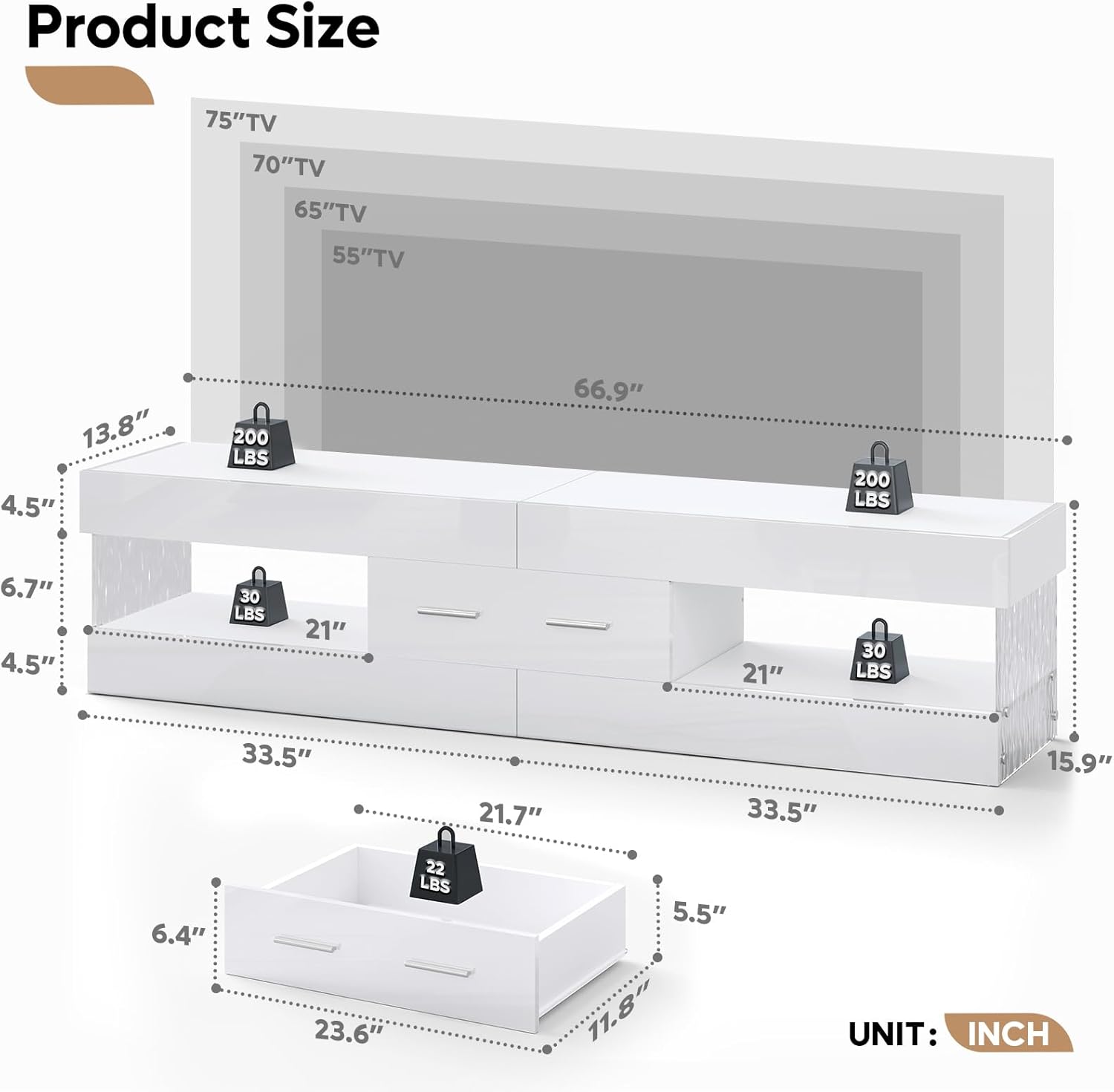
Image: Fully assembled Bestier 67-inch Modern LED TV Stand.
5. LED Lighting Operation
The integrated LED lighting system offers 22 dynamic modes and 7 main colors to enhance your entertainment experience. Use the included remote control to adjust settings.
- Power On/Off: Press the power button on the remote.
- Color Selection: Use the color buttons to select from 7 main colors.
- Mode Selection: Cycle through 22 dynamic lighting modes using the mode buttons.
- Brightness Adjustment: Adjust the light intensity using the brightness controls.

Image: LED lighting features with remote control.
Video: Demonstration of the 22 dynamic LED lighting modes and 7 main colors.
6. Maintenance
To maintain the appearance and longevity of your TV stand:
- Cleaning: Wipe with a damp cloth. Avoid harsh chemicals or abrasive cleaners that may damage the high-gloss finish.
- Dusting: Regularly dust with a soft, dry cloth.
- Spills: Clean spills immediately to prevent staining or damage to the finish.
- Inspection: Periodically check all hardware connections and anti-tipping devices to ensure they remain tight and secure.
7. Specifications
| Feature | Detail |
|---|---|
| Model | 67 Inch with Drawer |
| Color | White |
| Dimensions (L x W x H) | 67 x 13.78 x 15.75 inches |
| Item Weight | 45.4 Pounds |
| Material Type | Engineered Wood, Glass |
| Tabletop Weight Capacity | Up to 200 lbs |
| Shelf Weight Capacity | Up to 30 lbs per shelf |
| TV Size Compatibility | Up to 75 inches |
| LED Lighting | 22 Dynamic Modes, 7 Main Colors |
| Assembly Required | Yes |

Image: Product dimensions and weight limits.
8. Troubleshooting
If you encounter any issues with your Bestier TV stand, please refer to the following common solutions:
- LED Lights Not Working:
- Check all power connections to ensure they are securely plugged in.
- Verify the remote control batteries are correctly inserted and have sufficient charge.
- Ensure the LED strips are properly connected to the receiver.
- Stand Wobbles:
- Ensure all screws and cam locks are tightened.
- Confirm the anti-tipping devices are securely installed to the wall.
- Place the stand on a level surface.
- Drawer Not Sliding Smoothly:
- Check that the drawer slides are correctly installed and aligned.
- Ensure no obstructions are in the drawer tracks.
- Verify all screws on the drawer and slides are tight.
9. Warranty and Support
Bestier products come with a manufacturer's warranty. For specific warranty details, please refer to the documentation included with your purchase or contact Bestier customer support.
Customer Support Contact Information:
| Region | Contact |
|---|---|
| North American | Phone: 888-666-1086 Email: Service.US@bestier.net |
| Europe | Email: Service.UK@bestier.net, Service.DE@bestier.net, Service.FR@bestier.net, Service.IT@bestier.net, Service.ES@bestier.net |
| Asia | Phone: 04-8888-0283 Email: Service.JP@bestier.net |
| Global | Email: Service@bestier.net |
Documents and downloads
Ask a question about this manual
Ask about setup, troubleshooting, compatibility, parts, safety, or missing instructions. Manuals+ will review the question and use this page’s manual context to help answer it.