
1. Product Overview
The TORRAS COOLiFY Cyber Fold AI Neck Air Conditioner is a portable wearable device designed to provide personal cooling and heating. It features advanced cooling technology, adjustable airflow, and a foldable design for enhanced portability. The device offers multiple operating modes, including cooling, heating, and AI auto-sensing, controllable via both physical buttons and a dedicated smartphone application.
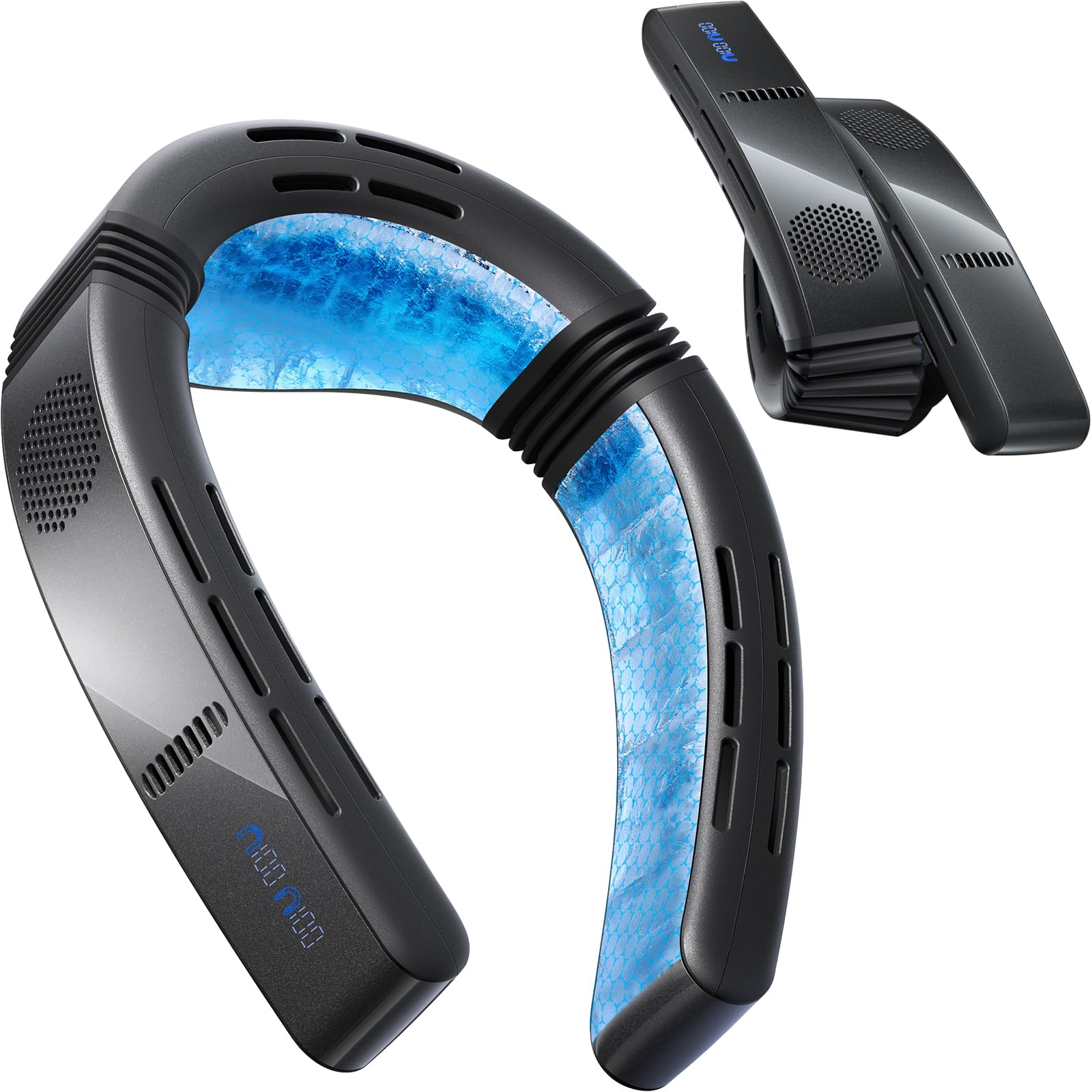
Figure 1: TORRAS COOLiFY Cyber Fold AI Neck Air Conditioner
Video 1: Demonstrating the cooling capabilities of the Cyber Fold neck air conditioner.
Video 2: Showcasing the device's use in active environments to maintain comfort.
Video 3: Highlighting the rapid cooling and strong airflow features.
2. Components
The TORRAS COOLiFY Cyber Fold package typically includes the following items:
- COOLiFY Cyber Fold AI Neck Air Conditioner Unit
- USB-C Charging Cable
- Carrying Case
- Quick Start Guide
- Safety Guidelines

Figure 2: Top view of the device, highlighting air vents.
3. Setup
3.1 Charging the Device
Before first use, fully charge the COOLiFY Cyber Fold. Connect the provided USB-C charging cable to the device's charging port and a compatible power source. The device features 20W fast charging technology.
3.2 Initial Use and Fitting
Place the device around your neck. The flexible design allows for adjustment to fit various neck sizes comfortably. Ensure the cooling plates are in contact with your skin for optimal performance.

Figure 3: Proper placement of the device on the neck.
4. Operating Instructions
4.1 Power On/Off
To power on the device, press and hold the power button located on the side of the unit. Repeat the action to power off. The device will indicate its status via LED lights and/or display.
4.2 Mode Selection and Adjustment
The COOLiFY Cyber Fold offers multiple modes and adjustable settings:
- Cooling Mode: Provides active cooling to the neck area. Intensity can be adjusted.
- Heating Mode: Provides warmth for comfort. Intensity can be adjusted.
- AI Auto Mode: Automatically adjusts cooling or heating based on ambient temperature and user preference.
- Adjustable Airflow: Direct airflow to the face, neck, or both using the adjustable vents.
Adjustments can be made using the physical buttons on the device or through the dedicated TORRAS smartphone application (Bluetooth connection required).

Figure 4: Smartphone application for device control.
Video 4: Instructions on how to fold the device and adjust wind direction.
4.3 Folding and Portability
The device features an innovative foldable design, allowing it to be compacted for easy storage and transport. Gently fold the arms inward to reduce its size. Store it in the provided carrying case to protect it during travel.

Figure 5: The device in its folded configuration for portability.
5. Maintenance
5.1 Cleaning
To clean the device, gently wipe the surfaces with a soft, dry cloth. Do not use abrasive cleaners or immerse the device in water. Ensure the air vents are free from dust and debris for optimal performance.
5.2 Storage
When not in use, store the COOLiFY Cyber Fold in its carrying case in a cool, dry place away from direct sunlight and extreme temperatures. This helps prolong battery life and maintain the device's condition.
6. Troubleshooting
If you encounter issues with your COOLiFY Cyber Fold, refer to the following common solutions:
- Device not turning on: Ensure the device is fully charged. Connect it to a power source and allow it to charge for at least 30 minutes before attempting to power it on again.
- No cooling/heating effect: Check that the desired mode (cooling or heating) is selected and the intensity is set appropriately. Ensure the cooling plates are in direct contact with your skin.
- App connectivity issues: Verify that Bluetooth is enabled on your smartphone and the device is within range. Restart both the device and the app, then attempt to reconnect.
- Reduced airflow: Inspect the air vents for any obstructions (e.g., dust, hair). Clean the vents as described in the Maintenance section.
For further assistance, please contact customer support.
7. Specifications
| Feature | Detail |
|---|---|
| Brand | TORRAS |
| Model Number | FG6B |
| Product Type | Wearable Air Conditioner / Neck Fan |
| Color | Obsidian Black |
| Power Source | Battery Powered |
| Battery Capacity | 6000mAh |
| Battery Life | Up to 2-15.5 hours (depending on mode/intensity) |
| Cooling Performance | Up to 10°C drop below ambient temperature |
| Cooling Area | 14,975 mm² |
| Control Method | Push Button, Smartphone App (Bluetooth) |
| Modes | Cooling, Heating, AI Auto |
| Fan Speed | Variable (Multiple settings via app) |
| Noise Level | 49.9 Decibels |
| Wattage | 3 watts |
| Usage Environment | Indoor, Outdoor |
| Material | Aluminum, Silicone |
| Dimensions (D x W x H) | 1.95" x 7.28" x 7.61" |
| Included Components | Device, USB-C Charging Cord, Carrying Case |
8. Warranty and Support
The TORRAS COOLiFY Cyber Fold AI Neck Air Conditioner comes with a 365-day warranty for free replacement in case of manufacturing defects. For any product-related inquiries, technical support, or warranty claims, please contact the TORRAS Flagship Store customer service.
Customer Service: Refer to the contact information provided in your Quick Start Guide or visit the official TORRAS website for support options.


