
1. Introduction
Thank you for choosing the UGREEN 6-in-1 Universal Travel Adapter. This device is designed to provide a versatile and compact charging solution for your electronic devices while traveling internationally. It features multiple AC outlets and USB ports to charge up to six devices simultaneously.
This manual provides essential information for the safe and efficient use of your adapter. Please read it thoroughly before use and retain it for future reference.
2. Important Safety Information
- Voltage Conversion: This product is a travel adapter, not a voltage converter. Ensure your devices are compatible with the local voltage (100-125V or 220-240V) before plugging them into the AC outlets. Failure to do so may damage your devices.
- Maximum Load: Do not exceed the maximum power rating of 2300W for 220-240V regions or 1250W for 100-125V regions.
- Indoor Use Only: This adapter is intended for indoor use in dry locations only. Do not expose to moisture or extreme temperatures.
- Child Safety: The adapter includes a child safety gate on the AC outlets. Keep out of reach of children.
- Damage: Do not use if the adapter is damaged. Contact customer support for assistance.
- Disassembly: Do not attempt to disassemble or modify the adapter. This will void the warranty and may pose a safety risk.

Figure 1: Internal safety features including flame-retardant casing and safety shutters.

Figure 2: Diagram showing multiple protection mechanisms: overcurrent, overvoltage, short-circuit, overload, and static electricity protection.
3. Product Overview
The UGREEN 6-in-1 Universal Travel Adapter (Model 85779) is a compact and versatile charging device. It integrates two AC outlets and four USB ports (two USB-C and two USB-A) into a single unit, allowing you to power and charge multiple devices simultaneously.

Figure 3: Front view of the UGREEN Universal Travel Adapter.
Key Features:
- 6-in-1 Charging: Two AC outlets and four USB ports (2x USB-C, 2x USB-A).
- PD 45W Fast Charging: USB-C ports support Power Delivery up to 45W for rapid charging of compatible devices.
- Universal Compatibility: Retractable pins for Type A, I, G, and C/E/K outlets, covering over 200 countries.
- Compact & Portable: Slim design (4.5 × 8.9 × 2.5 cm) and lightweight (135g) with foldable pins for easy travel.
- Multiple Protections: Built-in safeguards against overcurrent, overvoltage, short-circuit, overload, and static electricity.
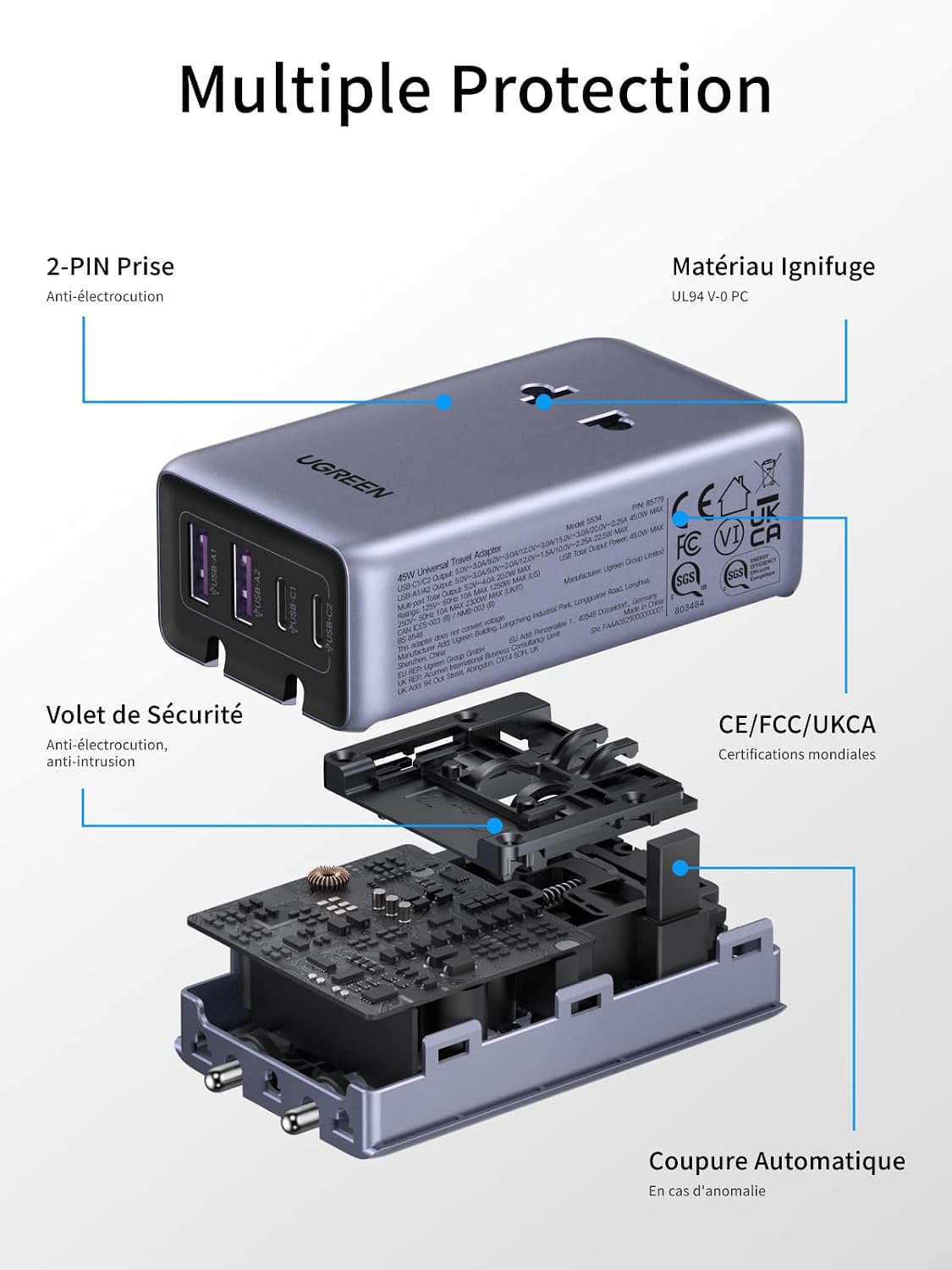
Figure 4: The adapter's compact design and retractable pins for portability.

Figure 5: The adapter fits easily into a travel case, demonstrating its portability.
4. Setup and Plug Selection
To use the adapter, select the appropriate plug type for your destination. The adapter features retractable pins for various international standards.
Selecting a Plug Type:
- Identify the required plug type for your travel destination (Type A, I, G, or C/E/K).
- Locate the corresponding slider on the side of the adapter.
- Slide the button to extend the correct pins. Ensure the pins are fully extended and locked into place before use.
- To retract the pins, press the release button (if applicable) and slide the pins back into the adapter body.

Figure 6: The adapter showing different plug configurations for various regions.

Figure 7: Detailed instructions for deploying and retracting Type I (AU), Type G (UK), Type A (US), and Type C/E (EU) plugs.
5. Operating Instructions
Once the correct plug type is selected and extended, insert the adapter into a wall outlet. The adapter is now ready to power and charge your devices.
Charging Devices:
- AC Outlets: Plug your AC-powered devices (e.g., laptop chargers, small appliances) into the two universal AC outlets on the adapter. Ensure the total wattage does not exceed the adapter's maximum load for the local voltage.
- USB-C Ports: Connect your USB-C compatible devices (e.g., smartphones, tablets, laptops) to the USB-C1 or USB-C2 ports for fast charging up to 45W (when using a single USB-C port).
- USB-A Ports: Connect your USB-A compatible devices to the USB-A1 or USB-A2 ports.
- Simultaneous Charging: The adapter can charge up to 6 devices simultaneously (2 AC + 4 USB). Note that when multiple USB ports are used, the total power output is distributed. For example, if all four USB ports are used, the total output is 20W (5V/4A shared).

Figure 8: Charging a laptop using the 45W USB-C Power Delivery port.

Figure 9: The adapter charging multiple devices at once, demonstrating its 6-in-1 capability.

Figure 10: USB port output specifications for single and multiple port usage.
Usage Scenarios:

Figure 11: Convenient charging in a hotel room.

Figure 12: Charging devices in an airport lounge.

Figure 13: Versatile use during international travel.

Figure 14: Ideal for study or work abroad.
6. Compatibility
The UGREEN Universal Travel Adapter is compatible with electrical outlets in over 200 countries and regions, supporting the following plug types:
- Type A (US): United States, China, Canada, Mexico, Japan, Thailand, etc.
- Type I (AU): Australia, New Zealand, Argentina, etc.
- Type G (UK): United Kingdom, Singapore, Hong Kong, Macau, etc.
- Type C/E/K (EU): France, Germany, Italy, Spain, South Korea, etc.

Figure 15: Comprehensive list of compatible countries and regions by plug type.
7. Specifications
| Feature | Specification |
|---|---|
| Brand | UGREEN |
| Model Number | 85779 |
| Item Weight | 135 Grams |
| Dimensions (L x W x H) | 9 x 5.2 x 3.1 centimeters |
| Plug Types Supported | Type A, Type I, Type G, Type C/E/K |
| Total Power Outlets | 6 (2 AC, 2 USB-C, 2 USB-A) |
| AC Input Voltage | 100-240V AC, 50/60Hz |
| AC Output (100-125V) | 10A Max, 1250W Max |
| AC Output (220-240V) | 10A Max, 2300W Max |
| USB-C Output (Single Port) | 5.0V=3.0A/9.0V=3.0A/12.0V=3.0A/15.0V=3.0A/20.0V=2.25A (45W Max) |
| USB-A Output (Single Port) | 5.0V=3.0A/9.0V=2.0A/12.0V=1.5A/10.0V=2.25A (22.5W Max) |
| USB Output (Total, Multiple Ports) | 20W Max (5V/4A shared) |
| Country of Origin | China |
8. Maintenance
- Cleaning: Disconnect the adapter from the power outlet and all devices before cleaning. Use a soft, dry cloth to wipe the surface. Do not use liquid cleaners or aerosols.
- Storage: When not in use, retract all pins and store the adapter in a cool, dry place away from direct sunlight and moisture.
- Inspection: Periodically inspect the adapter for any signs of damage, such as frayed cables or loose connections. If damage is found, discontinue use and contact customer support.
9. Troubleshooting
Common Issues and Solutions:
- Device not charging:
- Ensure the adapter is securely plugged into the wall outlet.
- Verify that the correct plug type is fully extended and locked.
- Check if your device's charging cable is properly connected to the adapter and the device.
- Confirm that your device is compatible with the local voltage (for AC outlets).
- Reduce the number of devices connected if the adapter is overloaded.
- Slow charging:
- When multiple USB ports are used, the total power output is shared. Disconnect other USB devices to maximize charging speed for a single device.
- Ensure your cable supports fast charging if using PD ports.
- Adapter feels warm:
- It is normal for the adapter to feel slightly warm during operation. If it becomes excessively hot, disconnect it immediately and check for overloading or faulty devices.
10. Warranty and Support
This UGREEN product is covered by a 24-month warranty from the date of purchase. This warranty covers manufacturing defects and workmanship under normal use.
The warranty does not cover damage caused by:
- Accident, abuse, misuse, or improper operation.
- Unauthorized repair or modification.
- Failure to follow the instructions in this manual.
- Damage from liquids or extreme temperatures.
Customer Support:
For technical support, warranty claims, or any questions regarding your UGREEN product, please contact UGREEN customer service through the retailer where you purchased the product or visit the official UGREEN website for contact information.
