
Introduction
Welcome to your new RadioShack 80W Wireless Speaker. This manual provides essential information for setting up, operating, and maintaining your speaker. Please read these instructions carefully before using the product to ensure proper function and longevity.
Package Contents

This image displays the contents included in the product packaging.
- 1x Wireless speaker
- 1x User manual
- 1x Fast charging cable
Product Features

This image highlights the main features and connectivity options of the speaker.
- 80W High-Power Audio: Delivers deep bass and clear highs through dual woofers and tweeters.
- Bluetooth 5.4 Connectivity: Enjoy wireless audio streaming with a range of up to 32 ft.
- Versatile Inputs: Includes USB and AUX inputs for various audio sources.
- Performance Ready: Dedicated guitar and wired microphone inputs support live performances and karaoke.
- Customizable Sound: Adjustable echo and bass controls allow personalized audio tuning.
- Wide Format Support: Compatible with MP3, WAV, APE, FLAC, and WMA audio formats.
- Extended Playtime: Up to 10 hours of continuous music playback.
- True Wireless Pairing: Connect two speakers for a stereo sound experience.
- Rechargeable Battery: For portable use.
- Wireless Recording: Record audio directly to a USB drive.
Controls and Ports
Rear Panel Connections
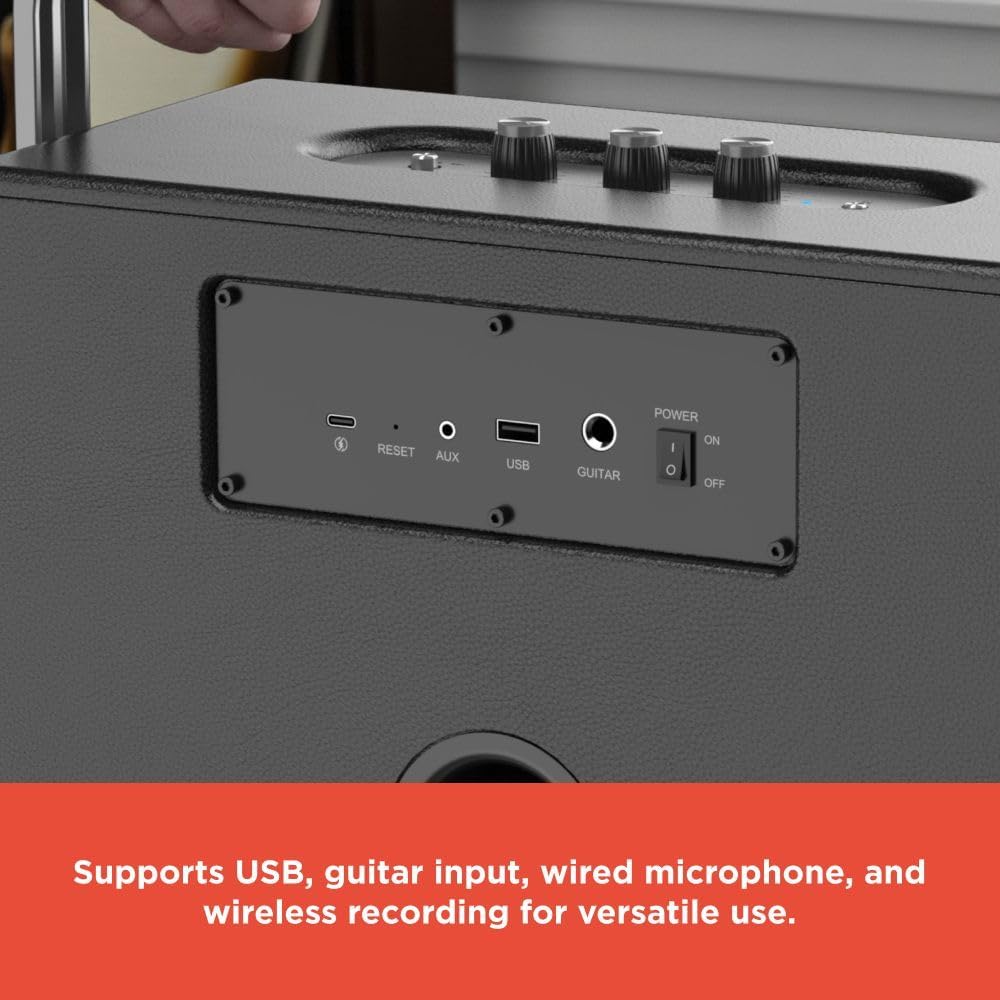
This image shows the rear panel of the speaker with various input ports and controls.
- Power Switch: Toggles the speaker ON or OFF.
- USB Port: For USB drive playback and wireless recording.
- AUX Input: 3.5mm jack for connecting external audio devices.
- Guitar Input: 6.35mm jack for connecting a guitar.
- Microphone Input: 6.35mm jack for connecting a wired microphone.
- Reset Button: Used to reset the speaker to factory settings.
- Charging Port: Connect the fast charging cable here.
Top Panel Controls

This image displays the top control panel with knobs for adjusting sound.
- Volume Control: Adjusts the overall speaker volume.
- Echo Control: Adjusts the echo effect for microphone input.
- Bass Control: Adjusts the bass level of the audio output.
- Treble Control: Adjusts the treble level of the audio output.
- Mode Button: Switches between input modes (Bluetooth, USB, AUX).
- Play/Pause Button: Controls audio playback.
- Previous/Next Track Buttons: Navigates through audio tracks.
Setup
Charging the Speaker
Before initial use, fully charge the speaker using the provided fast charging cable. Connect the cable to the charging port on the speaker and a suitable USB power adapter (not included). The charging indicator will illuminate to show the charging status and turn off when fully charged.
Powering On/Off
Locate the Power switch on the rear panel of the speaker. Flip it to the "ON" position to power on the speaker. Flip it to "OFF" to power off the device.
Operating Instructions
Bluetooth Pairing
- Power on the speaker. It will automatically enter Bluetooth pairing mode, indicated by a flashing LED light.
- On your mobile device, enable Bluetooth and search for "RadioShack 4001985" (or similar) in the list of available devices.
- Select the speaker from the list to initiate pairing. A confirmation sound will indicate successful pairing.
- Once paired, you can play audio from your device through the speaker.
USB Playback
- Insert a USB drive containing compatible audio files (MP3, WAV, APE, FLAC, WMA) into the USB port on the rear panel.
- The speaker will automatically switch to USB mode and begin playing audio. If not, press the Mode button to select USB input.
- Use the Play/Pause and Previous/Next Track buttons on the top panel to control playback.
AUX Input
- Connect one end of a 3.5mm audio cable (not included) to the AUX input port on the rear panel of the speaker.
- Connect the other end to the audio output of your external device (e.g., smartphone, MP3 player).
- Press the Mode button to select AUX input.
- Play audio from your external device.
Guitar and Microphone Usage
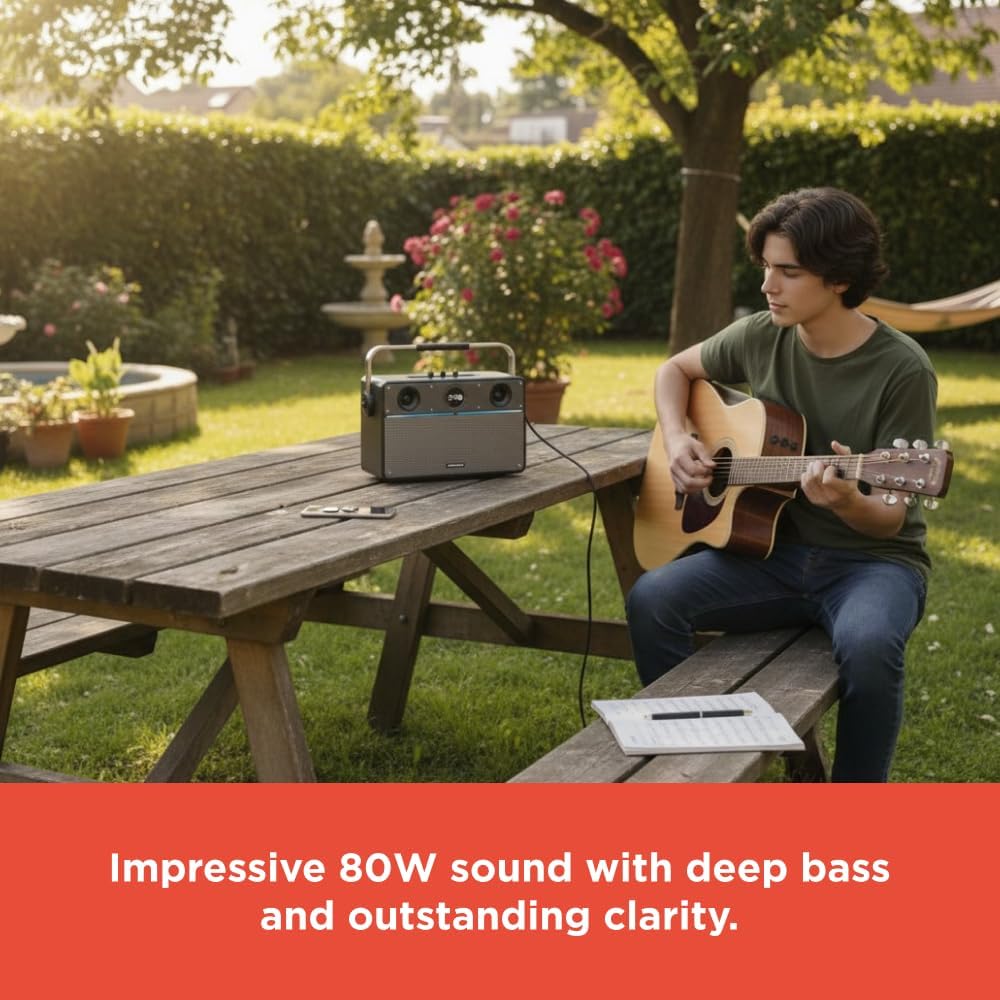
This image shows a person playing a guitar outdoors with the speaker, demonstrating its use for live performances.

This image depicts a group of people enjoying music and karaoke with the speaker, highlighting its versatility for various audio formats.
- Connect your guitar to the Guitar input port on the rear panel.
- Connect your wired microphone to the Microphone input port on the rear panel.
- Adjust the Volume, Echo, and Bass/Treble controls on the top panel to achieve your desired sound mix.
Wireless Recording
- Ensure a USB drive is inserted into the USB port.
- Connect a microphone to the microphone input.
- Press the dedicated Record button (if available, or refer to specific button on device, not explicitly shown in images) to begin recording audio from the microphone onto the USB drive.
- Press the Record button again to stop recording.
Maintenance
- Keep the speaker away from water, moisture, and extreme temperatures to prevent damage.
- Clean the speaker with a soft, dry cloth. Do not use abrasive cleaners, solvents, or harsh chemicals.
- Do not attempt to disassemble or repair the speaker yourself. Contact qualified service personnel for any repairs.
- Store the speaker in a cool, dry place when not in use for extended periods.
Troubleshooting
| Problem | Solution |
|---|---|
| Speaker does not power on | Ensure the speaker is fully charged. Check the power switch position on the rear panel. |
| No sound output | Check volume levels on both the speaker and the connected device. Ensure the correct input mode (Bluetooth, USB, AUX) is selected. Verify all cable connections for AUX, Guitar, or Microphone inputs. |
| Bluetooth not pairing | Ensure the speaker is in Bluetooth pairing mode (flashing LED). Disable and re-enable Bluetooth on your device. Move your device closer to the speaker. |
| USB playback not working | Ensure the USB drive is formatted correctly and contains compatible audio files (MP3, WAV, APE, FLAC, WMA). Try a different USB drive. |
Specifications

This image visually represents the speaker's internal components, specifically the woofers, emphasizing its sound quality.

This image provides the physical dimensions of the speaker.
- Brand: RadioShack
- Model Number: 4001985
- Speaker Type: Portable Speaker
- Connectivity Technology: Bluetooth (Bluetooth 5.4)
- Speaker Maximum Output Power: 80 Watts
- Product Dimensions: 13.78"D x 10.63"W x 19.69"H
- Item Weight: 1.71 pounds
- Material: Acrylonitrile Butadiene Styrene (ABS)
- Batteries: 1 Nonstandard Battery (included)
- Play Time: Up to 10 hours
- Wireless Range: Up to 32 ft
- Supported Audio Formats: MP3, WAV, APE, FLAC, WMA
Warranty Information and Customer Support
This RadioShack product is covered by a limited warranty. Please refer to the warranty card included in your package for specific terms and conditions regarding coverage and duration.
For technical support, troubleshooting assistance, or warranty claims, please visit the official RadioShack website or contact their customer service department.
Online Support: www.radioshack.com/support
Manufacturer: RadioShack