
Introduction
This manual provides essential information for setting up, operating, maintaining, and troubleshooting your Google Pixel 10a smartphone. Please read it carefully to ensure optimal performance and longevity of your device.

The Google Pixel 10a smartphone, showcasing its display and overall design.
What's in the Box
Verify that all items are present in your product packaging:
- Google Pixel 10a Smartphone
- USB-C to USB-C Cable (1m, USB 2.0)
- Quick Start Guide / Safety and Warranty Booklet
- SIM Ejector Tool
The Google Pixel 10a smartphone alongside its included USB-C to USB-C cable and SIM ejector tool, representing the contents of the product box.
Setup
1. Insert SIM Card
- Locate the SIM card tray on the side of your Pixel 10a.
- Insert the SIM ejector tool into the small hole on the tray and press firmly until the tray pops out.
- Place your Nano-SIM card into the tray with the gold contacts facing down.
- Carefully push the tray back into the phone until it clicks into place.
2. Initial Power On and Configuration
- Press and hold the power button until the Google logo appears.
- Follow the on-screen instructions to select your language, connect to Wi-Fi, and set up your Google account.
3. Data Transfer from Old Device
The Google Pixel 10a simplifies the transfer of data from your previous smartphone. Connect your new Pixel to your old device and follow the on-screen prompts to transfer apps, contacts, photos, and more.

The Google Pixel 10a display showing the data transfer interface, allowing users to easily copy applications, contacts, photos, and other data from their old smartphone.
Operating Your Device
Camera Features
The Pixel 10a features advanced camera capabilities, including Photo Coach and Magic Editor for enhanced photo editing.
- Photo Coach: Learn to take better photos with on-screen guidance for composition.
- Magic Editor: Retouch photos directly in Google Photos to remove objects, change backgrounds, and more.
- Group Photo Optimization: Automatically combine multiple similar shots to create a superb group photo.

This image demonstrates the Photo Coach feature on the Google Pixel 10a, guiding users to compose photos easily, such as 'Look towards the horizon,' 'High perch,' and 'Face to sky.'
Gemini Live AI Assistant
Gemini, your integrated AI assistant, simplifies daily tasks and helps with organization. It can assist with task lists, provide information, and offer recommendations.

The Google Pixel 10a screen showing an interaction with Gemini, the integrated AI assistant, providing recommendations based on user queries.
Pixel Security
Your Pixel 10a is equipped with advanced security features. Google's AI can detect theft and automatically lock your device to protect your personal data.

An illustration on the Google Pixel 10a screen depicting the theft protection feature, which automatically locks the device if stolen.
Battery and Charging
The Google Pixel 10a offers over 30 hours of battery life on a single charge and supports fast charging. The actual battery life may vary based on usage and network conditions.
- Battery Capacity: 5051 mAh
- Average Battery Life: Up to 30 hours
- Charging: Use the included USB-C to USB-C cable for optimal charging.

A visual representation highlighting the Google Pixel 10a's extended battery life of over 30 hours and the commitment to seven years of software updates and new features.
Durability and Design
The Pixel 10a features a satin finish and a durable design, built to withstand daily use. It is equipped with Corning Gorilla Glass 7i for scratch resistance.
- Screen Protection: Corning Gorilla Glass 7i
- Water Resistance: IP68 rating for dust and water resistance.

This image illustrates the Google Pixel 10a's satin finish and durable construction, emphasizing its robust build quality.
Maintenance
Software Updates
Google provides 7 years of software updates for the Pixel 10a, including security updates and new features. Ensure your device is connected to Wi-Fi to download and install updates.
General Care
- Clean your device regularly with a soft, lint-free cloth.
- Avoid exposing the phone to extreme temperatures or direct sunlight for extended periods.
- Protect the screen with a screen protector and use a protective case to prevent physical damage.
Troubleshooting
Common Issues
- Device not responding: Press and hold the power button for about 30 seconds to force a restart.
- Battery draining quickly: Check background app usage, reduce screen brightness, and ensure software is up to date.
- Network connectivity issues: Restart your device, check SIM card insertion, or contact your wireless carrier.
Emergency Services
In areas without mobile network or Wi-Fi, you can contact emergency services via satellite to get help and share your location with contacts.
Specifications
| Feature | Detail |
|---|---|
| Brand | |
| Operating System | Android 16 |
| CPU Model | Google Tensor G2 |
| Storage Capacity | 128 GB |
| Screen Size | 6.3 Inches |
| Display Resolution | 1080 x 2424 Pixels |
| Refresh Rate | 60 Hz |
| Model Name | Pixel 10a |
| Wireless Carrier | Unlocked |
| Cellular Technology | 5G |
| Color | Volcanic Black |
| Number of SIM Slots | Single SIM |
| Port Type | USB Type C |
| Form Factor | Slate |
| SIM Card Size | Nano |
| Water Resistance Level | Not Waterproof |
| Headphone Jack | [Unknown] |
| Spare Parts Availability | 7 Years |
| Specific Absorption Rate (SAR) | 2.79 Watts per kilogram |
| Number of Front Cameras | 1 |
| Battery Capacity | 5051 mAh |
| Item Weight | 184.7 Grams |
| Item Dimensions | 15.4 x 7.3 x 0.9 centimeters |
| Average Battery Life | 30 Hours |
| Talk Time Battery Life | 30 Hours |
| GPS Geopositioning Feature | False |
| Display Type | OLED |
| Max Display Resolution | 1080 x 2424 Pixels |
| Pixel Density | 422.2 Pixels per inch (PPI) |
| Connectivity Technology | USB, Wi-Fi |
| Screen Capture Resolution | 1080p |
| Frame Rate | 120, 30, 60 |

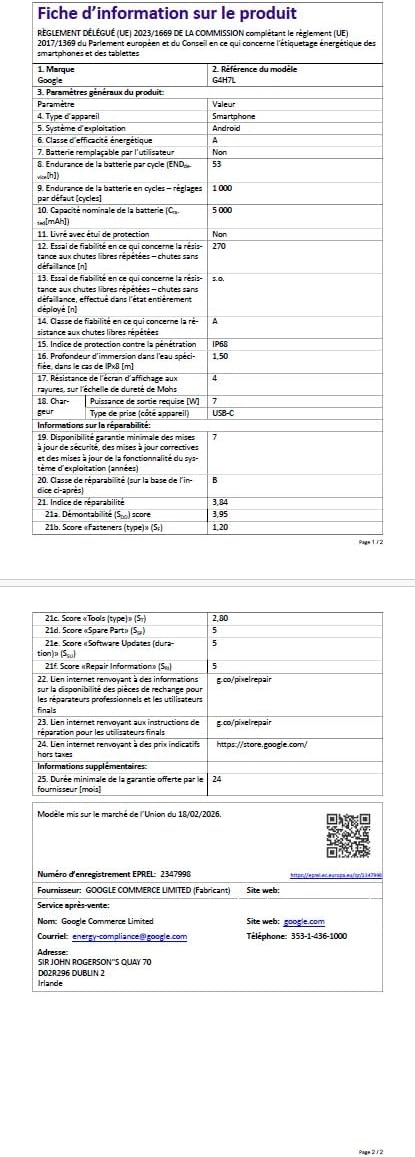
A detailed product information sheet for the Google Pixel 10a, providing technical specifications, regulatory compliance, and other essential data.
Warranty and Support
Warranty Information
Your Google Pixel 10a comes with a 2-year manufacturer's warranty. Please refer to the included warranty booklet for full terms and conditions.
Additional Resources
- User Guide (PDF): Download Official User Guide
- Data Transparency Statement (PDF): Download Data Transparency Statement
- EU Energy Label Information: For detailed energy efficiency information, visit the EPREL database.
- Manufacturer: Google
- Spare Parts Availability: 7 Years


