
Belife S8 Cordless Vacuum Cleaner User Manual
Model: S8
1. Important Safety Instructions
Please read all instructions carefully before using the appliance and retain them for future reference. Failure to follow these instructions may result in electric shock, fire, or serious injury.
- This appliance is for household use only. Do not use outdoors or on wet surfaces.
- Do not allow children to operate the vacuum cleaner. Close supervision is necessary when used near children.
- Do not pick up flammable or combustible liquids, such as gasoline, or use in areas where they may be present.
- Do not pick up anything that is burning or smoking, such as cigarettes, matches, or hot ashes.
- Do not use without the dust cup and filters in place.
- Turn off the appliance before connecting or disconnecting the motorized brush, accessories, or charging.
- Use only the charger supplied by the manufacturer to recharge.
- Store the vacuum cleaner indoors in a dry place.
2. Package Contents
Verify that all components are present in the package:
- Main Unit
- Floor Brush
- Telescopic Tube
- Battery
- Sofa Brush
- Long Crevice Brush
- 2-in-1 Brush
- Small Cleaning Tool
- Wall Mount Set
- HEPA Filter (pre-installed or spare)
- Charger

3. Product Overview
The Belife S8 Cordless Vacuum Cleaner is designed for efficient cleaning across various surfaces. It features a 600W brushless motor, providing up to 48KPa suction power in Turbo Mode. The vacuum operates quietly at approximately 45dB.
Key features include a detachable battery offering up to 65 minutes of runtime in Auto Mode, an all-in-one LED touch display for real-time monitoring of battery life and suction modes, and an 8-stage HEPA filtration system. The design incorporates a self-standing capability, adjustable height, and an anti-tangle floor brush with LED headlights for enhanced visibility.


4. Assembly
Follow these steps to assemble your Belife S8 Cordless Vacuum Cleaner:
- Attach the Telescopic Tube: Insert the telescopic tube into the main unit until it clicks securely into place.
- Connect the Floor Brush: Attach the floor brush to the other end of the telescopic tube, ensuring it locks firmly.
- Install the Battery: Slide the detachable battery pack into the designated slot on the main unit until it clicks.
- Attach Accessories: For handheld use, remove the telescopic tube and attach desired accessories (e.g., sofa brush, crevice nozzle) directly to the main unit.


5. Charging the Battery
The Belife S8 features a detachable battery for convenient charging. A full charge takes approximately 4.5 hours.
- Connect the Charger: Plug the charger into a wall outlet and connect the charging cable to the charging port on the battery pack or the wall mount.
- Monitor Charging: The LED display on the main unit will indicate the charging status. Once fully charged, the display will show 100%.
- Wall Mount Charging: The included wall mount allows for convenient storage and charging. Install the wall mount in a suitable location and hang the vacuum cleaner for charging.


6. Operation
6.1 Powering On/Off and Suction Modes
Press the power button on the main unit to turn the vacuum cleaner on or off. Use the LED touch display to select your desired suction mode:
- Auto Mode: The vacuum automatically adjusts suction power based on the surface and debris level, optimizing battery life.
- Min Mode: For light cleaning and extended runtime.
- Med Mode: For everyday cleaning tasks.
- Max Mode (Turbo): Provides maximum suction for stubborn dirt and deep cleaning.


6.2 Using Attachments and Features
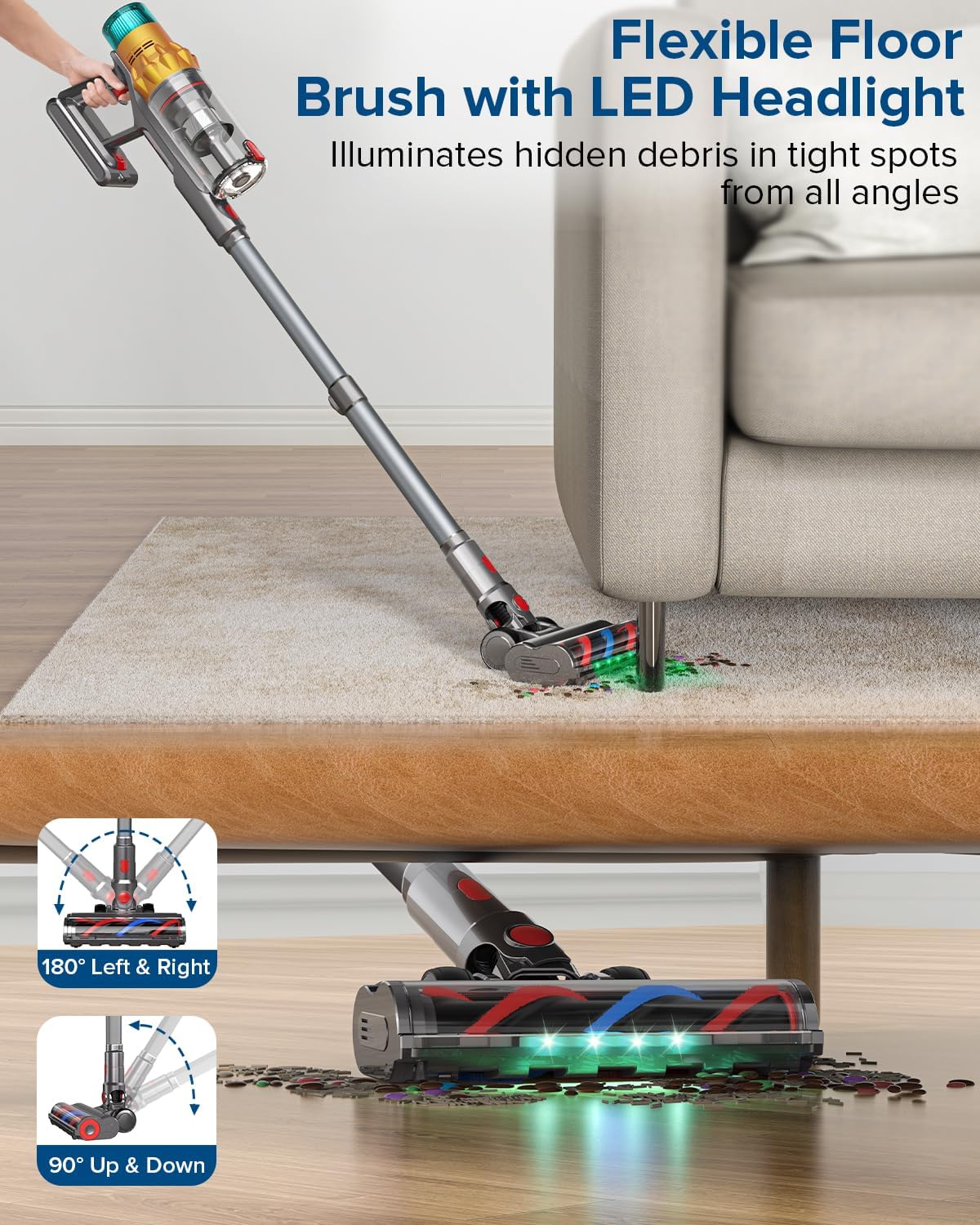
- Floor Brush with LED Headlights: The main floor brush is equipped with LED headlights to illuminate hidden dirt and debris under furniture and in dark areas. Its 180° swivel steering allows for easy maneuverability.
- Self-Standing Design: The vacuum can stand upright on its own, providing convenience during cleaning breaks or storage.
- Sofa Brush: Ideal for cleaning upholstery, pet hair from fabric, and delicate surfaces.
- Long Crevice Brush: Designed for reaching narrow gaps, corners, and tight spaces in your home or car.
- 2-in-1 Brush: A versatile tool for dusting and cleaning various surfaces.


7. Maintenance
Regular maintenance ensures optimal performance and extends the lifespan of your vacuum cleaner.
7.1 Emptying the Dust Cup
The 1.6L extra-large dust cup should be emptied regularly, especially when the 'MAX' line is reached, to maintain suction power.
- Ensure the vacuum is turned off.
- Press the dust cup release button to detach it from the main unit.
- Position the dust cup over a trash bin.
- Press the one-click emptying button to release the bottom flap and empty the contents.
- Close the flap and reattach the dust cup to the main unit until it clicks.

7.2 Cleaning the HEPA Filter
The 8-stage HEPA filtration system traps 99.97% of micro dust. Clean the washable HEPA filter monthly and replace it every three months for optimal performance.
- Ensure the vacuum is turned off and the dust cup is removed.
- Twist and pull out the HEPA filter from the dust cup.
- Rinse the filter under cold running water until the water runs clear.
- Allow the HEPA filter to air dry completely for at least 24 hours before reinserting. Do not use a dryer or heat to dry.
- Reassemble the filter and dust cup.

7.3 Cleaning the Floor Brush
The S anti-tangle floor brush is designed to minimize hair wrap, but regular inspection and cleaning are recommended.
- Ensure the vacuum is turned off.
- Detach the floor brush from the telescopic tube or main unit.
- Locate the brush roll release mechanism (usually a latch or button) and remove the brush roll.
- Use the small cleaning tool or scissors to cut and remove any tangled hair or debris from the brush roll.
- Clean any debris from the brush housing.
- Reinsert the brush roll and secure the release mechanism.

8. Troubleshooting
If you encounter issues with your Belife S8, refer to the following common problems and solutions:
| Problem | Possible Cause | Solution |
|---|---|---|
| Vacuum does not turn on | Battery is not charged or not properly installed. | Ensure the battery is fully charged and correctly inserted until it clicks. |
| Reduced suction power | Dust cup is full, filter is clogged, or blockage in the hose/brush. | Empty the dust cup. Clean the HEPA filter. Check for and remove any blockages in the telescopic tube, floor brush, or main unit. |
| Brush roll not spinning | Hair or debris tangled in the brush roll, or brush roll is jammed. | Turn off the vacuum. Remove the brush roll and clear any obstructions. Ensure it is reinstalled correctly. |
| Battery drains quickly | Operating in Max/Turbo mode continuously, or battery degradation. | Use Auto or Min mode for longer runtime. Ensure the battery is fully charged before use. If issues persist, contact customer support. |
| Unusual noise during operation | Blockage in the air path or foreign object in the brush roll. | Turn off and inspect all parts for blockages or foreign objects. Remove any found. |
9. Specifications
| Feature | Specification |
|---|---|
| Brand | Belife |
| Model Name | S8 |
| Motor Wattage | 600W |
| Max Suction Power | 48KPa (Turbo Mode) |
| Battery Capacity | 8*2500mAh (Detachable) |
| Max Runtime | Up to 65 minutes (Auto Mode) |
| Charging Time | 4.5 hours |
| Dust Cup Capacity | 1.6 Liters |
| Filter Type | 8-Stage HEPA Filter |
| Noise Level | Approximately 45dB |
| Item Weight | 7 pounds |
| Dimensions (L x W x H) | 11.4" x 7.48" x 17.2" |
| Surface Recommendation | All floors, Carpet, Hard Floor, Hardwoods, Upholstery, Bare Floor, Ceramic tile |
10. Warranty and Support
The Belife S8 Cordless Vacuum Cleaner comes with a manufacturer's warranty. For specific warranty details, duration, and terms, please refer to the warranty card included in your product packaging or contact Belife customer support directly.
If you have any questions, require technical assistance, or need to claim warranty service, please contact Belife customer support through their official website or the contact information provided in your product documentation.
Please have your model number (S8) and purchase date ready when contacting support.


