
Introduction
Thank you for choosing the LIVELYGLOW White Large Makeup Vanity Desk. This manual provides essential information for the safe assembly, operation, and maintenance of your new vanity desk. Please read these instructions carefully before use and retain them for future reference.
Safety Information
Warning: Assembly may involve sharp edges or pinch points. Always follow instructions and use appropriate tools. Be cautious when using electrical components and lighting. Ensure all electrical connections are secure and comply with local safety standards. Do not overload the power outlets.
Assembly Instructions
Your LIVELYGLOW vanity desk requires assembly. All necessary parts are labeled, and detailed instructions are included in the packaging. An installation video is also available to guide you through the process. Please ensure all components are present before beginning assembly.
- Unpack all components and verify against the parts list.
- Follow the step-by-step instructions provided in the assembly manual.
- Use the appropriate tools as specified.
- Ensure all screws and fasteners are tightened securely.
- Connect the smart LED mirror and power station according to the electrical connection guide.

Figure 1: Fully assembled LIVELYGLOW White Makeup Vanity Desk.
Operating Instructions
Smart LED Mirror
The integrated smart LED mirror features adjustable lighting to suit various needs. It offers three color temperature modes and stepless dimming functionality.
- Power On/Off: Touch the power icon on the mirror surface to turn the LED lights on or off.
- Change Color Temperature: Briefly touch the color temperature icon to cycle through the three modes: Cool Light (6000K), Natural Light (4000K), and Warm Light (3000K).
- Stepless Dimming: Press and hold the power icon to adjust the brightness of the selected light mode. Release when the desired brightness is achieved.
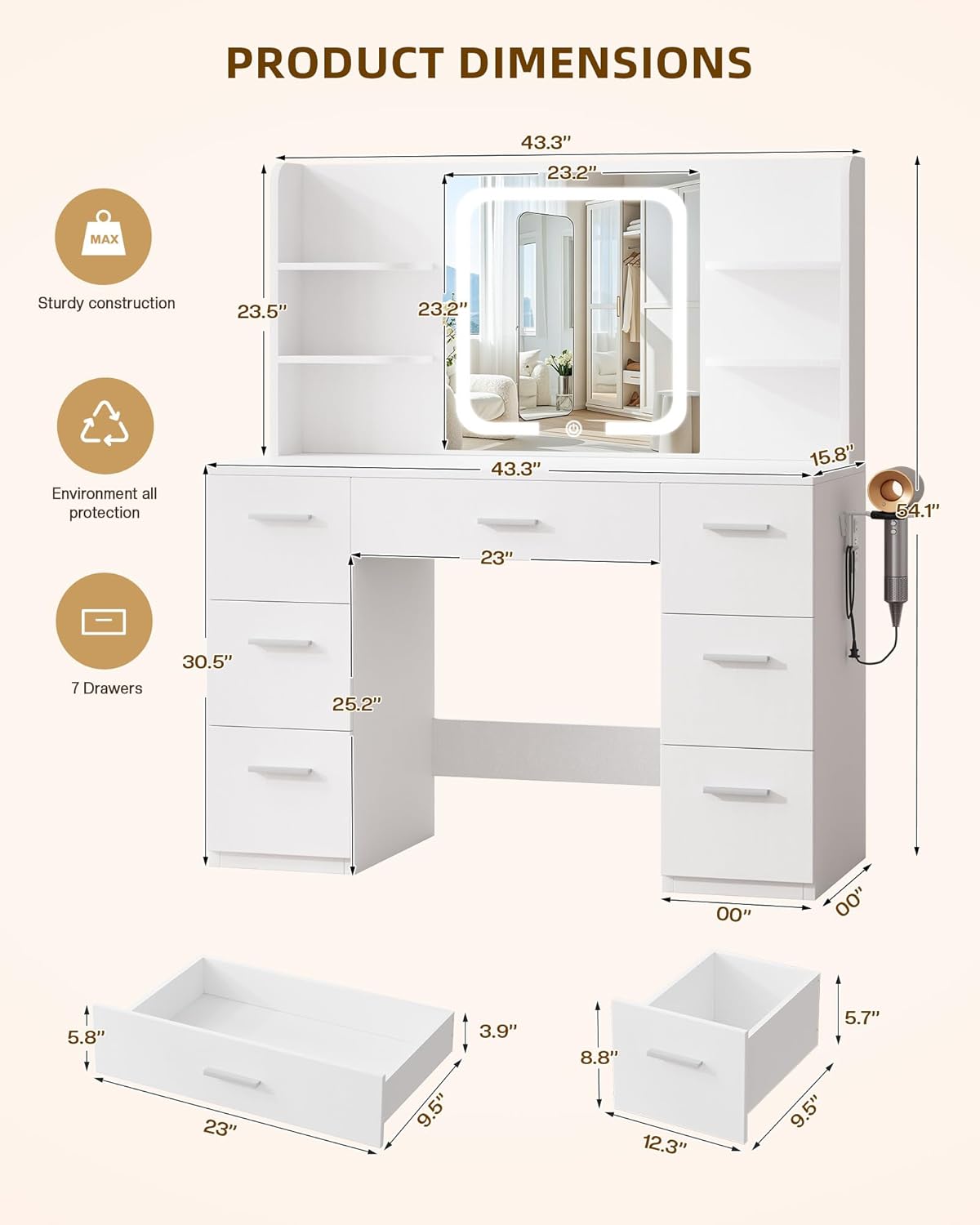
Figure 2: Smart LED Mirror with 3 color temperature options and stepless dimming.
Power Station
The vanity desk includes a built-in power station for convenient access to electrical outlets and USB charging ports.
- AC Outlets: Two 125V/12A AC outlets are provided for powering devices such as hairdryers, curling irons, or other small appliances.
- USB Ports: Two 5V/2.1A USB ports are available for charging mobile phones, tablets, and other USB-powered devices.
- Hairdryer Holder: A dedicated rack is included on the side of the desk to securely hold your hairdryer.

Figure 3: Built-in power station with AC outlets, USB ports, and hairdryer holder.
Storage Features
The vanity desk is designed with ample storage to organize your cosmetics, jewelry, and skincare products.
- Drawers: Seven drawers (six small, one large) provide enclosed storage for various items.
- Open Shelves: Four open shelves offer easy access and display space for frequently used items or decorative pieces.

Figure 4: Vanity desk with drawers and open shelves for storage.
Maintenance and Care
Proper care will extend the life and appearance of your vanity desk.
- Cleaning the Surface: Wipe the engineered wood surfaces with a soft, damp cloth. Avoid harsh chemicals or abrasive cleaners.
- Mirror Cleaning: Use a glass cleaner and a microfiber cloth for the mirror surface. Do not spray cleaner directly onto the mirror to prevent liquid from seeping into the electrical components.
- Electrical Components: Ensure the power station and LED mirror are unplugged before cleaning. Do not immerse any electrical parts in water.
- Avoid Direct Sunlight: Prolonged exposure to direct sunlight may cause fading or damage to the finish.
- Weight Capacity: Do not exceed the recommended weight capacity for drawers and shelves to prevent damage.
Troubleshooting
If you encounter issues with your vanity desk, refer to the following common solutions:
- LED Mirror Not Lighting Up: Check if the power cord is securely plugged into a working outlet. Ensure the touch sensor is clean and unobstructed.
- Power Outlets Not Working: Verify the main power connection to the vanity desk. Ensure devices are properly plugged into the outlets. Avoid overloading the power strip.
- Drawers Sticking: Check for any obstructions in the drawer slides. Ensure the desk is on a level surface.
- Loose Components: Periodically check and tighten all screws and fasteners to maintain stability.
If problems persist, please contact customer support for assistance.
Specifications

Figure 5: Product Dimensions.
| Feature | Detail |
|---|---|
| Brand | LIVELYGLOW |
| Model Number | RXUS-RGHCS 2601 |
| Color | White |
| Material | Engineered Wood |
| Product Dimensions (D x W x H) | 15.7"D x 53.2"W x 43.3"H |
| Item Weight | 102 Pounds |
| Number of Drawers | 7 |
| Included Components | LED Mirror, Power Outlet, Hairdryer rack |
| Mirror Features | Smart LED, 3 Color Modes (6000K, 4000K, 3000K), Stepless Dimming |
| Power Station | 2 AC Outlets (125V/12A), 2 USB Ports (5V/2.1A) |
| Assembly Required | Yes |
Warranty and Support
LIVELYGLOW provides a reliable warranty for this product. For detailed warranty information, claims, or technical support, please refer to the warranty card included in your packaging or contact LIVELYGLOW customer service directly. Ensure you have your model number (RXUS-RGHCS 2601) and proof of purchase ready when contacting support.


