
Introduction
This manual provides detailed instructions for the installation, operation, and maintenance of your Anweller MD1 Smart Deadbolt Lock. The MD1 offers multiple unlocking methods including fingerprint, passcode, RFID card, mechanical key, and mobile app control. It features built-in Wi-Fi for remote access, an auto-lock sensor, a display screen, and a 10000mAh rechargeable battery.
Video: Anweller MD1 Smart Deadbolt Lock Overview. This video provides a general introduction to the features and design of the Anweller MD1 Smart Deadbolt Lock.

Image: The Anweller MD1 Smart Deadbolt Lock offers 7 unlocking methods: 100 Fingerprints, 100 Passcodes, 100 RFID Cards, 2 Mechanical Keys, Mobile App, Apple Watch, and Alexa.
Setup
1. Installation
The Anweller MD1 Smart Deadbolt Lock is designed for easy installation, typically within 15 minutes, using only a screwdriver. It is reversible for both left and right-handed doors and fits standard U.S. doors with a thickness of 1-3/8" to 2-1/8" (35mm to 55mm) and a hole diameter of 2-1/8" (54mm) or 1-1/2" (38mm). The backset can be 2-3/8" (60mm) or 2-3/4" (70mm).
Video: Anweller MD1 Installation Guide. This video demonstrates the step-by-step process for installing the Anweller MD1 Smart Deadbolt Lock.

Image: Compatibility details for the Anweller MD1 Smart Deadbolt Lock, illustrating required door dimensions for installation. It is compatible with single cylinder deadbolts and reversible for left or right-handed doors.
2. App Setup and Wi-Fi Connection
Download the eSMARTLOCK app from your device's app store. Follow the in-app instructions to pair your lock and connect it to your 2.4GHz Wi-Fi network. The built-in Wi-Fi allows for remote control and management without an additional bridge.
3. User Registration
Register fingerprints, passcodes, and RFID cards through the eSMARTLOCK app or directly on the lock's keypad. The lock supports up to 100 fingerprints, 100 passcodes, and 100 RFID cards.
Operating the Lock
Unlocking Methods
- Fingerprint: Place your registered finger on the sensor.
- Passcode: Enter your registered code on the keypad.
- RFID Card: Tap a registered RFID card against the lock.
- Mechanical Key: Use one of the provided physical keys as a backup.
- Mobile App: Use the eSMARTLOCK app to remotely unlock the door.
- Voice Control: Integrate with Alexa for voice commands (if configured).

Image: The Anweller MD1 Smart Deadbolt Lock supports remote control via its built-in Wi-Fi, allowing users to manage access from anywhere using the mobile app. Wi-Fi mode can be toggled to save power.
Smart Auto-Lock and Door Sensor
The lock features a smart sensor that automatically engages the deadbolt when the door is closed. If the door remains open for more than 60 seconds, the app will send a reminder notification to ensure security.
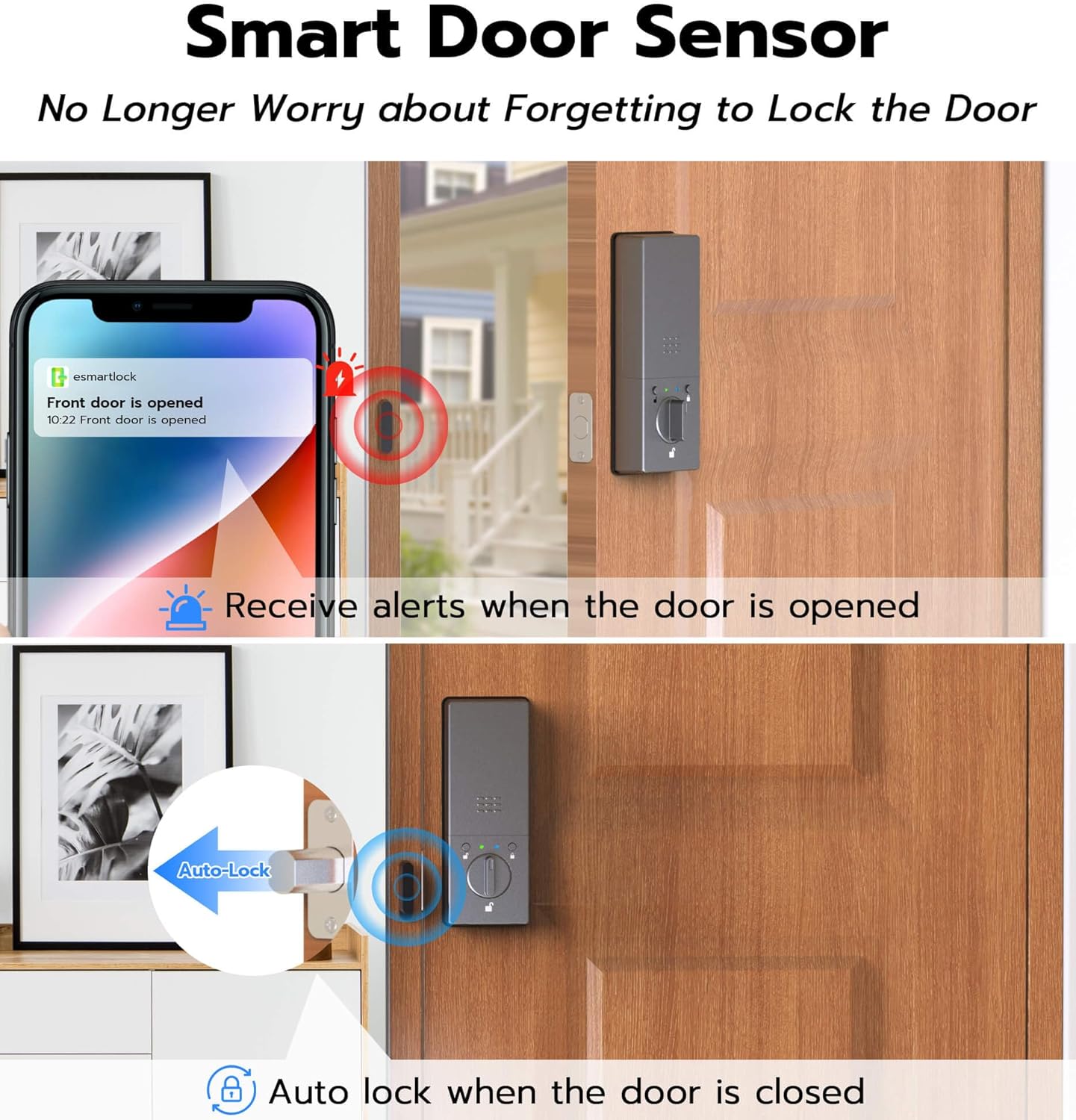
Image: The smart door sensor sends alerts when the door is opened and automatically locks the deadbolt when the door is closed.
Intuitive Display Screen
The integrated display screen provides real-time information, including:
- Current battery level and low-battery reminders.
- Date and time.
- Active mode (e.g., Privacy Mode, Passage Mode).
- Auto-lock countdown.
- Passcode input display.

Image: The smart display screen on the Anweller MD1 provides clear visibility of the lock's status and operational data.
Mode Switching
The lock features a mode switching button for quick changes between operational modes, such as Normal Mode (auto-lock), Passage Mode (stays unlocked), and Anti-unlock Mode (only owner can unlock).
Maintenance
Battery Charging
The Anweller MD1 is powered by a 10000mAh rechargeable Li-ion battery. Monitor the battery level via the display screen or the mobile app. When the battery is low, a reminder will appear. Charge the battery using the provided USB-C cable. In case of a completely drained battery, a backup port is available for emergency power, or use the mechanical keys.

Image: The Anweller MD1 is powered by a large-capacity 10000mAh rechargeable Li-ion battery, designed for long-lasting and eco-friendly operation. It can be unlocked with a power bank or key if the battery dies.
Cleaning
Wipe the lock's exterior with a soft, damp cloth. Avoid using abrasive cleaners or solvents that could damage the finish or electronic components.
Troubleshooting
Common Issues and Solutions
- Lock not responding: Check battery level. Recharge if necessary. Use mechanical key for emergency access.
- Fingerprint not recognized: Ensure your finger is clean and dry. Re-register fingerprint if issues persist.
- Wi-Fi connectivity issues: Ensure your router is broadcasting a 2.4GHz signal. Check Wi-Fi signal strength at the door. Restart the lock and router.
- Auto-lock not engaging: Verify the door sensor is correctly installed and aligned. Check app settings for auto-lock duration.
- Incorrect time/date on display: Sync the lock with the mobile app to update time and date settings.
For further assistance, refer to the dedicated support section or contact customer service.
Specifications
| Feature | Detail |
|---|---|
| Brand | Anweller |
| Model Number | SL-MD1 |
| Lock Type | Biometric, Deadbolt, Keypad |
| Unlocking Ways | Fingerprint, Passcode, RFID Card, Mechanical Key, Mobile App, Apple Watch, Alexa |
| Battery | 10000mAh Rechargeable Li-ion Battery |
| Connectivity | Built-in Wi-Fi (2.4GHz), Bluetooth |
| Material | Aluminum, Zinc |
| Security Standard | ANSI/BHMA Grade 2 |
| Weatherproof Rating | IP54 |
| Door Thickness | 1-3/8" to 2-1/8" (35mm to 55mm) |
| Operating Temperature | -4°F to 122°F |
| Item Dimensions (L x W x H) | 6 x 2.9 x 1.1 inches |
| Item Weight | 2.9 Pounds |

Image: The Anweller MD1 Smart Deadbolt Lock is built with high-security and durable materials, meeting ANSI/BHMA Grade 2 safety standards and IP54 weatherproof rating.
Warranty and Support
Anweller provides a 12-month warranty for the MD1 Smart Deadbolt Lock. Additionally, free lifetime technical support is available. For any setup questions, troubleshooting, or warranty claims, please contact our support team. Our response team is accessible 24/7 via Amazon messages.