
1. Introduction
Thank you for choosing the GIANDEL 3000W Pure Sine Wave Inverter. This device is designed to convert 12V DC battery power into stable 220-230V AC household power, suitable for a wide range of sensitive electronics and appliances. With a continuous output of 3000W and a peak power capability of 6100W for 2 seconds, it can handle high-starting current loads efficiently. Please read this manual thoroughly before installation and operation to ensure safe and optimal performance.
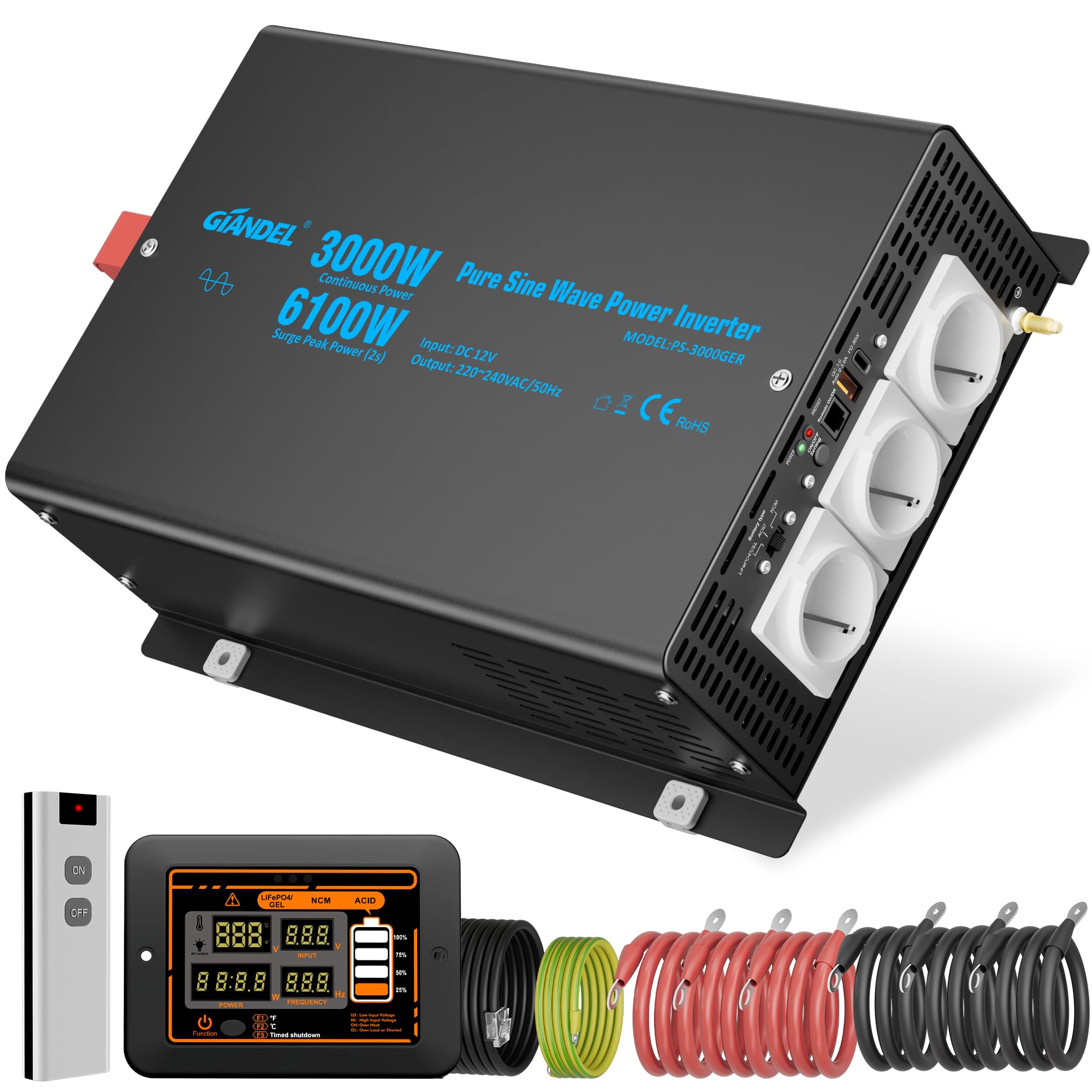
Image 1.1: Front view of the GIANDEL 3000W Pure Sine Wave Inverter, showing AC outlets and connection ports.
2. Safety Instructions
Always observe the following safety precautions to prevent injury or damage to the inverter and connected devices:
- Ventilation: Ensure adequate ventilation around the inverter. Do not block cooling vents.
- Environment: Install the inverter in a dry, cool, and dust-free environment. Avoid direct sunlight, heat sources, and moisture.
- Flammable Materials: Do not operate the inverter near flammable liquids or gases.
- Wiring: Use appropriate gauge cables for battery connections. Ensure all connections are tight and secure to prevent overheating and arcing.
- Grounding: The inverter must be properly grounded. Connect the grounding terminal to a suitable earth ground.
- Load Capacity: Do not exceed the inverter's rated continuous power output. Be mindful of peak power requirements for certain appliances.
- Children: Keep the inverter out of reach of children.
- Maintenance: Only qualified personnel should perform maintenance or repairs.
3. Product Features
The GIANDEL 3000W Pure Sine Wave Inverter offers advanced features for reliable power conversion:
- High Power Output: Provides 3000W continuous power and 6100W peak power for 2 seconds, ideal for appliances with high starting currents such as microwaves, air conditioners, refrigerators, water pumps, and power saws.
- Pure Sine Wave Output: Delivers a clean and stable AC waveform, ensuring compatibility and safe operation for sensitive electronics without interference.
- High Efficiency: Converts 12V DC to 220-230V AC with an efficiency of up to 91%.
- Adjustable Input Voltage: Features an adjustable input voltage function for precise adaptation to various battery types, including lithium batteries, optimizing battery life and performance.
- Comprehensive Protection: Equipped with multiple safety features including short-circuit protection, input under-voltage and over-voltage protection, reverse polarity protection, overheating protection, overload protection, and galvanic isolation between input and output.
- Dual Remote Control Options: Includes both a wired LCD remote control and a wireless remote control for convenient operation and monitoring from a distance.

Image 3.1: Illustration showing the GIANDEL inverter's ability to provide 6100W peak power for 2 seconds, handling high-load startup compared to other inverters.

Image 3.2: Diagram illustrating the various protection mechanisms of the GIANDEL inverter, including high-temperature, short-circuit, low input voltage, low output voltage, reverse polarity, overload, and over-voltage protection, along with an integrated cooling system.
4. Package Contents
Upon opening the package, please verify that all items are present and undamaged:
- GIANDEL 3000W Pure Sine Wave Inverter Unit
- Wired LCD Remote Control
- Wireless Remote Control
- Battery Cables (6 x 21mm², 60cm length)
- Grounding Cable (2mm², 90cm length)
- 4.5 Meter Long Cable (for wired remote control connection)
- User Manual (this document)

Image 4.1: Visual representation of all items included in the GIANDEL inverter package, showing the inverter, both remote controls, and all connecting cables with their specifications.
5. Setup
Follow these steps for proper installation of your GIANDEL inverter:
5.1 Mounting the Inverter
- Choose a secure, well-ventilated location away from direct sunlight, heat, and moisture.
- Ensure there is sufficient space around the inverter for airflow, especially around the cooling fans.
- Mount the inverter horizontally on a flat, stable surface using appropriate fasteners.
5.2 Battery Connection
Important: Ensure the inverter is OFF before making any battery connections.
- Connect the RED battery cable to the POSITIVE (+) terminal of your 12V battery.
- Connect the other end of the RED cable to the POSITIVE (+) terminal on the inverter.
- Connect the BLACK battery cable to the NEGATIVE (-) terminal of your 12V battery.
- Connect the other end of the BLACK cable to the NEGATIVE (-) terminal on the inverter.
- Ensure all connections are tight and secure. Loose connections can cause overheating and damage.
5.3 Grounding the Inverter
Connect the provided grounding cable from the inverter's grounding terminal to a reliable earth ground point. This is crucial for safety.
5.4 Remote Control Connection
The inverter supports both wired and wireless remote controls. Connect the wired remote control cable to the designated port on the inverter if desired. The wireless remote control operates via radio frequency.
5.5 Battery Type Selection
The inverter features a battery type selector switch to optimize performance for different battery chemistries. Adjust the switch on the inverter's remote control panel to match your battery type (e.g., LiFePO4, GEL, SLA, AGM, etc.).

Image 5.1: Diagram showing the versatile battery compatibility of the GIANDEL inverter and the location of the battery type selector switch on the remote control panel.
6. Operating Instructions
6.1 Turning the Inverter On/Off
- After all connections are secure, press and hold the power button on the inverter or the remote control for a few seconds to turn it ON. The LCD display will illuminate.
- To turn OFF, press and hold the power button again until the display turns off.
6.2 Using the Remote Controls
The wired LCD remote control provides detailed information about input voltage, output power, frequency, and error codes. The wireless remote offers basic ON/OFF functionality.

Image 6.1: Displaying both the wired LCD remote control and the wireless remote control, highlighting their functions and the information available on the LCD screen.
6.3 Connecting AC Loads
- Plug your AC appliances into the output sockets on the inverter.
- Ensure the total continuous power draw of all connected appliances does not exceed 3000W.
- For appliances with high starting currents (e.g., motors, compressors), ensure their peak power requirement does not exceed 6100W.

Image 6.2: The GIANDEL inverter connected to various devices, showcasing its multiple AC outlets, USB-A, and USB-C ports for charging and powering different appliances simultaneously.
7. Maintenance
Regular maintenance ensures the longevity and optimal performance of your inverter:
- Cleaning: Periodically clean the exterior of the inverter with a dry, soft cloth. Ensure cooling vents are free from dust and debris. Do not use liquid cleaners.
- Connections: Regularly check all battery and AC connections to ensure they are tight and free from corrosion.
- Battery Care: Maintain your battery according to its manufacturer's instructions. A healthy battery is crucial for inverter performance.
- Storage: If storing the inverter for an extended period, disconnect it from the battery and store it in a cool, dry place.
8. Troubleshooting
If you encounter issues with your inverter, refer to the following common problems and solutions:
| Problem | Possible Cause | Solution |
|---|---|---|
| No power output / Inverter not turning on | Loose battery connections, low battery voltage, inverter switch off, blown fuse. | Check battery connections, charge battery, ensure inverter is switched on, check internal fuses (if accessible and safe). |
| Overload alarm / Inverter shuts down | Connected load exceeds inverter's continuous or peak power rating. | Reduce the total load by disconnecting some appliances. Restart the inverter. |
| Low voltage alarm / Inverter shuts down | Battery voltage is too low. | Recharge or replace the battery. |
| Over-temperature alarm / Inverter shuts down | Inverter is overheating due to poor ventilation or excessive load. | Ensure proper ventilation, clear any obstructions from cooling vents, reduce load. Allow inverter to cool down before restarting. |
| Distorted output / Appliance malfunction | Incompatible appliance, faulty inverter. | Ensure the appliance is compatible with pure sine wave inverters. If problem persists, contact support. |
If the problem persists after attempting these solutions, please contact GIANDEL customer support.

Image 8.1: Illustration demonstrating the clean, pure sine wave output of the GIANDEL inverter, ensuring stable power for sensitive devices and preventing humming noises.
9. Specifications
| Specification | Value |
|---|---|
| Brand | GIANDEL |
| Model Name | PS-3000GER |
| Rated Continuous Power | 3000 Watts |
| Peak Power | 6100 Watts (for 2 seconds) |
| Input Voltage | 12 Volts DC |
| Output Voltage | 230 Volts AC |
| Output Waveform | Pure Sine Wave |
| Efficiency | Up to 91% |
| Recommended Uses | Household, Vehicles |
| Power Source | Solar and Battery Powered |
| Dimensions (L x W x H) | 39.5L x 26.1W x 11.8H cm |
| Item Weight | 5 Kilograms |
| Certifications | CE |
10. Warranty and Support
GIANDEL products are manufactured to high-quality standards and come with a standard manufacturer's warranty. Please refer to the warranty card included in your package for specific terms and conditions.
For technical support, troubleshooting assistance, or warranty claims, please contact GIANDEL customer service through the retailer where you purchased the product or visit the official GIANDEL website for contact information.


