
1. Introduction
This manual provides detailed instructions for the safe and efficient operation, setup, and maintenance of your OutIn Nano Portable Electric Espresso Machine and OutIn Fino Portable Electric Coffee Grinder. Please read this manual thoroughly before first use and retain it for future reference.
2. OutIn Nano Espresso Machine Components
Familiarize yourself with the parts of your OutIn Nano Portable Electric Espresso Machine:
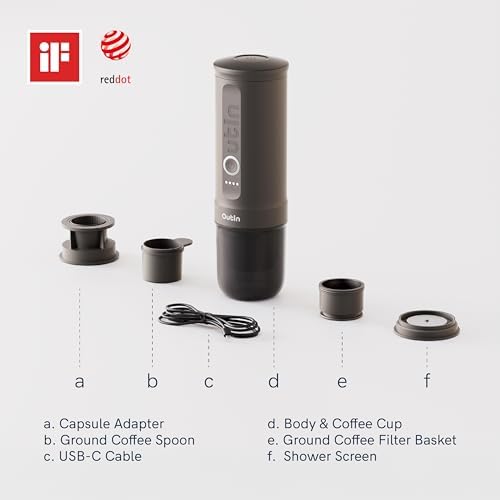
Image 2.1: OutIn Nano Components
a. Capsule Adapter
b. Ground Coffee Spoon
c. USB-C Cable
d. Body & Coffee Cup
e. Ground Coffee Filter Basket
f. Shower Screen
3. OutIn Fino Coffee Grinder Components
Familiarize yourself with the parts of your OutIn Fino Portable Electric Coffee Grinder:

Image 3.1: OutIn Fino Components
a. Fino Portable Bag
b. Hex Key
c. Ground Coffee Cup Lid with Dosing Funnel
d. USB-C Charging Cable
e. OutIn Fino Grinder Body
f. Cleaning Brush Air Blower
g. Inner Burr
4. OutIn Nano Espresso Machine Operation
4.1 Initial Setup and Charging
- Before first use, fully charge the OutIn Nano using the provided USB-C cable. Connect the cable to the charging port on the device and a compatible USB power adapter. The indicator lights will show charging status.
- Ensure all components are clean before assembly.
4.2 Espresso Extraction (Ground Coffee)
- Unscrew the coffee cup (d) from the main body.
- Insert the ground coffee filter basket (e) into the main body.
- Using the ground coffee spoon (b), add your desired amount of finely ground coffee into the filter basket. Do not overfill.
- Place the shower screen (f) on top of the ground coffee.
- Fill the water reservoir with cold or hot water, up to the MAX line.
- Screw the coffee cup (d) back onto the main body securely.
- Press and hold the power button for 2 seconds to turn on the device.
- Press the power button once to begin extraction. If using cold water, the device will first heat the water (approximately 200 seconds) before extraction. If using hot water, extraction will begin immediately.
- The device will automatically stop when extraction is complete.
4.3 Espresso Extraction (Capsule)
- Unscrew the coffee cup (d) from the main body.
- Insert the capsule adapter (a) into the main body.
- Place a compatible coffee capsule into the capsule adapter.
- Fill the water reservoir with cold or hot water, up to the MAX line.
- Screw the coffee cup (d) back onto the main body securely.
- Press and hold the power button for 2 seconds to turn on the device.
- Press the power button once to begin extraction. If using cold water, the device will first heat the water before extraction. If using hot water, extraction will begin immediately.
- The device will automatically stop when extraction is complete.

Image 4.1: OutIn Nano Instant Extraction
The OutIn Nano supports instant extraction with hot water and features one-touch operation for convenience.

Image 4.2: OutIn Nano Portable Use
The OutIn Nano is designed for portable use, offering 200-second heat-up time and the ability to make 3-5 cups without needing an external power outlet.
5. OutIn Fino Coffee Grinder Operation
5.1 Initial Setup and Charging
- Before first use, fully charge the OutIn Fino using the provided USB-C cable (d). Connect the cable to the charging port on the device and a compatible USB power adapter.
- Ensure all components are clean before assembly.
5.2 Adjusting Grind Size
- Locate the grind adjustment dial on the OutIn Fino.
- Rotate the dial to select your desired grind size. The Fino offers 28 settings for micro-adjustment, allowing seamless switching between fine and coarse grinds without resetting.
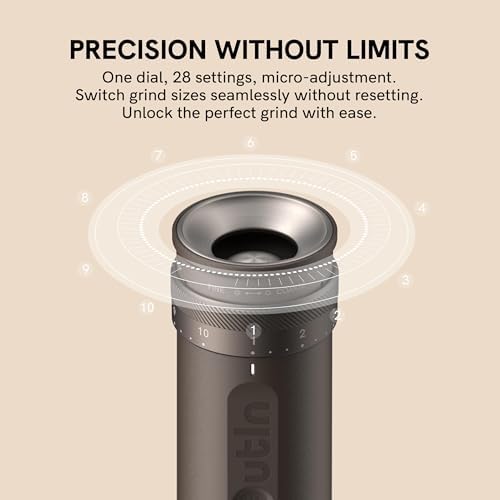
Image 5.1: OutIn Fino Grind Adjustment
The Fino features a precision dial with 28 settings for fine-tuning your coffee grind.
5.3 Loading Coffee Beans
- Remove the top lid of the OutIn Fino.
- Pour whole coffee beans into the bean hopper. Do not overfill.
- Replace the lid securely.

Image 5.2: OutIn Fino Bean Loading
Load whole coffee beans into the top of the grinder for fresh grounds in seconds.
5.4 Grinding Coffee
- Ensure the grind size is set correctly.
- Press the power button to start grinding. The Fino will grind the beans into the collection cup.
- The device will stop automatically once grinding is complete or when the battery is low.
- Remove the collection cup to access your fresh coffee grounds.
6. Care and Maintenance
Regular cleaning ensures optimal performance and longevity of your OutIn devices.
6.1 OutIn Nano Espresso Machine Cleaning
- After Each Use: Disassemble the coffee cup, filter basket, shower screen, and capsule adapter. Rinse all removable parts under running water.
- Main Body: Wipe the exterior of the main body with a damp cloth. Do not immerse the main body in water.
- Drying: Ensure all parts are completely dry before reassembling or storing.
- Dishwasher Safety: The OutIn Nano is NOT dishwasher safe. Hand wash only.
6.2 OutIn Fino Coffee Grinder Cleaning
- After Each Use: Empty any remaining coffee grounds from the hopper and collection cup.
- Burrs: Use the provided cleaning brush air blower (f) to remove coffee residue from the inner burr (g) and grinding chamber. A small brush can also be used.
- Exterior: Wipe the exterior with a dry or slightly damp cloth. Do not immerse the main body in water.
- Dishwasher Safety: The OutIn Fino is NOT dishwasher safe. Hand wash only.
7. Troubleshooting
If you encounter issues, refer to the following common problems and solutions:
| Problem | Possible Cause | Solution |
|---|---|---|
| OutIn Nano: No espresso extraction. | Low battery; insufficient water; clogged filter; improper assembly. | Charge the device; refill water reservoir; clean filter/shower screen; ensure all parts are securely assembled. |
| OutIn Nano: Water not heating. | Low battery; device malfunction. | Ensure device is fully charged. If problem persists, contact customer support. |
| OutIn Fino: Grinder not starting. | Low battery; beans jammed; lid not secured. | Charge the device; clear any jammed beans; ensure the lid is properly closed. |
| OutIn Fino: Inconsistent grind. | Burrs need cleaning; grind setting too coarse/fine for desired result. | Clean the burrs thoroughly; adjust grind setting as needed. |
If the problem persists after attempting these solutions, please contact OutIn customer support.
8. Technical Specifications
8.1 OutIn Nano Portable Electric Espresso Machine
- Brand: OutIn
- Model Number: B0GFW5G21X
- Capacity: 150 Milliliters
- Special Features: Heating Technology, One-Button Operation System
- Coffee Maker Type: Espresso Machine
- Specific Uses: Espresso
- Operation Mode: Fully Automatic
- Power Source: Electric (Rechargeable Battery)
- Material: Stainless Steel
- Dishwasher Safe: No
8.2 OutIn Fino Portable Electric Coffee Grinder
- Brand: OutIn
- Coffee Input Type: Whole Bean
- Grind Settings: 28 precision settings
- Power Source: Electric (Rechargeable Battery)
- Material: Stainless Steel
- Dishwasher Safe: No
9. Safety Information
- Read all instructions before using the appliance.
- Do not immerse the main body of either device in water or other liquids.
- Keep out of reach of children.
- Use only the provided USB-C cable for charging.
- Do not operate if the device appears damaged.
- Exercise caution when handling hot water or hot espresso.
- Ensure proper ventilation during operation.
- Comply with global airline regulations regarding portable electronic devices. Carry the device in your carry-on luggage only and do not use it during flight.
10. Warranty and Customer Support
OutIn products are designed for quality and durability. For warranty information, technical support, or service inquiries, please refer to the official OutIn website or contact your retailer.
Please have your product model number (B0GFW5G21X) and purchase date available when contacting support.


