
Introduction
This manual provides essential information for the safe and efficient operation of your Mellerware Horizon 46 Mini Oven. Please read these instructions carefully before using the appliance and retain them for future reference. This appliance combines a 46-liter oven with three integrated solid hotplates, offering versatile cooking options.
Important Safety Instructions
To reduce the risk of fire, electric shock, or injury, always follow these basic safety precautions:
- Read all instructions before using the appliance.
- Do not touch hot surfaces. Always use oven mitts or pot holders when handling hot items or parts.
- To protect against electrical shock, do not immerse the power cord, plugs, or the appliance itself in water or any other liquid.
- Close supervision is necessary when any appliance is used by or near children.
- Unplug the appliance from the outlet when not in use and before cleaning. Allow it to cool completely before attaching or removing parts.
- Do not operate any appliance with a damaged cord or plug, or if the appliance malfunctions or has been damaged in any manner. Contact customer support for examination, repair, or adjustment.
- The use of accessory attachments not recommended by the appliance manufacturer may cause injuries.
- Do not use outdoors. This appliance is for indoor household use only.
- Do not let the power cord hang over the edge of a table or counter, or touch hot surfaces.
- Do not place the appliance on or near a hot gas or electric burner, or in a heated oven.
- Extreme caution must be used when moving an appliance containing hot oil or other hot liquids.
- Always attach the plug to the appliance first, then plug the cord into the wall outlet. To disconnect, turn any control to "off", then remove the plug from the wall outlet.
- Do not use the appliance for purposes other than its intended use.
- Oversized foods or metal utensils must not be inserted into the oven as they may create a fire or risk of electric shock.
- A fire may occur if the oven is covered or touching flammable material, including curtains, drapes, walls, and the like, when in operation.
- Do not place any of the following materials in the oven: paper, cardboard, plastic, or similar materials.
- Do not store any materials, other than manufacturer's recommended accessories, in this oven when not in use.
- Do not place cooking utensils or baking dishes on the glass door when it is open.
- Ensure proper ventilation around the appliance during operation.
Product Components
Your Mellerware Horizon 46 Mini Oven includes the following main parts and accessories:
- Main Oven Unit with 3 Solid Hotplates
- Glass Door
- Control Knobs (Temperature, Function, Timer for oven; individual for hotplates)
- Baking Pan
- Wire Rack
- Rack Handle
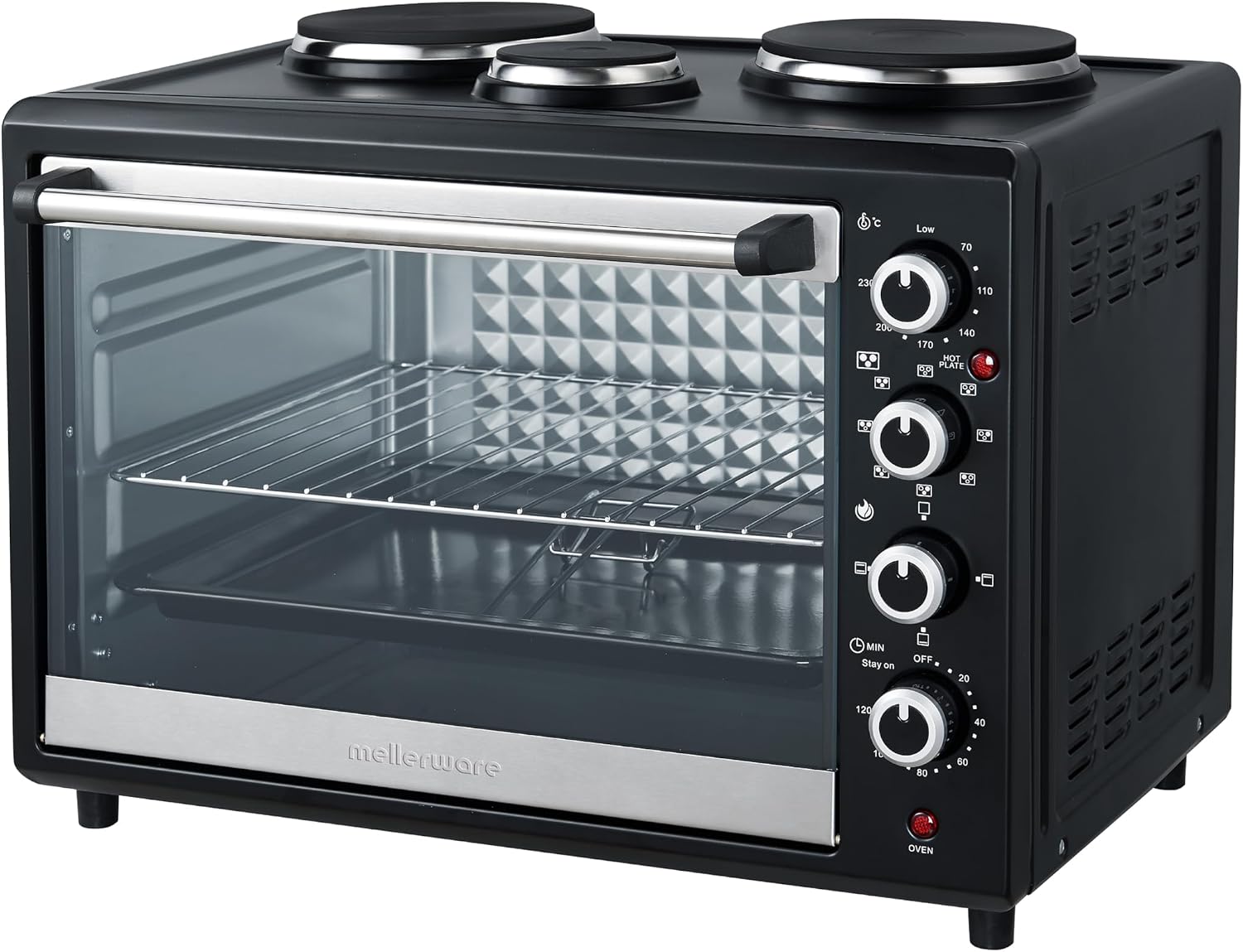
Figure 1: Front view of the Mellerware Horizon 46 Mini Oven. This image displays the oven door, interior rack, the three solid hotplates on the top surface, and the control panel on the right.
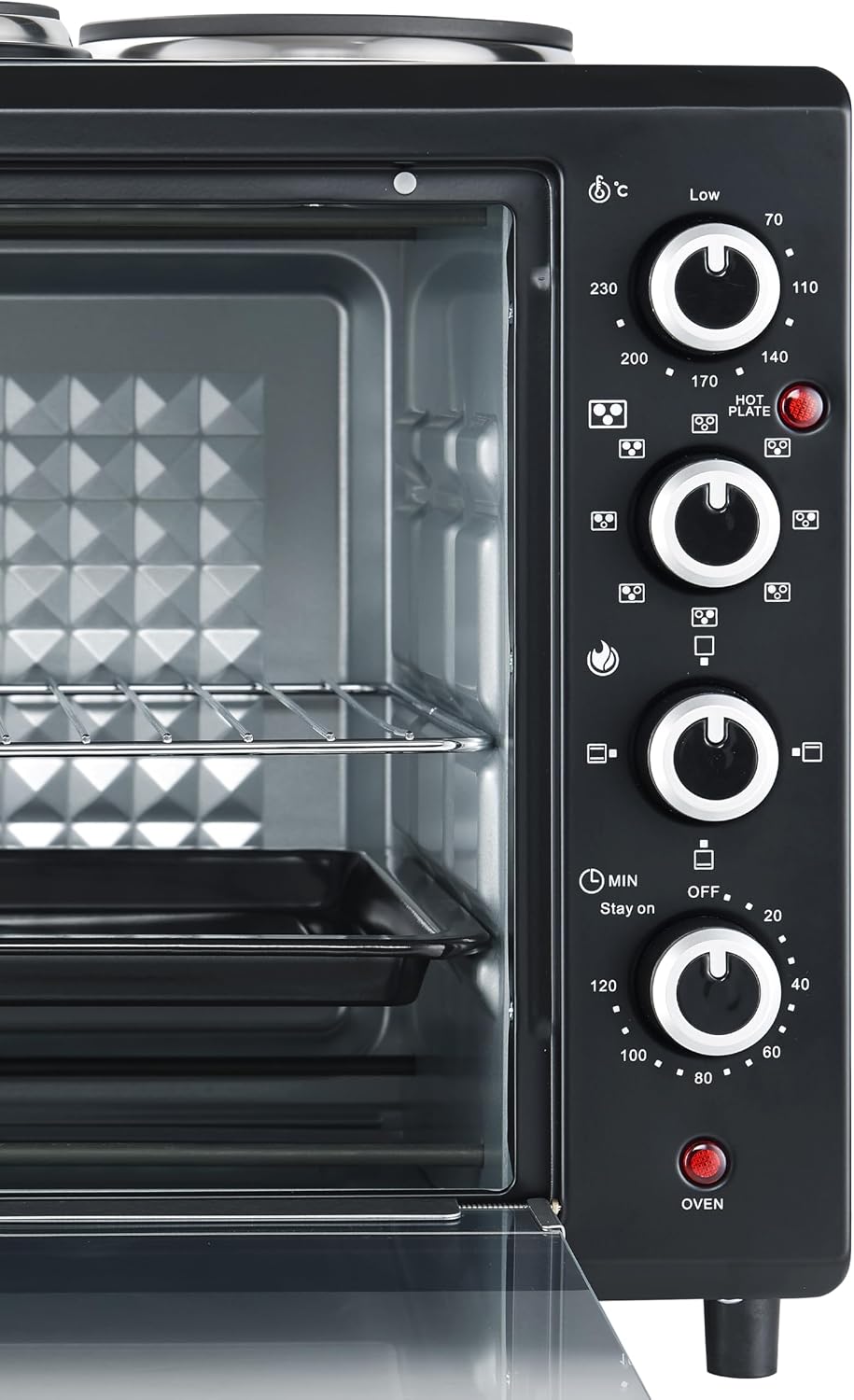
Figure 2: Detailed view of the control panel. From top to bottom, the knobs control oven temperature, cooking function, and timer. A hotplate indicator light is also visible.

Figure 3: The included baking pan, suitable for roasting and baking within the oven.

Figure 4: The wire rack, designed for grilling, toasting, or supporting baking dishes.

Figure 5: The rack handle, used for safely inserting and removing the hot baking pan or wire rack.
Setup and First Use
- Unpacking: Carefully remove the oven from its packaging. Remove all packing materials, including any protective films or stickers.
- Placement: Place the oven on a stable, heat-resistant, and level surface. Ensure there is adequate clearance (at least 10-15 cm) on all sides and above the oven for proper ventilation. Do not place it near flammable materials or directly against a wall.
- Cleaning: Wipe the exterior of the oven with a damp cloth. Wash the baking pan, wire rack, and rack handle in warm, soapy water, rinse thoroughly, and dry completely.
- First Use (Burn-off): Before cooking food, operate the oven empty for approximately 15 minutes at the maximum temperature (230°C) with the oven function set to "Bake" (top and bottom heating). This process helps to burn off any manufacturing residues and odors. A slight smoke or odor is normal during this process. Ensure the area is well-ventilated.
- Power Connection: Plug the power cord into a grounded electrical outlet. Ensure the voltage matches the appliance's requirements (220-240V, 50/60Hz).
Operating Instructions
Oven Operation
The oven features three control knobs on the right side of the appliance:
- Temperature Control Knob: Sets the desired oven temperature from 70°C to 230°C.
- Function Control Knob: Selects the cooking mode. Options typically include:
- Off
- Top Heating
- Bottom Heating
- Top & Bottom Heating (Bake)
- Top & Bottom Heating with Convection (Fan)
- Timer Control Knob: Sets the cooking time up to 120 minutes or to "Stay On" for continuous operation. The oven will turn off automatically when the timer reaches zero.
To use the oven:
- Place food on the baking pan or wire rack. Use the rack handle to safely insert or remove accessories.
- Close the glass door securely.
- Turn the Temperature Control Knob to the desired temperature.
- Turn the Function Control Knob to the desired cooking mode.
- Turn the Timer Control Knob to the desired cooking time. The oven indicator light will illuminate when the oven is active. For continuous operation, turn the timer to the "Stay On" position.
- When cooking is complete, the timer will chime (if set) and the oven will turn off. If using "Stay On", manually turn the Function Control Knob to "Off".
- Carefully remove food using oven mitts and the rack handle.
Hotplate Operation
The Mellerware Horizon 46 Mini Oven is equipped with three solid hotplates on the top surface, each with individual temperature control.

Figure 6: Top view illustrating the three solid hotplates. The larger hotplates are on the left and right, with a smaller one in the center.
Each hotplate has its own dedicated control knob located on the right side of the appliance, below the oven controls. The hotplates have different power ratings:
- Left Hotplate: 850W
- Right Hotplate: 600W
- Middle Hotplate: 450W
To use a hotplate:
- Place a suitable cooking pot or pan on the desired hotplate. Ensure the cookware base is flat and covers the hotplate surface adequately.
- Turn the corresponding hotplate control knob to the desired heat setting (Low, Medium, High). The hotplate indicator light will illuminate when a hotplate is active.
- Adjust the heat as needed during cooking.
- After cooking, turn the hotplate control knob back to the "Off" position. The indicator light will turn off.
Simultaneous Use
The oven and hotplates can be used simultaneously. However, be mindful of the total power consumption (3500W) to avoid overloading your electrical circuit. Adjust settings as necessary to manage power usage.
Maintenance and Cleaning
Regular cleaning ensures optimal performance and extends the life of your appliance.
- Before Cleaning: Always unplug the oven from the power outlet and allow it to cool completely before cleaning.
- Exterior: Wipe the exterior surfaces with a soft, damp cloth. Do not use abrasive cleaners, steel wool, or scouring pads, as they may damage the finish.
- Interior: For the oven interior, wipe with a damp cloth and mild detergent. For stubborn stains, a non-abrasive oven cleaner designed for conventional ovens can be used, following the product's instructions. Ensure all cleaner residue is thoroughly removed.
- Glass Door: Clean the glass door with a glass cleaner or a damp cloth.
- Hotplates: After the hotplates have cooled, wipe them with a damp cloth. For burnt-on food, use a non-abrasive scraper or a specialized hotplate cleaner. Do not immerse the hotplates or the appliance in water.
- Accessories: Wash the baking pan, wire rack, and rack handle in warm, soapy water. Rinse and dry thoroughly. These accessories are generally not dishwasher safe unless explicitly stated otherwise.
- Storage: When not in use, ensure the oven is clean and dry. Store it in a cool, dry place, away from moisture and direct sunlight.
Troubleshooting
If you encounter issues with your Mellerware Horizon 46 Mini Oven, refer to the following common problems and solutions:
| Problem | Possible Cause | Solution |
|---|---|---|
| Appliance does not turn on. | Not plugged in; power outage; faulty electrical outlet; oven timer not set. | Ensure the power cord is securely plugged into a working electrical outlet. Check your household circuit breaker. Test the outlet with another appliance. Ensure the oven timer knob is set to a cooking time or "Stay On". |
| Oven not heating properly. | Incorrect temperature or function setting; oven door not closed properly. | Verify that the temperature and function knobs are set correctly for your desired cooking. Ensure the oven door is fully closed and sealed. |
| Hotplates not heating. | Individual hotplate control knob not turned on; power issue. | Ensure the individual hotplate control knob is turned to a heat setting (Low, Medium, High). Check the main power supply as described above. |
| Excessive smoke or odor during first use. | Manufacturing residues burning off. | This is normal during the initial use. Ensure adequate ventilation in the area. The smoke and odor should subside after 15-20 minutes of operation. |
| Food cooking unevenly. | Improper rack position; overcrowding the oven; uneven heat distribution. | Adjust the rack height to suit the food being cooked. Avoid overcrowding the oven to allow for proper air circulation. Utilize the convection function if available for more even heat distribution. Rotate food if necessary. |
If the problem persists after trying these solutions, please contact Mellerware customer support.
Specifications
| Feature | Detail |
|---|---|
| Model Name | Horizon 46 |
| Model Number | 27346L |
| Brand | Mellerware |
| Capacity | 46 Liters |
| Total Power | 3500W |
| Oven Power | 1600W |
| Left Hotplate Power | 850W |
| Right Hotplate Power | 600W |
| Middle Hotplate Power | 450W |
| Material | Steel |
| Color | Black |
| Product Dimensions (D x W x H) | 52.3D x 42.3W x 39.6H centimetres |
| Item Weight | 9.9 Kilograms |
| Control Type | Knob Control |
| Included Components | Baking Pan, Broiling Rack, User Manual |
| Power Source | Corded Electric |
| Number of Shelves | 1 |
| Country of Origin | South Africa |
Warranty and Support
Warranty Information:
Your Mellerware Horizon 46 Mini Oven comes with the following warranty:
- 1 Year Retail Warranty
- 1 Year Extended Warranty (Registration)
- 1 Year Extended Warranty (Opt In)
Please refer to the warranty card included with your product or visit the official Mellerware website for detailed terms and conditions regarding warranty registration and claims. Retain your proof of purchase for warranty validation.
Customer Support:
For technical assistance, spare parts, or any inquiries regarding your appliance, please contact Mellerware customer support. Contact details can typically be found on the Mellerware official website or on the product packaging.
When contacting support, please have your model name (Horizon 46) and model number (27346L) ready to facilitate quicker service.
