
Introduction
The PROW JFH-180TV Wireless TV Headphones are designed to provide a clear and personalized audio experience for seniors and individuals with hearing impairments. These headphones feature independent left and right volume controls, large, easy-to-use buttons, and broad compatibility with various TV audio outputs. The lightweight, semi-in-ear design ensures comfort for extended wear, while the wireless system offers freedom of movement without compromising sound quality.

Image: A woman wearing the PROW JFH-180TV headphones, demonstrating the comfortable, lightweight design for all-day use.

Image: A visual comparison illustrating the semi-in-ear design of the PROW headphones, which rests comfortably at the ear canal entrance, versus a traditional in-ear design that can cause pressure and discomfort.
What's in the Box
Upon unboxing your PROW JFH-180TV Wireless TV Headphones, you will find the following components:
- PROW JFH-180TV Headphones (1 unit)
- USB Transmitter (1 unit)
- Optical Cable (1 unit)
- 3.5mm Audio Cable (1 unit)
- RCA Audio Cable Adapter to 3.5mm Female Jack (1 unit)
- Charging Cable (1 unit)
- Instruction Manual (1 unit)

Image: A clear layout of all items included in the PROW JFH-180TV package, showing the headphones, USB transmitter, optical cable, 3.5mm audio cable, RCA adapter, and charging cable.
Setup Instructions
The PROW JFH-180TV headphones are designed for plug-and-play operation. Follow these steps to connect them to your television:
- Connect the USB Transmitter: Insert the USB transmitter into an available USB port on your TV. This transmitter facilitates the wireless connection between your TV and the headphones.
- Choose Your Audio Output Method: The headphones support multiple audio output options. Select the one compatible with your TV:
- Optical Connection: Use the provided optical cable. Connect one end to the 'Optical Out' port on your TV and the other end to the optical input on the USB transmitter. Important: When using optical connection, ensure your TV's audio format/digital audio output is set to "PCM/Stereo" in your TV's sound settings.
- 3.5mm Audio Connection: Use the provided 3.5mm audio cable. Connect one end to the 'Headphone Out' or 'Audio Out' (3.5mm jack) on your TV and the other end to the 3.5mm input on the USB transmitter.
- RCA Audio Connection: Use the provided RCA audio cable adapter (red and white plugs) with the 3.5mm audio cable. Connect the RCA plugs to the 'Audio Out' (red and white) ports on your TV, and then connect the 3.5mm end of the adapter to the 3.5mm input on the USB transmitter.
- Power On: Turn on your TV and then press and hold the oversized power button on the headphones for approximately 3 seconds until the indicator light illuminates. The headphones will automatically sync with the USB transmitter.
The system is now ready for use. Please note that HDMI audio output connection is not supported directly. If you need to connect via HDMI, a separate adapter would be required.
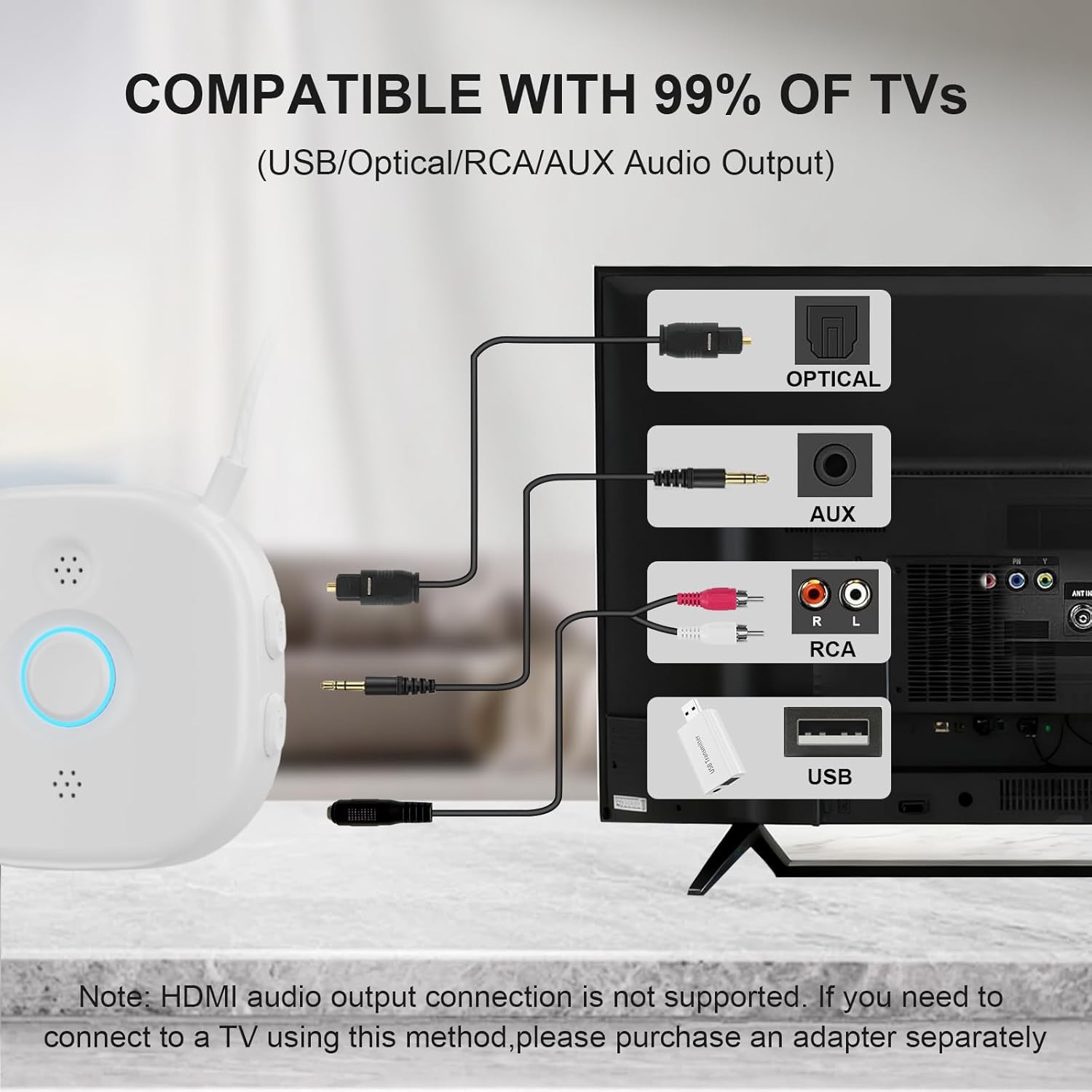
Image: A detailed diagram illustrating how to connect the PROW JFH-180TV headphones to a television using USB, Optical, AUX (3.5mm), and RCA audio output ports.
Operating Instructions
Power On/Off
- To power on, press and hold the large central button for 3 seconds.
- To power off, press and hold the large central button for 3 seconds.
Independent Left/Right Volume Adjustment
The headphones feature independent volume controls for each ear, allowing you to customize the sound balance to your specific hearing needs.
- Left Ear Volume: Use the 'L+' and 'L-' buttons located on the left side of the control unit to increase or decrease the volume for the left earbud.
- Right Ear Volume: Use the 'R+' and 'R-' buttons located on the right side of the control unit to increase or decrease the volume for the right earbud.

Image: A detailed view of the headphone control unit, highlighting the large central power button and the distinct 'L+'/'L-' and 'R+'/'R-' buttons for independent left and right volume adjustment.
Charging and Battery Life
The headphones are equipped with a long-lasting battery for extended listening sessions.
- Charging Time: A full charge typically takes 2-3 hours using the provided charging cable.
- Operating Time: Once fully charged, the headphones provide up to 20 hours of continuous playback.
- Low Battery Alert: The headphones will provide an audible alert when the battery is low, indicating it's time to recharge.

Image: The PROW JFH-180TV headphones displayed with key battery information: 2-3 hours for a full charge and up to 20 hours of operating time.
Wireless Range
The wireless system provides a stable connection up to 100 feet (30 meters), allowing you to move freely around your home without losing audio quality.

Image: A floor plan diagram showing the PROW JFH-180TV headphones and USB transmitter, illustrating the extended wireless range of up to 100 feet (30 meters) for whole-home coverage.
Maintenance
To ensure the longevity and optimal performance of your PROW JFH-180TV headphones, follow these maintenance guidelines:
- Cleaning: Use a soft, dry cloth to wipe the headphones and transmitter. Do not use liquid cleaners or abrasive materials.
- Storage: Store the headphones in a cool, dry place away from direct sunlight and extreme temperatures.
- Cable Care: Avoid sharp bends or excessive pulling on the cables to prevent damage.
- Battery Care: For best battery life, avoid fully discharging the headphones frequently. Charge them regularly, even if not in constant use.
Troubleshooting
If you encounter any issues with your PROW JFH-180TV headphones, refer to the following common solutions:
| Problem | Possible Cause | Solution |
|---|---|---|
| No sound from headphones | Headphones not powered on Transmitter not connected or powered Incorrect TV audio output setting TV volume too low Cables not securely connected | Ensure headphones are powered on. Verify transmitter is plugged into TV's USB port and audio cable is connected. Check TV audio settings (e.g., set optical output to PCM/Stereo). Increase TV volume. Ensure all cables are firmly seated. |
| Poor sound quality or static | Out of range Interference Low battery | Move closer to the TV/transmitter. Ensure no other wireless devices are causing interference. Charge the headphones fully. |
| Headphones not charging | Charging cable not connected properly Faulty charging cable or power source | Ensure charging cable is securely connected to headphones and power source. Try a different USB port or power adapter. |
| Independent volume control not working | Buttons not pressed correctly | Ensure you are pressing the 'L+'/'L-' for the left ear and 'R+'/'R-' for the right ear. |
Specifications
Key technical specifications for the PROW JFH-180TV Wireless TV Headphones:
- Model Name: JFH-180TV
- Brand: PROW
- Ear Placement: Semi-in-Ear
- Connectivity Technology: Wireless (Bluetooth 5.2)
- Wireless Range: Up to 100ft (30m)
- Battery Life: Up to 20 hours (playback)
- Battery Charge Time: 2-3 hours
- Item Weight: 50 Grams
- Impedance: 16 Ohms
- Sensitivity: 110 dB
- Audio Latency: 40 Milliseconds
- Control Type: Button Control/Media Control
- Compatible Devices: Television (via USB, Optical, 3.5mm, RCA)
- Material: Acrylonitrile Butadiene Styrene (ABS), Metal
Warranty and Support
Warranty Information
The PROW JFH-180TV Wireless TV Headphones come with a 6-month warranty from the date of purchase. This warranty covers manufacturing defects and ensures the product functions as intended under normal use. Please retain your proof of purchase for warranty claims.
Customer Support
For further assistance, technical support, or warranty inquiries, please contact PROW customer service. Refer to the contact information provided with your product packaging or visit the official PROW website for support details.